Positioning
Technical documentation is often the first casualty of time pressure in data and DWH projects. Acceptances are signed, systems go live -- and documentation remains incomplete or outdated. The consequences show up later: during onboarding of new team members, when troubleshooting poorly documented ETL pipelines, or when operational responsibility changes hands. I bring technical documentation into every project as a first-class deliverable -- not as an afterthought, but as an integral part of the work.
My background is in database development, DWH engineering, and infrastructure operations. I write documentation not from the perspective of a pure technical writer, but as someone who has built and operated the underlying systems. This combination -- technical depth and documentation experience -- allows me to produce Data Dictionaries that are genuinely accurate, runbooks that actually work in the field, and architecture documents that make decisions comprehensible.
Concrete references: at an insurance company I contributed to and extended a web-based, XML-backed database documentation system. At a public sector / research organisation I created and maintained requirements and test documentation in a regulated DWH environment. For my own infrastructure setup I built a central operations documentation repository integrating automated configuration backups.
Documentation is also a question of format. Not every document belongs in a Word file or a Confluence wiki. Runbooks benefit from Git versioning. Data Dictionaries can be auto-generated from database metadata. Architecture concepts gain from diagrams maintained alongside the text. I choose format and tooling based on the intended use -- favouring open, long-lived standards.
Importance of Technical Documentation in DWH and Infrastructure
In data and DWH projects, documentation covers far more than technical descriptions of tables and fields. It includes the business meaning of the data, its origin (source systems, transformation logic), the dependencies between tables and ETL pipelines, the operational procedures for monitoring and error handling, and the test documentation required for formal acceptance. A complete documentation picture has at least four layers: the concept layer (architecture, decisions), the operations layer (setup, monitoring, configuration), the runbook layer (step-by-step for recurring tasks), and the data layer (Data Dictionary, lineage, metadata).
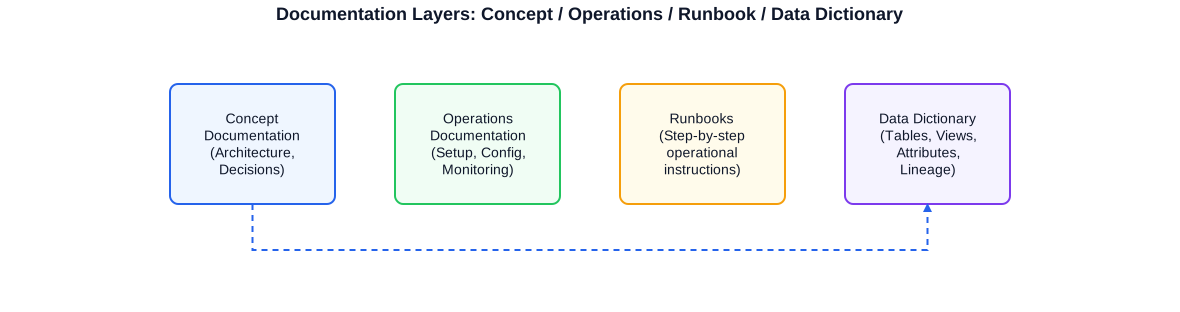
The four layers of technical documentation: from architecture decisions and operations guides through runbooks to the complete Data Dictionary. All layers versioned in Git and published to the wiki or as static HTML.
Knowledge silos and their consequences
Knowledge silos arise when documentation lives in the heads of individuals rather than in written, findable form. In DWH environments this is especially critical: if only one person knows how a particular ETL package transforms source data, or which column in a fact table implements a given business rule, the team has a single point of failure. The consequences are onboarding times of weeks instead of days, errors in extensions due to missing context, and avoidable operational outages.
Documentation as a measurable investment
The effort invested in documentation pays back quickly: complete operations documentation significantly reduces onboarding times for new team members. Automated Data Dictionary generation from database metadata saves hours of manual maintenance per week. Versioned runbooks prevent critical steps from being forgotten under the stress of a production incident. Requirements documentation protects both parties -- client and service provider -- in disputes about the agreed scope of work.
- Concept documentation: architecture decisions, system boundaries, integration points
- Operations documentation: server overviews, configurations, contacts, SLAs
- Runbooks: recurring tasks, error handling, emergency procedures step by step
- Data Dictionary: tables, views, columns, data types, business meaning, relationships
- Data Lineage: origin and transformation of data through all layers
- Interface documentation: API parameters, data formats, external system interfaces
- Requirements documentation: business requirements, acceptance criteria, open items
- Test documentation: test cases, results, acceptance records
I recommend planning documentation from the start as a formal project deliverable -- with defined deliverables, assigned owners, and a review process that assures quality. Documentation created as a late afterthought is usually incomplete and goes stale rapidly.
Operations Documentation & Runbooks
Operations documentation is the institutional memory of an IT environment. It describes what exists (inventory, configurations, interfaces), how it is operated (processes, tasks, schedules), and what to do when things go wrong (runbooks, escalation paths). Without this foundation, operations depend on the knowledge of specific individuals -- a risk that materialises at the worst possible moment.
In my own infrastructure setup -- based on Proxmox VE, Debian, NGINX, WireGuard and various services -- I built a central operations documentation repository integrating automated configuration backups. Configuration changes are automatically saved as text files and version-controlled, so the current state is always traceable without manual documentation effort.
Structure of operations documentation
Useful operations documentation follows a consistent structure. At the top level sits the inventory: all servers, services, interfaces, access points and responsibilities. Below that come system-specific sections with configuration details, dependencies and operational notes. The third layer covers runbooks for recurring tasks and emergency procedures.
Runbooks: actionable and tested
A runbook is only valuable if it works in the field. That means: concrete step-by-step instructions, no room for interpretation, explicit requirements for permissions and tools, and a realistic execution time. Runbooks must be tested regularly -- a runbook that has not been executed in two years may well be outdated. Git versioning makes changes traceable and prevents different teams from working with different versions.
# Runbook: SQL Server Agent -- Restart after planned patching

## Metadata
- **Version**: 1.3
- **Last tested**: 2025-04-15
- **Tested by**: DBA team
- **Applies to**: SQL Server 2019 / 2022 on-premises

## Prerequisites
- Windows account with local administrator rights on the target server
- PowerShell 5.1+ or PowerShell 7+
- dbatools module installed (Import-Module dbatools)

## Procedure

### Step 1: Check and stop active jobs
```powershell
# Show all currently running SQL Agent jobs
Get-DbaAgentJob -SqlInstance 'sql-prod-01' | Where-Object { $_.CurrentRunStatus -eq 'Executing' }
# Stop jobs if necessary
Stop-DbaAgentJob -SqlInstance 'sql-prod-01' -Job 'ETL_Night_FullLoad'
```

### Step 2: Stop the service in a controlled manner
```powershell
Stop-DbaService -SqlInstance 'sql-prod-01' -Type Agent
# Status check after 30 seconds
Start-Sleep 30
Get-DbaService -SqlInstance 'sql-prod-01' | Select-Object ServiceName, State
```

### Step 3: Await patching (performed by patch team)

### Step 4: Restart and verify the service
```powershell
Start-DbaService -SqlInstance 'sql-prod-01' -Type Agent
# All jobs in status 'Idle' = restart successful
Get-DbaAgentJob -SqlInstance 'sql-prod-01' | Select-Object Name, CurrentRunStatus
```

## Error handling
| Symptom                       | Cause                              | Action                               |
|-------------------------------|-----------------------------------|--------------------------------------|
| Service does not start        | Missing service account password  | Check / renew password in AD         |
| Jobs stuck in Running status  | Hung job                          | Execute sp_stop_job via T-SQL        |
| Connection errors after start | Network firewall issue            | Verify port 1433 in firewall rules   |

## Escalation
If unresolved after 3 attempts: DBA on-call +49 173 XXXXXXX
Runbooks in Markdown format can be versioned directly in Git and published to Confluence or GitHub Pages. The error-handling table makes the runbook immediately usable in the field.
The runbook template above demonstrates the practical value of Markdown for operations documentation: clear structure, metadata header for version tracking, embedded code examples that can be copied directly, and an error-handling table. Such templates can be standardised across the organisation and used as the basis for new runbooks.
Data Dictionary & Data Model Documentation
A Data Dictionary is the central reference for all tables, views, columns and relationships in a database environment. It answers the questions that business users and developers ask every day: What does the column 'customer_status' mean? What values can it hold? Where does it come from? Which tables depend on it? Without this information, every extension or troubleshooting effort involves unnecessary overhead.
During my work at an insurance company I contributed to a web-based, XML-backed database documentation system. The system stored metadata about tables, views and columns in structured form and generated an HTML view accessible to both developers and business users. This project sharpened my understanding of how a Data Dictionary must be both technically accurate and business-comprehensible.
Structure of a complete Data Dictionary
A complete Data Dictionary contains at the table level: physical name, logical name, business description, category (fact table / dimension / staging), source tables, and dependencies. At the column level: physical column name, logical name, data type, nullable, value range, business meaning, example values, and transformation rule (if derived). In addition: relationships (foreign keys), partitioning information, and version / change history.
-- Extracts a complete Data Dictionary from SQL Server system views.
-- Returns tables, columns, data types, nullable status and extended properties.
-- Extended properties (MS_Description) can be maintained in SSMS or via
-- sp_addextendedproperty and are read here as machine-readable metadata.

SELECT
    t.TABLE_SCHEMA                          AS schema_name,
    t.TABLE_NAME                            AS table_name,
    t.TABLE_TYPE                            AS object_type,      -- BASE TABLE or VIEW
    c.COLUMN_NAME                           AS column_name,
    c.ORDINAL_POSITION                      AS col_order,
    c.DATA_TYPE                             AS data_type,
    COALESCE(
        CAST(c.CHARACTER_MAXIMUM_LENGTH AS VARCHAR(10)),
        CAST(c.NUMERIC_PRECISION        AS VARCHAR(10))
    )                                       AS type_detail,
    c.IS_NULLABLE                           AS is_nullable,
    -- Business description from Extended Properties (MS_Description)
    CAST(ep_t.value AS NVARCHAR(500))       AS table_description,
    CAST(ep_c.value AS NVARCHAR(500))       AS column_description
FROM INFORMATION_SCHEMA.TABLES  t
JOIN INFORMATION_SCHEMA.COLUMNS c
    ON  t.TABLE_SCHEMA = c.TABLE_SCHEMA
    AND t.TABLE_NAME   = c.TABLE_NAME
-- Extended Property at table level
LEFT JOIN sys.extended_properties ep_t
    ON  ep_t.major_id    = OBJECT_ID(t.TABLE_SCHEMA + '.' + t.TABLE_NAME)
    AND ep_t.minor_id    = 0
    AND ep_t.name        = 'MS_Description'
-- Extended Property at column level
LEFT JOIN sys.extended_properties ep_c
    ON  ep_c.major_id    = OBJECT_ID(t.TABLE_SCHEMA + '.' + t.TABLE_NAME)
    AND ep_c.minor_id    = c.ORDINAL_POSITION
    AND ep_c.name        = 'MS_Description'
WHERE t.TABLE_SCHEMA NOT IN ('sys','information_schema')
ORDER BY t.TABLE_SCHEMA, t.TABLE_NAME, c.ORDINAL_POSITION;
This query is the starting point for any automated documentation generation. The MS_Description fields can be maintained via SSMS, SSDT or sp_addextendedproperty and are thus available as a machine-readable metadata source.
Foreign keys and relationship diagrams
Alongside table and column metadata, relationships between tables are an essential component of the Data Dictionary. Foreign-key relationships can be extracted from sys.foreign_keys and sys.foreign_key_columns and visualised in a relationship diagram. In large data models a complete ER diagram is often too complex; thematic subdivision by business area or star schema is more practical.
Docs-as-Code: Markdown, Git and CI/CD
The 'Docs-as-Code' concept treats documentation like source code: written in text formats (Markdown, AsciiDoc, reStructuredText), versioned in Git, reviewed via pull requests, and automatically built and published via CI/CD. This approach has clear advantages over traditional methods (Word documents, unversioned wikis): every change is traceable, reviews can be integrated into the code review process, and the published documentation is always in sync with the repository.
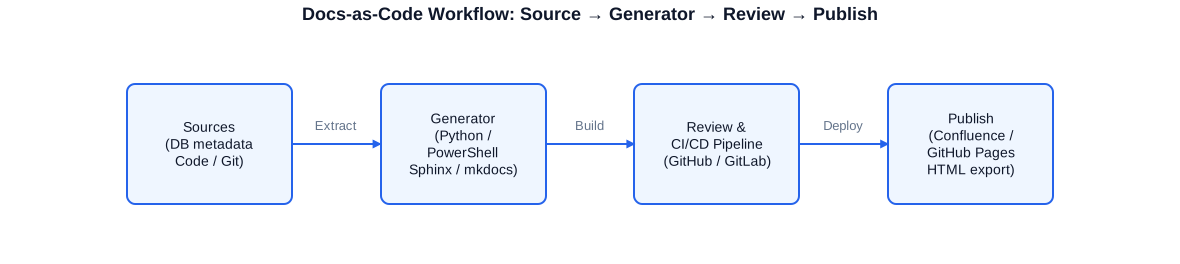
The complete Docs-as-Code workflow: DB metadata and code comments are extracted, a generator (Sphinx, mkdocs, Python script) builds Markdown or HTML, the CI/CD pipeline runs review and tests, and the result is published to Confluence, GitHub Pages or as static HTML.
Markdown as a universal documentation format
Markdown is simple enough to be readable without tooling, and powerful enough to represent complex structures: tables, code blocks, images, links and nesting. With extensions (Mermaid diagrams in GitHub Markdown, Admonitions in mkdocs, Directives in Sphinx) Markdown becomes a fully capable format for technical content. The frontmatter header (YAML block at the start of the file) allows metadata such as author, creation date, version, and category to be captured in structured form.
---
# Frontmatter structure for technical documentation articles.
# Parsed by mkdocs, Sphinx, and many other tools.
title:       "DWH Customer Dimension Load Process"
slug:        dwh-customer-dimension-load
category:    ETL Documentation
version:     "2.1"
date:        2025-03-10
last_review: 2025-05-20
reviewed_by: Stefan Corsten
status:      active         # active | deprecated | in-progress
tags:
  - DWH
  - ETL
  - CustomerDimension
  - SSIS
related:
  - dwh-source-crm
  - ssis-deployment-process
---

# DWH Customer Dimension Load Process

## Purpose and overview
This article describes the SSIS-based load process for the customer dimension in the DWH.
Source system is the CRM (table `dbo.customers`), target is `dim.Customer` in the DWH.

## Business rule
- Only customers with `active_flag = 1` are loaded.
- Address changes are historicised as SCD Type 2.
- Missing postal codes are substituted with '00000'.

## Technical details
- SSIS package: `Load_DimCustomer.dtsx`
- Schedule: daily 02:30, SQL Agent job `DWH_NightLoad`
- Dependency: `Load_Staging_CRM` must have completed.
- Expected runtime: 8-12 minutes

## Error handling
If errors exceed 10 rejected rows: job aborts and alert sent to dwh-team@example.com
The frontmatter header makes metadata machine-readable: mkdocs automatically generates table-of-contents, search indexes and navigation trees from these fields. The review workflow is integrated directly into the header.
CI/CD for documentation
A CI/CD pipeline for documentation checks on every commit whether the documentation is valid (no broken links, no invalid frontmatter), complete (all required fields present) and consistent (links to other articles resolve correctly). After a successful check the documentation is automatically deployed to the target system -- without manual release steps.
# CI pipeline for Docs-as-Code with mkdocs.
# Triggered on every push to main or on pull requests.
# Compatible with GitHub Actions (file: .github/workflows/docs.yml)

name: Build and Deploy Documentation

on:
  push:
    branches: [main]
  pull_request:
    branches: [main]

jobs:
  build-docs:
    runs-on: ubuntu-latest
    steps:
      # Step 1: Check out the repository
      - uses: actions/checkout@v4
        with:
          fetch-depth: 0   # full Git history for git-revision-date plugin

      # Step 2: Set up Python with mkdocs and plugins
      - uses: actions/setup-python@v5
        with:
          python-version: '3.12'
      - name: Install dependencies
        run: |
          pip install mkdocs-material                       mkdocs-git-revision-date-localized-plugin                       mkdocs-minify-plugin                       pymdown-extensions

      # Step 3: Build docs and check for broken links
      - name: mkdocs build (strict mode -- fail on broken links)
        run: mkdocs build --strict

      # Step 4: Deploy only on pushes to main (not on pull requests)
      - name: Deploy to GitHub Pages
        if: github.ref == 'refs/heads/main' && github.event_name == 'push'
        run: mkdocs gh-deploy --force

  # Optional: Sphinx-based build (for Python projects)
  # build-sphinx:
  #   runs-on: ubuntu-latest
  #   steps:
  #     - uses: actions/checkout@v4
  #     - run: pip install sphinx sphinx-rtd-theme
  #     - run: sphinx-build -b html docs/ docs/_build/html -W
This pipeline builds the documentation on every push, checks for broken links in strict mode, and deploys to GitHub Pages. For GitLab CI the structure is equivalent with '.gitlab-ci.yml' and a 'pages' job name.
Automated Documentation Generation from DB Metadata
The most labour-intensive documentation task in database projects is maintaining the Data Dictionary. Documenting hundreds of tables and thousands of columns manually is time-consuming and error-prone -- and outdated documentation is worse than none, because it actively misleads. The solution: automatic generation of the technical base structure from database metadata, combined with manually maintained business descriptions.
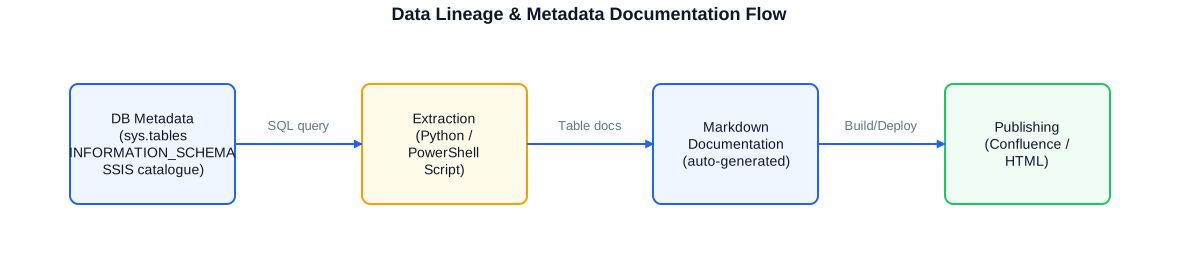
The documentation generation flow: DB metadata (sys.tables, INFORMATION_SCHEMA, SSIS catalogue) is extracted by a Python or PowerShell script, prepared as Markdown files, and published via CI/CD to Confluence or as static HTML.
Python-based Markdown generation from DB metadata
With Python, the SQL queries described above can be turned into complete Markdown documents: one file per table or schema group, with a column table, metadata header, relationship notes, and placeholder sections for manually added business descriptions. The script runs in the CI pipeline or as a SQL Agent job and automatically updates the documentation whenever the schema changes.
#!/usr/bin/env python3
# Generates Markdown files as Data Dictionary documentation from SQL Server metadata.
# Connection via pyodbc, output is one Markdown file per table.
# Prerequisite: pip install pyodbc

import pyodbc
import os
import re

# Connection parameters (in production, read from KeyVault or environment variable)
CONN_STR = (
    "DRIVER={ODBC Driver 18 for SQL Server};"
    "SERVER=localhost;"
    "DATABASE=DWH_Production;"
    "Trusted_Connection=yes;"
)
OUT_DIR = "./docs/data-dictionary"

# SQL: load tables and columns with extended properties
SQL = '''
    SELECT
        t.TABLE_SCHEMA    AS schema_name,
        t.TABLE_NAME      AS table_name,
        c.COLUMN_NAME     AS col_name,
        c.ORDINAL_POSITION AS col_order,
        c.DATA_TYPE       AS data_type,
        COALESCE(
            CAST(c.CHARACTER_MAXIMUM_LENGTH AS NVARCHAR(10)),
            CAST(c.NUMERIC_PRECISION        AS NVARCHAR(10))
        )                 AS type_detail,
        c.IS_NULLABLE     AS nullable,
        CAST(ep_t.value AS NVARCHAR(500)) AS tbl_desc,
        CAST(ep_c.value AS NVARCHAR(500)) AS col_desc
    FROM INFORMATION_SCHEMA.TABLES  t
    JOIN INFORMATION_SCHEMA.COLUMNS c
        ON  t.TABLE_SCHEMA = c.TABLE_SCHEMA
        AND t.TABLE_NAME   = c.TABLE_NAME
    LEFT JOIN sys.extended_properties ep_t
        ON  ep_t.major_id = OBJECT_ID(t.TABLE_SCHEMA+'.'+t.TABLE_NAME)
        AND ep_t.minor_id = 0 AND ep_t.name = 'MS_Description'
    LEFT JOIN sys.extended_properties ep_c
        ON  ep_c.major_id = OBJECT_ID(t.TABLE_SCHEMA+'.'+t.TABLE_NAME)
        AND ep_c.minor_id = c.ORDINAL_POSITION AND ep_c.name = 'MS_Description'
    WHERE t.TABLE_SCHEMA NOT IN ('sys','information_schema')
    ORDER BY t.TABLE_SCHEMA, t.TABLE_NAME, c.ORDINAL_POSITION
'''

def sanitize(name):
    # Derive safe filenames from table names (alphanumeric + hyphen only)
    return re.sub(r'[^a-zA-Z0-9_-]', '_', name).lower()

def gen_markdown(schema, table, tbl_desc, columns):
    # Generate a Markdown file for a single table
    lines = [
        f"---",
        f"title: "{schema}.{table}"",
        f"category: Data Dictionary",
        f"generated: auto",
        f"---",
        f"",
        f"# {schema}.{table}",
        f"",
        f"{tbl_desc or '_No business description available -- please add._'}",
        f"",
        f"## Columns",
        f"",
        f"| # | Column name | Data type | Nullable | Description |",
        f"|---|-------------|-----------|----------|-------------|",
    ]
    for col in columns:
        dtype = col['data_type']
        if col['type_detail']:
            dtype += f"({col['type_detail']})"
        desc = col['col_desc'] or ''
        lines.append(
            f"| {col['col_order']} | `{col['col_name']}` | {dtype} "
            f"| {col['nullable']} | {desc} |"
        )
    lines += ["", "## Relationships", "", "_Please add manually._", ""]
    return "\n".join(lines)

def main():
    os.makedirs(OUT_DIR, exist_ok=True)
    conn = pyodbc.connect(CONN_STR)
    cursor = conn.cursor()
    cursor.execute(SQL)
    rows = cursor.fetchall()
    cols = [d[0] for d in cursor.description]

    # Group rows by table
    tables = {}
    for row in rows:
        rec = dict(zip(cols, row))
        key = (rec['schema_name'], rec['table_name'])
        if key not in tables:
            tables[key] = {'desc': rec['tbl_desc'], 'cols': []}
        tables[key]['cols'].append(rec)

    # Write one Markdown file per table
    for (schema, table), data in tables.items():
        md = gen_markdown(schema, table, data['desc'], data['cols'])
        fname = os.path.join(OUT_DIR, f"{sanitize(schema)}__{sanitize(table)}.md")
        with open(fname, 'w', encoding='utf-8') as f:
            f.write(md)
        print(f"Generated: {fname}")

    print(f"Done: {len(tables)} tables documented.")
    conn.close()

if __name__ == "__main__":
    main()
This script generates a complete Markdown file per table with header, column table and placeholder for manual additions. It can run daily via SQL Agent or CI pipeline to keep the documentation automatically up to date.
PowerShell alternative for Windows environments
In Windows-dominated environments the same approach can be implemented with PowerShell. The dbatools module provides Get-DbaDbTable and Get-DbaDbColumn, which deliver the metadata directly without SQL queries. Combined with Out-File or Set-Content, Markdown files can be generated directly from PowerShell.
Confluence & Wiki Structuring
Confluence is the central knowledge management system in many organisations for technical and business documentation. Like any wiki, it can quickly become an unstructured repository: outdated pages, inconsistent naming, missing links, unclear ownership. A useful Confluence structure requires a well-thought-out concept from the start for spaces, page types, naming conventions and review processes.
Space concept and page hierarchy
I structure Confluence spaces by purpose: a technical space for operations documentation and runbooks, a project space for requirements and test documentation, and a data space for Data Dictionary and lineage information. Within each space the page hierarchy follows a consistent template: overview page (scope, links to sub-sections), system-specific pages, individual runbooks or dictionary entries.
Naming conventions and metadata labels
Consistent page titles and labels are the key to a searchable Confluence structure. Page titles follow a scheme: '[System] -- [Topic] -- [Type]', for example 'DWH-Prod -- CustomerDimension -- LoadProcess'. Labels enable cross-space search: 'runbook', 'data-dictionary', 'incident-response', 'sla-relevant'. Confluence macros such as 'Page Tree' and 'Content by Label' generate automatic overview pages without manual maintenance.
Migration from Word documents and SharePoint to Confluence
Migrating existing documentation from Word files or SharePoint to Confluence is a common scenario. The technical migration (import via API or Confluence import tool) is often simpler than the content review: sorting out outdated content, identifying missing information, creating links. I support such migrations both technically and in terms of content, and ensure the result is a navigable, current knowledge base -- not a digital archive of old documents.
- Confluence space concept: technical docs, project docs, Data Dictionary as separate spaces
- Page templates: consistent frontmatter, review date, responsible owner
- Naming conventions: [System] -- [Topic] -- [Type] as a consistent scheme
- Labels and macros: cross-space search, automatic overview pages
- Migration: Word/SharePoint to Confluence with content review
- Archiving process: mark outdated pages rather than deleting
Data Lineage & Metadata Documentation
Data lineage describes the path of data through all transformation steps: from the source system through staging and the DWH to the BI front end. This information is equally indispensable for audits, troubleshooting, and compliance. When a KPI in a report is wrong, it must be traceable which source it came from, what transformation rules were applied, and where in the chain an error may have occurred.
Complete data lineage is rarely captured in a single tool. In SSIS-based environments the SSIS catalogue (SSISDB) provides information about package executions and data flows. In Azure Data Factory, activity logs and monitoring are available. I combine these sources with a Markdown-based lineage documentation that is human-readable and versioned in Git.
SSIS catalogue as a metadata source
The SSIS catalogue (SSISDB) is an underestimated metadata source. It contains not only execution logs but also structured information about package parameters, connections and package configuration. T-SQL queries on SSISDB.catalog can produce a complete inventory of all SSIS packages, their connections and parameters -- the foundation for automated lineage documentation.
Metadata from ADF and Azure Synapse
In Azure environments, Azure Data Factory and Synapse Analytics provide similar metadata via their REST APIs. Pipelines, datasets and linked services can be queried via Azure PowerShell or Python (azure-mgmt-datafactory) and translated into lineage documentation. This automatically generated base is supplemented with manually created flow diagrams that show business relationships not directly readable from metadata alone.
- SSIS catalogue: packages, connections, parameters, execution logs as metadata source
- ADF / Synapse: pipeline metadata via REST API or azure-mgmt-datafactory
- Markdown lineage: tabular representation of source-target relationships
- Mermaid diagrams: automatically generated flow diagrams from metadata
- Version history: schema changes and transformation rules traceable over time
- Audit support: lineage documentation as evidence for compliance requirements
A central lineage document that tabularly describes for each KPI / data field the source, the transformation rule, and the target is often sufficient for audit purposes. It does not need to be fully automated -- more important is that it is complete and current. A hybrid approach (automated base plus manual additions) is usually the best practical compromise.
Requirements & Test Documentation
Requirements documentation is especially important in DWH and data projects because business and technical requirements are tightly intertwined. A poorly documented business requirement leads to technical implementations that produce surprises at acceptance testing. I create requirements documentation that is comprehensible to both clients and developers -- with clear acceptance criteria that allow unambiguous testing of whether a requirement has been met.
At the public sector / research organisation I created and maintained requirements and test documentation in a strictly regulated DWH environment. The particular demands of the public sector for traceability, versioning and formal acceptance sharpened my understanding of quality requirements for documentation in regulated environments.
Requirements structure for DWH projects
A requirement in the DWH context should contain: unique ID, business context (source, target, purpose), technical description (transformation rule, data types, exceptions), acceptance criteria (testable, measurable), dependencies (other requirements, source systems), priority and status. This structure allows requirements to be linked to test cases and systematically worked through at acceptance testing.
Test documentation and acceptance records
Test documentation covers more than bare test results. It documents the test framework (which environment, which data, who tested), the test cases (what is being tested, what result is expected), the actual results and open items. Acceptance records formalise the client's decision and create a reliable basis for follow-on work.
- Requirement ID and versioning: every change traceable
- Acceptance criteria: measurable, testable, unambiguously formulated
- Test cases: positive tests, negative tests, boundary value tests
- Traceability matrix: requirement to test case to acceptance result
- Acceptance record: date, tester, result, reservation, sign-off
- Open items list: remaining defects with due date and responsible party
Knowledge Transfer & Training Material
At the end of a project the internal team should be able to continue independently. This is my guiding principle, and it applies not only to operations documentation but also to active knowledge transfer: training sessions, pair-programming, annotated code reviews, and written tutorials that explain why something was implemented that way -- not just how.
Documentation as training material
Well-structured operations documentation and runbooks are simultaneously training material. A new colleague who finds a complete runbook for the monthly DWH load process can execute that process independently after one supervised run-through. That is more efficient than any formal training. I write documentation with this purpose explicitly in mind: understandable to someone who does not yet know the system.
Glossary and naming conventions
A glossary defining business terms, technical abbreviations and organisation-specific terminology is often the underestimated foundation of all other documentation. If 'customer' means something different in the source system than in the DWH, and nobody has explicitly documented that, misunderstandings arise at every level. Naming conventions for tables, columns, SSIS packages and variables -- written down and consistently applied -- significantly reduce the cognitive load when working with an unfamiliar system.
Multilingual documentation
In international projects, multilingual documentation is sometimes required: German operations documentation for the local IT team, English API documentation for external partners, Portuguese user documentation for Brazilian sites. I create documentation in German, English and Portuguese and understand the content challenges of multilingual documentation: terminology consistency, keeping versions in sync after changes, and the differences in writing style between technical texts in the three languages.
- Pair programming and code reviews as informal knowledge transfer
- Annotated tutorials: explain the Why, not just the How
- Glossary: business and technical terms, abbreviations, organisation-specific terminology
- Naming conventions: written, binding, with examples
- Multilingual documentation: DE / EN / PT, terminologically consistent
- Onboarding packages: documentation tree + runbooks + glossary for new team members
Working approach
A documentation project starts with a stock-taking: what is already documented? What is missing? In what format does existing documentation exist? Who are the users of the documentation, and what questions must they be able to answer with it? This analysis typically takes one to two days and is the basis for a realistic implementation plan.
- Stock-taking: existing docs, gaps, formats, user groups
- Concept: documentation structure, tooling, versioning strategy
- Automation: metadata extraction, CI/CD pipeline for doc build
- Creation: operations docs, runbooks, Data Dictionary, requirements docs
- Review: content review by subject-matter experts and technical review
- Publication: deployment to Confluence, GitHub Pages or internal portal
- Handover: maintenance processes, ownership, review cycles defined
I work remotely, in hybrid mode or on-site. For creating operations documentation and Data Dictionaries, remote work is well suited; for requirements workshops and knowledge transfer to internal teams, personal presence is often more effective. I adapt the working mode to the project.
An important aspect of my approach is involving the internal team from the start. Documentation that comes from outside and is not owned by the internal team will not be maintained. I actively involve subject-matter experts and developers -- through reviews, through joint development of glossary and naming conventions, and through handover of documentation tools and processes that the team can continue after the engagement.
Typical services in Technical Documentation
The service range in technical documentation and knowledge management spans from one-off documentation creation to building permanent structures and processes. Depending on the project phase and needs I take on individual areas or the complete spectrum.
- Operations documentation: server inventories, configuration manuals, contact directories
- Runbooks: step-by-step for load processes, monthly jobs, error handling, emergency procedures
- Data Dictionary: extraction from DB metadata, business enrichment, HTML/Markdown/Confluence
- Data Lineage: source-target documentation, transformation rules, lineage diagrams
- Docs-as-Code: Markdown/AsciiDoc structures, mkdocs/Sphinx setup, CI/CD pipeline for docs
- Automation: Python/PowerShell scripts for documentation generation from metadata
- Confluence structuring: space concept, templates, naming conventions, migration
- Requirements documentation: requirement IDs, acceptance criteria, traceability
- Test documentation: test cases, acceptance records, open-items lists
- Interface documentation: API descriptions, data format specifications
- Glossary and naming conventions: organisation-wide terminology standards
- Knowledge transfer: training, annotated code reviews, onboarding packages
- Multilingual documentation: DE / EN / PT for international projects
I prefer to work on projects where documentation is understood as a quality attribute -- not as an unwelcome obligation. These are typically regulated environments, larger DWH new-build projects, migration projects where knowledge needs to be transferred, and infrastructure projects intended for long-term operation. The combination of technical depth and documentation experience allows me to produce documentation that is genuinely accurate and useful.
Whether as a dedicated documentation freelancer, as a technical author alongside development work, or as an advisor for building documentation processes: I adapt the collaboration to the project's needs. Remote work suits the bulk of the work; workshops and reviews occasionally benefit from personal presence.
Selected anonymised reference projects
Insurance / Reinsurance
Extension of a web-based, XML-backed database documentation system. The system stored metadata about tables, views and columns in structured form and generated an HTML-based documentation view. Work included extending the metadata structure, integrating new schemas and improving the user interface for developers and business users. Result: complete, searchable Data Dictionary for the entire database landscape.
Public Sector / Research Organisation
Creation and maintenance of requirements and test documentation in a regulated DWH environment with strict requirements for traceability and formal acceptance. Documentation covered business requirement descriptions, acceptance criteria, test cases, acceptance records and a traceability matrix. The documentation was used in internal audits and data protection reviews.
Own infrastructure / Self-operated
Construction of central operations documentation for a Proxmox-based infrastructure with Debian, NGINX, WireGuard, Docker and additional services. Integration of automated configuration backups that regularly save configuration files to Git. The operations documentation is written in Markdown, versioned in Git and accessible as static HTML -- always current and without manual maintenance effort.
Industrial company / Mechanical engineering
Documentation of the SSIS migration approach from SQL Server 2016 to 2022 and creation of process documentation for the newly introduced Azure DevOps build and deployment process. Documentation included technical specifications, release-management runbooks and an onboarding package for the internal team.
Frequently asked questions about technical documentation
What documentation formats do you prefer?
It depends on the intended use. For operations docs and runbooks I prefer Markdown in Git -- versionable, easy to maintain, publishable to Confluence or as HTML. For Data Dictionaries I combine auto-generated Markdown files with manual additions. For requirements documentation I use Confluence or structured Markdown templates. Word documents only when the client requires a formal acceptance document.
How do you deal with outdated documentation?
Outdated documentation is often more harmful than none. My approach: stock-taking with age stamp (when was this page last reviewed?), prioritisation by criticality (business-critical runbooks first), archiving outdated content with a marker rather than deletion, and setting up a review cycle (e.g. quarterly) with named owners.
Can you automatically generate documentation from database metadata?
Yes. With Python (pyodbc + pandas) or PowerShell (dbatools) I extract metadata from INFORMATION_SCHEMA, sys.tables, sys.columns and Extended Properties. The result is Markdown files with business descriptions as placeholders. This generation can run in a CI pipeline or as a SQL Agent job and keeps the technical base of the Data Dictionary automatically current.
What is Docs-as-Code and why is it useful?
Docs-as-Code means treating documentation like source code: written in Markdown or AsciiDoc, versioned in Git, reviewed via pull request, and automatically built and deployed via CI/CD. This is useful because it makes documentation traceable, reviewable and reproducible -- exactly the qualities that have long been standard in software development.
How do you support building a Data Dictionary?
In three steps: first, stock-taking of existing metadata (Extended Properties, existing documentation, team knowledge). Second, building the extraction -- SQL scripts or Python scripts that pull metadata from the database and translate it into Markdown or Confluence. Third, enrichment with business context through workshops with the business side. The result is a Data Dictionary that is both technically correct and business-comprehensible.
How do you version documentation?
Via Git. Every change to a runbook, a configuration description or a Data Dictionary entry is traceable as a commit -- who changed what, when, and why (commit message). Branches allow simultaneous work on different versions. Tags mark released documentation states for formal acceptances.
Can you create documentation in German and Portuguese as well?
Yes. German, English and Portuguese -- all three fluently, including technical texts with domain terminology. I understand the differences in writing style between technical texts in these three languages and ensure terminology consistency across languages.
How long does a typical documentation project take?
It depends strongly on the scope. Complete operations documentation for a medium DWH environment (20-30 systems) typically requires 4-8 weeks. A Data Dictionary for 100-200 tables with automation can be built in 2-4 weeks. Setting up a Docs-as-Code workflow with CI/CD is a 1-2-week project. I give concrete estimates after an initial stock-taking.


