Positioning
A well-designed BI architecture is the bridge between the data warehouse and the people who use data to make decisions. It ensures that technically accurate data becomes understandable, reliable, and performant reports — and that those reports remain consistent over years, even as new measures, new sources, and new users are added. This end-to-end architecture, from the data model through to the report, is my primary focus.
I have designed and delivered business intelligence solutions across numerous projects — with Microsoft Power BI, with SQL Server Analysis Services in the Tabular variant, with SSRS reports, and with tools such as Grafana for technical monitoring. The range spans from classic, centrally operated reporting landscapes to modern self-service scenarios in which business departments analyse independently — within clearly defined guardrails.
In my work I connect the BI layer closely with the underlying data warehouse. A BI solution stands or falls by the quality of the data it evaluates. I therefore never treat BI in isolation, but always as part of a continuous data pipeline from the source system through ETL, data warehouse, and semantic layer to the report. This holistic understanding allows me to resolve problems where they originate — rather than masking in the report what has gone wrong further down the pipeline.
For many years I have been helping organisations transform their data into reliable decision-making foundations. I have witnessed how business intelligence has evolved from centralised, IT-driven reporting systems toward decentralised self-service scenarios. Both worlds have their place, and the art lies in combining their strengths: the consistency and security of central models with the flexibility and speed of self-service. That is precisely the balance I design for my clients.
My project experience spans public-sector clients, financial services providers, industrial companies, and logistics and retail groups. Working in these very different environments has taught me that every organisation brings its own language, its own key metrics, and its own requirements for security and governance. A BI architecture must therefore be not only technically sound, but also tailored to the respective organisation. This attentiveness to business and organisational context is a core element of my work.
What BI Architecture Encompasses
Business intelligence is often reduced to colourful dashboards. In reality, visualisation is only the tip of the iceberg. A solid BI architecture encompasses far more: the dimensional data model, the semantic layer with measures and calculations, the security concept, the refresh logic, governance, and finally the reports and dashboards. Working only at the surface means building on sand.
The decisive value of a well-designed architecture lies in consistency. When the measure 'Revenue' means the same thing in every report, when every user sees exactly the data they are permitted to see, and when new requirements can be added without jeopardising what already exists, trust in the numbers is created. That trust is the true product of business intelligence.
- Data model: dimensional star schema as the foundation for performant analysis
- Semantic layer: unambiguous measures, relationships, and hierarchies
- Security: Row-Level-Security and a well-conceived permissions concept
- Performance: a model that responds quickly even with large data volumes
- Governance: clear rules for self-service, certification, and lifecycle management
These components interlock like gears. An excellent data model is of little use if security has gaps; a perfect security solution does not help if reports are slow; and even the fastest solution fails if nobody trusts the numbers because governance is absent. That is precisely why I view BI architecture as a whole rather than as a collection of individual tools. Only the interplay of all layers produces a solution that holds up in daily use and grows with the organisation.
Experience from many projects has shown that most BI problems do not originate at the surface but in the lower layers. Contradictory figures, unclear definitions, and sluggish reports can almost always be traced back to an unclean data model or a missing semantic layer. Investments in the foundation therefore pay off far more than cosmetic improvements to individual dashboards — a principle that shapes my approach to every BI project.
The Layers of a BI Architecture
A BI architecture is best understood as a sequence of clearly separated layers. Each layer has a defined responsibility, and the data flow proceeds from source to report in traceable steps. This separation is the foundation for maintainability and extensibility.
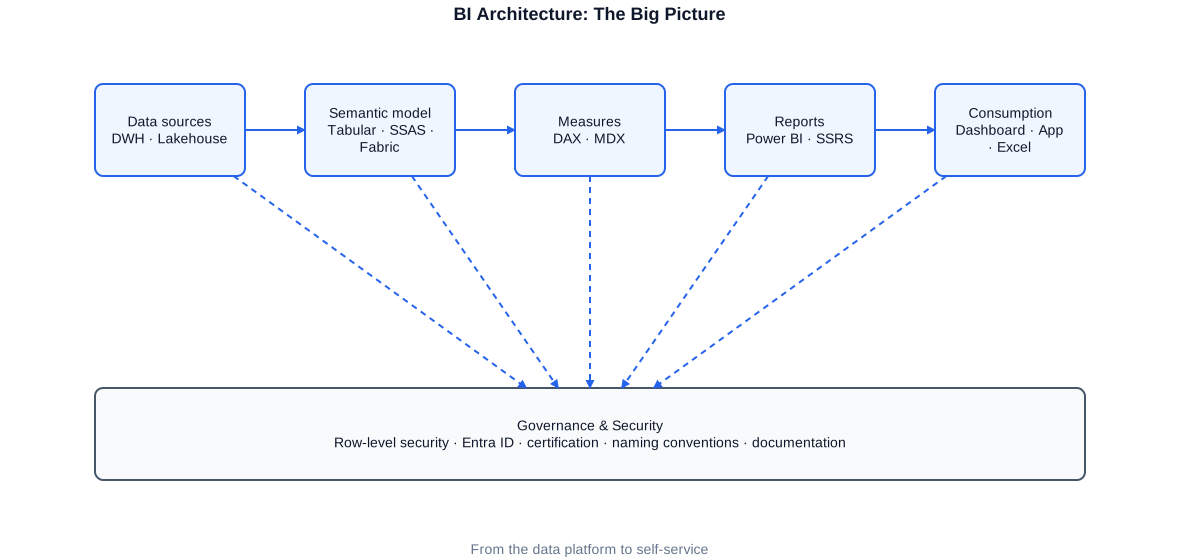
Overview of a BI architecture: data warehouse, semantic layer (Tabular/Power BI), security and governance layer, and the reporting and self-service tier.
At the bottom sits the data warehouse with its analysis-optimised structures. On top of that rests the semantic layer — a Tabular model or a Power BI dataset that encapsulates the business logic: measures, relationships, hierarchies, and permissions. Only above that layer do the actual reports and dashboards reside. Running horizontally across all layers are security and governance, which determine who may see and do what.
This layering brings an additional, often underestimated benefit: it makes responsibilities clear. The data warehouse owns the correct, historised data foundation. The semantic layer owns the business definition of measures and the security model. The reporting layer owns the compelling, audience-appropriate presentation. When these responsibilities are cleanly separated, each layer can evolve independently, and errors can be unambiguously attributed. When layers blur — for example, when business logic migrates into individual reports — the result is a tangle that is hard to maintain.
A practical observation: the further down in the architecture a piece of logic resides, the broader its reach. A measure defined once, centrally in the semantic layer, is consistently available to all reports. Maintaining the same measure separately in every report is not only additional effort but a guarantee of divergence. My guiding principle is therefore: logic as far down as possible, as far up as necessary.
In practice, this layering is easily illustrated by a concrete project. At a public-sector client, I derived analysis-optimised Kimball structures from a historised Data Vault layer and built a central semantic model on top. Business departments accessed data exclusively through this model, so every measure — from the count of processed cases to complex ratios — shared the same definition across all reports. Changes to a measure needed to be maintained in only one place and took effect consistently across all analyses immediately.
A cleanly partitioned layer structure also facilitates team scaling. Specialists for the data warehouse, for semantic layer modelling, and for report design can work largely independently of one another as long as the interfaces between layers are clearly defined. This clarity reduces friction and coordination overhead — an effect that becomes increasingly important as an organisation grows.
The Dimensional Data Model
The foundation of every performant BI solution is a clean dimensional data model, typically a star schema. A central fact table holds the measurable values — such as revenue, quantity, or count — surrounded by dimension tables that supply context: time, customer, product, region. This structure is not only intuitively understandable but also exactly the form with which analytics engines such as VertiPaq work most efficiently.
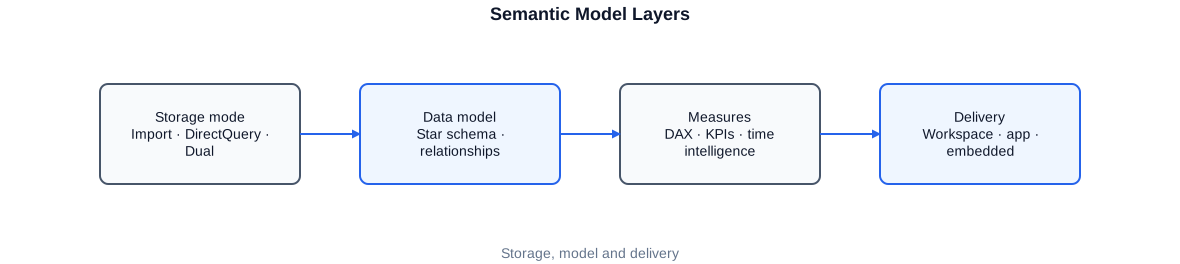
A star schema: a central fact table surrounded by dimensions such as time, customer, product, and region — the foundation for a performant, comprehensible BI model.
The modelling of dimensions deserves particular attention. A well-designed time dimension is the prerequisite for any time intelligence — that is, for year-over-year comparisons, cumulative values, or rolling averages. Slowly Changing Dimensions of Type 2 allow analyses to reference the state that was valid at the time in question. I derive these structures in many projects from the underlying data warehouse — frequently from a Data Vault layer that handles integration and historisation.
-- A lean view exposes the fact table, ready for enrichment, to the
-- Tabular/Power BI model. Keys have already been resolved.

CREATE OR ALTER VIEW bi.FactSales AS
SELECT  f.DateKey,
        f.CustomerKey,
        f.ProductKey,
        f.RegionKey,
        f.Amount,
        f.Quantity,
        f.Amount / NULLIF(f.Quantity, 0) AS UnitPrice
FROM    core.FactSales AS f
WHERE   f.IsValid = 1;     -- expose only business-valid records
The BI layer deliberately receives only business-valid, fully prepared data. Logic that belongs in every model is encapsulated here once, centrally, rather than repeated in every report.
A common mistake is the temptation to carry the relational model of the data warehouse unchanged into the BI layer. Highly normalised structures with many joined tables make sense for transactional processing but are counterproductive for analytical evaluation in VertiPaq. I therefore deliberately denormalise to a star schema: fewer relationships, flatter dimensions, clearly separated facts. This form is not only optimal for the engine but also intuitively understandable for users, because it matches the way business users think.
Particular care is warranted for the relationships between facts and dimensions. Unambiguous, directed one-to-many relationships are the normal case and keep the model predictable. Bidirectionally filtering or ambiguous relationships, by contrast, quickly lead to results that are hard to explain and cause performance degradation. Where multiple fact tables of different granularity come together, I resolve the situation through shared, conformed dimensions — keeping even complex models manageable and delivering consistent figures across different subject areas.
The Semantic Layer: Tabular and Power BI
The semantic layer translates the technical data model into business language. Here, tables and columns become named measures, understandable hierarchies, and clear relationships. In the Microsoft ecosystem I use SQL Server Analysis Services in the Tabular variant and Power BI datasets for this purpose — both are based on the same VertiPaq engine and the same language, DAX.
The choice between a central Tabular model and a Power BI dataset depends on the scenario. A central Tabular model operated in Analysis Services is suited for large, enterprise-wide models with many users and strict governance requirements. Power BI datasets — particularly as shared, certified datasets — are ideal for agile, business-department-facing scenarios. I often combine both: a solid central model as the single source of truth, with department-specific reports built on top.
The semantic layer is also where technical column names become meaningful business terms. A field such as 'amt_net_eur' is named 'Net Revenue (EUR)' in the model; a cryptic status code becomes a readable label. This translation into the language of the business is not a cosmetic detail — it determines whether users can work with the model independently. Hierarchies are added as well — for example year, quarter, month, day in the time dimension — enabling the intuitive drill-down and roll-up behaviour in reports.
When choosing storage mode I weigh Import against DirectQuery. Import mode loads data into the compressed VertiPaq engine and is usually the fastest option. DirectQuery queries the source in real time and is appropriate when data is too large to import or when day-level freshness is required — at the cost of response time. Composite models allow both worlds to be combined selectively. I make this decision depending on data volume, freshness requirements, and available infrastructure.
For the semantic layer to fulfil its purpose, I place emphasis on conventions from the very start. Consistent naming rules for measures and columns, clearly flagged helper columns that should not be visible in reports, and meaningful descriptions for every measure make the model self-documenting. In larger models I additionally organise measures into thematic display folders so that users can find what they need even among hundreds of measures. This investment pays back many times over by reducing support requests and strengthening trust in the numbers.
An important aspect is versioning and deployment of the semantic layer. I treat Tabular models and Power BI datasets like software: they are held in version control, promoted through defined environments from development to production, and deployed automatically. In projects with Azure DevOps or comparable tools I have built pipelines that deliver model changes to production in a controlled and traceable manner — including automated checks before a new version is released.
In larger landscapes it is worth modularising the semantic layer. Instead of a single, all-encompassing model, multiple thematically scoped models are created, connected through shared, conformed dimensions. This keeps individual models manageable, simplifies maintenance, and allows different teams to work in parallel. The crucial requirement is that central dimensions and core metrics remain consistently defined, so that cross-domain analyses continue to yield coherent results.
Measures with DAX
DAX — Data Analysis Expressions — is the language used to define measures in Tabular and Power BI. It is powerful but also treacherous: the same measure can return different values depending on context, and understanding filter context versus row context is critical for correct results. Clean, well-documented DAX measures are a core part of my BI work.
Basic measures such as sums are quickly written. Real value is created through derived measures: year-over-year comparisons, cumulative values, shares of a total, or rolling averages. The following example shows a base measure together with time intelligence built on top of it.
-- Base measure: revenue as the sum over the fact table
Revenue := SUM ( FactSales[Amount] )

-- Prior-year value via a marked date table
Revenue PY :=
CALCULATE (
    [Revenue],
    SAMEPERIODLASTYEAR ( 'Date'[Date] )
)

-- Year-over-year growth in percent
Revenue Growth % :=
VAR Current   = [Revenue]
VAR PriorYear = [Revenue PY]
RETURN
    DIVIDE ( Current - PriorYear, PriorYear )
DIVIDE instead of the division operator prevents errors on division by zero. Time intelligence only works with a marked, gapless date table — a frequently overlooked requirement.
Another powerful instrument is context-sensitive calculation using CALCULATE combined with variables. Variables make DAX not only more readable but often faster, because intermediate results are computed only once. The following example shows a measure that calculates a product's share of total revenue — regardless of how the report is filtered.
Revenue Share % :=
VAR RevenueContext = [Revenue]
VAR RevenueTotal   =
    CALCULATE ( [Revenue], ALL ( 'Product' ) )   -- remove the product filter
RETURN
    DIVIDE ( RevenueContext, RevenueTotal )
ALL selectively removes the filter on the product dimension and thus provides the total as the reference value. Context-sensitive measures like this are at the heart of sophisticated DAX modelling.
A common stumbling block in DAX is the distinction between row context and filter context. A calculated column operates row by row and is materialised once at load time; a measure, by contrast, evaluates the current filter context at query time. Confusing these two worlds produces seemingly inexplicable results. In my work I explain this distinction explicitly and document for every non-trivial measure which context it assumes. This keeps models comprehensible for colleagues who work with them later.
Performance and correctness go hand in hand in DAX. Iterating functions over large tables, nested filters, and unnecessarily complex expressions can noticeably slow down reports. I therefore examine critical measures specifically with tools such as Performance Analyzer and DAX Studio to identify the most expensive queries and optimise them deliberately. A skillful reformulation or pre-computing a helper column in the model often yields several times the speed improvement.
To keep measures maintainable over the long term, I place emphasis on consistent patterns and thorough documentation. Recurring building blocks — such as the handling of blank values, subtotal behaviour, or year-over-year comparison logic — are implemented following the same conventions, so that a measure is immediately understandable once the pattern is known. This consistency is invaluable in grown models with many measures: it reduces the onboarding time for new team members and prevents subtle errors that arise when every measure takes its own unique approach.
Row-Level-Security and Permissions
In most BI solutions, not every user is permitted to see all data. A sales representative should see their own region, a department head their own division, and senior management the overall picture. This row-level restriction is called Row-Level-Security (RLS) and is a central component of every professional BI architecture. I have designed and implemented RLS in several projects.
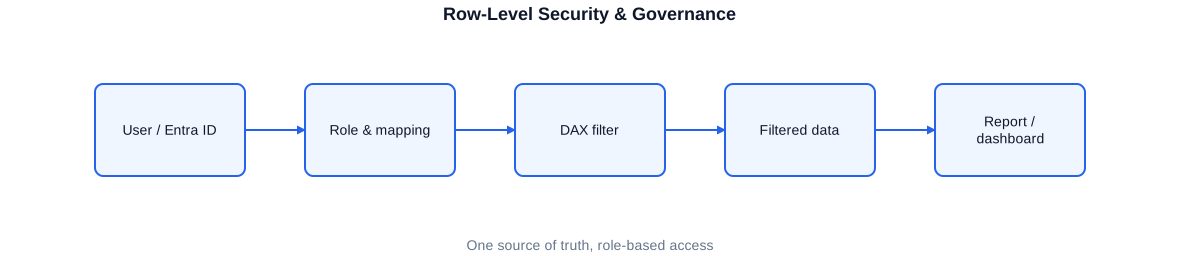
Row-Level-Security: the same reports, but each role sees only the data released for it — controlled through roles and dynamic DAX filter rules.
RLS works through roles to which filter rules are assigned. A static role filters on a fixed value; far more powerful is dynamic RLS, where the filter rule evaluates the signed-in user and determines through a permissions table which data is visible. A single role thus suffices for any number of users.
-- Filter rule for the "Sales" role. USERPRINCIPALNAME() returns the
-- signed-in user; a permission table determines which regions
-- this user is allowed to see.

[Region] IN
CALCULATETABLE (
    VALUES ( 'Permission'[Region] ),
    'Permission'[UserPrincipalName] = USERPRINCIPALNAME ()
)
A single dynamic role replaces dozens of static roles. Maintenance is handled conveniently through the permissions table rather than the model itself — significantly reducing the administrative overhead.
When designing the security model I always consider performance as well. Complex filter rules evaluated against large permissions tables on every query can noticeably slow down reports. I therefore keep filter logic as lean as possible, use compact keys, and test response behaviour specifically under realistic user contexts. Security must not come at the expense of speed — both must be right together for the solution to be accepted in daily use.
It is important to test RLS thoroughly. An error in the filter rule can cause users to see either too little or — more critically — too much. Testing security with multiple user contexts is therefore a fixed part of the acceptance process in my projects.
In larger organisations a single permissions table is often insufficient, because visibility rules overlap along multiple dimensions — for example region, business unit, and client simultaneously. In such cases I design a multi-dimensional permissions model that represents access rules centrally and enforces them consistently in both the BI layer and the underlying data warehouse. The result is a unified security concept that is also transparently documented for audit purposes.
A proven practice is to derive the permissions table from the authoritative source systems rather than maintaining it manually. When the assignment of users to regions or divisions is already maintained in HR or organisational systems, I have that information flow automatically into the permissions table. This keeps security always up to date and prevents discrepancies between organisational reality and report access.
Performance and VertiPaq
The VertiPaq engine that powers Tabular and Power BI is a column-oriented, compressed in-memory database. It is extremely fast — provided the model takes its mode of operation into account. Performance problems in Power BI rarely arise from large data volumes per se, but from unfavourable modelling and inefficient DAX measures.
- Star schema instead of snowflake: fewer relationships, better compression
- Prefer low-cardinality columns; omit unnecessary columns
- Split high-cardinality columns (e.g. timestamps) into separate date and time columns
- Use measures rather than calculated columns wherever possible
- Use aggregation tables for large fact tables
A frequently underestimated lever is cardinality reduction. VertiPaq compresses columns the more effectively the fewer distinct values they contain. A timestamp column with millisecond precision is harmful to compression; separated into a date column and a time column, the same information compresses dramatically better. Interventions like this often have a greater impact than any DAX optimisation.
For very large fact tables I use aggregation tables. Frequently queried aggregations — such as revenue by month and region — are pre-computed and held in a compact table. The engine then automatically accesses the aggregation when the query permits it, and falls back to the large fact table only for detailed queries. For users, this mechanism is invisible, but reports become noticeably faster. In projects with several hundred million rows, this was often the decisive lever for acceptable response times.
The data model itself also has a major influence on storage size. I consistently remove columns that are not needed for business purposes, avoid high-cardinality text keys in favour of compact integer keys, and verify whether long decimal values are truly required at full precision. Each of these measures shrinks the model, accelerates refresh, and reduces memory consumption — a benefit that pays dividends every day in ongoing operations.
Governance and Self-Service
Self-service BI promises that business departments can analyse independently, without waiting for IT. This is a major gain — but it carries the risk of sprawl: contradictory measures, unsecured data sources, and a thicket of half-finished reports. Good governance resolves this tension by enabling freedom within clear guardrails.
The key is a shared, certified semantic layer. Business departments build their own reports — but on a centrally maintained, validated data model with binding measures and enforced security. This preserves the flexibility of self-service without compromising the consistency and security of the numbers. Certified datasets, clear naming conventions, and a defined certification process are the tools for achieving this.
- Centrally maintained, certified datasets as the binding data foundation
- Clear separation of development, test, and production environments
- Naming and storage conventions for workspaces and reports
- Defined certification and lifecycle process for reports
- Security enforced through RLS rather than manual report filters
Governance is primarily a matter of agreed rules and roles, not of tools. I help organisations define a sustainable operating model: who may publish certified datasets, who maintains the central measures, how new reports are approved, and when a report is retired. Clarifying these roles cleanly prevents the BI landscape from growing uncontrolled over time until nobody knows any longer which figure is authoritative.
At the same time I take care not to stifle self-service. The guardrails should be secure but not obstructive. A practical approach is a tiered model: a small, strictly controlled core of certified datasets and measures, alongside an area where business departments may freely experiment, and a clear path by which proven custom solutions can be promoted into the certified core. This keeps innovation possible without threatening the reliability of the central figures.
Governance also includes a deliberate approach to data protection. Particularly in regulated industries and with public-sector clients, personal data must be handled with special care. I therefore plan early which data may enter the BI layer at all, where anonymisation or pseudonymisation is appropriate, and how access is logged in an audit-proof manner. The result is a solution that is not only compelling from a business perspective but also stands up to legal and organisational requirements.
Operations, Refresh, and Monitoring
A BI solution is not finished at delivery — it must be reliably refreshed, monitored, and maintained. The data refresh must be coordinated with the data warehouse refresh: there is no benefit in refreshing a Power BI dataset before the underlying load processes have completed. I plan this coordination between ETL and BI refresh from the very start.
For monitoring I use different means depending on the environment. The refresh history and usage statistics of Power BI show whether refreshes have succeeded and which reports are actually being used. For technical monitoring I have used Grafana in one project to visualise pipeline runs and system states. Identifying unused reports is as valuable as monitoring successful runs: those reports can be cleaned up, relieving the operational burden.
In my refresh concept I explicitly distinguish between full and incremental refresh. Small models can be fully reloaded without issue. For large fact tables I configure incremental refresh, where only the most recent or changed time periods are reloaded while historical partitions remain untouched. This drastically shortens refresh duration and reduces load on both the source and the engine — an important building block for models that need to be current multiple times per day.
To ensure that disruptions are not first noticed by end users, I build active notification wherever feasible. If a refresh fails or a load process exceeds its time window, the operations team is notified automatically. This allows problems to be resolved before they visibly affect the reporting operation — a significant contribution to the reliability that a BI solution requires in daily use.
Capacity planning also belongs to a mature operations model. When many users access reports simultaneously or multiple models are refreshed in parallel, bottlenecks can occur. I monitor utilisation, distribute refresh times sensibly throughout the day, and ensure that the most heavily used models receive sufficient resources. This keeps response times stable even during peak periods, and the solution scales as the number of users and analyses grows.
Working Approach
A BI architecture takes shape in close dialogue with the business departments. Before I build a model, I clarify which questions the reports should answer, which measures are genuinely needed, and how they are defined from a business perspective. The business definition of measures is often more demanding than their technical implementation — and this is precisely where most misunderstandings arise if it is not addressed early.
- Analysis: clarify business questions, measures, and their binding definitions
- Modelling: design the star schema and semantic layer
- Implementation: measures in DAX, security through RLS, iterative report development
- Testing and sign-off: validate figures and security together with business departments
- Operations: refresh, monitoring, governance, and documentation
In many projects — in the areas of controlling, finance, sales, and HR — I have worked requirements out directly with business teams and translated them into appropriate BI solutions. This direct connection to the business department matters to me: a technically perfect solution that misses the business question helps no one.
I work deliberately iteratively. Rather than spending months building a perfect model in isolation, I deliver a working first version early and develop it further together with the users. A tangible prototype surfaces misunderstandings about measure definitions or expected analyses much faster than any requirements document. These short feedback loops reduce the risk of building past the actual need and ensure that business departments take ownership of the solution from the very beginning.
Part of my work is also empowering the team. I do not hand over a black box; I explain the decisions made, train the future owners in working with the model and the measures, and leave behind documentation that enables independent further development. My objective is a solution that continues to live well without me — that is my benchmark for sustainable BI work.
Precisely because I know the entire data pipeline — from the source through ETL and data warehouse to the finished report — I can apply the right fix at the right layer. Some problems that manifest in a report are most sensibly resolved in the data model or even in the load process. This end-to-end understanding prevents surface-level symptom treatment and leads to solutions that address the root cause and therefore hold up over the long term.
Typical Services in a BI Project
Around BI architecture I take on different tasks depending on the project phase — from concept design through implementation to ongoing operations.
- Design of an end-to-end BI architecture from data warehouse to report
- Dimensional modelling as a star schema, including SCD2 and time dimension
- Building semantic layers in SSAS Tabular and Power BI
- Development of DAX measures, time intelligence, and context-sensitive calculations
- Design and implementation of Row-Level-Security, including dynamic RLS
- Performance analysis and VertiPaq optimisation of models and reports
- Governance concepts for self-service BI with certified datasets
- Coordination of ETL refresh and BI dataset refresh
- Monitoring of refresh processes, usage statistics, and system states
- Training, knowledge transfer, and technical documentation
Selected anonymised reference projects
Engineering / consulting
Build-out of a BI architecture with Data Vault as the integration layer, SSAS Tabular models on top, and Power BI reports for business departments, including measure logic and security concept.
Loyalty / retail / clearing
Development of Power BI data models with Row-Level-Security, SSRS reports, and connection of REST and OData sources, embedded in an existing SSIS/SSDT landscape with versioning via Bitbucket.
Textile & service provider
BI delivery on the basis of an Enterprise Operational Data Store, master data through Master Data Services, data preparation through Azure Synapse and Databricks, and Power BI reports for sales and HR.
Public-sector client
Derivation of analysis-ready Kimball structures from a Data Vault layer as the foundation for business reporting, functional testing of measure logic, and GDPR-compliant data preparation.
Insurance / telecommunications
Redesign of a data warehouse on a Data Vault basis with a dimensional reporting layer on top as the foundation for consistent, enterprise-wide reports.
Controlling / finance / HR
Elaboration of business measure definitions directly with the respective departments and translation into consistent DAX measures, reports, and dashboards for controlling, finance, and HR.
Frequently asked questions about BI architecture
Do you work with Power BI or with SSAS Tabular?
With both. Both use the same VertiPaq engine and DAX. For large, enterprise-wide models with strict governance I often use central Tabular models; for agile scenarios I use certified Power BI datasets — frequently in combination.
Why is a star schema so important?
Because the VertiPaq engine works most efficiently with it, and because it keeps the modelling comprehensible. A clean star schema is the foundation for performance and for consistent measures.
How do you ensure that each user sees only permitted data?
Through Row-Level-Security, usually dynamic RLS via a permissions table and USERPRINCIPALNAME(). Security is enforced in the model, not through manual report filters, and is thoroughly tested with multiple user contexts.
My Power BI report is slow — what is causing that?
Usually the modelling or inefficient DAX, rarely the sheer volume of data. Using Performance Analyzer and DAX Studio I identify the root cause and optimise deliberately — often through cardinality reduction, a clean star schema, or aggregation tables.
Can you enable self-service BI without risking sprawl?
Yes. Through a central, certified semantic layer and clear governance rules. Business departments build their own reports on a validated, secure data model — combining flexibility with consistency.
In which languages can we work together?
In German, English, and Portuguese — each fluently, including technical and business discussions.


