Positioning
A data warehouse is the analytical memory of an organisation. It brings data from various source systems into a unified, reliable form and makes it available for reports, analyses, and decision support. That sounds simple – but it is not. A DWH that holds up in daily operations requires a well-thought-out architecture, careful modelling, robust load processes, and a quality assurance mechanism that catches errors before they surface in reports. Without this foundation, the analytical memory quickly becomes an opaque data store that nobody trusts any more.
This is exactly where my focus lies. I build data warehouses on SQL Server based on proven patterns: a layered architecture for clear responsibilities, Kimball dimensional models for performant and understandable analyses, Data Vault for robust historisation and decoupling of raw data, automated ETL pipelines with SSIS and T-SQL, and tSQLt for the automated testing of load logic. The result is a delivery layer via SSAS Tabular and Power BI that gives end users fast, self-explanatory reports.
I have worked with SQL Server since version 2000 – in projects for public-sector clients, in industry, in service businesses, and in consulting. This breadth helps: I know the typical growing pains of a DWH as well as the pitfalls that arise during greenfield builds. I know which compromises come back to haunt you and which simplifications are legitimate. And I can do both – a brand-new build from scratch as well as the targeted modernisation of an evolved system.
Clients come to me when an existing DWH has hit its limits: when load times grow too long, when numbers diverge between reports, when nobody knows what is really happening inside a grown ETL pipeline. Or when a new DWH should be built and done right from the start. In both cases the work begins with understanding the business requirements, the source systems, and the existing data landscape – before a single table is created.
What Makes a Data Warehouse
A data warehouse is more than a database where reports run. It is a system that brings data from various sources into an integrated, consistent, and time-traceable form. These four properties – integration, consistency, time-variance, and subject orientation – were formulated by William H. Inmon as early as the 1990s and are still regarded today as the foundation of any serious DWH design.
Integration: a unified view of all sources
Most organisations run several operational systems in parallel: an ERP for finance, a CRM for customers, an HR system for personnel data, plus specialised solutions for individual departments. Every system has its own keys, its own terminology, and its own logic. The data warehouse brings these worlds together and ensures that a customer is the same customer across all sources and a product is the same product across all systems. This integration is a business task, not a purely technical one.
Historisation: tracking changes over time
Operational systems care about the current state. A data warehouse cares about development over time. What did a product cost six months ago? How has revenue evolved month by month? Which customers were in which segment a year ago? These questions can only be answered if changes are historised – with Slowly Changing Dimensions, with insert-only layers, or with a Data Vault. Which pattern is right depends on the use case.
Subject orientation: business questions, not technical structures
A data warehouse is structured according to business subjects, not according to the technical structures of the source systems. Instead of tables like 'KDBZK' or 'BWART' there are dimensions like 'Customer' and 'Material' and fact tables like 'Revenue' and 'Purchasing'. This subject-oriented structure makes the DWH readable for business users and directly usable for analyses – without extensive knowledge of the underlying source systems.
- Integration of heterogeneous source systems via unified keys and concepts
- Historisation of changes for time-series analyses
- Subject-oriented structure instead of mirroring technical source structures
- Consistency: one number, one definition, one result
- Separation of operational and analytical loads (OLTP vs. OLAP)
- Traceability: every figure can be traced back to its source
Consistency: one truth for all reports
One of the most common pain points in organisations without a unified DWH is the 'number of the month' discussion: every department has its own revenue figure, its own customer count, its own definition of 'active'. The data warehouse ends this debate by enshrining a single, jointly agreed definition for each metric and feeding all reports from the same source. This consistency is technically achievable, but requires that the business definitions are clarified first.
The value of a reliable DWH is not immediately visible in flashy dashboards, but in daily operations: reports run on time, figures agree, management requests can be answered in minutes rather than days. This trust in the data is the true value of a well-built data warehouse.
Layered Architecture in the Data Warehouse
A proven principle for every data warehouse is the consistent separation into layers. Each layer has a clearly defined task, and the transitions between layers follow defined rules. This separation makes the system understandable, testable, and maintainable: a change in a source structure ideally affects only the lowest layer, not the business modelling; a new delivery requirement affects only the top layer, not the loading process.
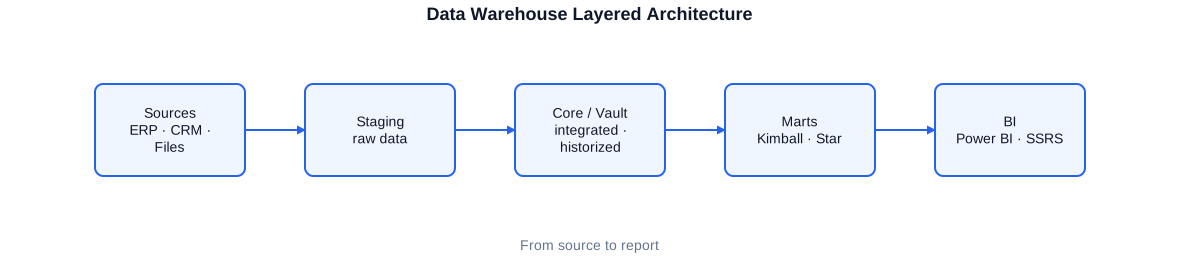
The layered architecture of a data warehouse: staging area for raw source data, core DWH with Data Vault or ODS layer, dimensional model (star schema) as reporting layer, and SSAS Tabular as the semantic delivery layer for Power BI.
Staging area: the buffer zone
The staging area is the first stop for all source data. Data lands here exactly as it comes from the source systems – unchanged, without any business transformation. The staging area is the buffer between the outside world and the actual DWH. It decouples load times and makes it possible to process source data multiple times without querying the source systems again. In practice, the staging area is often cleared or overwritten after each run – it is not a permanent store but a working area.
Core DWH: the reliable data foundation
The core is the heart of the data warehouse. This is where source data is cleansed, integrated, and historised. Depending on the architecture decision, the core can be structured as an Operational Data Store (ODS), as a Data Vault layer, or as a normalised model. What all variants have in common is that the data here is complete, historised, and consistent – the single, reliable version of the truth. The reporting layer is populated from the core; the core itself is not a direct query model for end users.
Reporting layer: optimised for analysis
The reporting layer contains data in a form optimised for analysis. The classic pattern for this is the Kimball star schema: a central fact table with the key metrics, surrounded by dimension tables with the descriptive attributes. This model is efficient for relational queries, readable for end users, and forms the direct basis for SSAS Tabular and Power BI. In some projects, additional aggregates or pre-summarised views complement the base layer to further accelerate particularly frequent queries.
Semantic layer: SSAS Tabular and Power BI
Above the reporting layer sits the semantic layer. In SQL-Server-based DWH projects this is typically SSAS Tabular – an in-memory analytics model that builds on the data of the star schema and centralises business calculations via DAX measures. Power BI connects directly to the Tabular model or imports the data into its own model. This separation between data storage and the semantic layer is a decisive quality factor: business metrics are defined once, maintained once, and are consistent across all reports.
- Staging area: raw source data, reloaded daily, no permanent store
- Core DWH: cleansed, historised, and integrated data as the reliable foundation
- Reporting layer: Kimball star schema, optimised for relational queries
- SSAS Tabular: in-memory semantic layer with centralised DAX measures
- Power BI: self-service reports and dashboards based on the Tabular model
Kimball and Dimensional Modelling
Dimensional modelling after Ralph Kimball is the most widely used pattern for the reporting layer of a data warehouse. Its core idea is as simple as it is effective: measurable facts – revenue, quantities, costs – reside in fact tables; the descriptive contexts – customers, products, dates, regions – reside in dimension tables. Combining both produces the star schema, which enables any analysis after just two or three joins.
The appeal of the Kimball model lies in its performance and comprehensibility. A star schema with well-chosen surrogate keys is highly optimisable for relational databases: the fact table grows linearly, dimensions are comparatively small and can fit entirely into the SQL Server buffer pool. Queries that aggregate billions of fact rows across a few dimensions therefore complete in an acceptable time even on large data volumes.
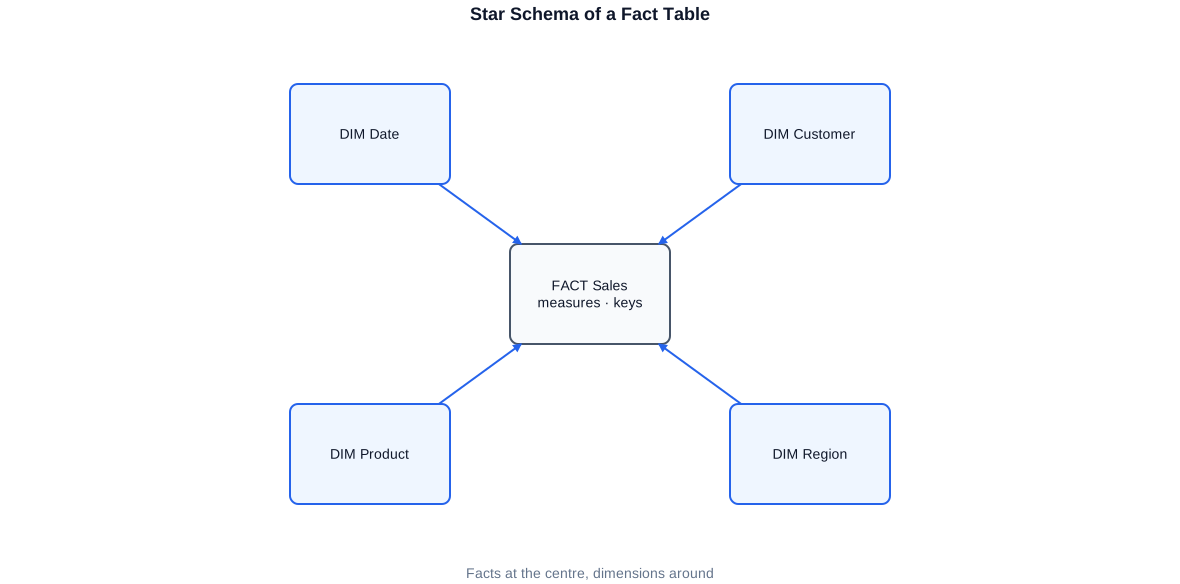
A classic star schema: the 'Revenue' fact table in the centre, linked to the Customer, Product, Date, and Region dimension tables via integer surrogate keys. Each dimension carries descriptive attributes for drill-down and filtering.
Fact tables: what is measured
The fact table contains the key metrics of the business process – revenue, quantity, cost, count – as well as foreign keys to all associated dimensions. Each row corresponds to an event or measurement at the chosen grain. Selecting the right grain is one of the most important decisions in DWH design: too coarse leads to information loss; too fine leads to a huge table with barely usable detail. Surrogate keys as integer foreign keys instead of the original business keys keep the fact table lean and independent of source system changes.
-- Fact table for the 'Revenue' business process.
-- Surrogate keys (SK) as INT foreign keys instead of business keys.
-- Grain: one row per order line item and delivery date.
CREATE TABLE reporting.FactRevenue
(
    -- Degenerate dimension: document number directly in the fact table
    OrderNo           NVARCHAR(20)    NOT NULL,
    OrderLineNo       SMALLINT        NOT NULL,

    -- Surrogate key foreign keys to the dimensions
    CustomerSK        INT             NOT NULL,
    ProductSK         INT             NOT NULL,
    DeliveryDateSK    INT             NOT NULL,   -- reference to DimDate (YYYYMMDD)
    RegionSK          INT             NOT NULL,
    SalesRepSK        INT             NOT NULL,

    -- Metrics (additive facts)
    QuantityDelivered DECIMAL(12, 3)  NOT NULL DEFAULT 0,
    NetRevenue        DECIMAL(14, 2)  NOT NULL DEFAULT 0,
    DiscountAmount    DECIMAL(14, 2)  NOT NULL DEFAULT 0,
    ManufacturingCost DECIMAL(14, 2)  NOT NULL DEFAULT 0,

    -- Audit columns
    ETL_LoadTimestamp DATETIME2    NOT NULL DEFAULT SYSUTCDATETIME(),
    ETL_SourceSystem  NVARCHAR(50) NOT NULL,

    CONSTRAINT PK_FactRevenue PRIMARY KEY NONCLUSTERED (OrderNo, OrderLineNo),
    CONSTRAINT FK_FactRevenue_Customer FOREIGN KEY (CustomerSK)     REFERENCES reporting.DimCustomer (CustomerSK),
    CONSTRAINT FK_FactRevenue_Product  FOREIGN KEY (ProductSK)      REFERENCES reporting.DimProduct  (ProductSK),
    CONSTRAINT FK_FactRevenue_Date     FOREIGN KEY (DeliveryDateSK) REFERENCES reporting.DimDate     (DateSK)
);

-- Clustered columnstore index for analytical queries on large data volumes
CREATE CLUSTERED COLUMNSTORE INDEX CCI_FactRevenue
    ON reporting.FactRevenue;
The clustered columnstore index enables analytical queries across millions of rows in seconds. Surrogate keys keep the fact table independent of source system key changes.
Dimension tables: the context
Dimension tables describe the objects being measured: customers with address and segment, products with category and supplier, date dimensions with weekday, month, quarter, and fiscal year. A well-developed dimension is wide – many attributes – and relatively flat: instead of normalising deep hierarchies (snowflake), the classic Kimball world denormalises them into the dimension table. This simplifies queries and improves query performance because no additional joins are required.
In practice I supplement the star or snowflake schema as needed with outrigger dimensions and bridge tables for many-to-many relationships – for example when an order can have multiple cost centres or a product can belong to multiple categories. Such edge cases require careful modelling to avoid double-counting in reports.
-- Query for monthly net revenue by product category and region.
-- Star-join across four dimensions; the columnstore index makes the scan efficient.
SELECT
    d.FiscalYear,
    d.Month,
    p.ProductCategory,
    r.RegionName,
    SUM(f.NetRevenue)        AS NetRevenue,
    SUM(f.ManufacturingCost) AS ManufacturingCost,
    SUM(f.NetRevenue)
        - SUM(f.ManufacturingCost) AS ContributionMargin,
    COUNT_BIG(*)             AS NumberOfLineItems
FROM  reporting.FactRevenue         f
JOIN  reporting.DimDate             d  ON f.DeliveryDateSK = d.DateSK
JOIN  reporting.DimProduct          p  ON f.ProductSK      = p.ProductSK
JOIN  reporting.DimRegion           r  ON f.RegionSK       = r.RegionSK
JOIN  reporting.DimCustomer         k  ON f.CustomerSK     = k.CustomerSK
WHERE d.FiscalYear   = 2024
  AND k.CustomerSegment = 'BusinessCustomer'
GROUP BY
    d.FiscalYear, d.Month,
    p.ProductCategory, r.RegionName
ORDER BY
    d.Month, p.ProductCategory;
The star-join across four dimensions is highly optimisable internally by SQL Server. The execution plan uses hash joins and the columnstore index for a fast, parallel scan of the fact table.
Data Vault as Raw-Data and Historisation Layer
Data Vault is a modelling approach for the core layer of a data warehouse, developed by Dan Linstedt in the 1990s. It separates raw-data historisation rigorously from business modelling and thus makes the DWH more agile in the face of source system changes. Where a classic ODS must be adapted with every structural change in the source, a Data Vault absorbs new sources and new attributes without restructuring.
The Data Vault model consists of three table types. Hubs contain the business keys of the business entities – customers, products, bookings – with hash key, business key, load timestamp, and source identifier. Links connect hubs and represent relationships between entities. Satellites hold all descriptive attributes of hubs and links, with full historisation: every version of an attribute is stored with its valid-from timestamp and is never overwritten. This insert-only principle makes the Data Vault auditable back to the very first load day.
In a project for a public-sector research client, we ran a Data Vault import layer in parallel with a Kimball-based reporting model. The Data Vault handled the raw-data historisation: every change in the source systems was documented in the vault, regardless of whether it was business-relevant or not. From the vault the Kimball dimensions were then derived according to business rules – a clean separation between 'what was delivered' and 'what does it mean from a business perspective'.
Hubs, links, and satellites in practice
A hub for the entity type 'Customer' contains exactly one row per business key – regardless of how many source systems know this customer. The hash key is a SHA-1 or MD5 hash over the business key and serves as an efficient, stable surrogate key throughout the vault. The satellite for the customer hub stores all descriptive attributes – name, address, segment – with load date, end date, and source identifier. If an attribute changes, a new row is inserted; the old one is retained. This makes it possible to reconstruct, for any point in time, what the record looked like then.
- Hubs: business keys and hash keys, one row per entity and source
- Links: relationships between hubs, historised and cross-source
- Satellites: descriptive attributes, fully historised, insert-only
- Hash diff: efficient change comparison without column-by-column checking
- Parallel loading: hubs, links, and satellites can be loaded independently
- Agile extensibility: new sources and attributes without restructuring
ETL Loading: Bringing Data into the Data Warehouse Reliably
ETL – Extract, Transform, Load – is the operational core of a data warehouse. This is where source data is collected, transformed into DWH structures, and loaded. That sounds mechanical – but it is not: a reliable ETL pipeline must be idempotent (repeatable runs without side effects), restartable after failures, traceable through logging, and it must handle real-world source data – meaning null values, duplicates, encoding errors, and unexpected values.
My preferred combination for SQL-Server-based DWH projects is SSIS for orchestration and physical data transport, and T-SQL stored procedures for the business transformation. SSIS is good at reading data from different sources, transforming it, and loading it reliably. Business logic – mappings, key lookups, cleansing rules – is, however, more readable, testable, and maintainable in T-SQL than in SSIS dataflow configurations. Where large data volumes need to be moved without complex transformation, I also replace SSIS pipelines with direct T-SQL commands via a SQL Server Agent job.
A recurring pattern in my projects is the control table: a metadata table containing all objects to be loaded with source and target information, incremental watermark, status, and last runtime timestamp. A generic SSIS pipeline or a stored procedure iterates over this table and executes the load step for each object. New sources are added by inserting a new row in the control table – without any change to the ETL pipeline itself.
-- Stored procedure as the entry point for the nightly load run.
-- Controlled via a metadata table; errors are logged.
CREATE OR ALTER PROCEDURE etl.usp_StartLoadRun
    @LoadRunID      INT,
    @FromDate       DATE = NULL   -- NULL = watermark from ctrl.Watermark
AS
BEGIN
    SET NOCOUNT ON;
    DECLARE @v_FromDate     DATE;
    DECLARE @v_StartTime    DATETIME2 = SYSUTCDATETIME();

    -- Fall back to stored watermark if no date was passed
    IF @FromDate IS NULL
        SELECT @v_FromDate = MAX(LastLoadMark)
        FROM   ctrl.Watermark
        WHERE  LoadRunID = @LoadRunID;
    ELSE
        SET @v_FromDate = @FromDate;

    BEGIN TRY
        -- 1) Load staging area (generically via control table)
        EXEC etl.usp_LoadStaging @LoadRunID = @LoadRunID, @FromDate = @v_FromDate;

        -- 2) Populate core / Data Vault layer from staging
        EXEC etl.usp_LoadCore    @LoadRunID = @LoadRunID;

        -- 3) Update reporting dimensions and fact tables
        EXEC etl.usp_LoadReporting @LoadRunID = @LoadRunID;

        -- Advance watermark after successful run
        UPDATE ctrl.Watermark
        SET    LastLoadMark   = SYSUTCDATETIME(),
               LastStatus     = 'OK',
               LastStart      = @v_StartTime
        WHERE  LoadRunID = @LoadRunID;

    END TRY
    BEGIN CATCH
        -- Log the error without corrupting the load run status
        INSERT INTO ctrl.ErrorLog (LoadRunID, ErrorTime, ErrorMessage, Procedure)
        VALUES (@LoadRunID, SYSUTCDATETIME(), ERROR_MESSAGE(), ERROR_PROCEDURE());

        UPDATE ctrl.Watermark
        SET    LastStatus = 'ERROR'
        WHERE  LoadRunID = @LoadRunID;

        THROW;   -- propagate the error for alerting
    END CATCH;
END;
The three-stage stored procedure orchestrates staging, core, and reporting within a single transaction framework. The watermark is advanced only after all stages have completed successfully – making the run safely restartable.
Incremental loading is mandatory in almost every production DWH. A full load of all source data on every run is feasible for small data volumes, but neither timely nor resource-viable for large tables. Watermark control – a marker that records the state of the last successful run – is the simplest and most robust pattern for incremental loading. It can be combined with a change-date column in the source or with Change Data Capture (CDC) in SQL Server.
- Idempotency: every run delivers the same result regardless of how many times it is executed
- Restart capability: interruption and restart without manual corrections
- Watermark control for incremental loading
- Central error logging and alerting on failure
- Control table for metadata-driven, generic load processes
- SSIS for data transport, T-SQL for business transformation
SCD and Historisation: Preserving Changes over Time
Master data changes. A customer moves, changes their segment, or is assigned a new account manager. A product changes its category or its price. How the data warehouse handles such changes is one of the most important architectural decisions – and it directly determines which historical questions can be answered.
The standard pattern for historising dimensions is the Slowly Changing Dimension (SCD) in its various types. SCD Type 1 simply overwrites the old value – no historisation, the current state always applies. SCD Type 2 inserts a new row and retires the old one: this makes it possible to reconstruct, for any historical transaction, which segment the customer was in at that time. SCD Type 3 stores the previous value in an additional column – useful for exactly one generation of depth, but not for arbitrary history queries.
In most of my DWH projects, SCD Type 2 dominates for the business-relevant attributes. The implementation follows a proven pattern: each dimension row has a valid-from date, a valid-to date (often a far-future date like '9999-12-31' for the current row), and a flag marking the current row. The MERGE statement in T-SQL is the most efficient tool for this update.
-- SCD Type 2 update of the customer dimension via MERGE.
-- New customers are inserted; changed attributes create a new version.
-- Unchanged rows are not touched (no unnecessary update).
MERGE reporting.DimCustomer AS tgt
USING (
    -- Source: cleansed staging data with hash diff for efficient comparison
    SELECT
        CustomerID,
        CustomerName,
        CustomerSegment,
        RegionCode,
        -- Hash over all SCD-2 attributes for efficient comparison
        HASHBYTES('SHA1',
            CONCAT_WS('|', UPPER(TRIM(CustomerName)),
                            UPPER(TRIM(CustomerSegment)),
                            UPPER(TRIM(RegionCode)))
        ) AS HashDiff
    FROM staging.Customers
) AS src
ON tgt.CustomerID_BK = src.CustomerID
AND tgt.IsCurrent = 1   -- check only against the current version

-- Unchanged record: do nothing (no WHEN MATCHED without condition!)
WHEN MATCHED AND tgt.HashDiff = src.HashDiff THEN
    UPDATE SET tgt.ETL_LastChecked = SYSUTCDATETIME()   -- heartbeat only

-- Changed record: close old version
WHEN MATCHED AND tgt.HashDiff <> src.HashDiff THEN
    UPDATE SET
        tgt.ValidTo    = CAST(GETDATE() AS DATE),
        tgt.IsCurrent  = 0

-- New record: insert directly
WHEN NOT MATCHED BY TARGET THEN
    INSERT (CustomerID_BK, CustomerName, CustomerSegment, RegionCode,
            ValidFrom, ValidTo, IsCurrent, HashDiff)
    VALUES (src.CustomerID, src.CustomerName, src.CustomerSegment, src.RegionCode,
            CAST(GETDATE() AS DATE), '9999-12-31', 1, src.HashDiff);

-- Insert new version for changed records (second step)
INSERT INTO reporting.DimCustomer
    (CustomerID_BK, CustomerName, CustomerSegment, RegionCode,
     ValidFrom, ValidTo, IsCurrent, HashDiff)
SELECT
    src.CustomerID, src.CustomerName, src.CustomerSegment, src.RegionCode,
    CAST(GETDATE() AS DATE), '9999-12-31', 1, src.HashDiff
FROM staging.Customers src
JOIN reporting.DimCustomer tgt
    ON tgt.CustomerID_BK = src.CustomerID
    AND tgt.IsCurrent = 0                     -- just closed
    AND tgt.ValidTo = CAST(GETDATE() AS DATE);  -- closed today
The two-stage MERGE followed by an INSERT is the most established T-SQL pattern for SCD Type 2. The hash-diff comparison avoids column-by-column checks and is significantly faster for wide dimensions.
Historisation in the fact table
Fact tables are typically insert-only: new events are added, existing ones are not changed. This does not apply to all fact types, however. Periodic snapshot facts – such as monthly stock levels or account balances – are rewritten or upserted on each run. Transaction facts, by contrast, are closed events and are never changed, at most corrected by a reversal posting. This distinction is fundamental for the correctness of historical analyses.
A special case is the late-arriving fact: a posting arrives in the DWH after the dimension has already been advanced. In this case the ETL process must ensure that the correct historical dimension key is used – i.e. the version of the dimension that was valid at the time of the posting, not the current one. This lookup for the historically valid surrogate key is solvable in an SCD Type 2 model via the validity date interval, but requires conscious implementation.
Data Quality and Automated Tests with tSQLt
Data quality is not a nice extra – it is a basic prerequisite. A data warehouse that business departments do not trust will simply not be used – no matter how elegant the architecture and how beautiful the reports. Trust arises from reliability, and reliability arises from systematic quality assurance that catches errors before they surface in reports.
My tool of choice for automated testing of ETL logic is tSQLt – an open-source unit test framework for SQL Server that stores tests as stored procedures in the database itself. tSQLt makes it possible to test individual transformation steps in isolation by replacing dependencies such as source tables with fake tables. This allows edge cases, null values, duplicates, and special cases to be systematically covered – without touching production data.
In a large DWH project for a public-sector research client, I built tSQLt for business tests and regression tests and integrated it into a Jenkins CI/CD pipeline. The result: every change to the ETL logic was automatically checked against the existing test suite. Regression errors – inadvertent changes to metrics through modifications in seemingly unrelated transformation steps – were reliably caught before going to production.
-- tSQLt unit test: verifies that a changed customer attribute is correctly
-- inserted as a new SCD Type 2 version in DimCustomer.
EXEC tSQLt.NewTestClass 'TestDimCustomer';
GO

CREATE OR ALTER PROCEDURE TestDimCustomer.[test SCD2 creates new version on segment change]
AS
BEGIN
    -- Arrange: create fake tables to isolate production data
    EXEC tSQLt.FakeTable 'staging.Customers';
    EXEC tSQLt.FakeTable 'reporting.DimCustomer';

    -- Initial state: one customer in segment 'SME'
    INSERT INTO reporting.DimCustomer
        (CustomerSK, CustomerID_BK, CustomerName, CustomerSegment, ValidFrom, ValidTo, IsCurrent)
    VALUES
        (1, 'C-001', 'Sample Ltd', 'SME', '2023-01-01', '9999-12-31', 1);

    -- Staging input: customer moves to segment 'Enterprise'
    INSERT INTO staging.Customers (CustomerID, CustomerName, CustomerSegment, RegionCode)
    VALUES ('C-001', 'Sample Ltd', 'Enterprise', 'DE-NRW');

    -- Act: execute the SCD load procedure
    EXEC etl.usp_LoadDimCustomer;

    -- Assert: two versions present; old version closed, new one active
    DECLARE @VersionCount INT;
    SELECT @VersionCount = COUNT(*) FROM reporting.DimCustomer WHERE CustomerID_BK = 'C-001';
    EXEC tSQLt.AssertEquals 2, @VersionCount, 'Expected: 2 versions for C-001';

    DECLARE @CurrentSegment NVARCHAR(50);
    SELECT @CurrentSegment = CustomerSegment
    FROM   reporting.DimCustomer
    WHERE  CustomerID_BK = 'C-001' AND IsCurrent = 1;
    EXEC tSQLt.AssertEquals 'Enterprise', @CurrentSegment, 'New segment must be Enterprise';
END;
GO

-- Run the test
EXEC tSQLt.Run 'TestDimCustomer';
tSQLt fully isolates each test: the fake tables contain only the rows relevant to the test; production data remains untouched. Tests run within a transaction and are automatically rolled back after the test completes.
Data quality rules in ETL
Alongside unit tests for the ETL logic, data quality rules belong inside the load process itself. Before handover to the core I typically check: mandatory fields present, data types correct, references to valid keys resolvable, record counts within the expected range. Records that violate these rules are moved to a quarantine table with an error flag and message. This means that poor-quality source data does not impair the rest of the run, but is documented in a traceable way.
In projects with high quality requirements – for example in the public sector, where data is used for research and reporting – I supplement technical tests with business plausibility rules: does the sum of the line items match the header total? Is the quantity within a realistic range? Is the delivery date not before the order date? These rules are straightforward to formulate and reliably catch real data problems.
- tSQLt unit tests for every ETL transformation stage
- Regression tests protect existing logic against unintended changes
- CI/CD integration: tests run automatically on every deployment (e.g. Jenkins)
- Quarantine tables for source data that fails quality checks
- Plausibility rules: business consistency checks in the ETL
- Completeness checks: record counts within the expected range?
Delivery to SSAS Tabular and Power BI
The analytical model is the last mile between the data warehouse and the end user. SQL Server Analysis Services Tabular is the most proven choice for SQL-Server-based DWH projects: an in-memory analytics model that builds on the data of the relational star schema, centralises business metrics via DAX measures, and integrates seamlessly with Power BI. The great advantage of the Tabular model over a direct Power BI import is centralisation: measure definitions, relationships, hierarchies, and security rules are defined once and are consistent across all reports.
In a DWH greenfield project for an engineering and consulting firm, I built SSAS Tabular covering the Finance, Controlling, and HR departments. The Tabular model translated the relational structures of the star schema into a semantic model readable for end users: named measures for all KPIs, meaningful hierarchies in the dimensions, Row-Level Security for restricting access to relevant data areas. Power BI connects via Live Connection directly to this model – reports always use the central, verified logic.
DAX – Data Analysis Expressions – is the formula language of SSAS Tabular and Power BI. Well-written DAX measures are performant, clearly named, and business-expressive. Poorly written DAX measures can bring a Tabular model to a crawl even on moderate data volumes. I place emphasis on sparing use of CALCULATE, on avoiding unnecessary context transitions, and on the use of storage-mode options such as DirectQuery for live data and Import for historical aggregates.
Partitioning and refresh strategy
For large Tabular models a well-thought-out partitioning and refresh strategy is essential. Instead of reloading the entire model on every update, I split large facts into time-based partitions. Only the current partitions are reloaded on each nightly run; historical partitions remain untouched. This significantly shortens processing time and keeps the model within a manageable refresh window even with hundreds of millions of rows.
- SSAS Tabular as the central semantic layer: one model, all reports
- DAX measures for all business KPIs: defined once, consistent everywhere
- Hierarchies, display folders, and naming for end-user readability
- Row-Level Security for role-based data access restriction
- Partitioning for short refresh times with large data volumes
- Power BI Live Connection for direct use of the central Tabular model
Performance in the Data Warehouse
Performance is always a topic in a data warehouse – sooner or later. A freshly built DWH often runs without issue; after two years of growth, five additional sources, and a hundred new reports, that can change quickly. Performance problems in a DWH arise at multiple levels: in the database structure (missing or wrong indexes, over-wide fact tables), in the ETL logic (unnecessary full loads, expensive row-by-row operations), in queries (inefficient joins, missing filters), and in the Tabular model (expensive DAX measures, missing partitioning concept).
At the database level, columnstore indexes are the most effective instrument for analytical queries. A clustered columnstore index on the fact table compresses data column-by-column, enables batch processing, and makes optimal use of modern CPU parallelism. Queries that aggregate billions of rows are therefore orders of magnitude faster than with classical row-store indexes. Complementarily, partitioned tables help to subdivide very large tables into manageable segments and limit scans to the relevant partitions.
ETL performance is a discipline in its own right. The most common causes of slow load times are: unnecessary cursors and RBAR operations (Row by Agonizing Row) instead of set-based SQL operations, missing indexes on staging tables for MERGE operations, unnecessary logging activity in bulk transactions, and overly granular transaction control. In my projects I have reduced ETL runtimes from several hours to under one hour simply by converting cursor logic to set-based T-SQL operations and by adding targeted temporary indexes during loading.
Query tuning and execution plan analysis
With concrete performance problems I start with the execution plan. The actual execution plan (not the estimated one) shows where SQL Server is spending time and resources: which operators are expensive, where estimation errors arise from stale statistics, whether a join type is optimal, and where the critical wait statistics are. Common patterns are key lookups that can be eliminated by adding a few columns to a covering index, and table spools that point to missing indexes on MERGE sources.
Statistics are the foundation on which the query optimiser bases its decisions. Stale statistics lead to plan decisions based on incorrect assumptions about data volumes and value distributions – sometimes with dramatic performance drops. In production DWH environments I ensure regular statistics updates in the maintenance window, combined with automated monitoring that draws attention to plans with high estimation errors.
- Clustered columnstore index on fact tables for analytical queries
- Table partitioning for very large facts and ETL efficiency
- Set-based T-SQL operations instead of cursors and RBAR
- Covering indexes on staging tables for efficient MERGE operations
- Execution plan analysis: actual plan, wait statistics, cost drivers
- Regular statistics updates and index maintenance in the maintenance window
Working Approach
A data warehouse project does not begin with the first CREATE TABLE, but with understanding the business requirements. Which questions need to be answered? Which source systems exist, and how reliable and complete are their data? What historical data is available, and what depth of history is actually needed? These questions sound obvious, but in practice they are frequently skipped – with the result that months after the project start a model must be rebuilt because an overlooked requirement has made the original design decision obsolete.
- Analysis: examine source data, assess data quality, understand business requirements
- Architecture: define layered model, modelling approach, and ETL strategy
- Implementation: iterative build, starting with the business-critical subject areas
- Quality assurance: tSQLt tests, plausibility rules, results reconciliation
- Delivery: SSAS Tabular or Power BI, with documented measure definitions
- Operations: monitoring, error alerting, maintenance concept and documentation
I work remotely, in a hybrid arrangement, or on-site – depending on the project needs and the client's preference. In projects that already have a team, I work embedded: as additional capacity, as a specialist for specific subject areas, or as the technical lead who sets the architecture and direction while the team carries the implementation. In projects without an existing DWH team, I take on full conception and implementation, from the layered architecture through to the first productive delivery.
Documentation is for me not an appendix but part of the deliverable. Architecture decisions, model glossaries, ETL descriptions, and operating manuals are delivered as part of the project – in such a way that a team can independently extend and operate the DWH after the project ends. A data warehouse that only its builder understands is not an asset but a risk.
Typical entry situations: a company has a grown DWH that is becoming increasingly maintenance-intensive and whose ETL times are getting out of hand. Or a DWH does not exist at all, and reporting runs directly on production databases – with all the associated performance and quality problems. Or an existing DWH needs to be extended with new subject areas, and there is nobody in-house who can build that in a structured way. In all these situations I create clarity: what is in place, what is missing, and what is the sensible next step.
Typical Data Warehouse Services
My offering covers the full lifecycle of a data warehouse – from conception through build to ongoing development and modernisation. Depending on the project phase and requirement, I bring different areas of focus.
- Conception and architecture: layered model, modelling approach, ETL strategy
- Kimball dimensional modelling: star schema, fact tables, dimensions, hierarchies
- Data Vault modelling: hubs, links, satellites, hash keys, load logic
- ETL development with SSIS and T-SQL: staging, core, reporting, incremental and idempotent
- SCD Type 2 historisation: MERGE-based, hash diff, full versioning
- Data quality assurance: tSQLt unit tests, quarantine mechanisms, plausibility rules
- CI/CD integration: deployment via Jenkins or Azure DevOps, automated test execution
- SSAS Tabular: model build, DAX measures, RLS, partitioning, refresh strategy
- Performance analysis and optimisation: indexes, partitioning, ETL tuning, query optimisation
- Modernisation of grown DWH systems: architecture review, consolidation, documentation
- Connection and migration to Azure: ADF, Synapse, SSAS Tabular on Azure, Power BI Premium
I do not deliver standard projects by the book, but tailor my work to the specific undertaking. That starts with understanding what is actually needed – and explicitly includes the honest conversation about what is not needed and what cost a particular decision carries. A DWH must be proportional to the business requirement; the best architecture is the simplest one that reliably meets the requirement.
My experience spans from small mid-sized companies with a handful of source systems to large organisations with complex, heterogeneous data landscapes. I know the typical growing pains of both worlds: the mid-sized DWH that has become a tangle of Excel exports and manual corrections, as well as the enterprise DWH that buckles under its own weight of interfaces, edge-case logic, and technical debt. In both cases the path forward is similar: analysis, prioritisation, structured build, quality assurance.
Selected anonymised reference projects
Public-sector client / research
Further development of an existing data warehouse: building a Data Vault import layer in parallel with a Kimball-based reporting model, implementation of business and regression tests with tSQLt, integration into a Jenkins CI/CD pipeline for automated deployment and test execution on every release.
Engineering / consulting
Complete greenfield build of a data warehouse: layered architecture with a Data Vault historisation layer and Kimball reporting model, building SSAS Tabular across the Finance, Controlling, and HR departments, development of DAX measures, and connection of Power BI. Load logic via T-SQL procedures and SQL Server Agent.
Textile & service provider
Build and operation of an enterprise operational data store (eODS) with SSIS pipelines for the HR and Sales departments, modelling and loading of the associated datastores, connection of Power BI for self-service reporting, and governance-compliant data management.
Frequently Asked Questions about Data Warehouse Consulting
Kimball or Data Vault – which approach is right?
That depends on the use case. Kimball dimensional models are the best choice for the reporting layer: performant, readable, and directly usable in Power BI. Data Vault is suited to the core and historisation layer, especially when many sources need to be integrated or frequent source changes are expected. In many of my projects I combine both: Data Vault for raw-data historisation, Kimball for delivery.
How do you test ETL logic?
With tSQLt – a unit test framework directly in SQL Server. Tests run automatically in the CI/CD pipeline on every deployment. Every transformation gets at least one happy-path test and tests for edge cases and error conditions. This way regression errors are caught before going to production rather than after.
Can you modernise an existing grown DWH?
Yes, this is a frequent entry point. Typical is an assessment that documents the current architecture, identifies weaknesses, and produces a prioritised action plan. A step-by-step modernisation follows – without a risky big-bang switch.
How long does a typical DWH project take?
That depends strongly on the scope. A first subject area – for example revenue with three to four source systems – can reach a stable state within six to eight weeks. A complete enterprise DWH covering many sources and departments is a medium-term undertaking of several months to a year.
Do you also build the SSAS Tabular / Power BI layer?
Yes. SSAS Tabular and Power BI are an integral part of my DWH projects. I build the Tabular model, define the DAX measures, set up Row-Level Security, and connect Power BI – either via Live Connection or import model.
Which SQL Server versions do you cover?
SQL Server 2000 through 2025, including all BI services (SSIS, SSRS, SSAS). I have also carried out version-to-version migrations and know the relevant behavioural changes and feature updates in each version. I additionally work with Azure SQL, Azure Synapse, and SSAS Tabular on Azure.
How do you ensure the DWH stays maintainable?
Through clear layer separation, consistent naming conventions, documented architecture decisions, and tSQLt tests as living documentation of the ETL logic. A DWH that only its builder understands is a risk. I always deliver with the goal that a team can independently operate and extend the system.
Can you work remotely?
Yes, fully remote or hybrid. I have worked primarily remotely in recent years – in Germany, within the EU, and with international teams. I speak German, English, and Portuguese.


