Positioning
ETL processes are the backbone of every data platform. They determine whether reports, KPIs, and dashboards are available reliably, completely, and on time. A data warehouse is only ever as good as the load processes that feed it. This is precisely where my focus lies: I develop ETL and ELT pipelines that not only work on the first run but remain stable, transparent, and maintainable in continuous production.
I have been working with databases since 1994 and with data warehouse and ETL technologies since the early 2000s. Over that time I have implemented ETL processes with a wide range of tools: Microsoft SSIS and T-SQL, Informatica PowerCenter, Oracle Data Integrator, Teradata BTEQ scripts, Shell, Perl, and PowerShell scripts, and increasingly with Azure Data Factory, Azure Synapse, and Databricks. This breadth allows me to look at load processes not from the perspective of any single tool, but from the perspective of the actual task: moving data reliably from A to B and transforming it correctly along the way.
This long experience across many technology cycles shapes the way I work. I have witnessed ETL landscapes migrate from purely host-based pipelines through client-server tools all the way to cloud-native solutions. What has never changed are the core business questions: Is the data complete? Is it correct? Is it available on time? Can the origin of a value be traced? These are the questions I align every ETL pipeline with, regardless of whether it is built with SSIS, T-SQL, or Databricks. Tools are a means to an end; business reliability is the goal.
Clients typically bring me in when they need robust data pipelines that have to carry the weight of day-to-day operations: reports for controlling, regulatory analytics in banking and public-sector environments, KPIs for management, or data feeds to downstream systems. In all of these cases, a failure of the ETL pipeline is not a minor technical issue but has immediate business consequences. I take that responsibility seriously and design pipelines from the outset for stability, transparency, and maintainability.
What ETL Development Means in Practice
ETL stands for Extract, Transform, Load. In practice, however, this is merely a rough framework for an entire series of detail tasks that determine whether a data project succeeds or fails. Anyone who thinks of ETL processes purely as 'copying data from source to target table' will sooner or later be caught out by reality: changing source systems, data quality problems, load spikes, sources that become unavailable mid-run, and business requirements that evolve over time.
Extract – Reading the Sources
The extract step reads data from the source systems. This sounds straightforward, but it is the step that demands the most care. Source systems are rarely designed to deliver large volumes of data to a data warehouse. They are operational systems – ERP, CRM, webshops, line-of-business applications – that must not be slowed down by large queries during normal operations. For this reason I work with clearly defined read windows, incremental approaches, Change Data Capture, and – where necessary – file-based interfaces via sFTP.
In my projects I have connected sources of very different kinds: relational databases such as SQL Server, Oracle, Informix, and Teradata; NoSQL sources such as MongoDB; flat files in fixed-length and CSV format; XML files; REST and OData APIs; and mainframe data files whose structure was described via COBOL and PL/1 copybooks. Integrating legacy systems in particular shows that the extract step is about more than a SELECT statement: it requires understanding the source structure, the data types, the edge cases, and the business meaning behind the data.
Transform – The Business Logic
Transformation is the heart of the process. This is where data is cleansed, standardised, joined, enriched, historised, and adapted to the target structures. Typical tasks include key unification, code-table resolution, deduplication, NULL-value handling, business-value mapping, calculation of derived KPIs, and the implementation of business rules. The critical requirement is that every transformation remains traceable: which rule was applied, where did a value come from, why does a record look the way it does?
Load – Controlled Writing
The load step writes the transformed data into the target structures. Here too, the devil is in the detail: is the load full or incremental? Are histories maintained? What happens to records deleted in the source? How is it ensured that an aborted load run does not leave duplicate or incomplete data? I answer these questions not in the error case, but already during the design of the pipeline.
- Incremental loading instead of expensive full loads, wherever the source permits
- Idempotent load processes that deliver the same result when repeated
- Clear separation of staging, core, and delivery layers
- End-to-end logging with batch IDs and run metadata
- Business and technical tests as a fixed part of development
Reference Architecture of an ETL Pipeline
Across many projects a layered architecture has proven its worth. Each layer has a defined responsibility and a defined scope. This makes the pipeline understandable, testable, and extensible. New requirements can be addressed at the appropriate layer without cascading changes throughout the entire pipeline.
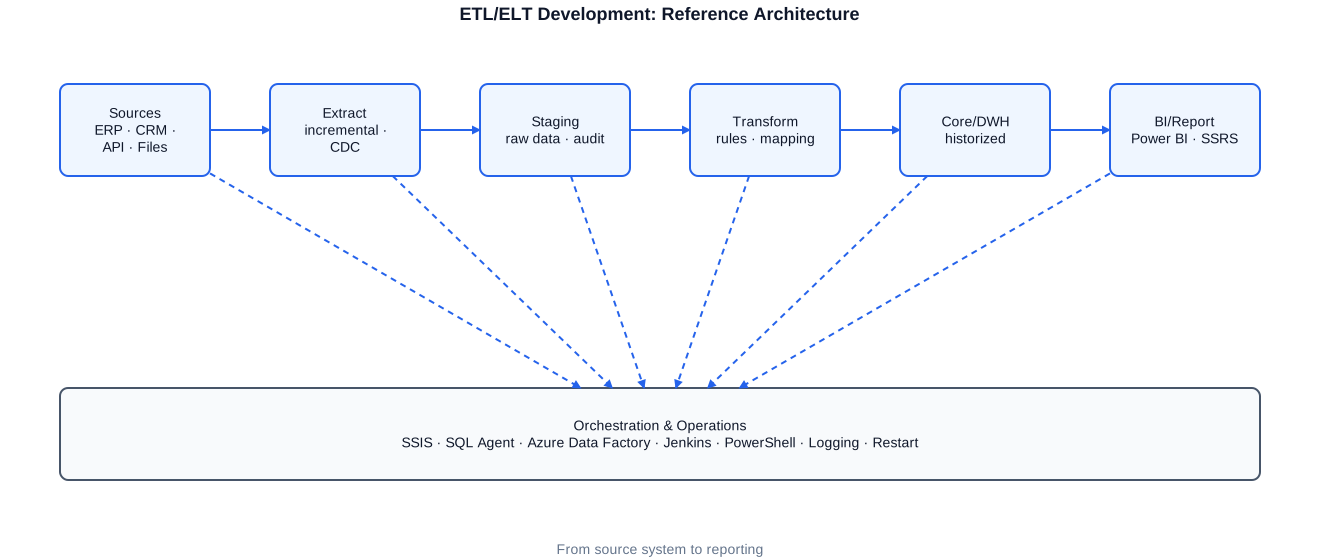
Reference architecture of an ETL pipeline: sources, extract, staging, transform, core/DWH, and BI delivery – flanked by orchestration, logging, and restart capability.
Sources are first loaded as unchanged as possible into a staging layer. This raw-data layer serves as an audit and restart point: it records exactly what was actually delivered and allows a run to be repeated without re-querying the sources. Business rules are applied only in the transformation layer. The result lands in the core or data warehouse, which is historised and optimised for analysis. From the core, delivery layers for reports, cubes, and BI models are populated.
The staging layer fulfils several roles simultaneously. It decouples the reading of sources from the processing of data, so that short read windows in the source systems are sufficient and the often expensive transformation can run independently. It serves as evidence of what was actually delivered – an important aspect especially in regulated environments. And it enables the restart: if a run fails during transformation, it can be restarted from staging without querying the sources a second time. In projects with sensitive operational systems, this decoupling is often the decisive factor for smooth operations.
Between the core and the delivery layer I deliberately draw a boundary. The core is optimised for business correctness and historisation and follows a stable, long-term modelling approach. The delivery layer, by contrast, is tailored to specific analyses – for example as a star schema for a Power BI model or as a denormalised view for a particular report. This separation allows new analyses to be added without touching the core of the data warehouse, and conversely protects existing reports from changes to the internal modelling.
Load Patterns: Full Load, Delta, and SCD2
Choosing the right load pattern is a key decision that determines performance, stability, and the analytical value of the data. In my projects three patterns are used most frequently, often combined depending on the table and the capabilities of the source system.
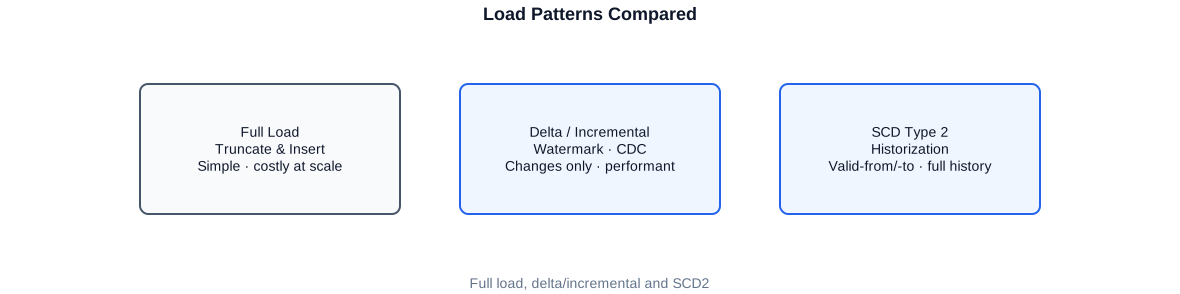
Three load patterns compared: Full Load, Delta/Incremental, and Slowly Changing Dimension Type 2.
Full Load
With a full load the target table is completely rebuilt – typically via a truncate followed by an insert. This is simple and robust, but suitable only for manageable data volumes or small dimension tables. For large fact tables, full loads quickly become a bottleneck and can consume the entire available load window.
Delta and Incremental Loading
With incremental loading, only the records that have changed since the last run are processed. This requires a reliable criterion: a timestamp, a sequential ID, a Change Data Capture mechanism, or a hash-based comparison. The following example shows a typical watermark-based incremental load in T-SQL.
-- Incremental load of a staging table based on a high-water mark.
-- Only records newer than the last successful load run are read.

DECLARE @LastWatermark datetime2(3);
DECLARE @NewWatermark  datetime2(3);

-- 1) Retrieve the last mark from the control table
SELECT @LastWatermark = LastLoadedAt
FROM   etl.LoadControl
WHERE  TableName = N'SalesOrder';

-- 2) Determine the current maximum of the source
SELECT @NewWatermark = MAX(ModifiedDate)
FROM   src.SalesOrder;

-- 3) Load only the delta into staging
INSERT INTO stg.SalesOrder (OrderId, CustomerId, Amount, ModifiedDate, BatchId)
SELECT  s.OrderId, s.CustomerId, s.Amount, s.ModifiedDate, @@SPID AS BatchId
FROM    src.SalesOrder AS s
WHERE   s.ModifiedDate >  @LastWatermark
  AND   s.ModifiedDate <= @NewWatermark;

-- 4) Advance the control table only after successful load
UPDATE etl.LoadControl
SET    LastLoadedAt = @NewWatermark,
       LastRunAt    = SYSUTCDATETIME()
WHERE  TableName = N'SalesOrder';
The watermark is deliberately advanced only after a successful load. If the run aborts beforehand, the same delta will be reprocessed on the next attempt – making the process restart-capable.
Slowly Changing Dimensions Type 2
When not only the current state but also the history of a record matters, the SCD Type 2 pattern is applied. Instead of overwriting an existing record, the old version is closed with a valid-to date and a new version is inserted with a valid-from date. This allows any analysis to be referenced back to the state that was valid at that time. I have implemented SCD2 both classically in SSIS and in pure T-SQL stored procedures using the MERGE statement.
-- Historisation of a dimension using SCD Type 2.
-- Changed records are closed and reinserted as a new version.

MERGE dim.Customer AS tgt
USING stg.Customer AS src
   ON  tgt.CustomerBk = src.CustomerBk
   AND tgt.IsCurrent  = 1
WHEN MATCHED
     AND (tgt.City <> src.City OR tgt.Segment <> src.Segment)
THEN UPDATE SET
       tgt.ValidTo   = SYSUTCDATETIME(),
       tgt.IsCurrent = 0
WHEN NOT MATCHED BY TARGET
THEN INSERT (CustomerBk, City, Segment, ValidFrom, ValidTo, IsCurrent)
     VALUES (src.CustomerBk, src.City, src.Segment, SYSUTCDATETIME(), NULL, 1)
OUTPUT $action, inserted.CustomerBk INTO etl.MergeLog;

-- For changed records, a second step inserts the new current version
-- (classic SCD2 two-step approach).
INSERT INTO dim.Customer (CustomerBk, City, Segment, ValidFrom, ValidTo, IsCurrent)
SELECT s.CustomerBk, s.City, s.Segment, SYSUTCDATETIME(), NULL, 1
FROM   stg.Customer AS s
JOIN   dim.Customer AS d
       ON d.CustomerBk = s.CustomerBk AND d.IsCurrent = 0
       AND d.ValidTo >= DATEADD(SECOND, -2, SYSUTCDATETIME());
MERGE is elegant but must be tested carefully. For very large tables I often prefer separate, set-based INSERT/UPDATE steps for performance and locking reasons.
Development with SSIS and T-SQL
Microsoft SQL Server Integration Services (SSIS) has been my primary ETL tool in the Microsoft ecosystem for many years. I have developed, migrated, optimised, and stabilised SSIS packages in numerous projects – from Stadtsparkasse Munich and Loyalty Partner (Payback) to the Federal Employment Agency. The scope ranges from simple import pipelines for text files to complex, parameterised packages with loops, containers, event handlers, and dynamic configuration.
One important principle: SSIS excels at orchestration, data flow, and connecting heterogeneous sources. However, the actual set-based transformation often belongs in the database. I therefore deliberately combine SSIS with T-SQL and stored procedures. The package controls the workflow, handles files, logging, and error handling; the heavy transformations run as set-based SQL operations directly in SQL Server, where they execute fastest.
SSIS also offers a range of building blocks that are particularly valuable for robust pipelines: Foreach Loop containers for processing entire file directories, Sequence containers for logical grouping, event handlers for centralised error handling, and variables and parameters for clean, environment-aware configuration. I use these features deliberately to keep packages generic and reusable. A well-designed master package can process dozens of source files uniformly without requiring a separate package for each file – significantly reducing maintenance effort.
Structured Stored Procedure as a Load Building Block
To keep ETL logic maintainable, I encapsulate load steps in clearly structured procedures with a consistent layout: parameter validation, transaction wrapper, error handling via TRY/CATCH, and end-to-end logging through a central log table. The following pattern is one I use in many variations.
CREATE OR ALTER PROCEDURE etl.LoadSalesFact
    @BatchId  bigint
AS
BEGIN
    SET NOCOUNT ON;
    SET XACT_ABORT ON;       -- automatic rollback on error

    DECLARE @Rows int = 0;

    BEGIN TRY
        EXEC etl.WriteLog @BatchId, N'LoadSalesFact', N'START';

        BEGIN TRANSACTION;

        -- Set-based transformation directly in SQL Server
        INSERT INTO core.FactSales (DateKey, CustomerKey, ProductKey, Amount, BatchId)
        SELECT  d.DateKey, c.CustomerKey, p.ProductKey, s.Amount, @BatchId
        FROM    stg.SalesOrder    AS s
        JOIN    core.DimDate      AS d ON d.FullDate    = CAST(s.ModifiedDate AS date)
        JOIN    core.DimCustomer  AS c ON c.CustomerBk  = s.CustomerId AND c.IsCurrent = 1
        JOIN    core.DimProduct   AS p ON p.ProductBk   = s.ProductId;

        SET @Rows = @@ROWCOUNT;

        COMMIT TRANSACTION;

        EXEC etl.WriteLog @BatchId, N'LoadSalesFact', N'SUCCESS', @Rows;
    END TRY
    BEGIN CATCH
        IF XACT_STATE() <> 0 ROLLBACK TRANSACTION;
        EXEC etl.WriteLog @BatchId, N'LoadSalesFact', N'ERROR', NULL, ERROR_MESSAGE();
        THROW;   -- propagate the error to the calling job or SSIS package
    END CATCH
END;
The THROW at the end is important: the error is logged but not swallowed. This allows the parent SSIS or SQL Agent job to abort in a controlled manner so that monitoring fires immediately.
Robustness: Logging, Restart, and Error Handling
The difference between an ETL pipeline that works in a demo and one that holds up in production for years lies in robustness. Sources go down, files arrive late or incomplete, networks drop, data volumes grow. A well-designed load process assumes that something will go wrong – and is prepared for it.
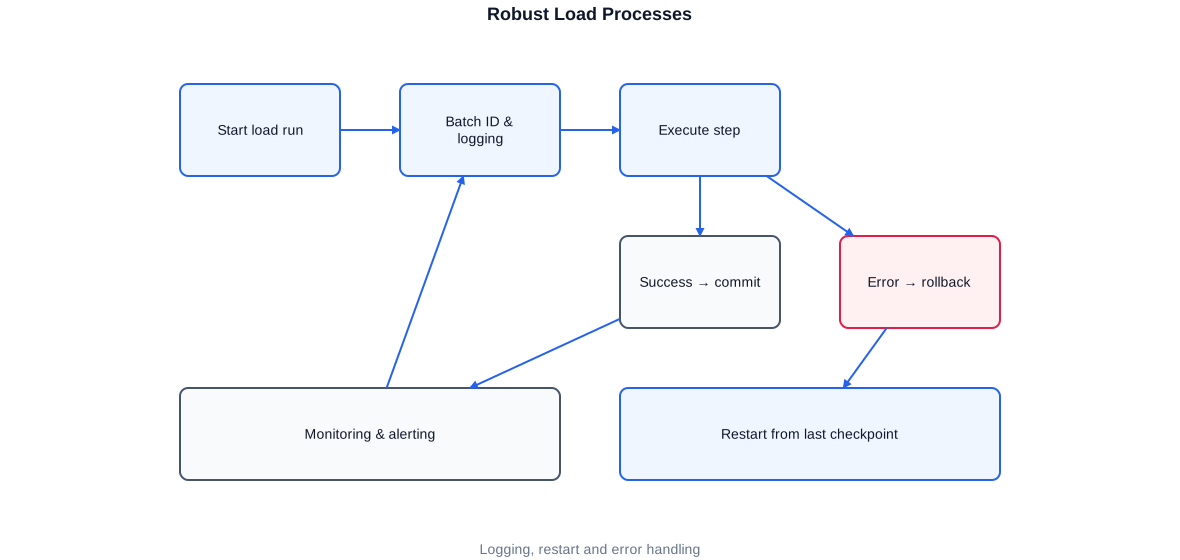
Robust load run: every step is logged, successes are committed, errors trigger a controlled rollback and a restart from the last checkpoint.
End-to-End Logging
Every run receives a unique batch ID. Via this ID, all steps, row counts, runtimes, and any errors can be attributed to a specific run. This is the foundation for monitoring, troubleshooting, and audit requirements. In projects with strict governance – such as banking and public-sector environments – this complete audit trail is not optional but mandatory.
Restart Capability and Idempotency
A load process must be able to restart at a specific point after an abort, without writing data twice or leaving gaps. I achieve this through checkpoints, idempotent load steps, and control logic that knows which steps have already completed successfully. For Informatica workflows I developed a dedicated restart logic; in the Microsoft ecosystem I rely on batch control tables and transaction-safe stored procedures.
Control via PowerShell
Around the actual load processes I like to automate operational tasks with PowerShell – for example deploying SSDT projects, triggering and monitoring runs, or populating Excel reports from the data warehouse. The following example shows a lean wrapper that calls a load procedure, checks the result, and reacts cleanly in the error case.
# Starts an ETL run, logs the result, and returns a clear exit code
# for the parent scheduler (Jenkins/Agent).

param(
    [string]$Server   = "SQLPROD01",
    [string]$Database = "DWH",
    [int]   $BatchId  = (Get-Date -Format "yyyyMMddHHmm")
)

$ErrorActionPreference = "Stop"

try {
    Write-Host "[$BatchId] Starting ETL run on $Server/$Database"

    Invoke-Sqlcmd -ServerInstance $Server -Database $Database `
        -Query "EXEC etl.RunDailyLoad @BatchId = $BatchId;" `
        -QueryTimeout 0 -ErrorAction Stop

    $log = Invoke-Sqlcmd -ServerInstance $Server -Database $Database `
        -Query "SELECT Status FROM etl.LoadLog WHERE BatchId = $BatchId AND Step='RunDailyLoad';"

    if ($log.Status -ne "SUCCESS") {
        throw "ETL run $BatchId did not complete successfully: $($log.Status)"
    }

    Write-Host "[$BatchId] ETL run completed successfully."
    exit 0
}
catch {
    Write-Error "[$BatchId] Error: $($_.Exception.Message)"
    exit 1   # Scheduler detects the failure and raises an alert
}
A clear exit code is invaluable: Jenkins, the SQL Agent, or a cron job can reliably detect whether a run should be retried or escalated.
Data Quality and Testing with tSQLt
Data that nobody trusts is worthless. Data quality is therefore inseparable from ETL development in my view. Quality does not arise from one-off checks, but from automated tests that run with every change. In the SQL Server ecosystem I use the tSQLt framework, which allows business and technical tests to be written directly in the database.
At the Federal Employment Agency I extended business tests and regression tests with tSQLt and integrated them into a CI/CD pipeline with Jenkins. This means: every change to a procedure or an SSIS package is automatically verified against a defined set of expected values before it moves to the next environment.
-- Test: negative amounts must not reach the fact table.
EXEC tSQLt.NewTestClass 'SalesTests';
GO
CREATE OR ALTER PROCEDURE SalesTests.[test negative amounts are filtered]
AS
BEGIN
    -- 1) Isolate dependencies (fake table instead of real table)
    EXEC tSQLt.FakeTable @TableName = N'stg.SalesOrder';
    EXEC tSQLt.FakeTable @TableName = N'core.FactSales';

    -- 2) Insert test data: one valid, one invalid record
    INSERT INTO stg.SalesOrder (OrderId, Amount) VALUES (1,  100.00);
    INSERT INTO stg.SalesOrder (OrderId, Amount) VALUES (2, -50.00);

    -- 3) Execute the logic under test
    EXEC etl.LoadSalesFact @BatchId = 999;

    -- 4) Check expectation: only the valid record should have arrived
    DECLARE @Cnt int = (SELECT COUNT(*) FROM core.FactSales);
    EXEC tSQLt.AssertEquals @Expected = 1, @Actual = @Cnt,
         @Message = N'Only positive amounts may be loaded.';
END;
tSQLt isolates the test completely from real data via fake tables. The test is therefore reproducible, fast, and independent of the current data state.
The real benefit of automated tests shows over time. Data structures, business rules, and source systems change; without tests, every modification becomes a risk, because nobody can say with certainty whether a change in one place breaks something elsewhere. With a growing suite of business tests, that uncertainty turns into confidence: if a test fails after a change, the error is immediately located, long before incorrect figures appear in a report. This confidence is the real lever that makes fast yet reliable further development possible in the first place.
- Plausibility checks directly within the load process (value ranges, mandatory fields, references)
- Reconciliation of source and target totals as a business control
- Regression tests that run automatically with every change
- GDPR-compliant anonymisation of personal data as a fixed ETL component
Anonymisation deserves a special mention: in several projects I developed procedures and SSIS packages that periodically anonymise personal data in compliance with GDPR. This is a good example of how ETL does not merely move data, but also implements legal and business requirements. Ensuring GDPR compliance within the pipeline itself – rather than as an afterthought – reduces risk and simplifies audits significantly.
Cloud ELT with Azure Data Factory, Synapse, and Databricks
With the cloud, classic ETL increasingly shifts to ELT: data is loaded first and transformed in the powerful target system. I have actively shaped this transition in several projects – for example at a textile and service provider where I built load processes via Azure Synapse and Azure Data Factory, and extracted data into Databricks as Parquet and Delta Lake files.
Azure Data Factory handles orchestration: pipelines, triggers, parameterisation, and connecting the sources. The actual processing of large data volumes happens in Synapse or in Databricks with PySpark. The following PySpark example shows a typical incremental processing pattern with Delta Lake, including an idempotent upsert via MERGE.
# Incremental processing in Databricks: read the delta, cleanse it,
# and write idempotently into the target table via MERGE.
from pyspark.sql import functions as F
from delta.tables import DeltaTable

# 1) Read only new/changed records from the bronze layer
last_wm = spark.sql("SELECT MAX(processed_ts) AS wm FROM ctrl.watermark "
                    "WHERE entity = 'sales'").collect()[0]["wm"]

bronze = (spark.read.format("delta").table("bronze.sales")
              .filter(F.col("modified_ts") > F.lit(last_wm)))

# 2) Business cleansing
silver = (bronze
          .filter(F.col("amount") >= 0)               # no negative amounts
          .dropDuplicates(["order_id"])               # deduplication
          .withColumn("load_date", F.current_date()))

# 3) Idempotent upsert into the silver table
target = DeltaTable.forName(spark, "silver.sales")
(target.alias("t")
   .merge(silver.alias("s"), "t.order_id = s.order_id")
   .whenMatchedUpdateAll()
   .whenNotMatchedInsertAll()
   .execute())
Delta Lake brings ACID transactions to the data lake. The MERGE is idempotent: rerunning with the same data changes nothing – exactly the behaviour that robust load processes require.
Even in the cloud the principle remains the same: clearly separated layers, centralised orchestration, and end-to-end logging – implemented with Azure Data Factory, Synapse, and Databricks.
CI/CD, Versioning, and Deployment
Modern ETL development is software development. Version control, automated builds, and controlled deployment are therefore standard practice for me. I have migrated existing database and SSIS developments into clean SSDT solutions and brought them under version control in several projects – using Git in the forms of GitHub, GitLab, Bitbucket, and Azure DevOps.
At Danfoss Power Solutions I migrated SSIS packages from SQL Server 2016 to 2022, moved the solutions into version control, and built Azure DevOps pipelines for automated builds. At the Federal Employment Agency I extended a CI/CD pipeline with Jenkins in which tSQLt tests run automatically. The following example shows the core of an Azure DevOps pipeline for a database project.
# Build and deployment of a SQL database project (SSDT/DACPAC).
trigger:
  branches: { include: [ main ] }

pool:
  vmImage: 'windows-latest'

stages:
- stage: Build
  jobs:
  - job: BuildDacpac
    steps:
    - task: VSBuild@1
      displayName: 'Build DACPAC'
      inputs:
        solution: '**/*.sqlproj'
        configuration: 'Release'
    - publish: '$(Build.SourcesDirectory)/bin/Release'
      artifact: dacpac

- stage: Deploy_Test
  dependsOn: Build
  jobs:
  - deployment: DeployTest
    environment: 'DWH-Test'
    strategy:
      runOnce:
        deploy:
          steps:
          - task: SqlAzureDacpacDeployment@1
            displayName: 'Deploy DACPAC to Test'
            inputs:
              azureSubscription: 'DWH-ServiceConnection'
              ServerName: 'sql-test.internal'
              DatabaseName: 'DWH'
              DacpacFile: '$(Pipeline.Workspace)/dacpac/DWH.dacpac'
              AdditionalArguments: '/p:BlockOnPossibleDataLoss=true'
The BlockOnPossibleDataLoss flag prevents an automated deployment from accidentally deleting data. Safety nets like this are indispensable in production-adjacent pipelines.
Performance and Scaling
Performance is a recurring topic in ETL projects. As data volumes grow, it is not enough to get processes running somehow – they must fit within a limited load window and must not disrupt the operational business. I always approach performance issues with measurement rather than assumption: execution plans, wait statistics, runtime logs, and bottleneck analysis show where time is actually being lost.
- Set-based processing instead of row-by-row iteration (set-based instead of cursors)
- Incremental loading instead of repeated full loads
- Appropriate indexing and – for large fact tables – partitioning
- Partition switching for fast loading and archiving of large data volumes
- Minimising data movement: transform where the data resides
- Parallelisation of independent load steps
In one DWH project I implemented the partitioning of large tables along with automatic extension of partition functions. This allows new time periods to be loaded and old ones archived without affecting overall performance. In other projects the lever was the redesign of existing SSIS packages and the rewriting of inefficient SQL queries – with immediately measurable runtime improvements.
What matters to me here is a realistic view of performance. Not every process needs to be as fast as possible; what counts is that it reliably fits within the available load window and does not disrupt operational systems. An optimisation that reduces a process from ten minutes to two is only worthwhile if those ten minutes were a real problem. I therefore prioritise based on actual bottlenecks: which step consumes the load window, which query generates the most locks, where does unnecessary data movement arise? This targeted approach delivers more than blanket optimisations that cost a lot of effort and achieve little.
Performance considerations must be built into the architecture from the start. Retrofitting partitioning onto a table with billions of rows, or introducing incremental loading to a pipeline originally designed for full loads, is far more expensive than getting these decisions right upfront. During the design phase I therefore assess expected data volumes, growth rates, and load window constraints, and make explicit architecture decisions that account for these factors – documented so that future developers understand the reasoning.
Orchestration and Operations
An ETL pipeline rarely consists of a single step. In practice, dozens or hundreds of individual load steps must be executed in the correct order, with the correct dependencies, and at the correct time. Orchestration is a discipline in its own right. A misplaced dependency arrow or a forgotten restart point can bring an entire load run to a standstill.
Depending on the environment I use different orchestration tools. In the classic Microsoft ecosystem, SQL Server Agent controls the jobs, often combined with master packages in SSIS that call child packages within defined containers. In the cloud, Azure Data Factory takes the role of conductor with pipelines, triggers, and activities. Across environments I use Jenkins as an orchestration and automation layer, particularly where ETL is tightly integrated with CI/CD workflows.
Control Tables as the Backbone
Regardless of the tool, I like working with control tables in the database. They record which steps exist, in which order they run, when they last completed successfully, and which parameters a run requires. This metadata-driven control has a major advantage: new load steps can often be added by simply inserting a row in the control table, without changing any code. This reduces error sources and makes operations transparent.
-- A lean controller reads the next due load steps from a metadata table
-- and calls the registered procedure for each step.

DECLARE @Step sysname, @Proc nvarchar(256),
        @BatchId bigint = NEXT VALUE FOR etl.BatchSeq;

DECLARE cur CURSOR LOCAL FAST_FORWARD FOR
    SELECT StepName, ProcName
    FROM   etl.LoadStep
    WHERE  IsActive = 1
    ORDER  BY StepOrder;

OPEN cur;
FETCH NEXT FROM cur INTO @Step, @Proc;

WHILE @@FETCH_STATUS = 0
BEGIN
    BEGIN TRY
        EXEC etl.WriteLog @BatchId, @Step, N'START';
        EXEC sp_executesql @stmt   = N'EXEC ' + @Proc + N' @BatchId',
                           @params = N'@BatchId bigint', @BatchId = @BatchId;
        EXEC etl.WriteLog @BatchId, @Step, N'SUCCESS';
    END TRY
    BEGIN CATCH
        EXEC etl.WriteLog @BatchId, @Step, N'ERROR', NULL, ERROR_MESSAGE();
        BREAK;   -- halt the run in a controlled manner; restart from this step
    END CATCH
    FETCH NEXT FROM cur INTO @Step, @Proc;
END;

CLOSE cur; DEALLOCATE cur;
The controller is deliberately kept simple. It logs every step, halts in a controlled manner on error, and allows a targeted restart – without hard-coding the execution order in the code.
Operations also includes monitoring. From the log tables, dashboards can be built that show at a glance which runs completed successfully, how long they took, and where issues are occurring. In one project I visualised such monitoring with Grafana; in others, targeted queries and automatic alerts on failure were sufficient. What matters is that the team knows about a problem before the business does.
Documentation of the orchestration logic is part of operations. A control-table-based approach already documents itself to a large extent, because the metadata table captures the intent. Supplementing this with a brief description of each step, its dependencies, and its expected runtime turns the control table into a living operations runbook.
Working Approach and Collaboration
Good ETL development does not begin with code, but with understanding. Before building or rebuilding a pipeline, I form a clear picture of the source systems, the business requirements, and the existing operations. This approach has proven itself over many projects and ensures that the solution ultimately fits the reality of the organisation.
- Analysis: understand source systems, data structures, business rules, and existing processes
- Concept: define layered architecture, load patterns, and error strategy
- Implementation: develop load processes iteratively, with tests and logging from the start
- Testing and acceptance: business and technical validation together with the specialist departments
- Operations: monitoring, restart, documentation, and continuous improvement
Close coordination with the business departments matters to me. In many projects – for example in controlling, finance, and HR – I have worked out requirements directly with the specialist departments and translated them into appropriate technical solutions. Data is not an end in itself; it is supposed to answer a business question. The better I understand that question, the better the solution becomes.
I work both remotely and in a hybrid or on-site capacity, either independently or as part of an existing team. Over the years I have familiarised myself with very different industries – public sector, financial services, manufacturing, retail, logistics, and insurance. This variety helps, because proven patterns from one industry can often be transferred to another. At the same time I respect that every organisation has its own evolved landscape, its own conventions, and its own constraints. A solution must fit that reality, not a textbook.
Typical Services in an ETL Project
Depending on the project phase and the specific need, I take on different tasks across the full ETL lifecycle – from analysis through implementation to operations.
- Analysis of existing ETL processes, source systems, and business rules
- Design of a layered ETL architecture (staging, core, delivery)
- Development of SSIS packages and set-based T-SQL load procedures
- Incremental loading, CDC, SCD2, and historisation
- Migration and modernisation of existing SSIS and ODI pipelines
- Cloud ELT with Azure Data Factory, Synapse, and Databricks
- Data quality, business tests, and regression tests with tSQLt
- GDPR-compliant anonymisation of personal data
- CI/CD with Jenkins and Azure DevOps, versioning with Git
- Performance analysis, optimisation, and partitioning
- Monitoring, restart, error handling, and technical documentation
Selected anonymised reference projects
Public-sector client
Further development of an existing data warehouse on SQL Server 2019: expansion of ETL procedures and SSIS packages, Data Vault import layer, business tests and regression tests with tSQLt, further development of the CI/CD pipeline with Jenkins, PowerShell automation, and GDPR-compliant anonymisation of personal data.
Industrial company
Migration of SSIS packages from SQL Server 2016 to 2022, migration into version control, and building Azure DevOps pipelines for automated builds, plus requirements analysis for an automated deployment to on-premises SQL Server.
Financial services / savings bank
Replacement of a Java application and an Oracle database with SSIS pipelines: development of SSIS packages to load text files, a database project for deployment to multiple servers, monitoring queries, and redesign and performance optimisation of existing packages.
Loyalty / retail / clearing
Further development and stabilisation of clearing processes, migration to an SSDT solution, introduction of Bitbucket on a Git basis, development of SSIS packages and SSRS reports, querying REST and OData APIs, GDPR-compliant anonymisation, and Power BI data models with Row-Level Security.
Textile & service provider
Further development of an enterprise operational data store, new datastores for sales and HR, load processes to Dynamics 365 via Azure Synapse, Azure pipelines for orchestration, extraction to Databricks as Parquet/Delta files, and cost-reduction measures in Azure.
Logistics / corporate group
Development of DWH ETL processes for bonus and quality assurance systems: transaction-driven BTEQ scripts for data acquisition, Informatica mappings, worklets, and workflows with restart logic, tuning of SQL statements, and monitoring of scheduled runs.
Frequently Asked Questions about ETL Development
Do you work primarily with SSIS or T-SQL?
With both – and above all with the right combination. SSIS excels at orchestration and connecting heterogeneous sources; T-SQL excels at set-based transformations. In many projects I have replaced row-by-row SSIS data flows with set-based T-SQL logic, significantly improving runtime and stability.
Can you take over and modernise existing ETL pipelines?
Yes. A large part of my project work involves taking over, stabilising, and modernising existing load processes – including version control, testing, migration to new SQL Server versions, and step-by-step migration to the cloud.
How do you ensure that the data is correct?
Through built-in plausibility checks, through reconciliation of source and target totals, and above all through automated business tests and regression tests with tSQLt integrated into the CI/CD pipeline.
Do you also support cloud ETL / ELT?
Yes. I have built load processes with Azure Data Factory, Azure Synapse, and Databricks, extracted data as Parquet and Delta Lake files, and paid careful attention to cost control throughout.
How do you handle personal data?
GDPR-compliant anonymisation is a fixed ETL component in several of my projects. I have developed procedures and SSIS packages that periodically and traceably anonymise personal data.
In which languages can we work together?
In German, English, and Portuguese – all fluent, including technical and business discussions.


