Positioning
Legacy ETL technologies such as Informatica PowerCenter, Oracle Data Integrator, and Teradata were the workhorses of data movement in large enterprises for decades. They functioned reliably but were built on infrastructures that have since changed fundamentally: AIX servers replaced by Windows and Linux clusters; Oracle databases migrated to SQL Server or Azure; licensing models created in an era when cloud-based alternatives did not yet exist. The result is systems that still run technically but have become an increasing organizational and economic burden.
I grew up with these technologies. At a logistics group I operated Informatica PowerCenter 8.6.1 and 9.1.0 in production: mappings, maplets, workflows, worklets, Workflow Manager and Workflow Monitor, restart logic for interrupted runs, SQL overrides on Source Qualifier and Lookup transformations, parameter files for multi-tenant operation, and the AIX/KSH/Perl scheduling layer that called workflows nightly. I know the strengths of this architecture – and I know its limits and costs.
I encountered Oracle Data Integrator in an insurance environment where ODI interfaces loaded Oracle source data into target tables. The ELT philosophy of ODI – running transformations directly in the database rather than on a dedicated ETL server – is conceptually elegant, but the proprietary Knowledge Module layer and Oracle dependency make it difficult to operate ODI economically outside an Oracle stack.
I encountered Teradata BTEQ scripts and FastLoad jobs both at the logistics group and in a healthcare and social-sector project. In short: BTEQ is a powerful but archaic tool; FastLoad loads flat files into Teradata tables at impressive speed but requires a deep understanding of Teradata's own parallelism model.
Market Context: Why Legacy ETL Retirement Is Urgent
For many organisations the question of whether to retire Informatica PowerCenter or Oracle Data Integrator is no longer a strategic option but an economic necessity. Informatica PowerCenter licences have for years run into five- or six-figure annual figures in euros – and they have not fallen since. On top come maintenance contracts, expensive support escalations, and the need to keep specialised personnel who can operate these tools.
Oracle Data Integrator is tied to the Oracle stack. Anyone wanting to run ODI without an Oracle database faces a conceptual problem: ODI is architecturally designed as an ELT tool for Oracle. In organisations seeking to reduce their Oracle footprint as part of a SQL Server or Azure migration, ODI becomes the reason for keeping the last remaining Oracle licence – which makes overall operations more expensive, not less.
Teradata is the most expensive data platform on the market. For organisations that now run only a portion of their data on Teradata and have already shifted the rest to SQL Server or Azure, the remaining Teradata block is often the single largest cost item in the entire data infrastructure. The question is not whether but when and how to retire that block.
Technology Consolidation as a Strategy
Alongside pure licence costs, technology consolidation is a goal in its own right. Organisations running Informatica, ODI, SSIS, ADF, and Teradata simultaneously have an operational problem: they need specialists for each of these technologies, cannot share tools and scripts between teams, and must debug failures in four different paradigms. Consolidating onto a single platform – typically SSIS for on-premises and ADF for the cloud – reduces not only licence costs but also operational complexity and onboarding effort for new staff.
- Informatica PowerCenter: Eliminate annual licence and maintenance costs
- Oracle Data Integrator: Break Oracle dependency, unify the stack
- Teradata: Replace the most expensive data platform with SQL Server or Azure
- Consolidate onto SSIS/ADF: Single platform, broader talent pool
- Risk reduction: Eliminate end-of-life risks from old versions
- Introduce modern DevOps practices: CI/CD, Git, deployment automation
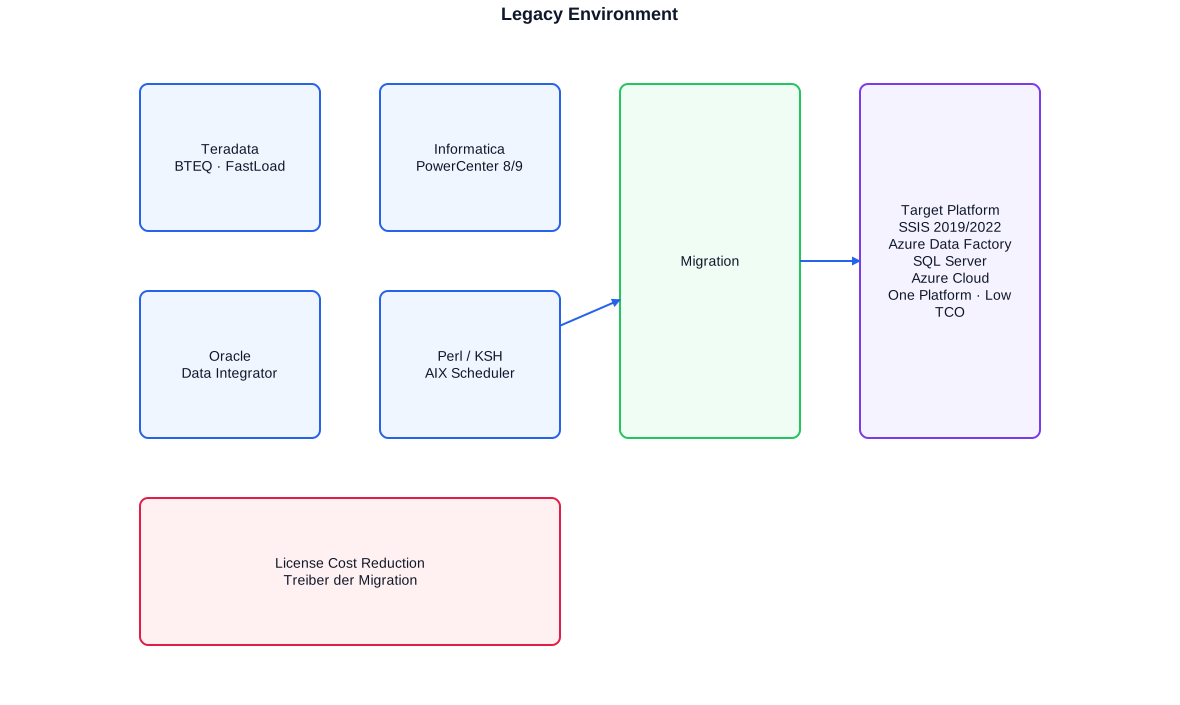
The legacy ETL landscape of a typical large enterprise: Teradata, Informatica PowerCenter, and ODI on AIX infrastructure – with SSIS/Azure as the cost-efficient target. License cost reduction is the primary migration driver.
Informatica PowerCenter: Deep Expertise from Project Practice
Informatica PowerCenter is a complete ETL framework that is far more than a data integration tool. It includes a Repository Service, Integration Service, Reporting Service, and the Designer client with four editors: Source Analyzer, Target Designer, Mapping Designer, and Transformation Developer. Working with PowerCenter demands a deep understanding of this architecture to build solutions that run reliably, perform well, and restart cleanly after failures.
Mappings and Transformations
An Informatica mapping describes the data stream from source tables or files through transformations to target tables. Core components include the Source Qualifier (loads source data and allows SQL overrides), Expression Transformation (computes row-level expressions), Aggregator Transformation (sums, counts, groups), Lookup Transformation (retrieves reference data from a database or cache), Update Strategy (decides insert/update/delete per row), Router Transformation (distributes rows to different outputs), and Joiner Transformation (merges two source pipelines). The challenge is not knowing these transformations but using them correctly: an Aggregator with too much work placed in the mapping slows the entire data stream; a Lookup Transformation without a persistent cache issues a database query for every row.
Workflows, Worklets, and Restart Logic
While mappings describe data transformation logic, workflows control execution order: when does each session run? What dependencies exist? What happens on failure? Worklets are reusable workflow fragments – a concept analogous to stored procedures for process logic. Restart logic is one of the critical operational aspects: PowerCenter can resume interrupted sessions at certain recovery points, provided sessions are configured for recovery. At the logistics group I maintained nightly runs where restart configuration was critical – reloading an entire session with millions of rows was not an acceptable error response.
The pmcmd command-line interpreter and parameter files are also key operational tools. pmcmd allows starting, stopping, and monitoring workflows from the command line – enabling integration with external schedulers such as Autosys or simple Perl/KSH scripts. Parameter files make mappings multi-tenant capable: instead of hard-coded source tables or connection strings, parameter files contain substitutable values passed at each invocation.
# Parameter file for Informatica PowerCenter workflow
# Defines connection and runtime parameters for tenant A
# Passed to the workflow at startup via pmcmd

[WF:WF_ORDER_LOAD]
# Source connection for the current tenant
$$SOURCE_DB_CONNECTION=TERADATA_PROD_TENANT_A
# Target connection - SQL Server DWH
$$TARGET_DB_CONNECTION=SQLSERVER_DWH_PROD
# Date range for delta load (format YYYY-MM-DD)
$$DELTA_FROM=2024-01-01
$$DELTA_TO=2024-01-31
# Batch ID for audit logging
$$BATCH_ID=20240131_A

[SESS:S_ORDER_LOAD]
# SQL Override on Source Qualifier - loads only current tenant
$$SQ_SQL_OVERRIDE=SELECT ORDER_NR, ORDER_DT, AMOUNT, TENANT_ID FROM TD_ORDER WHERE TENANT_ID = 'A' AND ORDER_DT BETWEEN TO_DATE('$$DELTA_FROM','YYYY-MM-DD') AND TO_DATE('$$DELTA_TO','YYYY-MM-DD')

# --- pmcmd call from the Perl scheduler ---
# Starts the workflow with the parameter file above
# pmcmd startworkflow -sv IntegrationService -d Domain -u admin -p <pw> -f Folder -paramfile ./params/tenant_a.par WF_ORDER_LOAD
Parameter files allow the same mapping to be used for different tenants, date ranges, or environments (test/prod) without modifying mapping code. pmcmd integrates PowerCenter with external schedulers.
Oracle Data Integrator: ELT Concepts and Migration Strategy
Oracle Data Integrator differs conceptually from ETL tools like Informatica or SSIS: ODI follows the ELT approach (Extract, Load, Transform), where transformations do not occur on a dedicated ETL server but directly inside the target database. Source data is first loaded into staging areas of the target database; there ODI generates SQL scripts (Knowledge Module executions) that perform the transformation. For Oracle-to-Oracle scenarios this is elegant; for heterogeneous migration scenarios it becomes a problem.
ODI Concepts: Interfaces, Knowledge Modules, Datastores
The central ODI concept is the interface: an interface describes where data comes from (source datastore), how it is transformed (mapping expressions and joins), and where it goes (target datastore). Knowledge Modules (KMs) are reusable code templates that generate concrete SQL or PL/SQL scripts from the interface definition: the Loading Knowledge Module (LKM) loads data into the staging area; the Integration Knowledge Module (IKM) executes the target transformation. For the migration specialist this means: it is not the interface that needs migrating but the generated SQL that results from the interface and KMs – that is the actual transformation logic.
In an insurance project I found ODI interfaces whose IKM-generated SQL was highly Oracle-specific: MERGE statements with NOAPPEND hints, PL/SQL procedure calls within the KM execution, CONNECT BY hierarchy queries, and Oracle-specific date formatting. The target was a migration to SSIS on SQL Server. The challenge was not understanding the ODI concept but translating the Oracle PL/SQL into equivalent T-SQL and ensuring that output was bit-identical to the old system.
-- Original logic: ODI interface with Oracle PL/SQL IKM output
-- (simplified representation of the generated SQL from the IKM)
-- Source: Oracle staging area (AP$_CONTRACT)
MERGE INTO DWH_CONTRACT TGT
USING (
    -- Source transformation in Oracle staging
    SELECT
        C.CONTRACT_NR,
        C.VERSION_NR,
        TO_DATE(C.INCEPTION_DATE, 'YYYYMMDD') AS INCEPTION_DT,
        NVL(C.PREMIUM, 0)                      AS PREMIUM_EUR,
        DECODE(C.STATUS, '1','ACTIVE','0','LAPSED','UNKNOWN') AS STATUS_TXT
    FROM AP$_CONTRACT C
    WHERE C.BATCH_ID = :BATCH_ID
) SRC
ON (TGT.CONTRACT_NR = SRC.CONTRACT_NR)
WHEN MATCHED THEN
    UPDATE SET TGT.PREMIUM_EUR = SRC.PREMIUM_EUR,
               TGT.STATUS_TXT  = SRC.STATUS_TXT,
               TGT.CHANGE_DT   = SYSDATE
WHEN NOT MATCHED THEN
    INSERT (CONTRACT_NR, VERSION_NR, INCEPTION_DT, PREMIUM_EUR, STATUS_TXT, CREATE_DT)
    VALUES (SRC.CONTRACT_NR, SRC.VERSION_NR, SRC.INCEPTION_DT,
            SRC.PREMIUM_EUR, SRC.STATUS_TXT, SYSDATE);

-- SSIS/T-SQL equivalent after migration:
-- The SSIS Data Flow loads from staging; the Execute SQL Task runs the T-SQL MERGE.
-- SSIS OLE DB Source loads from SQL Server staging (populated beforehand via ADF or Linked Server)
-- T-SQL MERGE on SQL Server DWH:
MERGE INTO dbo.DWH_Contract AS TGT
USING (
    -- Staging query on SQL Server
    SELECT
        CONTRACT_NR,
        VERSION_NR,
        -- Oracle TO_DATE -> T-SQL CONVERT with style 112 (YYYYMMDD)
        CONVERT(DATE, INCEPTION_DATE, 112)          AS INCEPTION_DT,
        ISNULL(PREMIUM, 0)                          AS PREMIUM_EUR,
        -- Oracle DECODE -> T-SQL CASE
        CASE STATUS WHEN '1' THEN 'ACTIVE'
                    WHEN '0' THEN 'LAPSED'
                    ELSE 'UNKNOWN' END              AS STATUS_TXT
    FROM dbo.Stg_Contract
    WHERE BATCH_ID = @BATCH_ID
) AS SRC
ON TGT.CONTRACT_NR = SRC.CONTRACT_NR
WHEN MATCHED THEN
    UPDATE SET TGT.PREMIUM_EUR = SRC.PREMIUM_EUR,
               TGT.STATUS_TXT  = SRC.STATUS_TXT,
               TGT.CHANGE_DT   = GETDATE()
WHEN NOT MATCHED THEN
    INSERT (CONTRACT_NR, VERSION_NR, INCEPTION_DT, PREMIUM_EUR, STATUS_TXT, CREATE_DT)
    VALUES (SRC.CONTRACT_NR, SRC.VERSION_NR, SRC.INCEPTION_DT,
            SRC.PREMIUM_EUR, SRC.STATUS_TXT, GETDATE());
The core ODI-to-SSIS/T-SQL migration challenge: Oracle-specific functions (NVL, DECODE, TO_DATE, SYSDATE) must be translated to T-SQL equivalents (ISNULL, CASE, CONVERT, GETDATE). The logic is identical; the syntax differs.
Teradata: BTEQ, FastLoad, and the SQL Dialect
Teradata is a data platform built for massively parallel SQL queries on very large data volumes. Its parallelism model – automatic row distribution across nodes via the Primary Index, parallel query execution across AMPs (Access Module Processors) – is impressively powerful but requires an understanding of Teradata-specific concepts: Primary Index, partitioning, spool space management, and BTEQ script authoring.
BTEQ: Batch Scripting on Teradata
BTEQ (Basic Teradata Query) is the primary batch scripting tool for Teradata. It allows executing SQL sequences, handling error codes, exporting and importing data, and controlling script flow conditionally. BTEQ runs on Unix/AIX, Windows, and the Teradata console itself and was in many large enterprises the primary mechanism for nightly batch processing before dedicated ETL tools were introduced.
At the logistics group I maintained BTEQ scripts that nightly loaded, transformed, and wrote bonus-programme and quality-assurance data to reporting tables. These scripts had grown organically and followed no unified error-handling convention – typical for BTEQ environments. Migration first required a complete inventory of these scripts, a dependency analysis, and translation to SQL Agent jobs on SQL Server.
.LOGON tdpid/tduser,tdpasswd;

-- Check whether a previous session is still running (lock table)
-- .IF errorcode <> 0 THEN .QUIT 12;

SELECT 'BTEQ run started: ' || CAST(CURRENT_TIMESTAMP AS CHAR(26));

-- Step 1: Clear target table (partition delete instead of TRUNCATE)
DELETE FROM DWH_ORDER_STG
WHERE BATCH_DT = CAST('${BATCH_DT}' AS DATE FORMAT 'YYYY-MM-DD');
.IF ERRORCODE <> 0 THEN .GOTO ERROR_HANDLER;

-- Step 2: Load data from source table
INSERT INTO DWH_ORDER_STG
  (ORDER_NR, ORDER_DT, CUSTOMER_ID, AMOUNT_EUR, BATCH_DT)
SELECT
    O.ORDER_NR,
    O.ORDER_DT,
    O.CUSTOMER_ID,
    -- Teradata decimal format: avoid dot as thousands separator
    CAST(O.AMOUNT AS DECIMAL(15,2)) AS AMOUNT_EUR,
    CAST('${BATCH_DT}' AS DATE FORMAT 'YYYY-MM-DD') AS BATCH_DT
FROM PROD_ORDER O
WHERE O.ORDER_DT = CAST('${BATCH_DT}' AS DATE FORMAT 'YYYY-MM-DD')
  AND O.STATUS_CD NOT IN ('X','S');
.IF ERRORCODE <> 0 THEN .GOTO ERROR_HANDLER;

SELECT CAST(COUNT(*) AS VARCHAR(10)) || ' rows loaded.' FROM DWH_ORDER_STG
WHERE BATCH_DT = CAST('${BATCH_DT}' AS DATE FORMAT 'YYYY-MM-DD');

.GOTO END_SCRIPT;
.LABEL ERROR_HANDLER;
  SELECT 'Error at BATCH_DT=${BATCH_DT}, ERRORCODE: ' || CAST(.ERRORCODE AS VARCHAR(5));
  .QUIT 99;
.LABEL END_SCRIPT;
  .LOGOFF;
  .QUIT 0;
Typical BTEQ pattern: logon, error-safe DELETE before INSERT, conditional jump labels (.IF ERRORCODE / .GOTO / .LABEL), explicit LOGOFF. The variable-substitution pattern (${BATCH_DT}) is set by the calling Perl or KSH wrapper.
Teradata FastLoad for Flat-File Loads
While BTEQ is used for SQL-based transformation and control, FastLoad is the Teradata tool for high-parallel flat-file loading. FastLoad bypasses the transaction log entirely and loads data directly into empty tables – making it orders of magnitude faster than INSERT-based loads, but also less flexible: row-level error handling requires error tables (ET tables). In the healthcare and social-sector project I maintained FastLoad jobs that daily loaded billing flat files with millions of rows into Teradata staging tables. Migrating these jobs to SSIS Bulk Insert Task or BCP was one of the simpler parts of the entire legacy retirement – the conceptual leap is small; the syntax differs.
Perl, KSH and AIX: The Scheduler World of the Mainframe Era
For many ETL environments of the early 2000s, AIX (IBM Advanced Interactive eXecutive, IBM's flavour of Unix) was the primary server basis. Informatica PowerCenter, Teradata BTEQ, and the entire scheduling infrastructure ran on AIX servers. Scripting was done in Perl or the Korn Shell (KSH); daily scheduling used cron jobs or commercial schedulers such as Autosys.
This layer – the Perl or KSH wrapper that called BTEQ scripts, checked return codes, wrote log files, and sent alert emails on failure – is often the most overlooked component during migrations. Yet it is essential: it defines execution order, parameter passing, error behaviour, and audit logging. During migration this layer must be fully inventoried and translated into SQL Agent jobs or Azure Data Factory pipelines.
#!/usr/bin/ksh
# KSH wrapper for Informatica PowerCenter and BTEQ batch jobs on AIX
# Usage: nightly_load.ksh YYYY-MM-DD
# Returns 0 on success, 99 on error (for Autosys integration)

BATCH_DT=${1:-$(date +%Y-%m-%d)}
LOGDIR=/opt/etl/logs
LOGFILE="${LOGDIR}/nightly_${BATCH_DT}.log"
BTEQ_DIR=/opt/etl/bteq
PMCMD=/opt/informatica/server/bin/pmcmd

# Helper function: log error message and abort
error_exit() {
    echo "[ERROR] $(date '+%Y-%m-%d %H:%M:%S') $1" >> "$LOGFILE"
    exit 99
}

echo "[INFO] $(date '+%Y-%m-%d %H:%M:%S') Night run started for BATCH_DT=${BATCH_DT}" >> "$LOGFILE"

# Step 1: Run BTEQ script (load Teradata staging)
# Substitute BATCH_DT in BTEQ template
sed "s/\${BATCH_DT}/${BATCH_DT}/g" "${BTEQ_DIR}/load_order.bteq" > /tmp/load_order_run.bteq
bteq < /tmp/load_order_run.bteq >> "$LOGFILE" 2>&1
RC=$?
if [ $RC -ne 0 ]; then
    error_exit "BTEQ load_order.bteq failed, RC=${RC}"
fi
echo "[OK] $(date '+%Y-%m-%d %H:%M:%S') BTEQ completed successfully." >> "$LOGFILE"

# Step 2: Start Informatica PowerCenter workflow
# pmcmd returns 0 on success
$PMCMD startworkflow \
    -sv IntegrationService_PROD \
    -d Domain_PROD \
    -u etl_user \
    -p $(cat /opt/etl/secrets/.ipc_pw) \
    -f ETL_ORDER \
    -paramfile "${BTEQ_DIR}/params/tenant_a_${BATCH_DT}.par" \
    WF_ORDER_LOAD >> "$LOGFILE" 2>&1
RC=$?
if [ $RC -ne 0 ]; then
    error_exit "Informatica workflow WF_ORDER_LOAD failed, RC=${RC}"
fi
echo "[OK] $(date '+%Y-%m-%d %H:%M:%S') Informatica workflow completed." >> "$LOGFILE"
echo "[INFO] $(date '+%Y-%m-%d %H:%M:%S') Night run completed successfully." >> "$LOGFILE"
exit 0
Typical AIX/KSH wrapper: parameter passing, BTEQ template substitution via sed, return code checking, pmcmd integration for Informatica PowerCenter. This layer must be fully inventoried during migration.
Migrating the Scheduling Layer to SQL Agent / ADF
The KSH/Perl wrapper on AIX has no direct counterpart as an OS script on SQL Server or Azure. The equivalence is created through SQL Agent jobs with multiple steps (T-SQL step, SSIS package step, PowerShell step) or through ADF pipelines with conditional activities and error handling. The key point is to preserve semantics: execution order, parameter passing, error handling, and alerting must be functionally equivalent even if the technology differs.
Migration Methodology: From Analysis to Go-Live
A legacy ETL migration is not a big-bang project. Anyone attempting to migrate all Informatica workflows, ODI interfaces, and BTEQ scripts simultaneously and cut over on a single date risks undetected errors and production incidents. My approach is iterative and phased: first understand, then translate, then compare, then retire.
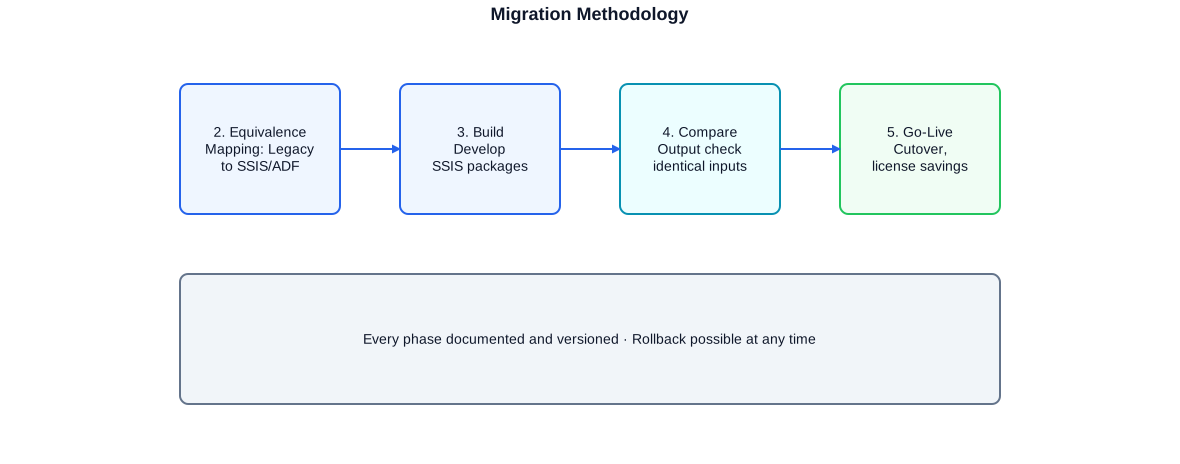
The migration methodology in five phases. Phase 4 (output comparison) is the quality-critical core phase: the new and old ETL logic run in parallel with identical input data; outputs are compared automatically.
Phase 1: Inventory and Dependency Analysis
Before a single line of new code is written, I capture the complete current state: all Informatica mappings and workflows (repository export), all ODI interfaces (topology/context export), all BTEQ scripts (file system scan), all Perl/KSH wrappers and their call relationships. From this inventory a dependency graph is built: which workflows depend on each other? Which tables are used as intermediate staging by multiple pipelines? This graph determines the migration sequence.
Phase 2: Equivalence Analysis
Each object to be migrated receives an equivalence mapping: Informatica mapping → SSIS package (data flow), ODI interface → SSIS data flow or T-SQL procedure, BTEQ script → SQL Agent job. For every transformation step the counterpart in the target platform is explicitly defined. Special attention goes to edge cases: Oracle-specific SQL functions, Teradata-specific DATE types and formats, Informatica internal functions with no direct SSIS equivalent.
Phase 3: Build in the Target Platform
With the equivalence mapping as the foundation, SSIS packages, T-SQL procedures, and SQL Agent jobs are built. Every new object is versioned in Git, follows the defined naming standard, and includes logging, error handling, and parameterisation. The build proceeds iteratively – not all pipelines at once, but in the order dictated by the dependency graph.
Phase 4: Output Comparison with Identical Inputs
Phase 4 is the quality-critical phase. The old system and the new system run in parallel with the same input data. Output tables are compared automatically – first by row count, then by hashes of aggregated columns, then by individual row differences. Only when the output comparison passes for all pipelines is the migration cleared for go-live.
Phase 5: Go-Live and Licence Retirement
Go-live is not hour zero but the conclusion of a validated process. The legacy system remains active for a defined run-out period (typically two to four weeks) to allow rollback if unexpected problems arise. Only after confirmed stability is the legacy licence cancelled – that is the moment when cost savings become tangible.
- Complete inventory before writing the first line of code
- Dependency graph as the foundation for migration sequence
- Explicit equivalence mapping for every step
- Git versioning of all new objects from day one
- Parallel operation and output comparison as a quality gate
- Defined rollback option until the legacy licence is cancelled
Technology Equivalence: Legacy to SSIS and Azure
Every legacy ETL component has an equivalent on the modern platform. The diagram below shows the primary correspondences – for both on-premises SSIS and Azure Data Factory as the cloud target. The mapping is not always one-to-one, but it is always complete: for every legacy concept there is a clear successor.
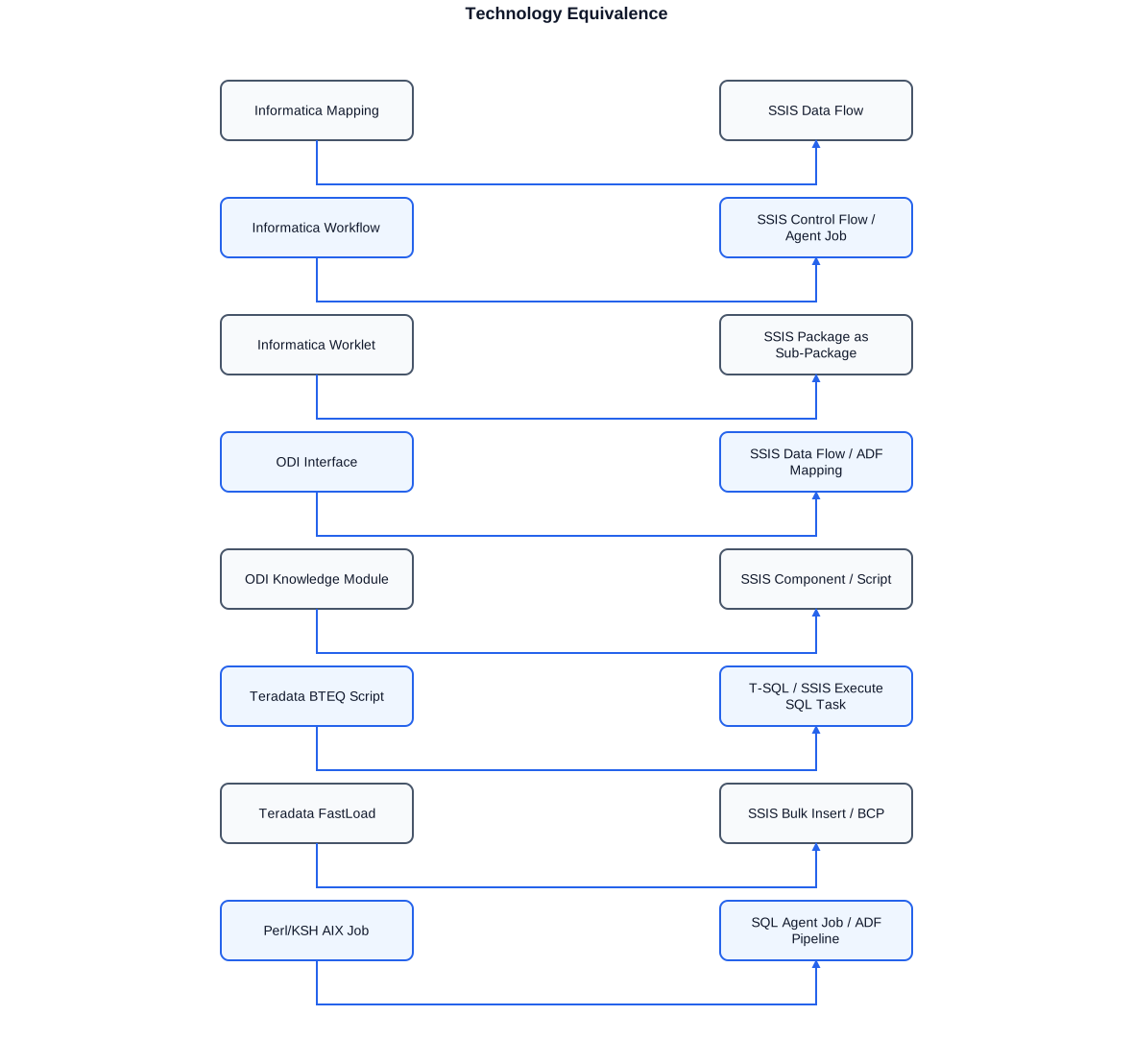
Complete technology equivalence matrix: every legacy component from Informatica PowerCenter, ODI, and Teradata has a defined counterpart in SSIS or Azure Data Factory. This matrix is the foundation of every migration plan.
Informatica Equivalences in Detail
The Informatica Source Qualifier maps to the SSIS OLE DB Source with a SQL query. SQL overrides on the Source Qualifier become parameterised queries in the SSIS OLE DB Source editor. The Informatica Aggregator maps to the SSIS Aggregate Transformation or – for more complex logic – a T-SQL GROUP BY in a staging procedure. The Informatica Lookup Transformation maps to the SSIS Lookup Transformation with the cache option (comparable to Informatica's connected cache). The Informatica Router maps to the SSIS Conditional Split.
ODI Equivalences in Detail
An ODI interface with LKM Oracle to Oracle maps to a SSIS data flow with OLE DB Source and OLE DB Destination. The IKM part (INSERT/UPDATE logic) maps to a SSIS Execute SQL Task with a MERGE statement or an upsert pattern in the SSIS data flow using SSIS Lookup + Conditional Split + OLE DB Command. ODI Procedures (freely editable PL/SQL blocks) map to SQL Agent job steps with T-SQL calls.
Teradata Equivalences in Detail
BTEQ logic (multi-step INSERT/SELECT sequences with error handling) becomes SQL Agent jobs with T-SQL steps. BTEQ variable substitution via sed/Perl becomes SQL Agent job parameters or SSIS package parameters. Teradata FastLoad becomes SSIS Bulk Insert Task, BCP, or a SSIS data flow with OLE DB Destination in fast-load mode. Teradata macros (reusable parameterised SQL blocks) map to T-SQL stored procedures on SQL Server.
- Informatica Mapping -> SSIS Package (Control Flow + Data Flow)
- Informatica Workflow/Worklet -> SQL Agent Job with job steps
- Informatica Session Log -> SSIS Logging (Event Handler + Logging Provider)
- ODI Interface (LKM+IKM) -> SSIS Data Flow + Execute SQL Task (MERGE)
- ODI Knowledge Module -> SSIS Custom Component or Script Task
- BTEQ script -> SQL Agent Job (T-SQL step) + SSIS package
- Teradata FastLoad -> SSIS Bulk Insert Task or BCP
- Perl/KSH scheduler -> SQL Agent Job with dependencies or ADF Pipeline
Quality Assurance: Output Comparison with Identical Inputs
Output comparison is the centrepiece of migration certification. The principle is simple: both systems – legacy and target platform – are run with identical input data. Output volumes, aggregate values, and individual rows are compared. If outputs match, the migration is correct. If they diverge, the comparison shows exactly where the divergence occurs.
In practice there are challenges: legacy systems on Teradata or Informatica may handle sort orders and NULL treatment differently from SQL Server. BTEQ scripts may rely on undocumented Teradata default behaviour that SQL Server handles differently. These deviations are not migration errors but platform-semantic differences that must be explicitly documented and aligned with the business.
Automated Comparison with T-SQL
I use T-SQL comparison procedures that run against both the legacy result and the migration result. First a row-count comparison, then aggregate hashes (CHECKSUM_AGG over aggregated columns), then individual row differences via a FULL OUTER JOIN with NOT EXISTS checks. Each comparison run is recorded in an audit table so a complete evidence trail exists.
A particular aspect is the treatment of floating-point numbers and rounded values: Oracle, Teradata, and SQL Server round differently at boundary cases. I define tolerance thresholds for numeric fields and log deviations below the threshold separately. Only deviations above the threshold count as migration errors.
License Cost Reduction as the Core Project Goal
Legacy ETL licences are expensive – and the costs rise while usage falls. Informatica PowerCenter licences are charged per core or per server and include annual maintenance fees that quickly reach six-figure annual amounts in larger environments. Oracle database licences, often only still needed because of ODI, cost similarly. Teradata is the single most expensive component: a Teradata appliance including software and maintenance exceeds the cost of a comparable SQL Server environment many times over.
The return on investment of a migration can be calculated concretely: annual legacy licence savings minus migration cost yields the break-even period. For a typical Informatica PowerCenter environment with three to five servers the break-even is often under one year because annual savings exceed migration cost. For Teradata environments at medium data volumes the break-even is also often under two years.
What SSIS Costs in the SQL Server Package: Nothing
SSIS is included in SQL Server Enterprise or Standard Edition – no separate licence, no annual renewal, no per-core surcharge. Anyone already running SQL Server who retires Informatica or ODI pays no additional licence costs for the migration target. This is one of the strongest economic arguments for SSIS as a migration target: the target platform is already paid for.
Azure Data Factory: Variable Cost Model Instead of Fixed Licence
Azure Data Factory follows a consumption model: costs accrue for executed pipeline activities, data movement volume, and integration runtime hours. For environments with daily batch runs and moderate data volumes these costs are typically well below the fixed costs of a comparable Informatica or Teradata environment – and scale down when loads are removed.
- Informatica PowerCenter: Eliminate licence and maintenance costs
- ODI: Retire Oracle DB licence kept only for ODI
- Teradata: Replace the most expensive platform with SQL Server or Azure
- SSIS: Already included in SQL Server – no additional licence required
- Azure Data Factory: Consumption-based instead of fixed licence
- ROI calculation: Break-even often under one year
Azure as the Target Platform: SSIS vs. ADF
With every migration the question arises: SSIS on-premises or Azure Data Factory? The answer depends on existing infrastructure, data source locations, and the organisation's strategic direction towards the cloud.
When SSIS Is the Right Choice
SSIS is the right choice when source and target systems are on-premises and network traffic does not justify the Azure detour. SQL Server with SSIS runs on existing infrastructure, can be put into production immediately, and requires no cloud migration costs. SSIS is also preferable when complex data flows with many transformation steps are involved that are more cumbersome to implement in ADF – SSIS offers a richer transformation library here.
When Azure Data Factory Is Better
ADF is the right choice when the organisation already uses Azure cloud services: Azure SQL Database, Azure Synapse, Blob Storage, Data Lake Storage. ADF integrates seamlessly with these services and avoids the detour through an on-premises SSIS server. ADF also provides cloud-native features such as elastic scaling, integrated monitoring through Azure Monitor, and native parameterisation via Azure Key Vault – aspects that on-premises SSIS does not offer in this form.
SSIS in Azure via Integration Runtime
A middle path is the SSIS Azure lift-and-shift via the Azure-SSIS Integration Runtime in ADF: existing SSIS packages run in Azure without being rewritten. This is an attractive option for organisations wanting to shift their SSIS packages to Azure without doubling development effort. Long-term, migrating to native ADF activities is recommended because the Azure-SSIS Integration Runtime is comparatively expensive.
- SSIS on-premises: For pure on-premises pipelines, immediate availability
- SSIS in Azure IR: Lift-and-shift of SSIS packages to the cloud
- Azure Data Factory: For cloud-native scenarios with Azure services
- Hybrid: SSIS and ADF can coexist and complement each other
- Azure Synapse Analytics: Large data volumes, data-warehouse workloads
- Long-term: Prefer native ADF for cloud-new development
Typical Services at a Glance
The scope of my legacy ETL services ranges from the initial inventory to the productive go-live of the migration solution. Depending on the project phase and requirements I take on individual areas or the complete migration path.
- Inventory: Informatica repository export, ODI topology, BTEQ file scan, Perl/KSH mapping
- Dependency analysis and prioritisation of migration sequence
- Equivalence mapping: legacy components to SSIS/ADF constructs
- SSIS development: data flows, control flows, error handling, logging, deployment
- T-SQL development: MERGE procedures, staging logic, SQL Agent jobs
- Azure Data Factory: pipelines, datasets, linked services, triggers, Key Vault
- Output comparison: T-SQL comparison procedures, difference report, sign-off documentation
- Go-live support: parallel operation, monitoring, licence cancellation coordination
- Documentation: technical specification, operations manual, handover to internal team
Migration work can be run as a complete project (from analysis to go-live) or as targeted support for individual phases. For organisations that have already started a migration and hit problems, I can join precisely where support is needed – whether in equivalence analysis, SSIS development, or output comparison automation.
Remote work is well suited to legacy ETL migrations provided access to the relevant systems (Informatica repository, ODI topology, Teradata, SQL Server, Azure) is assured. For the initial inventory phases and go-live support, on-site presence is often valuable because communication overhead in critical phases is high.
Anonymised Reference Projects
Logistics Group
Operation and further development of a complex legacy ETL environment: Informatica PowerCenter 8.6.1 and 9.1.0 with mappings, maplets, workflows, worklets, and restart logic on AIX infrastructure. Teradata BTEQ scripts and Perl/KSH wrappers for nightly batch runs. QA systems and bonus-programme data as the core payload. Preparation of the migration analysis for the transition to SSIS and SQL Server.
Insurance / Reinsurance
Migration of Oracle Data Integrator interfaces to SSIS on SQL Server. Focus: translation of ODI-specific ELT logic (LKM/IKM-generated PL/SQL) to T-SQL MERGE procedures. Full output comparison with identical input data as migration sign-off. Retirement of the Oracle database licence as a secondary project goal after successful ODI retirement.
Healthcare / Social Sector
Migration of Teradata FastLoad jobs that daily loaded billing flat files with millions of rows into Teradata staging tables, to SSIS with Bulk Insert Task. Inventory and documentation of FastLoad scripts, creation of equivalent SSIS packages with identical output behaviour, verification against production data. Licence cost savings as a measurably achieved project goal.
Savings Bank / Financial Services
Retirement of Java- and Oracle-based ETL processes by SSIS pipelines on SQL Server. This project exemplifies technology consolidation: several heterogeneous ETL solutions were consolidated onto a single platform (SSIS/SQL Server), permanently reducing both licence costs and operational complexity.
Frequently Asked Questions about Legacy ETL Migration
Which Informatica PowerCenter versions do you know from practice?
I have worked with Informatica PowerCenter 8.6.1 and 9.1.0 in production environments. I know Repository Manager, Designer, Workflow Manager, Workflow Monitor, and the command-line tools pmcmd and pmrep. The architecture is comparable across all versions in this generation, so 9.6.x and 10.x introduce no fundamentally different concepts.
How do you handle SQL overrides in Informatica?
SQL overrides on Source Qualifier and Lookup transformations are a central Informatica design pattern. During migration they are realised as parameterised SQL queries in the SSIS OLE DB Source or as staging procedures on SQL Server. The key is to preserve parameterisation so the same runtime-parameter flexibility is available.
What does ELT mean in ODI, and why does it make migration more complex?
ODI executes transformations not in the ETL server but generates SQL that runs directly in the database (ELT). This means: the transformation logic is not a visible data flow as in SSIS but hidden SQL inside the Knowledge Modules. In migration you must first extract and analyse this generated SQL before translating it into T-SQL.
How is a BTEQ script migrated to T-SQL?
BTEQ scripts consist of SQL sequences with BTEQ control commands (.LOGON, .IF, .GOTO, .LABEL). The SQL itself is mostly similar to T-SQL but requires adjustments: Teradata DATE types and formats, OREPLACE/OTRANSLATE instead of REPLACE/TRANSLATE, FORMAT clauses and QUALIFY (Teradata window-function filter) all have T-SQL equivalents. BTEQ control commands become SQL Agent job steps.
Can SSIS achieve the same performance as Teradata FastLoad?
For medium data volumes (up to several hundred million rows daily) SSIS Bulk Insert or BCP with SQL Server is very competitive. Teradata FastLoad was optimised for extreme parallelism on a Teradata appliance – most organisations no longer need to handle that load range after migrating to SQL Server, because SQL Server handles the data volumes that Teradata previously required more efficiently.
How long does a typical Informatica-to-SSIS migration take?
This depends strongly on the number of mappings, transformation complexity, and availability of documentation. For an environment with 20 to 50 mappings and clear documentation a timeframe of three to six months is realistic – including inventory, build, output comparison, and go-live support.
Are there cases where migration is not worthwhile?
Rarely, but theoretically possible: if an organisation relies heavily on Informatica clustered grids or multi-domain features that SSIS does not offer, a migration could reduce functional scope. In practice I have not encountered this – most Informatica installations use a fraction of the licensed features, which SSIS covers easily.
In which languages can we work together?
In German, English, and Portuguese – fluently in technical and business discussions in all three languages.


