Positioning
Python has become the dominant language in data engineering over the past few years. What was once a niche topic for data scientists is now the foundation for data platforms in enterprises of all sizes. The reason is clear: Python combines a readable syntax with an ecosystem that covers virtually every data requirement -- from simple CSV processing through complex transformations with pandas to writing Delta Lake tables in Databricks at scale. I have been working with Python in the context of data engineering, business intelligence and cloud platforms for many years. The combination of SQL Server experience, Azure knowledge and Python expertise allows me to build data solutions that work reliably, are maintainable and fit into existing enterprise architectures.
What distinguishes me in Python projects from pure data science profiles is the engineering focus. My primary goal is not model building or machine learning, but getting data reliably from A to B: extract, cleanse, transform, validate, persist. Working in data engineering requires understanding how SQL Server source systems are queried, how to write performant pandas transformations, how to optimise Parquet files for downstream BI tools, and how to orchestrate pipelines in Azure Data Factory or Synapse. I bring this complete picture with me.
In practice this means: I built extraction pipelines from SQL Server systems for a textile and services provider, writing raw data as Parquet and Delta files into Azure Blob Storage for further processing in Databricks notebooks. Statistical analysis of HR and controlling data ran in Jupyter notebooks that served simultaneously as documentation. Azure Synapse dataflows and ADF pipelines orchestrated the execution order. This interplay -- Python as the processing core, Azure as the platform, Databricks as the scaling layer -- is the pattern I realise repeatedly in enterprise data engineering projects.
Python in the Data World
Demand for Python skills in data engineering projects has risen sharply in recent years. Several developments are driving this: First, cloud platforms such as Azure Databricks and Azure Synapse Analytics have established Python as a first-class language -- Databricks notebooks are essentially Python and PySpark notebooks. Second, the pandas ecosystem has reached a maturity that provides genuine SQL alternatives for transformation tasks in the data processing chain: JOINs, GroupBy aggregations, pivots and data cleansing are at least as precisely expressible in pandas as in T-SQL, but more flexible when handling complex logic. Third, Jupyter combines code, documentation and visualisation in a single notebook, fundamentally changing exploratory data analysis and the communication of results.
Why Python is indispensable in enterprise projects today
Python used to be a fringe tool in large enterprises -- a scripting utility for ad-hoc tasks. That has fundamentally changed. Azure Databricks is today used by numerous large enterprises as a central building block of their data platform, and Databricks notebooks run in Python or PySpark. Azure Data Factory can invoke Python activities directly. Azure Synapse Analytics offers native Spark notebooks. Anyone working in these environments cannot avoid Python. I bring experience from real enterprise projects: I know how to write Python code that not only runs locally but also scales on Databricks clusters and can be embedded in Azure pipelines.
The Python ecosystem in a data engineering context
The Python data ecosystem is both broad and deep. At its core sits pandas for tabular data processing. NumPy provides the numerical foundation. pyodbc and SQLAlchemy enable database access to SQL Server, Oracle and other systems. pyarrow and fastparquet are the bridges to the Parquet format. PySpark brings Spark processing to Python. Great Expectations and Pandera are frameworks for data validation. Matplotlib, seaborn and plotly enable visualisations. openpyxl and xlrd connect Python to Excel outputs for business departments. This ecosystem is the reason Python is so powerful in the data domain: for virtually every requirement there is a mature library.
- pandas: DataFrames, cleansing, joins, GroupBy, pivot, reshaping
- NumPy: numerical calculations, vector operations, basic statistical functions
- pyodbc / SQLAlchemy: SQL Server connectivity, connection pooling, ORM layer
- pyarrow / fastparquet: reading and writing Parquet files
- PySpark: distributed processing in Databricks and Synapse Spark pools
- Great Expectations / Pandera: data validation and schema checks
- Jupyter / JupyterLab: interactive notebooks for analysis and documentation
- Azure SDKs (azure-storage-blob, azure-synapse): cloud integration
pandas: DataFrames, Cleansing, Joins, GroupBy
pandas is the cornerstone of my Python toolkit for data engineering. The library offers a powerful abstraction over tabular data: the DataFrame. A DataFrame behaves similarly to a SQL table but is more flexible: columns can be dynamically added, transformed and removed; row operations run vectorised and therefore performantly; complex logic can be expressed in readable Python syntax. In day-to-day data engineering practice I use pandas mainly for three tasks: data acquisition and loading, cleansing and transformation, and aggregation and output.
Loading and exploring DataFrames
The simplest way to load data into a pandas DataFrame is read_sql() with a SQLAlchemy connection -- the result is an immediately usable DataFrame. For very large tables I use chunksize to control memory consumption. Initial exploration with shape, dtypes, describe() and isnull().sum() immediately reveals data volume, types and missing values -- this is the foundation for any cleansing strategy.
Data cleansing: missing values, types, duplicates
Real source data is rarely clean. Missing values, incorrect types, duplicates and inconsistent spellings are the norm. pandas provides the right methods for each of these cases: fillna() and dropna() handle NaN values; astype() converts types; drop_duplicates() removes duplicates; str.strip(), str.upper() and str.replace() normalise strings. A well-structured cleansing function that carries out these steps systematically is the first building block of any robust pipeline.
Joins, merges and GroupBy
pandas merge() implements SQL-style joins (INNER, LEFT, RIGHT, OUTER) between DataFrames. For simple index-based joins there is join(). GroupBy aggregations with groupby().agg() correspond to GROUP BY in SQL but are more flexible: any aggregation function can be passed, including user-defined lambda functions. pivot_table() and crosstab() generate pivot analyses. This combination covers almost all relational transformation requirements.
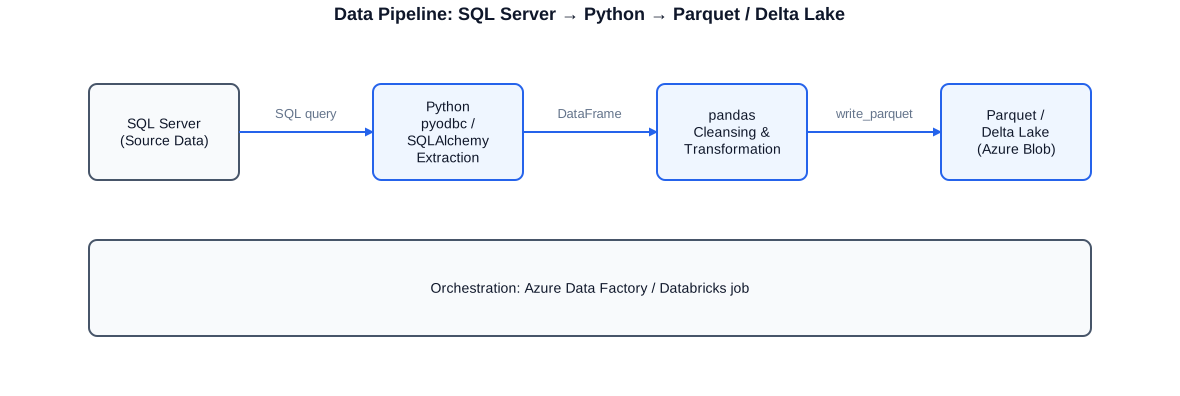
Typical extraction and transformation pipeline: SQL Server as source, Python with pyodbc/SQLAlchemy for extraction, pandas for cleansing and transformation, Parquet/Delta Lake as output format in Azure Blob Storage.
import pandas as pd
import sqlalchemy as sa
import pyarrow as pa
import pyarrow.parquet as pq
from datetime import date

# -- Build connection to SQL Server (Windows Authentication) ---------------
engine = sa.create_engine(
    "mssql+pyodbc://servername/databasename"
    "?driver=ODBC+Driver+17+for+SQL+Server&trusted_connection=yes"
)

# -- Load raw data: orders and products ------------------------------------
sql_orders = (
    "SELECT o.order_id, o.customer_id, o.order_date, "
    "o.status, o.gross_amount "
    "FROM dbo.orders o "
    "WHERE o.order_date >= '2024-01-01'"
)
sql_products = "SELECT product_id, description, category FROM dbo.products"

df_orders   = pd.read_sql(sql_orders,   engine)
df_products = pd.read_sql(sql_products, engine)

# -- Cleansing: missing values, types, duplicates --------------------------
df_orders["gross_amount"] = pd.to_numeric(
    df_orders["gross_amount"], errors="coerce"
)
df_orders.dropna(subset=["gross_amount"], inplace=True)
df_orders.drop_duplicates(subset=["order_id"], inplace=True)
df_orders["status"]     = df_orders["status"].str.strip().str.upper()
df_orders["order_date"] = pd.to_datetime(df_orders["order_date"])

# -- LEFT JOIN: merge orders with product master ---------------------------
df_merged = df_orders.merge(
    df_products,
    how="left",
    left_on="product_id",
    right_on="product_id"
)

# -- GroupBy aggregation: revenue by category and month -------------------
df_merged["month"] = df_merged["order_date"].dt.to_period("M")
df_agg = (
    df_merged
    .groupby(["category", "month"])
    .agg(
        order_count=("order_id",     "count"),
        total_revenue=("gross_amount", "sum"),
        avg_revenue=("gross_amount",   "mean"),
    )
    .reset_index()
)

# -- Write result as Parquet dataset (partitioned by month) ----------------
table = pa.Table.from_pandas(df_agg)
pq.write_to_dataset(
    table,
    root_path="/mnt/datalake/orders_agg",
    partition_cols=["month"],
)
print(f"Written: {len(df_agg)} rows, {df_agg['total_revenue'].sum():.2f} EUR total revenue")
This example shows the complete path: SQL Server connection via SQLAlchemy, data cleansing, LEFT JOIN between two DataFrames, GroupBy aggregation and partitioned writing as a Parquet dataset. English-style comments throughout.
Jupyter Notebooks: Exploratory Analysis and Documentation
Jupyter notebooks have fundamentally changed how data analyses are carried out and communicated. A notebook combines executable Python code with Markdown documentation, mathematical formulas and visualisations in a single document. The result is not just an analysis result but simultaneously its documentation and reproduction instructions. For me, Jupyter notebooks are the preferred tool for exploratory data analysis, for developing and testing new transformation logic, and for presenting analysis results to business departments.
Exploratory analysis: understanding data before transforming it
Before building a data pipeline I explore the source data systematically in a Jupyter notebook. The typical approach: load data, check shape and dtypes, examine distributions with describe() and value_counts(), visualise missing values and identify correlated columns. This exploratory phase typically takes a few hours but saves days of debugging later in the pipeline because problems in the source material become visible early.
Notebooks as living documentation
A well-structured Jupyter notebook is more than a script -- it is a traceable record of analysis steps. Markdown cells explain why a cleansing decision was made; code cells show how it was implemented; output cells document the result. This principle -- code, decision and result in a single file -- is equally valuable for clients and subsequent developers: the analysis process is reproducible, traceable and modifiable. I use nbconvert to export notebooks as HTML reports that can be read without Python knowledge.
Databricks notebooks and the handover to pipelines
Databricks notebooks are essentially extended Jupyter notebooks running on a Spark cluster. Logic developed locally in a Jupyter notebook as a pandas DataFrame can be migrated to a PySpark DataFrame in Databricks and scaled to large data volumes. I typically develop logic in a local Jupyter notebook against a representative sample of the data, test and document there, then port the final logic into a Databricks notebook that runs as part of an ADF pipeline or a Databricks Workflow job.
import pandas as pd
import matplotlib.pyplot as plt
import matplotlib
import warnings

matplotlib.use("Agg")    # no interactive window needed
warnings.filterwarnings("ignore")

# -- Load sample data (here: CSV, in practice: SQL Server) ----------------
df = pd.read_csv("controlling_export.csv", sep=";", encoding="utf-8-sig",
                 parse_dates=["booking_date"])

# -- Overview: shape, types, missing values --------------------------------
print("Shape:         ", df.shape)
print("Types:
",         df.dtypes)
print("NaN ratio:
",     df.isnull().mean().round(3))

# -- Analyse distribution of cost centres ---------------------------------
df["cost_centre"].value_counts().head(10).plot(
    kind="barh", figsize=(9, 5),
    title="Top 10 Cost Centres by Number of Bookings",
    color="#2563eb"
)
plt.tight_layout()
plt.savefig("top10_cost_centres.png", dpi=120)
plt.close()

# -- Monthly totals by cost type -------------------------------------------
df["month"] = df["booking_date"].dt.to_period("M")
monthly = (
    df.groupby(["month", "cost_type"])["amount"]
    .sum()
    .unstack(fill_value=0)
)
print("
Monthly cost types (excerpt):")
print(monthly.tail(6))

# -- Outliers: bookings above the 99th percentile -------------------------
p99 = df["amount"].quantile(0.99)
outliers = df[df["amount"] > p99][["booking_date", "cost_centre", "amount"]]
print(f"
Outliers (> P99 = {p99:.2f} EUR): {len(outliers)} bookings")
print(outliers.head())

# -- Save result as CSV for sharing ----------------------------------------
outliers.to_csv("outlier_report.csv", index=False)
print("Analysis complete. Results saved.")
This notebook snippet shows the exploratory analysis pattern: load data, check basic statistics, visualise and identify outliers. In practice this pattern runs directly in JupyterLab or as a Databricks notebook.
Extraction: SQL Server to Parquet / Delta
Extracting data from SQL Server source systems and storing it as Parquet or Delta files is a central pattern in modern data pipelines. Classical SSIS-based ETL runs directly on the SQL Server and writes to another SQL Server database. The modern pattern instead extracts from SQL Server via Python and writes to a cloud data lake in Azure Blob Storage -- as Parquet files for simple readability or as Delta tables for ACID transactions and Time Travel functionality. I have implemented this pattern in real projects and know the pitfalls: connection stability with large data volumes, character set issues with NVARCHAR columns, DateTime conversions and the right partitioning strategy for the target data lake.
pyodbc and SQLAlchemy: connecting to SQL Server
For SQL Server access from Python there are two common libraries: pyodbc is a direct ODBC driver wrapper, excellent for simple queries and bulk reads. SQLAlchemy additionally provides an ORM layer, connection pooling and a standardised dialect layer that simplifies switching between database types. For pandas read_sql() I always recommend SQLAlchemy as the connection object because it harmonises best with pandas internal batching. For Azure SQL with Entra ID authentication (formerly Azure AD) I use ODBC Driver 18 with the Authentication=ActiveDirectoryInteractive parameter or Managed Identity for headless pipelines.
Chunked reads for large tables
Very large tables cannot be loaded into memory in a single pass. pandas read_sql() supports the chunksize parameter, which splits the table into blocks of N rows and returns an iterator over DataFrames. Each chunk can be written immediately as a Parquet file. The result is a partitioned Parquet dataset that runs reliably even for tables with millions of rows without exhausting memory. For even larger volumes I use PySpark in Databricks, which can run the extraction in a distributed fashion.
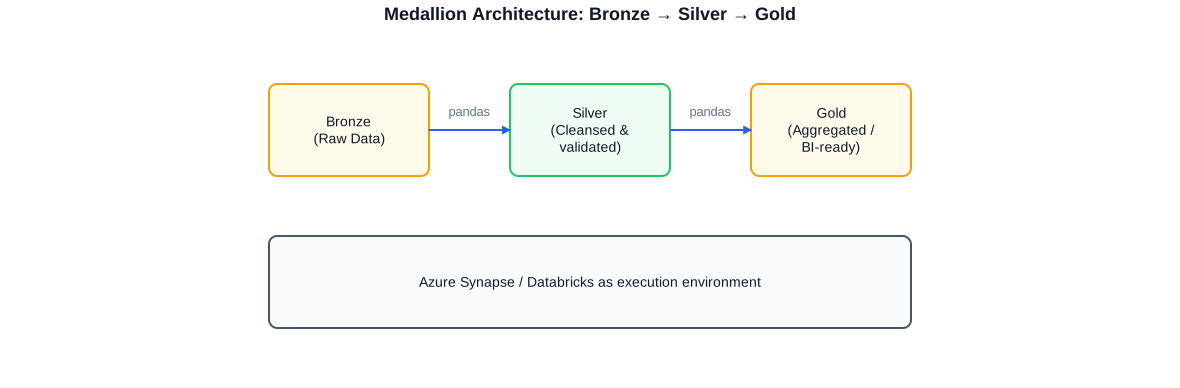
Three-tier medallion architecture: Bronze (raw data, extracted directly from SQL Server), Silver (cleansed and validated by pandas transformations), Gold (aggregated and BI-ready, stored as a Delta table in Databricks).
Parquet as a universal exchange format
Parquet is the preferred columnar format for data lake architectures: it compresses strongly (typically 3-10x versus CSV), supports predicate pushdown to read only relevant columns and rows when querying, and is language-agnostic -- Python, Spark, SQL Server PolyBase, Azure Synapse and Power BI can all work natively with Parquet. For writing Parquet I use pyarrow as the backend, which is faster and more memory-efficient than fastparquet for most use cases.
PySpark and Databricks
PySpark is the Python interface to Apache Spark and the primary language in which Databricks notebooks are written. While pandas DataFrame operations run on a single machine, PySpark scales to cluster size: a Databricks cluster can provide hundreds of cores and terabytes of RAM, processing even very large datasets in reasonable time. For data engineering tasks in enterprise projects this means: when the data volume exceeds the capacity of a single machine, or when very short processing times are required, PySpark is the right tool.
PySpark vs. pandas: when to use which?
pandas is ideal for datasets up to a few gigabytes that fit entirely in memory. It is simpler to write, debug and test. PySpark is used when data exceeds the size of a single machine, when distributed execution parallelism is required, or when the infrastructure already has a Databricks cluster and the processing should run embedded there. In practice I often use both: pandas for development and prototyping, PySpark for scaled production in Databricks.
Databricks as execution environment
Databricks unifies Spark cluster management, notebook development, workflow orchestration and Delta Lake support in a single platform. In a project for a textile and services provider I created Databricks notebooks that extracted data from SQL Server sources, persisted it as Delta tables, and made it accessible to BI reports via Azure Synapse Analytics. The Databricks jobs ran as part of an Azure Data Factory pipeline and were executed daily at 3 AM.
# This notebook runs on a Databricks cluster (PySpark context available)
from pyspark.sql import SparkSession
from pyspark.sql import functions as F
from pyspark.sql.types import StructType, StructField, StringType, DoubleType, DateType

# -- Spark session (in Databricks implicitly available as 'spark') ---------
spark = SparkSession.builder.getOrCreate()

# -- JDBC connection to SQL Server (credentials via Databricks Secrets) ----
jdbc_url = (
    "jdbc:sqlserver://my-server.database.windows.net:1433;"
    "database=SourceDatabase;encrypt=true;trustServerCertificate=false;"
    "hostNameInCertificate=*.database.windows.net;loginTimeout=30"
)
jdbc_props = {
    "user":     dbutils.secrets.get("kv-scope", "sql-user"),
    "password": dbutils.secrets.get("kv-scope", "sql-password"),
    "driver":   "com.microsoft.sqlserver.jdbc.SQLServerDriver",
    # Parallelisation: Spark reads in 8 partitions simultaneously
    "numPartitions": "8",
    "partitionColumn": "order_id",
    "lowerBound": "1",
    "upperBound": "10000000",
}

# -- Load source table as Spark DataFrame ----------------------------------
df_raw = spark.read.jdbc(
    url=jdbc_url,
    table="dbo.orders",
    properties=jdbc_props,
)

# -- Cleansing and transformation in PySpark -------------------------------
df_clean = (
    df_raw
    .filter(F.col("status").isin(["COMPLETED", "SHIPPED"]))
    .withColumn("net_amount",  F.round(F.col("gross_amount") / 1.20, 2))
    .withColumn("year_month",  F.date_format("order_date", "yyyy-MM"))
    .dropDuplicates(["order_id"])
)

# -- Aggregation: revenue by month and category ----------------------------
df_agg = (
    df_clean
    .groupBy("year_month", "category")
    .agg(
        F.count("order_id").alias("count"),
        F.sum("net_amount").alias("total_net"),
        F.avg("net_amount").alias("avg_net"),
    )
    .orderBy("year_month", "category")
)

# -- Write as Delta table (overwrite on each run) --------------------------
delta_path = "abfss://datalake@mystorageaccount.dfs.core.windows.net/gold/orders_agg"
df_agg.write.format("delta").mode("overwrite").save(delta_path)

print(f"Delta table written: {df_agg.count()} rows")
This notebook shows the complete PySpark pipeline in Databricks: JDBC extraction from SQL Server with parallel partitions, cleansing and aggregation in PySpark, writing as a Delta table into Azure Data Lake Storage Gen2. Credentials are loaded securely via Databricks Secrets (Azure Key Vault).
Delta Lake: ACID Transactions and Time Travel
Delta Lake is an open-source storage layer built on top of Parquet files that adds ACID transactions, schema enforcement, update/delete/merge operations and Time Travel functionality. In Databricks, Delta Lake is the default storage format: when you create a table in Databricks it is a Delta table by default. I have used Delta Lake in production projects and know the value it adds over plain Parquet files: MERGE operations enable upsert logic (insert if not present; update if present), which implements classical slowly changing dimension handling in a clean, SQL-like manner. Time Travel allows querying an older version of a table -- an enormous advantage when debugging and troubleshooting pipelines.
MERGE in Delta Lake: upsert logic
The MERGE command in Delta Lake corresponds to MERGE (UPSERT) in SQL Server and is one of Delta's most powerful features. In a typical extraction pipeline new records are inserted and existing ones updated without overwriting the entire table. This reduces write volume substantially and makes pipelines idempotent: re-running the pipeline does not change the result if the source data has not changed.
Partitioning and Z-ordering
Delta tables can be partitioned by one or more columns, which speeds up read queries that filter on those columns. Beyond that, Delta Lake supports Z-ordering, a data organisation technique that optimises multiple columns simultaneously by co-locating similar values physically within the Parquet files. For typical BI queries that filter by date and category, Z-ordering can reduce query time by a factor of 5-10.
- ACID transactions: atomic write operations, no partial write state
- Schema enforcement: deviating columns in input data are rejected
- Schema evolution: new columns can be added in a controlled way
- MERGE/UPSERT: insert and update in one step, idempotent
- Time Travel: query older versions of a table (by date or version number)
- VACUUM: clean up old file versions, free up storage
- Optimize + Z-Order: compact small files, improve query performance
Data Validation with Python
Data quality is not an optional requirement but the prerequisite for reliable BI reports and analyses. In practice source data is frequently flawed: referential integrity is not enforced, mandatory fields are empty, amounts lie outside plausible ranges, date values arrive in the wrong format. Failing to catch these issues systematically allows errors to enter the data lake undetected, where they surface later in BI reports -- at a point when tracing the root cause is difficult. Python provides several approaches to data validation that I apply depending on project requirements.
Simple assertions in pandas
For quick checks in extraction notebooks, pandas assertions suffice: assert df['amount'].ge(0).all() checks that all amounts are non-negative. assert df['customer_id'].notna().all() checks for complete mandatory fields. assert df.duplicated('order_id').sum() == 0 checks for unique keys. These assertions are run immediately after data loading; on violation Python raises an AssertionError that interrupts the pipeline and logs the problem.
Pandera for schema-based validation
Pandera is a library that validates pandas DataFrames against a declaratively defined schema. The schema specifies allowed data types, value ranges, nullable properties and user-defined checks. When the DataFrame violates the schema, Pandera delivers a detailed error report with row and column references. In production pipelines I insert Pandera validations between extraction and transformation: extraction delivers raw data; Pandera checks it; only when the check passes does transformation start. This substantially reduces the number of cryptic error messages later in the process.
import pandas as pd
import pandera as pa
from pandera import Column, DataFrameSchema, Check
import logging

logger = logging.getLogger(__name__)

# -- Define Pandera schema for the orders table ----------------------------
orders_schema = DataFrameSchema(
    columns={
        "order_id":     Column(int,   nullable=False, unique=True),
        "customer_id":  Column(int,   nullable=False),
        "order_date":   Column("datetime64[ns]", nullable=False),
        "gross_amount": Column(float, Check.ge(0.0),  nullable=False),
        "status":       Column(str,
                               Check.isin(["NEW", "SHIPPED", "COMPLETED", "CANCELLED"]),
                               nullable=False),
    },
    # Unknown extra columns are allowed (strict=False)
    strict=False,
)

def validate_orders(df: pd.DataFrame) -> pd.DataFrame:
    # Validates an orders DataFrame against the defined schema.
    # Returns the validated DataFrame or raises on error.
    # Log output at INFO level.

    # Step 1: simple assertions (fast, no library needed)
    assert df["order_id"].notna().all(),          "ERROR: Empty order IDs found"
    assert not df.duplicated("order_id").any(),   "ERROR: Duplicate order IDs"
    assert (df["gross_amount"] >= 0).all(),        "ERROR: Negative amounts in source"

    # Step 2: Pandera schema validation (detailed error report)
    try:
        df_valid = orders_schema.validate(df, lazy=True)
        logger.info("Validation passed: %d rows checked", len(df_valid))
        return df_valid
    except pa.errors.SchemaErrors as e:
        # Log failing rows and columns
        logger.error("Schema errors:
%s", e.failure_cases.to_string())
        raise

# -- Usage in the pipeline -------------------------------------------------
if __name__ == "__main__":
    import sqlalchemy as sa
    engine  = sa.create_engine(
        "mssql+pyodbc://srv/db?driver=ODBC+Driver+17+for+SQL+Server&trusted_connection=yes"
    )
    df_raw  = pd.read_sql(
        "SELECT * FROM dbo.orders WHERE order_date >= '2024-01-01'", engine
    )
    df_ok   = validate_orders(df_raw)
    print(f"Validation passed: {len(df_ok)} rows ready for transformation.")
This validation function combines simple pandas assertions with Pandera schema validation. The lazy=True flag ensures all errors are collected and reported at once -- not just the first error.
Statistical Analysis with Python
Data engineering projects rarely involve only moving data from place to place. Statistical analyses frequently come on top: distribution analyses, outlier detection, time series analysis, correlation analyses and aggregations that go beyond simple sums and averages. I implemented statistical analyses for HR and controlling data for a textile and services provider in Jupyter notebooks: monthly variance analyses, percentile-based outlier detection, trend analyses and comparisons between cost centres and periods. Python is the ideal tool for such tasks: NumPy and scipy supply the statistical methods; pandas provides the data structure; matplotlib and seaborn create meaningful visualisations.
Descriptive statistics and outlier detection
The first step in any statistical analysis is descriptive statistics: mean, median, standard deviation, quartiles and extreme values. pandas describe() delivers these metrics at the push of a button. For outlier detection I use the IQR-based approach (interquartile range): values outside Q1 - 1.5*IQR to Q3 + 1.5*IQR are flagged as outliers. This method is more robust than the simple Z-score approach because it is less sensitive to individual extreme values.
Time series and trends
Time series analyses are particularly relevant in controlling and HR projects: how does revenue develop over time? Are there seasonal patterns? How does a metric compare to the same period last year? pandas resample() and rolling() provide powerful tools for time series aggregations and rolling averages. Visualisation with matplotlib or seaborn makes trends and outliers immediately visible. For business departments I export results as Excel files with openpyxl that can be integrated directly into existing reporting processes.
Correlation analyses and pivot analyses
Correlation matrices with df.corr() quickly reveal which variables are linearly related -- useful for identifying redundant columns in a dimensional model or for exploring influencing factors on a target variable. Pivot analyses with pd.pivot_table() allow metrics to be displayed in a two-dimensional cross-table familiar from Excel. These outputs are frequently delivered directly as Excel reports for controlling departments.
Azure Integration: Synapse, ADF, Blob Storage
Python-based data engineering solutions in enterprise projects almost always run on Azure infrastructure. The connection between Python code and Azure services is provided by the official Azure SDKs, which supply a Python library for each service: azure-storage-blob for Blob Storage, azure-synapse-spark for Synapse Spark notebooks, azure-keyvault-secrets for secure password management, azure-identity for Entra ID authentication. In projects I have combined all of these: Python notebooks in Databricks that read credentials from Azure Key Vault, write data to Blob Storage and are executed by Azure Data Factory as pipeline activities.
Azure Blob Storage: reading and writing
Azure Blob Storage is the preferred data lake storage for Python data pipelines in Azure. With the azure-storage-blob library, files can be read, written and managed. For Parquet files you can write either directly via the Blob Storage library or via the abfss:// protocol (Azure Data Lake Storage Gen2), which is natively supported by pyarrow and PySpark. In Databricks, ADLS Gen2 is mounted as a mount point, simplifying file path access with /mnt/... notation.
Azure Data Factory: Python as a pipeline activity
Azure Data Factory can embed Python scripts and Databricks notebooks as activities in pipelines. The pattern is: ADF pipeline with a trigger (time-based or event-based) that executes a Databricks notebook activity. The notebook activity passes parameters (e.g. processing date), the notebook processes data and writes results to the data lake. I have implemented this pattern in multiple projects and know the configuration details: linked services, Databricks integration runtime, secret references for credentials and proper error handling in the pipeline.
Azure Synapse Analytics: Spark notebooks and dataflows
Azure Synapse Analytics combines SQL Pool, Spark Pool and data integration functions on a single platform. Synapse Spark notebooks are essentially PySpark notebooks run directly from Synapse. Synapse Dataflows are a visual alternative for simpler transformation tasks that do not require Python logic. In projects I have used Synapse Dataflows for standardised ELT patterns and Python notebooks for more complex transformation logic that cannot be expressed in dataflows.
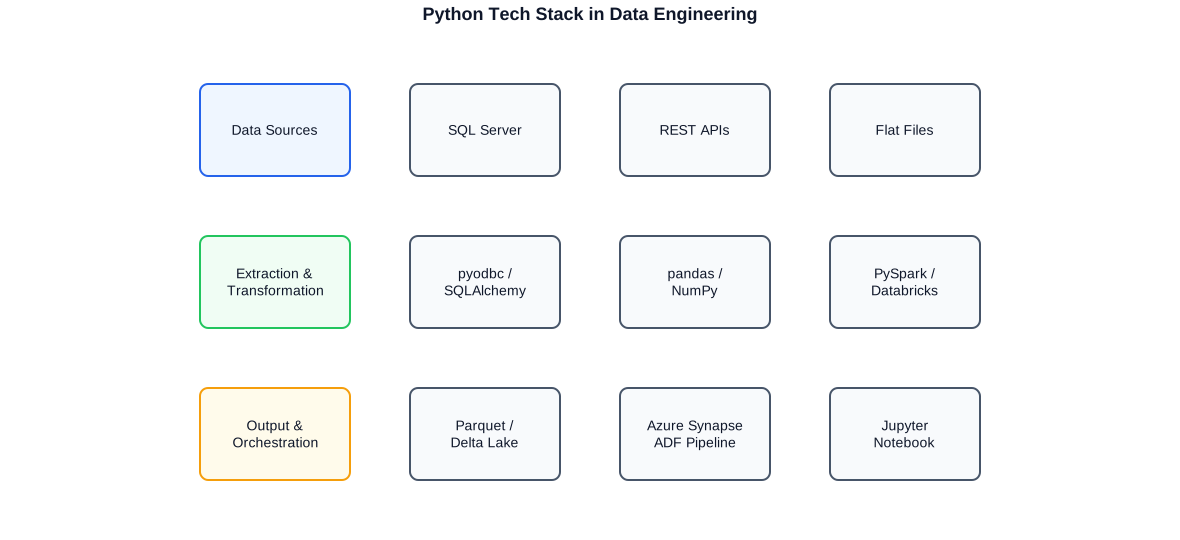
Complete Python tech stack: SQL Server, REST APIs and flat files as sources; pyodbc/SQLAlchemy, pandas/NumPy and PySpark/Databricks as transformation layer; Parquet/Delta Lake, Azure Synapse and Jupyter notebooks as output.
Automation with Python
Alongside its role as a transformation and analysis language, Python is also a powerful automation tool. In a data engineering context this means: running extraction scripts as scheduled jobs, automating file system operations, sending email notifications on errors, auto-populating Excel reports and loading configuration centrally from environment variables or Key Vault. Compared to PowerShell, Python is better suited for data-centric tasks, while PowerShell is stronger for Windows Server administration and dbatools integration. In projects I use both depending on the task.
Scheduled execution: cron, Windows Task Scheduler and ADF
A Python extraction script can be scheduled in three ways: as a cron job on Linux servers (typical in Azure VM or container environments), as a Windows Task Scheduler task on Windows servers, or as an Azure Data Factory pipeline activity with a trigger. For production pipelines I prefer the ADF route because it provides retry logic, monitoring and alerting within the Azure Monitor framework. For simple local automation Task Scheduler is sufficient.
Error handling, logging and alerting
In a production pipeline, error handling is not optional -- it is mandatory. I use Python's logging module with a configurable handler that writes logs both to a file and to Azure Application Insights. On critical errors a notification is sent via the smtplib module or an Azure Logic App endpoint. All unhandled exceptions are caught, logged and persisted in an error table in the database for later analysis and alerting.
Configuration: environment variables and Key Vault
Hardcoded credentials in code are unacceptable in production systems. I load connection strings, passwords and service principal secrets either from environment variables (os.environ) or directly from Azure Key Vault via the azure-keyvault-secrets library. For Databricks notebooks I use the built-in Secrets management (dbutils.secrets.get()), which loads secrets from the configured Key Vault scope without credentials appearing in notebook code.
- logging module: structured log output, configurable level and handlers
- try/except/finally: clean error handling in all pipeline stages
- os.environ / python-dotenv: environment variables for local development
- azure-keyvault-secrets: secure credential management in production
- openpyxl: automatically populate and format Excel reports
- smtplib / Azure Logic Apps: alerting on pipeline failures
- argparse: parameterisation of batch scripts via command line
- schedule / APScheduler: simple cron-like job scheduling in Python
Approach and Collaboration
The entry into a Python data engineering project always starts with an assessment: what source systems exist? What data volumes and quality can be expected? What Azure services and permissions are available? What BI tools and teams consume the data downstream? These questions determine the architectural decisions: whether pandas or PySpark, whether ADF or Databricks Workflow, whether Parquet or Delta, whether Synapse Dedicated Pool or Serverless. I make these decisions together with the client, explain the implications and document the rationale.
In the development phase I work iteratively: first pipeline versions in Jupyter notebooks, exploratory tests against representative samples of the source data, incremental addition of cleansing logic, validation and error handling, then porting into production-ready scripts or Databricks notebooks. Every step is documented -- in the notebook itself, in code comments and in a separate technical design document for the client. Clean, commented Python code is not a bonus for me but part of the deliverable.
- Assessment: source systems, data volumes, quality, Azure environment
- Architecture: tool selection (pandas/PySpark), format (Parquet/Delta), orchestration (ADF/Databricks)
- Development: iterative, notebook-first, then production-ready scripts
- Validation: schema tests, assertions, Pandera in every pipeline stage
- Documentation: inline comments, notebook Markdown, tech design doc
- Handover: knowledge transfer, operations guide, internal team onboarding
I work remotely, in hybrid mode and on-site. For development and testing phases remote is sufficient in most cases. For initial assessments, fundamental architectural decisions and handover to internal teams, personal presence is often more valuable. I follow whatever makes sense for the project. All three project languages -- German, English and Portuguese -- I speak fluently, including in technical discussions.
Typical Services
My Python services in the data engineering context cover the complete value chain: from source system connectivity through transformation and validation to cloud storage and orchestration. Depending on the project phase and needs I take on individual areas or the complete spectrum.
- Building Python ETL pipelines: SQL Server to pandas to Parquet/Delta in Azure
- Implementing PySpark notebooks in Databricks for large data volumes
- Exploratory data analysis and statistical evaluations in Jupyter notebooks
- Data validation: pandas assertions, Pandera schemas, schema evolution
- Azure Data Factory: pipeline design, Databricks activities, triggers, monitoring
- Azure Synapse Analytics: Spark notebooks, dataflows, linked services
- Azure Blob Storage / ADLS Gen2: Parquet datasets, Delta tables, permissions
- Delta Lake: upsert/MERGE logic, partitioning, Z-ordering, Time Travel
- Error handling, logging, alerting: structured production pipelines
- Excel report automation with openpyxl for business departments
- Code reviews and architecture consulting for existing Python data pipelines
- Knowledge transfer and onboarding of internal teams into Python and Databricks
Typical engagement scenarios: a company migrates from SSIS to Databricks and needs support building the first Python-based pipelines. A controlling team wants to automate statistical analyses from the DWH and document them as reproducible Jupyter notebooks. An IT team has built Databricks infrastructure but needs support writing efficient PySpark jobs and designing a Delta Lake partitioning strategy. In all of these scenarios I bring both the Python and the SQL Server and Azure context.
A particular advantage arises when Python skills and SQL Server experience combine: I know the quirks of SQL Server source data, know which NVARCHAR encodings cause problems in pyodbc, know SQL Server-specific DateTime types and their pandas equivalents, and understand how to efficiently load SQL Server tables with millions of rows via JDBC partitioning in Spark. This combination saves many hours of debugging.
Selected anonymised reference projects
Textile / Services Provider
Built extraction pipelines from SQL Server sources as Parquet and Delta files in Azure Blob Storage. Implemented PySpark notebooks in Databricks for processing large data volumes from HR, finance and controlling systems. Statistical analyses and exploratory analyses in Jupyter notebooks. Orchestration via Azure Synapse Dataflows and Azure Data Factory pipelines. Reduction of Azure infrastructure costs through Delta optimisation and partitioning strategies.
Public sector / Research organisation
Support for DWH development with Python-based ETL pipelines alongside existing SSIS packages. Implementation of anonymisation functions for personal data in Python. Jupyter notebooks for exploratory quality checks of the Data Vault ingestion layer.
Consultancy / MDM
Implementation of Python activities in Azure Data Factory pipelines for flexible transformation logic that could not be expressed in ADF dataflows. Secure credential management via Azure Key Vault in Python scripts. Integration with MDM system for automated data quality checks via Python client.
Loyalty / Retail / Clearing
Python scripts for extracting and processing REST/oData interfaces whose output was integrated into Power BI data models. Automated reports and data quality checks via pandas for clearing processes.
Frequently asked questions about Python in data engineering
What do you use Python for in data engineering?
I use Python for data extraction from SQL Server and other sources, for transformation and cleansing with pandas, for exploratory analysis in Jupyter notebooks, for PySpark jobs in Databricks and for statistical analyses. Python is the glue between source systems, cloud platforms and BI tools.
pandas or PySpark -- when to use which?
pandas is ideal for datasets that fit in memory (up to a few GB) and for development and prototyping. I use PySpark when data exceeds the capacity of a single machine or when the infrastructure is already Databricks. I often develop in pandas and port to PySpark for scaled production.
How do you connect Python to SQL Server?
Via pyodbc as a direct ODBC driver wrapper or via SQLAlchemy as an abstraction layer. For pandas read_sql() I recommend SQLAlchemy. For Azure SQL with Entra ID authentication I use ODBC Driver 18 with Managed Identity or Service Principal. In Databricks I use JDBC with parallel partitioning.
What is Delta Lake and why do you use it?
Delta Lake is an open-source storage layer on top of Parquet that provides ACID transactions, MERGE upsert logic, schema enforcement and Time Travel. I use it in Databricks as the default table format because it is more reliable, maintainable and performant than plain Parquet files.
How do you integrate Python with Azure Data Factory?
As a Databricks notebook activity invoked and parameterised by an ADF pipeline, or as an Azure Batch activity for Python scripts. Credentials are securely loaded via Azure Key Vault. Monitoring and retry logic are anchored in the ADF pipeline framework.
How do you ensure data quality in Python pipelines?
Through a combination of pandas assertions (quick basic checks), Pandera schema validation (declarative type and value-range checks) and structured logging. Errors are caught early after extraction and recorded in the log and an error table in the database.
Do you write maintainable, documented Python code?
Yes. Commented code with explanatory docstrings, structured modules and configurable parameters is my standard. Jupyter notebooks serve simultaneously as executable code and analysis documentation. My goal is that internal teams can maintain independently after my engagement ends.
Can you review and optimise existing Python pipelines?
Yes. Code reviews for existing Python ETL scripts and Databricks notebooks are part of my services. Typical optimisation opportunities: inefficient pandas operations (apply instead of vectorised methods), missing validation, hardcoded credentials, missing error handling and poor Parquet/Delta partitioning strategies.
In which languages can we work together?
German, English and Portuguese -- fluently, including in technical discussions about database architecture, Python code reviews and project status meetings.


