Positioning
Linux has been the dominant platform for server infrastructures, automation tasks and data-processing workflows in organisations of all sizes for decades. My experience with Linux and Unix stretches from early AIX/KSH projects in large enterprise environments to modern Debian and Ubuntu infrastructures that I build, operate and maintain today for personal use, client projects and hybrid scenarios. Over this time I have learned that solid Linux automation does not consist of individual scripts, but of a complete system: scheduler, robust error handling, logging, monitoring, backup and documentation.
What distinguishes me from pure infrastructure specialists is the combination with the data world. I bring Linux automation skills together with deep knowledge of SQL Server, data warehouses, ETL pipelines and BI processes. Load and unload pipelines running under Linux that feed SQL Server databases; Connect:Direct file-transfer jobs using shell scripts as wrappers; Python scripts that extract and transform DWH data — that is the environment I have been working in for years.
On top of that, I run my own infrastructure: a Proxmox-based multi-site environment with NGINX reverse proxy, WireGuard VPN, LXC containers, Docker services, Authelia SSO and automated backups. This hands-on operation is not a side project — it is proof that I use the technologies described here in production and know their pitfalls from personal experience.
Linux Automation Scope
Linux automation covers a broad spectrum of technologies and tasks. At the lowest level there are shell scripts automating recurring tasks: file transfers, log rotation, report generation, job orchestration. At the next level sit scheduling mechanisms like cron and systemd timers, which execute these scripts on a time-driven or event-driven basis. Above that lies process automation, where Python scripts, ETL triggers and database extractions run.
Shell Scripting: Bash and KSH
Bash is the standard shell on most Linux distributions; KSH (Korn Shell) is its counterpart on AIX and older Unix systems. I am fluent in both and know the differences: array syntax, arithmetic expansion, process substitution and portability pitfalls. In enterprise environments I consistently apply defensive programming: set -euo pipefail as the foundation, trap for cleanup on errors, structured logging with timestamps, and clearly defined exit codes for monitoring by schedulers or monitoring systems.
Python as a Shell Complement
Python complements shell scripts where more complex data processing, structured error handling or external libraries are required. File watchers with watchdog, database connections via pyodbc, REST API calls, data transformations with pandas — all of this is far cleaner and more maintainable in Python than in shell code. I combine both worlds: shell for system integration, process orchestration and simple transformations; Python for data processing, complex logic and external integrations.
Virtualisation and Containers
Proxmox VE is my preferred virtualisation platform for on-premise infrastructures. LXC containers offer the middle ground between VMs and Docker: less overhead than full VMs, more isolation than bare processes. I use Docker where applications already ship as containers or where fast portability is required. The combination of Proxmox host, LXC for system services, and Docker for applications is a proven pattern for medium-sized infrastructures.
- Debian/Ubuntu, SUSE Linux, AIX — distribution and shell matched to project environment
- Bash/KSH scripting: set -euo pipefail, trap, logging, exit codes
- Python automation: pyodbc, watchdog, pandas, paramiko, REST APIs
- Cron and systemd timers: scheduling, dependency management, journalling
- Proxmox VE: LXC containers, VM management, cluster operation
- Docker: Compose stacks, volume management, update automation
- NGINX: reverse proxy, SSL termination, rate limiting, Let's Encrypt
- WireGuard VPN: site-to-site, road warrior, key management
- rsync/rclone: backup, synchronisation, offsite replication
- Hardening: fail2ban, iptables/nftables, SSH hardening, firewall
Robust Bash Scripting with Error Handling and Logging
Bash scripts are often written in a hurry and then run in production for years without ever being revised. This leads to scripts that fail silently, leave no log trail, and whose error state nobody monitors. I follow a fixed basic pattern in every production script that combines robust error handling, structured logging and clean teardown logic.
The key building blocks: set -euo pipefail immediately aborts the script on any error (instead of silently continuing), unset variables are treated as errors, and pipe failures are exposed. trap ERR and trap EXIT ensure that resources are released and error states recorded regardless of how the script exits. Timestamps in the log enable post-mortem reconstruction of processing runs.
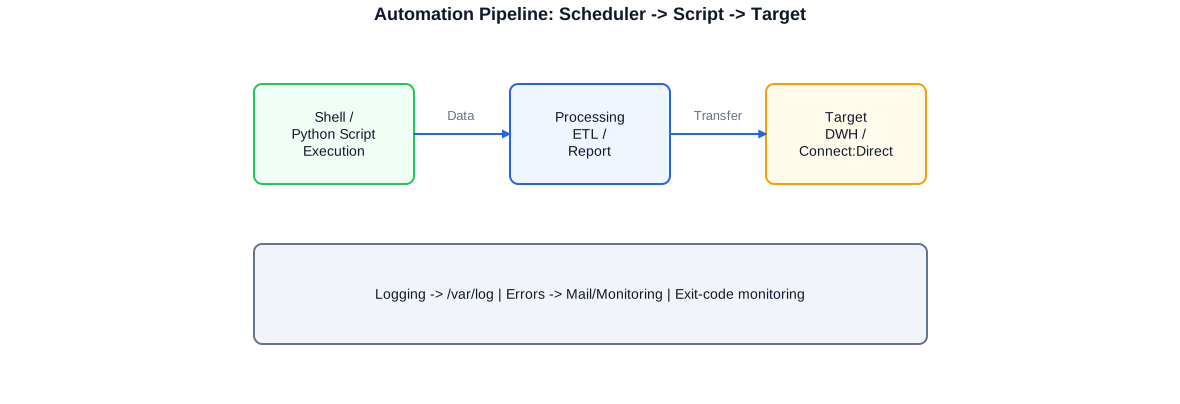
Typical Linux automation pipeline: a scheduler (cron or systemd timer) triggers a shell or Python script that processes data and transfers it to a target (DWH or Connect:Direct). Logging and monitoring are anchored at every stage.
Script Template with set -euo pipefail and trap
#!/usr/bin/env bash
# Production script for load/file-processing tasks
# Requirements: set -euo pipefail, logging, trap for cleanup
set -euo pipefail

# -- Configuration ------------------------------------------------------------
SCRIPT_NAME="$(basename "$0" .sh)"
LOG_DIR="/var/log/etl"
LOG_FILE="${LOG_DIR}/${SCRIPT_NAME}_$(date +%Y%m%d).log"
LOCK_FILE="/var/run/${SCRIPT_NAME}.lock"
SOURCE_DIR="/data/input"
TARGET_DIR="/data/processed"
ARCHIVE_DIR="/data/archive"
MAX_AGE_DAYS=30  # Remove archive files older than 30 days

# -- Logging function ---------------------------------------------------------
log() {
    local level="$1"; shift
    echo "$(date '+%Y-%m-%d %H:%M:%S') [${level}] $*" | tee -a "${LOG_FILE}"
}

# -- Error handler and cleanup ------------------------------------------------
cleanup() {
    local exit_code=$?
    if [[ -f "${LOCK_FILE}" ]]; then
        rm -f "${LOCK_FILE}"
        log "INFO" "Lock file removed"
    fi
    if [[ $exit_code -ne 0 ]]; then
        log "ERROR" "Script exited with code ${exit_code} -- line: ${BASH_LINENO[0]}"
        # Optional: send notification via mail or monitoring
        # echo "ETL error in ${SCRIPT_NAME}" | mail -s "ERROR: ${SCRIPT_NAME}" admin@example.com
    else
        log "INFO" "Script completed successfully (exit 0)"
    fi
}
trap cleanup EXIT
trap 'log "ERROR" "Error at line $LINENO (command: $BASH_COMMAND)"; exit 1' ERR

# -- Prerequisites ------------------------------------------------------------
mkdir -p "${LOG_DIR}" "${TARGET_DIR}" "${ARCHIVE_DIR}"

# Prevent concurrent execution (flock-based lock)
if [[ -f "${LOCK_FILE}" ]]; then
    log "WARN" "Script already running (lock: ${LOCK_FILE}) -- aborting"
    exit 0
fi
echo $$ > "${LOCK_FILE}"
log "INFO" "=== ${SCRIPT_NAME} started (PID $$) ==="

# -- Main logic ---------------------------------------------------------------
shopt -s nullglob  # No error if glob returns no matches
files=("${SOURCE_DIR}"/*.csv)

if [[ ${#files[@]} -eq 0 ]]; then
    log "INFO" "No input files found -- nothing to do"
    exit 0
fi

log "INFO" "${#files[@]} file(s) found"

for file in "${files[@]}"; do
    filename="$(basename "${file}")"
    log "INFO" "Processing: ${filename}"

    # Create target file (transformation via sed/awk/python possible)
    cp "${file}" "${TARGET_DIR}/${filename}"

    # Archive the source file
    mv "${file}" "${ARCHIVE_DIR}/${filename%.csv}_$(date +%Y%m%d%H%M%S).csv"
    log "INFO" "Archived: ${filename}"
done

# Remove old archive files
find "${ARCHIVE_DIR}" -name "*.csv" -mtime "+${MAX_AGE_DAYS}" -delete
log "INFO" "Archive cleanup: files older than ${MAX_AGE_DAYS} days removed"

log "INFO" "=== Processing complete ==="
I use this pattern as the foundation for all production Bash scripts: set -euo pipefail, timestamped logging, flock-based lock against duplicate runs, and trap-based cleanup. The exit code is evaluated by the monitoring system and scheduler.
Cron vs. systemd Timer: When to Use Which
Cron is the classic Linux scheduler and available on every system. For simple, time-driven tasks, cron is sufficient. systemd timers offer more: dependencies between units, automatic logging via journald, precise calendar expressions, monotonic timers (relative to last start), and the ability to check timer status with systemctl status. In modern Debian and Ubuntu environments I prefer systemd timers for new tasks because they integrate better with the operating system.
systemd: Services, Timers and Dependency Management
systemd has fundamentally changed the operation of Linux services. Where init scripts and cron entries were once necessary, systemd provides a unified, declarative interface: service units define how a process is started, monitored and restarted on failure. Timer units replace cron for scheduled tasks with better journalling and more flexible time expressions. And systemd's dependency management ensures that a service only starts when its prerequisites are satisfied.
In my own infrastructure and client projects I manage dozens of systemd units: database services, ETL triggers, backup jobs, monitoring agents and reverse-proxy configuration. The interplay between service units, timer units and target units enables precise dependency chains that ensure processes start in the correct order and are shut down cleanly on failure.
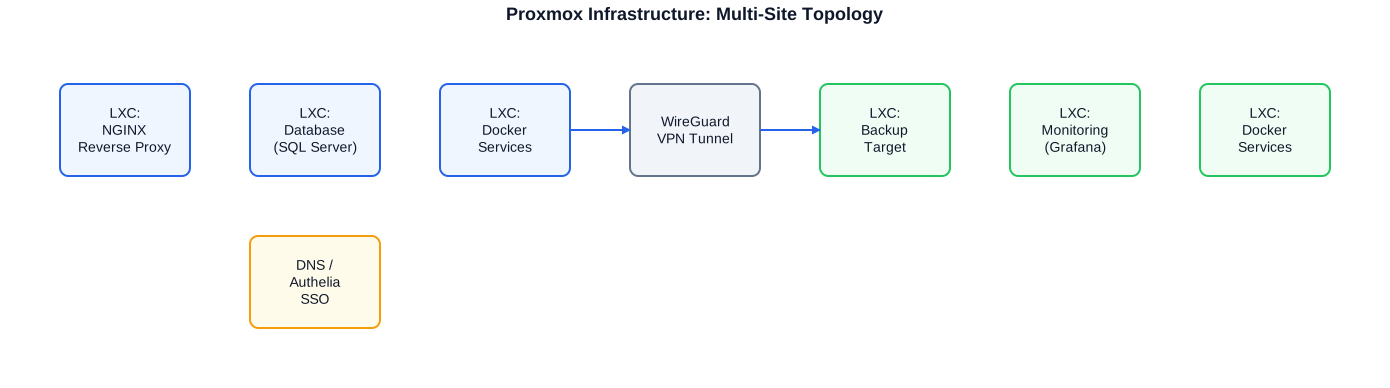
Typical Proxmox multi-site infrastructure: site A runs NGINX, database and Docker services as LXC containers. WireGuard VPN connects site A to site B, which hosts the backup target and monitoring (Grafana). DNS and Authelia SSO provide centralised access management.
# /etc/systemd/system/etl-daily-load.service
# Description: Runs the ETL daily load process
# Prerequisites: network must be available, PostgreSQL must be running

[Unit]
Description=ETL Daily Load Process
Documentation=https://wiki.internal/etl-processes
After=network-online.target postgresql.service
Requires=network-online.target
Wants=postgresql.service

[Service]
Type=oneshot
# Run as dedicated non-root user
User=etl-user
Group=etl-group

# Load environment variables from secure file (not inline in unit)
EnvironmentFile=/etc/etl/etl-daily-load.env

# Main process
ExecStart=/opt/etl/bin/etl_daily_load.sh

# Resource limits: cap CPU and memory usage
CPUQuota=50%
MemoryMax=512M

# Write stdout/stderr to journal
StandardOutput=journal
StandardError=journal
SyslogIdentifier=etl-daily-load

# Restart on unexpected exit (not on exit 0)
Restart=on-failure
RestartSec=60s

[Install]
WantedBy=multi-user.target

# ---------------------------------------------------------------------------

# /etc/systemd/system/etl-daily-load.timer
# Time-driven execution: weekdays at 22:00

[Unit]
Description=Timer for ETL Daily Load Process
Requires=etl-daily-load.service

[Timer]
# Calendar expression: Mon-Fri at 22:00
OnCalendar=Mon-Fri 22:00:00
# Run missed execution immediately if system was down
Persistent=true
# Random delay up to 5 minutes (load distribution across many timers)
RandomizedDelaySec=5min

[Install]
WantedBy=timers.target

# ---------------------------------------------------------------------------
# Activation and status check:
# systemctl daemon-reload
# systemctl enable --now etl-daily-load.timer
# systemctl status etl-daily-load.timer
# journalctl -u etl-daily-load.service -f   # Follow live log
The service unit and timer unit work as a pair: the timer triggers the service. The service runs as a oneshot process, writes logging via journald and reports errors to the timer via exit code. systemctl list-timers shows the next scheduled execution and past runs.
Dependency Management in Complex Chains
When multiple ETL steps must run in a specific sequence, systemd solves this elegantly: each step is its own service unit that starts after the previous step (After=). With OnSuccess= and OnFailure= in systemd 246+ follow-on units can be started conditionally — for example a notification unit on failure or an archiving unit on success. These declarative dependencies are far clearer than nested if-chains in shell scripts.
- Type=oneshot for batch scripts, Type=simple/notify for long-running services
- EnvironmentFile for secure credential passing (not in the unit file itself)
- Restart=on-failure with RestartSec for automatic restart strategy
- CPUQuota and MemoryMax prevent ETL jobs from starving other services
- Persistent=true in the timer: missed executions are caught up
- journalctl -u
-f for live log; --since for historical analysis
Python Automation on Linux
Python is the ideal complement to Bash for automation tasks that go beyond simple system commands. File watchers that react to new input files; ETL triggers that run database queries and store results as CSV or Parquet; REST API calls that fetch data from external systems and translate it into local structures — all of this is more precise, testable and maintainable in Python than in pure shell code.
In my projects I have used Python automation to implement database extractions from SQL Server under Linux (sqlcmd/bcp or pyodbc with the ODBC driver), to orchestrate and log batch processing runs, and to trigger notifications on errors or completed load operations. Integrating Python scripts into systemd units provides reliable scheduling with full journalling.
#!/usr/bin/env python3
# File watcher: new CSV files in the input folder trigger ETL processing
# Dependencies: watchdog, pyodbc, pandas, logging (all standard/pip)

import sys
import time
import logging
import pathlib
import shutil
import pandas as pd
import pyodbc
from watchdog.observers import Observer
from watchdog.events import FileSystemEventHandler

# -- Configuration ------------------------------------------------------------
INPUT_DIR    = pathlib.Path("/data/input")
PROCESSED    = pathlib.Path("/data/processed")
ERROR_DIR    = pathlib.Path("/data/error")
LOG_FILE     = pathlib.Path("/var/log/etl/file_watcher.log")

# ODBC connection string (driver: ODBC Driver 18 for SQL Server)
CONN_STR = (
    "DRIVER={ODBC Driver 18 for SQL Server};"
    "SERVER=db-server.internal;"
    "DATABASE=DWH_Staging;"
    "Trusted_Connection=no;"
    "UID=etl_user;PWD=__from_env__;"  # Password from environment variable
)

# -- Logging setup ------------------------------------------------------------
logging.basicConfig(
    level=logging.INFO,
    format="%(asctime)s [%(levelname)s] %(message)s",
    handlers=[
        logging.FileHandler(LOG_FILE),
        logging.StreamHandler(sys.stdout),
    ],
)
log = logging.getLogger(__name__)


def process_csv(path: pathlib.Path) -> None:
    # Load a CSV file, transform and write to SQL Server staging table.
    log.info("Processing file: %s", path.name)
    try:
        df = pd.read_csv(path, sep=";", encoding="utf-8", dtype=str)
        # Cleanse: strip leading/trailing whitespace from all string columns
        df = df.applymap(lambda x: x.strip() if isinstance(x, str) else x)
        df["load_timestamp"] = pd.Timestamp.now()

        # Write to SQL Server staging table
        conn = pyodbc.connect(CONN_STR, timeout=30)
        cursor = conn.cursor()
        cursor.fast_executemany = True
        cols = ", ".join(df.columns)
        placeholders = ", ".join(["?"] * len(df.columns))
        sql = f"INSERT INTO staging.csv_ingest ({cols}) VALUES ({placeholders})"
        cursor.executemany(sql, df.itertuples(index=False, name=None))
        conn.commit()
        conn.close()

        log.info("Successfully loaded: %d rows from %s", len(df), path.name)
        # Move successfully processed file
        shutil.move(str(path), str(PROCESSED / path.name))

    except Exception as err:
        log.error("Error processing %s: %s", path.name, err, exc_info=True)
        # Move failed file for manual review
        shutil.move(str(path), str(ERROR_DIR / path.name))
        raise  # Propagate so systemd captures the error exit code


class InputHandler(FileSystemEventHandler):
    # React to new files in the input folder.
    def on_created(self, event):
        if event.is_directory:
            return
        path = pathlib.Path(event.src_path)
        if path.suffix.lower() == ".csv":
            # Brief pause: ensure file is fully written before processing
            time.sleep(0.5)
            process_csv(path)


if __name__ == "__main__":
    for d in (INPUT_DIR, PROCESSED, ERROR_DIR, LOG_FILE.parent):
        d.mkdir(parents=True, exist_ok=True)

    log.info("File watcher started: %s", INPUT_DIR)
    observer = Observer()
    observer.schedule(InputHandler(), str(INPUT_DIR), recursive=False)
    observer.start()
    try:
        while True:
            time.sleep(5)
    except KeyboardInterrupt:
        observer.stop()
    observer.join()
    log.info("Watcher stopped")
This file watcher runs as a systemd service (Type=simple, Restart=on-failure). It reacts to new CSV files, loads them into SQL Server staging and moves files to processed or error folders. pyodbc with Microsoft ODBC Driver 18 runs reliably on Debian/Ubuntu without issues.
Python and Shell as a Team
The cleanest architecture combines shell scripts for system integration and Python for data logic. A shell wrapper starts the Python script, checks the exit code, writes a summary to the system log and notifies on failure. The Python script focuses on data processing. This separation makes both parts individually testable and independently maintainable.
Proxmox VE and LXC Virtualisation
Proxmox Virtual Environment is an open-source virtualisation platform that combines KVM virtualisation and LXC containers on a single management interface. I run Proxmox in production in my own infrastructure and bring this experience to client projects that need on-premise virtualisation without expensive vendor lock-in solutions.
LXC containers are the preferred deployment format for server processes on Proxmox: they start in seconds, consume significantly fewer resources than full VMs, and are easy to snapshot and restore via Proxmox. One container per service — NGINX, database, monitoring, backup agent — provides clean isolation and simple maintenance.
Clustering and High Availability
Proxmox supports clustering with multiple nodes and provides integrated high availability for VMs and containers. In a two-node configuration with an external quorum device, basic HA can be realised without significant complexity. For critical services this means automatic failover on node failure within seconds to minutes.
Backup and Snapshotting
Proxmox Backup Server (PBS) is the natural companion to Proxmox VE: incremental, deduplicated backups of VMs and containers with integrity verification. Configurable backup jobs run overnight; PBS periodically verifies backup data integrity. I additionally use guest-level backups with restic or rclone to selectively protect application data independently of the VM backup.
- Proxmox VE as on-premise hypervisor: KVM and LXC on a single platform
- LXC containers: fast provisioning, resource-efficient, snapshot-capable
- Proxmox Cluster: HA, live migration, centralised management of multiple nodes
- Proxmox Backup Server: incremental, deduplicated backups with verification
- Networking: Linux bridges, VLANs, Open vSwitch for complex topologies
- Storage: ZFS for production data with snapshots and checksums
- Automation: Proxmox API and pvesh for scripted VM/LXC management
Docker and Container Services
Docker is the standard in my infrastructure for application services that are shipped as containers or for which ready-made images are available. On Proxmox, Docker services typically run inside a dedicated LXC container (nested containers), providing isolation between system services and application services. Docker Compose manages stacks of multiple services and their dependencies declaratively.
Automated updates are an important aspect of Docker operations: Watchtower or a custom update script periodically checks for new image versions and updates containers according to a defined strategy. Volumes are stored outside the container and included in backup routines. Network policies ensure that containers can only reach services they actually need.
- Docker Compose: declarative stack definition, dependency management
- Volume management: named volumes or bind mounts to backed-up paths
- Network isolation: dedicated bridge networks per stack, minimal exposure
- Automated updates: Watchtower or script-based update routines
- Health checks: restart: unless-stopped, healthcheck directive in Compose file
- NGINX as reverse proxy in front of Docker containers: SSL termination, rate limiting
NGINX Reverse Proxy, WireGuard VPN and Network Configuration
NGINX is the central entry point for all web-based services in my infrastructure. As a reverse proxy, NGINX terminates TLS connections (Let's Encrypt via Certbot or acme.sh), forwards requests to internal containers and implements rate limiting, authentication (via Authelia) and access logging. This centralisation simplifies certificate management and security policies considerably.
WireGuard is my VPN of choice for site-to-site connections and road-warrior scenarios. Compared to OpenVPN, WireGuard offers substantially simpler configuration, higher performance and a smaller code footprint. In my infrastructure WireGuard connects multiple Proxmox sites and provides secure remote access to internal services without publicly exposed ports.
# /etc/nginx/sites-available/app-internal
# Reverse proxy for an internal web application with SSL and authentication

# Rate-limiting zone (20 requests/second per IP)
limit_req_zone $binary_remote_addr zone=app_limit:10m rate=20r/s;

server {
    listen 80;
    server_name app.example.com;
    # Redirect all HTTP to HTTPS
    return 301 https://$host$request_uri;
}

server {
    listen 443 ssl http2;
    server_name app.example.com;

    # SSL certificates (Let's Encrypt via certbot)
    ssl_certificate     /etc/letsencrypt/live/app.example.com/fullchain.pem;
    ssl_certificate_key /etc/letsencrypt/live/app.example.com/privkey.pem;

    # Modern SSL: TLS 1.2 and 1.3 only
    ssl_protocols TLSv1.2 TLSv1.3;
    ssl_ciphers   ECDHE-ECDSA-AES128-GCM-SHA256:ECDHE-RSA-AES128-GCM-SHA256;
    ssl_prefer_server_ciphers off;

    # Security headers
    add_header Strict-Transport-Security "max-age=63072000" always;
    add_header X-Content-Type-Options nosniff;
    add_header X-Frame-Options SAMEORIGIN;

    # Apply rate limiting
    limit_req zone=app_limit burst=50 nodelay;

    # Authelia authentication endpoint
    location /authelia {
        internal;
        proxy_pass        http://127.0.0.1:9091/api/verify;
        proxy_pass_request_body off;
        proxy_set_header  Content-Length "";
        proxy_set_header  X-Original-URL $scheme://$http_host$request_uri;
    }

    location / {
        # Verify authentication via Authelia
        auth_request     /authelia;
        auth_request_set $user  $upstream_http_remote_user;

        # Forward request to internal service (Docker/LXC)
        proxy_pass       http://127.0.0.1:8080;
        proxy_set_header Host            $host;
        proxy_set_header X-Real-IP       $remote_addr;
        proxy_set_header X-Forwarded-For $proxy_add_x_forwarded_for;
        proxy_set_header X-Forwarded-Proto https;
    }

    # Access log with timestamp and response code
    access_log /var/log/nginx/app.example.com_access.log combined;
    error_log  /var/log/nginx/app.example.com_error.log warn;
}
This NGINX configuration combines SSL termination, modern TLS, rate limiting and Authelia-based SSO authentication. All internal services are hidden behind this reverse proxy; externally only port 443 is public.
WireGuard: Site-to-Site and Road Warrior
WireGuard configurations are minimal and readable. An interface has a private key and an IP address in the VPN network; each peer receives its public key and the allowed destination IP ranges. In a site-to-site configuration entire subnets are routed; for road-warrior clients 0.0.0.0/0 is configured as the allowed network so that all traffic flows through the VPN tunnel. DNS configuration in the WireGuard interface ensures that internal hostnames are resolved correctly.
Backup Automation with rsync and rclone
Backup automation is one of the most important but frequently neglected aspects of Linux operations. Many systems have backup scripts that run but whose integrity has never been tested, or whose rotation strategy leads to growing data volumes without adequate retention periods. I implement backup systems that run reliably, report their status and are periodically verified.
rsync is the tool of choice for local and SSH-based synchronisation: incremental, efficient, and universally available. rclone extends rsync for cloud targets: S3-compatible storage, Azure Blob, Backblaze B2, SFTP and dozens of other backends are accessed via the same CLI interface. The combination of local rsync backup and cloud offsite replication via rclone implements a 3-2-1 backup strategy without proprietary solutions.
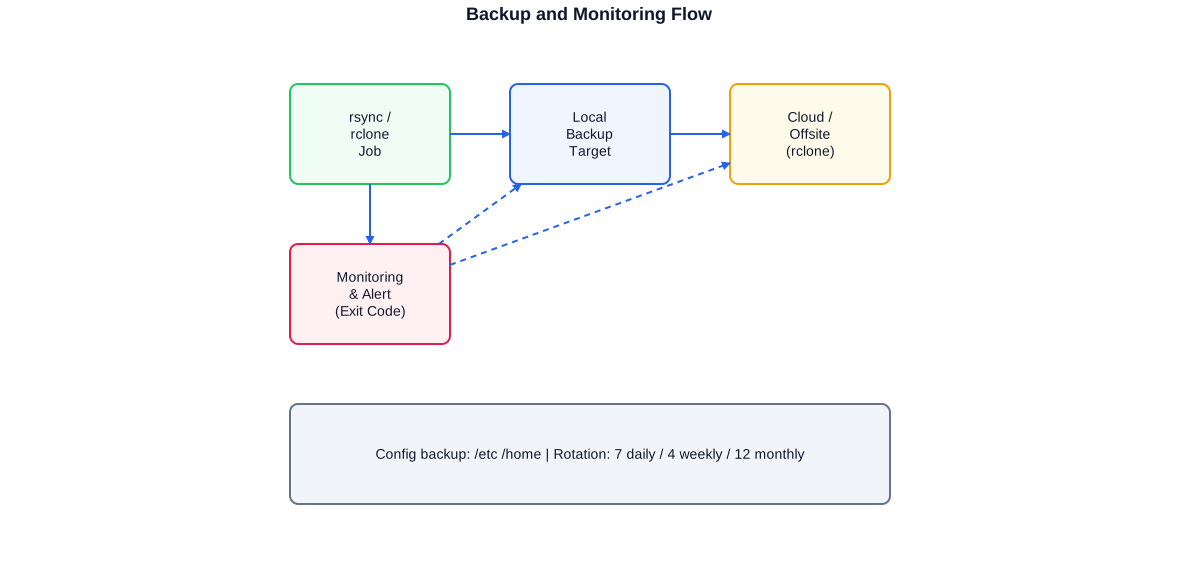
The backup flow consists of three stages: rsync backs up data from the source server to a local backup target; rclone selectively replicates to the cloud or an offsite location; a monitoring process tracks exit codes and sends alerts on errors or missed backups.
#!/usr/bin/env bash
# Backup script: rsync locally + rclone offsite replication
# Rotation strategy: 7 daily, 4 weekly, 12 monthly
set -euo pipefail

# -- Configuration ------------------------------------------------------------
SOURCE="/srv/data"               # Source directory
BACKUP_BASE="/backup"            # Local backup base directory
RCLONE_TARGET="b2:my-backup"    # rclone target (Backblaze B2 or S3)
MONITORING_URL="https://hc-ping.com/XXXX"  # Healthcheck URL (optional)
LOG="/var/log/backup/backup.log"
DATE=$(date +%Y%m%d)
DOW=$(date +%u)        # 1=Monday, 7=Sunday
DOM=$(date +%d)        # 01-31

mkdir -p "${BACKUP_BASE}"/{daily,weekly,monthly} "$(dirname "${LOG}")"

log() { echo "$(date '+%Y-%m-%d %H:%M:%S') $*" | tee -a "${LOG}"; }

# -- Notify monitoring: backup starting ---------------------------------------
[[ -n "${MONITORING_URL:-}" ]] && curl -fsS "${MONITORING_URL}/start" -o /dev/null || true

log "INFO Backup started: ${DATE}"

# -- Daily: rsync with hard links for space-efficient history -----------------
DAILY_TARGET="${BACKUP_BASE}/daily/${DATE}"
LATEST=$(ls -1d "${BACKUP_BASE}/daily"/20* 2>/dev/null | tail -1 || echo "")

if [[ -n "${LATEST}" && "${LATEST}" != "${DAILY_TARGET}" ]]; then
    # Incremental backup: unchanged files linked, not copied
    rsync -avz --delete \
        --link-dest="${LATEST}" \
        --exclude-from="/etc/backup/exclude.list" \
        "${SOURCE}/" "${DAILY_TARGET}/"
else
    # First backup or same day: full copy
    rsync -avz --delete \
        --exclude-from="/etc/backup/exclude.list" \
        "${SOURCE}/" "${DAILY_TARGET}/"
fi
log "INFO Daily backup complete: ${DAILY_TARGET}"

# -- Weekly: copy of daily backup every Sunday --------------------------------
if [[ "${DOW}" == "7" ]]; then
    WEEK=$(date +%Y_W%V)
    cp -al "${DAILY_TARGET}" "${BACKUP_BASE}/weekly/${WEEK}"
    log "INFO Weekly backup created: ${WEEK}"
fi

# -- Monthly: copy of daily backup on the 1st of each month ------------------
if [[ "${DOM}" == "01" ]]; then
    MONTH=$(date +%Y_%m)
    cp -al "${DAILY_TARGET}" "${BACKUP_BASE}/monthly/${MONTH}"
    log "INFO Monthly backup created: ${MONTH}"
fi

# -- Rotation: remove old backups ---------------------------------------------
find "${BACKUP_BASE}/daily"   -maxdepth 1 -type d -mtime +7   -exec rm -rf {} +
find "${BACKUP_BASE}/weekly"  -maxdepth 1 -type d -mtime +28  -exec rm -rf {} + 2>/dev/null || true
find "${BACKUP_BASE}/monthly" -maxdepth 1 -type d -mtime +365 -exec rm -rf {} + 2>/dev/null || true
log "INFO Rotation complete"

# -- Offsite replication via rclone -------------------------------------------
rclone sync "${BACKUP_BASE}/monthly" "${RCLONE_TARGET}/monthly" \
    --progress --transfers=4 --checkers=8 \
    --log-file="${LOG}" --log-level=INFO
log "INFO Offsite replication complete"

# -- Notify monitoring: backup successful -------------------------------------
[[ -n "${MONITORING_URL:-}" ]] && curl -fsS "${MONITORING_URL}" -o /dev/null || true
log "INFO Backup fully successful"
This script implements a complete 3-2-1 backup strategy: daily backups with hard links for space efficiency, automatic weekly backups on Sunday, monthly backups on the 1st, and offsite replication via rclone. A healthcheck ping confirms success; missing pings trigger an alert.
Configuration Backup
Alongside data backups, configuration backups are essential: /etc, crontabs, systemd units, NGINX configurations and application configuration files should be backed up regularly and versioned. Git is excellent for versioning configuration files; etckeeper automates this for /etc. Combined with rsync/rclone, the complete system configuration is treated as an independent backup artefact.
Hardening and Security
A Linux system in production must be hardened. Hardening means: minimising the attack surface, blocking brute-force attempts, restricting network access to necessary ports and logging access to the system. The most important measures are well known and yet frequently not applied consistently in practice.
SSH Hardening
SSH is the primary access path to Linux servers and therefore the most common attack target. Basic measures: disable password authentication and allow only public-key authentication; forbid root login via SSH; run SSH on a non-standard port (reduces automated scanning); use AllowUsers or AllowGroups to restrict permitted accounts. fail2ban monitors SSH login attempts and blocks IPs after repeated failures.
Firewall with iptables/nftables
Every publicly reachable server needs a firewall configuration that only permits ports that are actually required. iptables is the classic approach; nftables is the more modern successor with a more consistent syntax. For simple configurations I use ufw (Uncomplicated Firewall) on Ubuntu; for more complex topologies with source-based routing or port forwarding I use nftables directly. The fundamental rule: block everything, only allow what is needed.
Automatic Security Updates
Unpatched systems are the largest security risk. unattended-upgrades on Debian/Ubuntu automatically installs security patches and reports results by mail. For kernel updates without a reboot, kpatch or livepatch (Ubuntu) enables live patching. At minimum, automatic installation of security updates should be enabled on every production server.
- SSH: public key only, no root login, AllowUsers, fail2ban active
- Firewall: nftables/iptables with default-deny, only necessary ports open
- unattended-upgrades: automatic security patches without manual intervention
- Minimise services: only necessary services active (systemctl list-units --type=service)
- File permissions: no world-writable files outside /tmp
- fail2ban: protect SSH, NGINX and other exposed services
- Audit logging: auditd for security-relevant system events
Bridge from Linux to SQL Server and Data Warehouse
A significant portion of my project experience lies precisely at this interface: Linux-based processing pipelines that feed SQL Server databases or extract from DWH systems. Microsoft has provided sqlcmd and bcp for Linux for years; the ODBC Driver 17/18 for SQL Server runs stably on Debian, Ubuntu and SUSE. This availability enables ETL pipelines to run entirely under Linux, without requiring Windows servers as an intermediate layer.
In logistics and insurance projects I have developed shell-based load and unload pipelines running under UNIX/AIX/KSH that transferred data via Connect:Direct or FTP to central DWH systems. Perl wrappers orchestrated Teradata FastLoad jobs from shell scripts. This experience with heterogeneous environments makes me a reliable contact for all cross-platform scenarios.
sqlcmd and bcp under Linux
sqlcmd enables interactive and script-based T-SQL execution against SQL Server directly from the Linux shell. bcp (Bulk Copy Program) efficiently exports and imports large datasets. Both tools integrate into Bash scripts, require no Windows environment and work with Windows Authentication via Kerberos or SQL Server Authentication. Combined with the ODBC driver and pyodbc, a complete ETL stack can be built entirely under Linux.
Connect:Direct File Transfer Orchestration
Connect:Direct (Sterling File Gateway / IBM MQ File Transfer) is the standard solution for reliable cross-platform file transfer in large enterprise environments, particularly in insurance and logistics. Orchestrating Connect:Direct jobs from shell scripts — submitting process files, monitoring transfer status, error handling and logging — is a core part of such automation environments that I know from multiple projects.
- sqlcmd/bcp under Linux: T-SQL execution and bulk import/export
- ODBC Driver 17/18 for SQL Server on Debian/Ubuntu/SUSE
- pyodbc: Python-based database connection to SQL Server under Linux
- Connect:Direct: process file submission and transfer monitoring via shell
- Cross-platform ETL: AIX/KSH to SQL Server / Teradata from direct experience
- Perl wrappers for legacy jobs (Teradata FastLoad, Informatica invocations)
Approach and Operational Documentation
Starting a Linux automation engagement always begins with an inventory: which scripts are already running? Where are they scheduled — cron, systemd, manually? What error handling exists? Is there logging? Who monitors the processes? This inventory quickly reveals whether a system is operationally sound or an undocumented 'shared-nothing' state.
Operational documentation is not a trailing step for me, but part of the deliverable. Every automation process receives a runbook page with: purpose, execution frequency, dependencies, troubleshooting guide and contact. This documentation is written in Markdown, versioned in a Git repository and ideally published as a static site accessible to all stakeholders.
Configuration Management
For infrastructure consisting of more than one server, a configuration management system is worthwhile. Ansible is my first choice: agentless, YAML-based playbook system that describes configuration states declaratively and applies them idempotently. Playbooks for NGINX configuration, systemd units, fail2ban rules and user management run on every infrastructure change and ensure that all servers share the same desired state.
- Inventory: scripts, schedulers, logging, monitoring, error handling
- Prioritisation: missing error handling and monitoring first
- Implementation: stepwise, with testing in a non-production environment
- Documentation: runbooks in Markdown, versioned, accessible
- Configuration management: Ansible for reproducible server config
- Handover: team training and knowledge transfer as part of the project
In my own infrastructure I maintain a central operational documentation that describes all running services, their configurations, dependencies and backup status. This documentation is not a static artefact — it is updated with every change. I bring this approach to client projects.
Typical Linux Automation Services
My Linux automation services range from short-term support with a specific scripting problem to the full design and implementation of an automation infrastructure. Depending on the project phase and needs I take on individual areas or the complete scope.
- Bash/KSH script development and hardening (set -euo pipefail, logging, trap)
- systemd unit development: services, timers, dependency chains
- Python automation: file watchers, ETL triggers, database extraction
- Proxmox VE: setup, LXC container management, backup strategy
- Docker: Compose stacks, update automation, volume backup
- NGINX reverse proxy: SSL, rate limiting, Authelia SSO integration
- WireGuard VPN: site-to-site, road warrior, key management
- DNS services: Pi-hole, AdGuard Home, Unbound as resolver
- Backup automation: rsync, rclone, 3-2-1 strategy, restore tests
- Hardening: SSH, fail2ban, nftables/iptables, unattended-upgrades
- Cross-platform ETL: sqlcmd/bcp under Linux, pyodbc, Connect:Direct
- Monitoring: Prometheus/Grafana, Alertmanager, exit-code tracking
- Operational documentation: runbooks, Markdown, Git versioning, Ansible
This breadth of services means I can accompany projects without interface losses: from infrastructure planning, through automation development, to operational documentation I work as a single unit, saving the client coordination overhead across multiple specialists.
This breadth is particularly valuable in hybrid environments: Linux infrastructure interacting with SQL Server or Azure systems needs someone who is at home on all levels — from the shell to the database, from the container to the cloud.
Selected anonymised reference projects
Insurance / Reinsurance
Development and maintenance of shell-based load and unload pipelines on AIX and Bash, orchestrating file transfers via Connect:Direct and interacting with PL/1 and COBOL-based host systems. Perl wrappers for batch job orchestration, structured logging and exit-code monitoring by centralised monitoring. Data migration projects in the life insurance domain involving host copybooks and client-side database mapping.
Logistics / Corporate Group
Construction and further development of shell-based processing pipelines on UNIX/AIX, preparing and post-processing data for Teradata FastLoad and Informatica PowerCenter. Perl-based job orchestration, KSH scripts for file transfer and monitoring, AIX-specific file handling and process management.
Self-operated / Infrastructure
Build and operation of a self-managed Proxmox-based infrastructure with multiple sites, LXC containers and Docker services. Central configuration management, NGINX reverse proxy with Authelia SSO and Let's Encrypt, WireGuard VPN for site-to-site connectivity, fully automated backup pipeline with rsync and rclone (3-2-1 strategy), monitoring with Prometheus/Grafana and central operational documentation in Markdown/Git.
Public Sector / Research Organisation
Support for the automation of ETL processes in a Linux-based DWH environment. Shell scripts for data load processes, systemd unit development for scheduling and monitoring integration, operational documentation for handed-over processes.
Frequently asked questions about Linux automation
What distinguishes a production-ready Bash script from a quick-and-dirty one?
set -euo pipefail, trap for cleanup and error logging, structured timestamped logging, flock-based lock against duplicate runs, and clearly defined exit codes for monitoring and scheduler. These building blocks are the difference between a script that worked once and one that runs reliably in production day after day.
Cron or systemd timer — which do you recommend?
For new tasks on modern Debian/Ubuntu systems I prefer systemd timers: better journalling, queryable status via systemctl, flexible calendar expressions and Persistent mode for missed executions. Cron makes sense when portability to older systems or AIX/KSH environments is required.
Can you set up Proxmox VE for a small to medium enterprise infrastructure?
Yes. I have set up and operated Proxmox in production for personal use and client projects: LXC containers for services, KVM for Windows VMs, Proxmox Backup Server for backups, and clustering for basic HA. Proxmox delivers enterprise features without proprietary licence costs.
How do you connect Linux automation with SQL Server?
Via sqlcmd, bcp and pyodbc with the Microsoft ODBC Driver 18 for Linux, which runs reliably on Debian and Ubuntu. ETL pipelines developed entirely under Linux that load data into SQL Server databases are a standard scenario in my projects. Kerberos authentication for Windows-integrated login is also configurable.
What is your backup recommendation for a Linux server?
A three-tier strategy: rsync for incremental local backups with hard links (space efficient and fast); rclone for offsite replication to S3, Azure Blob or Backblaze B2; Proxmox Backup Server when Proxmox is in use. Exit-code monitoring and healthchecks ensure that backup failures are spotted immediately.
Can you review and harden existing legacy shell scripts?
Yes, this is a frequent task. Audit of the existing script, identification of failure sources (missing error handling, unprotected pipes, no logging), stepwise hardening without changing functionality, documented tests. The result is a script that does the same thing — but no longer fails silently on error.
Which Linux distributions do you have experience with?
Primarily Debian and Ubuntu (main focus in personal infrastructure and recent projects), SUSE Linux in enterprise environments, and AIX (IBM) with KSH in large corporate projects in logistics and insurance. The fundamental concepts and tools are cross-distribution, but I know distribution-specific package managers, init systems and paths from direct experience.
How do you integrate monitoring into automation processes?
Exit codes are the simplest and most reliable method: every script reports success (exit 0) or failure (exit !=0) to the scheduler. Healthcheck services such as healthchecks.io or Prometheus Pushgateway receive status pings and trigger alerts when pings are missing. Grafana dashboards visualise runs, runtimes and error rates over time.


