What this is about and who it is for
Version control with Git is the norm today – the real craft lies not in the tool but in the workflow, that is, in the agreement about which branches exist, what they are called, where they come from and where they flow to. A good workflow is the invisible infrastructure that keeps a team productive: it prevents developers from blocking one another, stops unfinished work from accidentally reaching production, and ensures that an urgent bug fix is not lost again later. A poor or missing workflow, by contrast, leads to „merge hell“, to releases nobody can reconstruct, and to production states whose exact content is unclear.
This article is aimed at teams that version SQL Server database projects (SSDT), integration packages (SSIS) and reports (SSRS) together and ship them across several staged environments. It describes a complete, field-proven workflow built on Bitbucket – from the first branch of a feature to the production release and the urgent hotfix. The mechanisms described are not limited to the Microsoft data stack, however: the same branch topology works equally well for application code, APIs or infrastructure-as-code, because it solves a generic problem – separating integration from delivery while work happens in parallel.
The common thread is this: three long-lived branches describe environment states, short-lived branches encapsulate individual work packages, and release branches deliberately decide which finished work is actually delivered. Anyone who internalises this principle can derive the rest of the workflow from it.
Historically, the branch topology used here goes back to the Gitflow model popularised by Vincent Driessen, which Atlassian picked up and prepared for teams in its tutorials. Classic Gitflow has two long-lived branches – a development branch and a production branch – plus the short-lived types feature, release and hotfix. The workflow described here extends this base pattern with a third long-lived stage (test) and with a consistently selective release composition, because database and ETL projects typically have their own, formally accepted test environment between development and production. The extension is therefore not an arbitrary complication but the adaptation of a proven standard model to a real, three-stage delivery chain.
One point about expectations matters here: a workflow is not an end in itself and not a bureaucratic hurdle, but a contract within the team. It only works if everyone involved knows, understands and follows it – and if the most important rules are enforced technically through branch protection and merge checks rather than relying on discipline alone. This dual path of clear agreement and technical safeguard runs as a guiding idea through the whole article.
Target model: an environment-oriented workflow
For a team that maintains database, ETL and reporting artefacts together, an environment-oriented workflow with the long-lived branches dev, test and main is the sustainable foundation. It is complemented by short-lived working branches and by short-lived release branches for selective deliveries. Bitbucket supports branch restrictions, pull-request rules and merge strategies so that the entire process can be safeguarded technically.1 2 3 4
The core idea is: dev is the integration branch of ongoing development, test is not a dumping ground for all changes but the baseline branch for the currently stabilised release train, and main describes the production state. Because parallel feature development requires selective promotion, a purely linear „everything from dev to test and everything from test to main“ is not enough in practice. For this, short-lived release/* branches are used per release; they are created from test or the most recently approved state and filled only with the features that are actually approved.5
For database projects this is especially fitting, because SQL Database Projects represent a declarative target state via DACPAC and can be automatically built, checked in advance as a Script or DeployReport, and then published using SqlPackage. Microsoft explicitly describes SqlPackage as a tool for automated database development and deployment tasks in pipelines.10 11 12
Why such a differentiated model at all? In small projects with a single developer and a single target environment, a single main branch is often enough. As soon as several people work on different topics at once, as soon as there is a separate test and production environment, and as soon as not every finished piece of development should go live immediately, conflicts arise that a simple workflow cannot resolve. The model described here is the answer to exactly this reality: parallel development, staged environments and a deliberate, controlled delivery. It is no more complex than necessary – it is exactly as complex as the task demands.
A further advantage of the environment-oriented approach is auditability. In regulated settings – financial data, healthcare or personal data – it must be demonstrable at any time which state is in which environment and how it got there. If each long-lived branch corresponds exactly to an environment target state, and every change reached it through a documented pull request with review and a green build, this question can be answered without gaps. The branch history thus becomes an audit-proof record of the delivery process.
Three core principles
The central guideline is: every long-lived branch describes an approved target state, not the personal working state of a developer. Changes are therefore always developed in short-lived feature, bugfix, hotfix or release branches and only taken into the long-lived target branches via pull request.1 2 5
Separating integration from promotion
The second guiding principle is the separation of integration and promotion. dev is the integration surface for parallel development, test the controlled approval stage, and main exclusively the production state. This allows dev to contain several integrated features, while test and production each carry only a deliberately assembled release content.5
Artefact orientation
The third guiding principle is artefact orientation. For SSDT, SSIS and SSRS there should be no manual changes directly on target environments; instead, built, versioned artefacts are promoted to the next stage through a clearly defined branch and release process. Once built, DACPAC artefacts are used unchanged across several environments; environment differences are steered via publish profiles, variables or pipeline parameters.10 11 12
Traceability as a fourth principle
Closely related to artefact orientation is a fourth principle that weighs especially heavily in regulated environments: gap-free traceability. Every change should be traceable to a ticket, every merge into a long-lived branch to a pull request with review and a green build, and every production state to a version tag. This linkage of ticket ID in the branch name, pull-request history and tag makes the entire delivery process auditable: at any point you can answer which functional task lies behind a line of code, who approved it, and in which version it went to production. This is exactly why branch names with a ticket ID and meaningful commit messages are not a formality but a central governance tool.
Why naming conventions matter
Consistent branch names are more than cosmetics. They make it possible in Bitbucket to target branch patterns such as feature/*, release/* or hotfix/* with permissions and merge checks, and they make it instantly clear where a branch comes from and where it belongs.4 A branch like feature/ABC-123-customer-report reveals type, ticket and content; a branch called „test2_final_new“ reveals nothing and blocks any automation. The convention is therefore the basis for the workflow's organisational rules to be enforced technically at all.
The branch model at a glance
There are three long-lived branches and four short-lived branch types. Each type has a clear origin, a clear destination and a clear purpose:
| Type | Example | Branches from | Merges back to | Purpose |
|---|---|---|---|---|
| Long-lived | dev | permanent | receives PRs from feature/*, bugfix/* | development integration state |
| Long-lived | test | permanent | receives only approved release states | stable test baseline state |
| Long-lived | main | permanent | receives only production-ready releases/hotfixes | production state |
| Short-lived | feature/ABC-123-customer-report | dev | first dev, later selectively into release/* | new features |
| Short-lived | bugfix/ABC-456-nullpointer | usually dev, exceptionally release/* or test | depending on where the bug is | fixing non-production defects |
| Short-lived | hotfix/ABC-789-prod-bug | main | first main, then port to release/*/test and dev | production defects |
| Short-lived | release/2026.05 | test | test, then main | selective release container |
The most important addition over a simple dev-test-main model is the release/* branch. Microsoft's branching guidance describes release branches as a means of deliberately stabilising a release and porting corrections in a controlled way between the release branch and the main development branch; for precisely selecting individual changes, cherry-picking is recommended.5 8
This addition is mandatory in the scenario described, because several features are developed in parallel and should not all go to test or production at the same time. Without release/*, every full merge from dev to test would automatically carry along features that are not yet approved.5
# Long-lived branches (protected, no direct push)
dev      # integration state of ongoing development
test     # stable baseline / release candidate
main     # production state

# Short-lived working branches (always with ticket ID)
feature/ABC-123-customer-report   # new feature, branched from dev
bugfix/ABC-456-wrong-join         # defect in the development state
hotfix/ABC-789-prod-bug           # production defect, branched from main
release/2026.05                   # selective release container from test
The lifecycle of a single feature
A new feature is always branched from dev. The developer creates a branch such as feature/ABC-123-new-etl-run based on the current dev state and works there in isolation. A branch is its own line of development in the repository. Branching from dev means, in functional terms: the feature starts from the current integration state but is not yet contained in any higher approval stage. This avoids developers accidentally orienting themselves on outdated test or production states.5
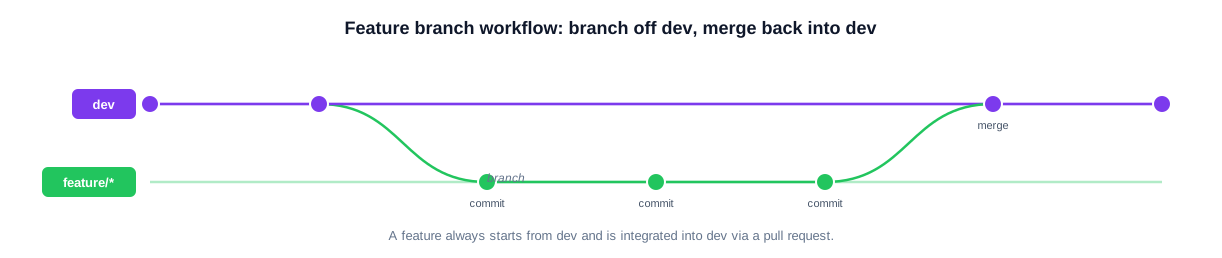
A normal feature always starts from dev, gathers several thematically clean commits, and is merged back into dev via pull request. Only afterwards does the selective path into a release follow.
Working in the feature branch
During development, small, thematically clean commits are created. The feature branch is regularly synchronised with dev – either by merge or by rebase – so that conflicts surface early and not just shortly before integration.2 5 6 7 Only artefacts that functionally belong to this ticket are changed in the feature branch. For SSDT this means: only the affected DB projects and as little large-scale reformatting or structural rework as possible; for SSIS and SSRS it additionally applies that parallel editing of the same packages or reports should be avoided organisationally, because designer- and XML-heavy files are particularly conflict-prone.
# 1) Fetch the current dev state and branch the feature
git checkout dev
git pull --ff-only origin dev
git checkout -b feature/ABC-123-new-etl-run

# 2) Small, thematically clean commits
git add src/Database/Sales/*.sql
git commit -m "ABC-123: fact table FactSalesDaily incl. index"

# 3) Sync with dev regularly (see conflicts early)
git fetch origin
git rebase origin/dev        # flatten local, not-yet-shared history
# Alternative for an already shared branch:
# git merge origin/dev       # keep the integration history

# 4) Publish the branch and open a pull request to dev
git push -u origin feature/ABC-123-new-etl-run
Entry criteria before the pull request
- Local build of the affected solutions succeeds.
- Database projects build to DACPAC artefacts.10 12
- Preliminary deploy validation or Script/DeployReport possible.10 11
- SSIS projects build to versionable artefacts.
- The branch is up to date against dev; conflicts were resolved in the feature branch, not in the target branch.
- The change is functionally cleanly scoped and explainable in the pull request.
Pull request, merge into dev and developer test
The pull request is the formal review and approval process. It bundles the functional description, review, build status and, where applicable, automated checks before integration into the target branch.1 2 3 Bitbucket lets you configure branch restrictions and merge checks so that no direct push and no unreviewed merge onto protected branches is possible.1 2 3 4 13 After the merge into dev, deployment to the dev environment happens automatically or semi-automatically – publishing DACPACs and, where applicable, SSIS/SSRS artefacts. For databases, at least a Script or DeployReport should be produced in advance to make the impact on the target/actual comparison visible.10 11 12
Using merge, rebase and cherry-pick correctly
Three Git operations form the tools with which the entire workflow functions. They differ fundamentally in their effect on history.
Merge
Merge brings the current state of one branch into another. The advantage is that the integration history stays visible and no commit history is rewritten; the disadvantage is a potentially branched, less linear history.2 6 7
Rebase
Rebase re-applies the feature branch's own commits onto the latest dev state. The advantage is a linear, clean history; the disadvantage is that the branch history is rewritten. Atlassian therefore describes rebase as a technique to use deliberately and with care – in particular not on branches that are already widely shared.6 7
Cherry-pick
Cherry-pick is the targeted adoption of individual commits into another branch. Unlike a merge, the whole branch is not merged, only the selected change. Atlassian also points out that cherry-pick is useful but not a general replacement for merge or rebase, because it creates new commits with new history and can produce a confusing history if overused.8 9
Fast-forward, no-ff and squash
When merging, there are additionally three practically important variants that determine how the target branch history looks. A fast-forward merge merely moves the branch pointer forward when no diverging commits exist – no separate merge commit is created, the history stays linear, but the information „a feature was integrated here“ is lost. A no-ff merge (--no-ff) always forces a merge commit and thus makes every integration visible as a delimited block – this is the recommended path for the long-lived branches and for release merges, because releases can then later be cleanly identified and reverted if necessary. A squash merge condenses all commits of a feature branch into a single commit; this keeps the target branch history compact but makes later cherry-picking of individual sub-changes harder. Bitbucket allows the permitted merge strategies to be specified per repository and per target branch.1 2
# MERGE: bring dev into the feature branch (history stays visible)
git checkout feature/ABC-123
git merge origin/dev

# REBASE: re-apply own commits onto the new dev state (linear history)
git checkout feature/ABC-123
git rebase origin/dev
# Caution: never rebase a branch that is already widely shared!

# CHERRY-PICK: take exactly one approved commit into release/*
git checkout release/2026.05
git cherry-pick 9f3a1c2 # only this one commit, not the whole branch| Situation | Recommended method | Reason |
|---|---|---|
| Feature branch is cleanly isolated, not mixed with foreign changes | Merge the feature branch into release/* | Good traceability |
| Feature is already in dev, but dev also contains unapproved features | Cherry-pick the approved commits into release/* | Exact selection of individual features |
| Feature was implemented across several tickets/commits | First consolidate into a cleanly portable branch, then cherry-pick or targeted merge | Avoids accidental side changes |
| A release fix in release/* must go back into dev | Cherry-pick or port branch towards dev | Controlled re-synchronisation |
For cherry-pick to work cleanly, every feature must be implemented with disciplined commit history. Mixed commits that simultaneously contain several features, refactorings and hotfixes destroy the ability to select.
Selective release with several parallel features
This is exactly where the decisive point lies: dev is an integration surface but not a direct release container. When several features exist in parallel and only some of them should go to test or production, the release content must be assembled separately.5
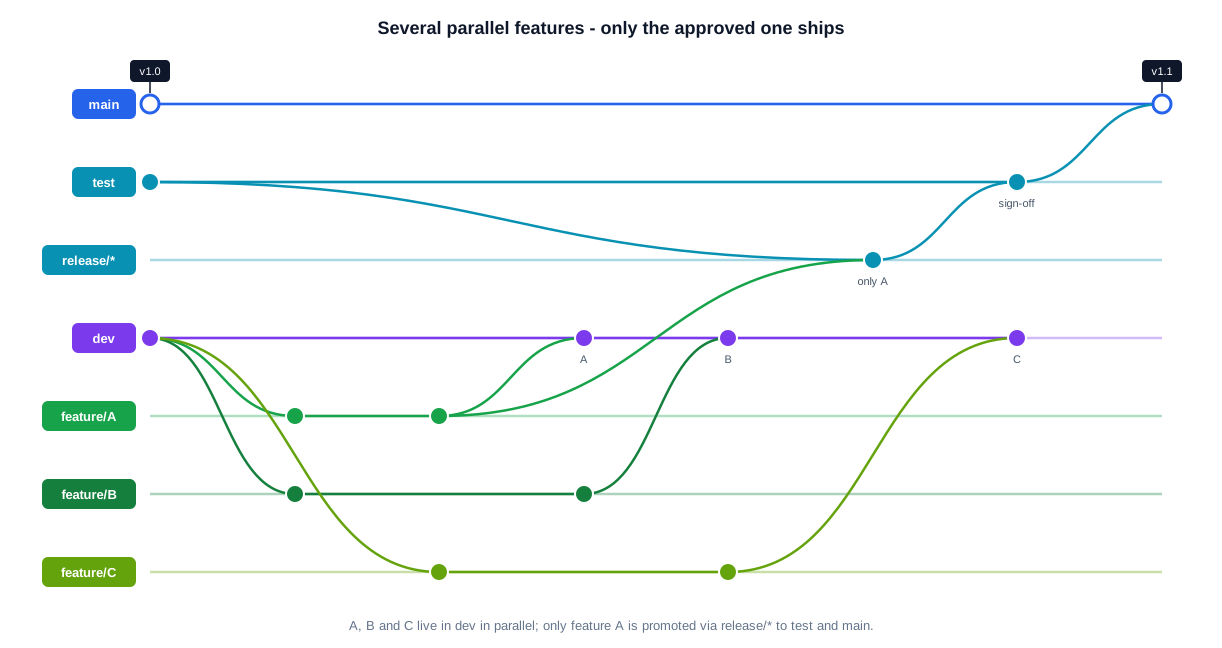
Features A, B and C lie in parallel in dev. For a release, a release/* branch is created from test, into which only feature A is taken. Only A reaches test and main; B and C remain in dev.
The basic mechanism is always the same: there is a stable test state as baseline. For a new release, a branch release/<version> is created from test. Into this release branch only the features that should actually be approved are taken. The release branch is then merged into test and deployed to the test environment; after successful acceptance, the same release branch is merged into main and deployed to production.2 5
# 1) Create the release branch from the stable test state
git checkout test
git pull --ff-only origin test
git checkout -b release/2026.05

# 2) Take ONLY feature A -- via cherry-pick of the approved commits ...
git cherry-pick 9f3a1c2 a17b8e4
# ... or via merge of a cleanly isolated port branch that contains only A:
# git merge --no-ff feature/ABC-123-portA

# 3) Promote the release to test for acceptance
git checkout test
git merge --no-ff release/2026.05
git push origin test

# 4) After acceptance: the same release branch to main + production tag
git checkout main
git merge --no-ff release/2026.05
git tag -a v2026.05 -m "Release 2026.05: feature A"
git push origin main --tags
A detailed walk-through with three parallel features
Suppose there are three features: feature A is finished and should soon go to production; feature B is intended for test but not yet production-ready; feature C is still in development and should remain on dev for now.
- Phase 1 – start from dev: feature/A, feature/B and feature/C are each created from dev. All three developers work in parallel, each branch is regularly synchronised with dev.5
- Phase 2 – integration into dev: all three are merged into dev via pull request as soon as they are ripe for the developer test – without thereby automatically becoming part of a release.1 2
- Phase 3 – release branch for test: from the current test state,
release/2026.05is created. Only feature A goes in – via cherry-pick of the A commits or via merge of a clean port branch.5 8 - Phase 4 – release to production: once A is accepted on test, the same release branch is merged into main. main and production now contain A, while B and C remain exclusively in dev.2 5
- Phase 5 – the next release: later,
release/2026.06is created from test (which now already contains A). Feature B is taken into this branch; feature C remains only in dev until it is approved.5
This procedure resolves exactly the conflict of „one feature still in dev, one in test, another in production“: the long-lived branches represent the environment baselines, while the release/* branches encapsulate the selective promotions.
Prerequisite: clean commit discipline
Selective promotion stands and falls with the quality of the commit history. For feature A to be cleanly extractable from dev at all, its commits must be unambiguously attributable to this feature. As soon as a single commit simultaneously contains parts of A, a refactoring and a side fix, it can no longer be adopted in isolation without dragging along unwanted changes. In practice this means: one commit per logical sub-change, speaking commit messages with ticket ID, and consistently avoiding „collection commits“ at the end of the day. Where a history is already unclean, a preceding clean-up step helps: the feature is first consolidated into a fresh port branch containing only A, which is then merged as a whole via --no-ff into the release branch. This keeps the release content exact and traceable.
What happens to unreleased features?
A frequent worry is: „If only feature A is released – are B and C then lost?“ No. B and C remain unchanged in dev and continue to evolve there. They simply wait for their own release train. As soon as they are approved, they are promoted just as selectively via a later release/* branch. The decisive point is that the decision „what gets delivered“ is made deliberately and at a defined moment – not implicitly because everything happened to be integrated into dev when someone merged into test.
The release branch in detail
The release branch is the heart of controlled delivery. It is created from the stable test state, takes in only approved content, is accepted on test and only then promoted to main – accompanied by a version tag.
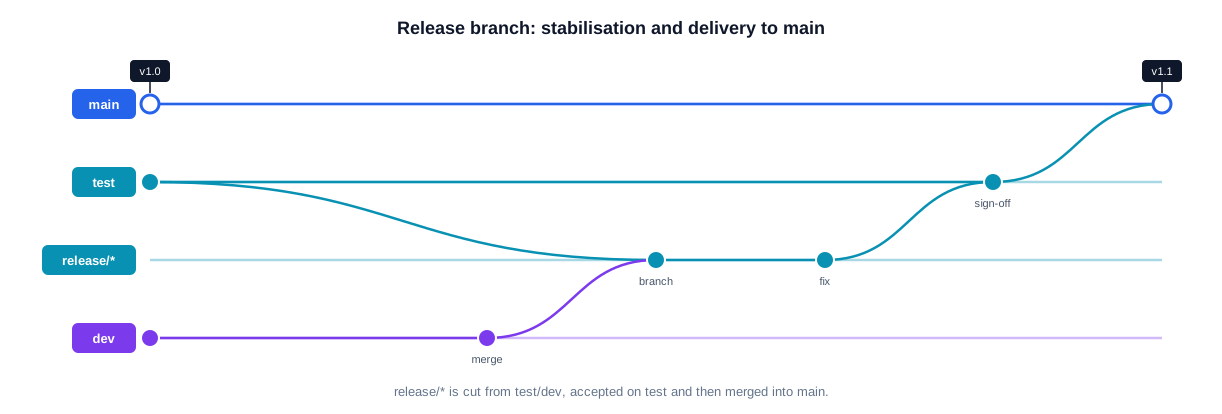
release/* is created from test or the approved dev state, supplemented with targeted fixes during the stabilisation phase, accepted on test, and finally delivered to main with a version tag.
While a release branch is open, only stabilising corrections may flow in – no new features. Every fix created here must afterwards be ported back to dev so that the development line does not reintroduce the defect. This very controlled bringing-back of an already validated fix is called a back-port and is technically often done via cherry-pick.5 8
Bugfixes and hotfixes – depending on where the defect is
Where a defect is fixed depends on where it occurs. Three cases must be distinguished.
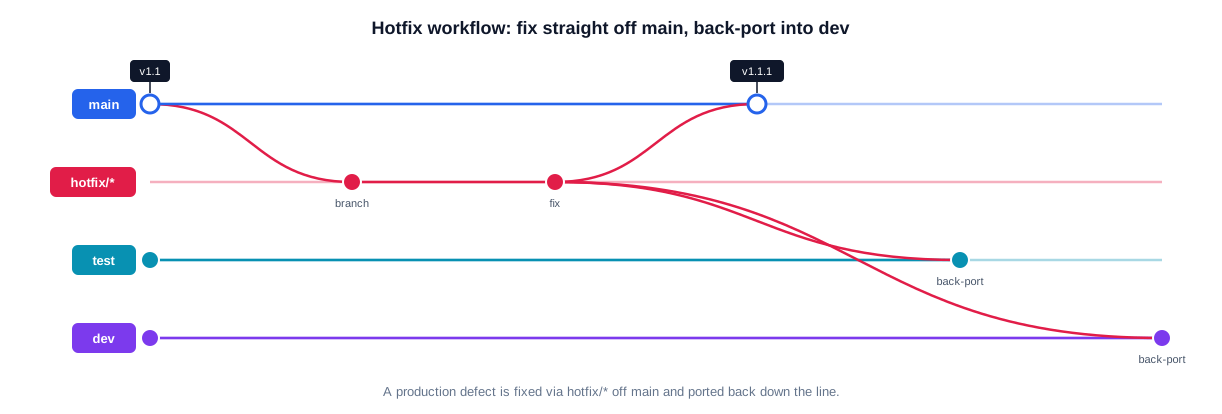
A production defect is fixed via hotfix/* from main, delivered with a version tag (e.g. v1.1.1), and afterwards mandatorily back-ported to test and dev so that the correction is not lost.
Bugfix in dev
A defect that occurs only in the development or integration state is fixed via bugfix/* from dev – for example bugfix/ABC-456-wrong-join – developed against dev and merged back into dev via pull request.5 The fix then continues quite normally with future releases.
Bugfix in test
A defect discovered only on test usually affects a specific release candidate. The fix is therefore not created as ordinary further development on dev, but on the affected release state – in release/* or, if no dedicated release branch exists yet, on test.5 The validated fix is then ported to dev in a controlled way, because if it stayed only on test, dev would later bring the same defect back. Back-porting to dev is therefore mandatory.
Hotfix in production
A production defect is always fixed on the basis of main. A hotfix/* branch is created from main, the fix implemented, merged back into main via pull request and deployed to production immediately or on an accelerated path.2 5 Afterwards the hotfix must be ported backwards: into the currently open release/* branch or to test, and then to dev. Cherry-pick is often the cleanest way here, because only exactly the hotfix should be transferred – a blanket merge from main to dev could carry along unwanted release-specific differences.5 8
# 1) Hotfix branch directly from main
git checkout main
git pull --ff-only origin main
git checkout -b hotfix/ABC-789-prod-bug

# 2) Implement the fix, PR to main, production tag
git commit -am "ABC-789: corrected NULL handling in dbo.usp_LoadFacts"
git checkout main
git merge --no-ff hotfix/ABC-789-prod-bug
git tag -a v2026.05.1 -m "Hotfix ABC-789"
git push origin main --tags

# 3) BACK-PORT (mandatory): port exactly this fix to test and dev
git checkout test  && git cherry-pick <hotfix-sha> && git push origin test
git checkout dev   && git cherry-pick <hotfix-sha> && git push origin dev
Rules for merges between dev, test and main
- Rule 1 – no permanent direct merging from dev to test. A blanket full merge dev → test would carry along every already integrated but not yet approved feature and make exactly the desired separation of A, B and C impossible. Instead: dev is the integration surface, release/* is the selection surface.5
- Rule 2 – update test only from release states. test is updated only by merging an approved
release/*branch. This keeps it traceable at all times which release candidate is on test and which features it contains.2 5 - Rule 3 – main only from test-accepted release states or hotfixes. main receives only a
release/*branch successfully accepted on test or a productionhotfix/*branch. main thus remains the production source of truth and is not contaminated with ongoing development.2 5
Pull-request and merge standards in Bitbucket
Bitbucket should be configured so that branch restrictions and merge checks are active for dev, test and main. Atlassian documents branch-specific push/merge restrictions, default reviewers and merge settings for this.1 2 3 4 13 Branch permissions control write and merge rights for specific branches or branch patterns; merge checks additionally allow conditions such as successful builds or required reviews to be enforced before a merge.3 4 13
- No direct push to dev, test, main – PR obligation for all merges.
- At least one functional and one technical reviewer for DB/ETL/report-relevant changes.
- A successful CI build as a merge prerequisite.
- Close the source branch automatically after the merge.
- Merge into test only by release owners, merge into main only by release managers/admin group – more restrictive than for dev.4
- A documented checklist for deployment, rollback, smoke test and database impact.
A CI/CD-ready target architecture for SSDT, SSIS and SSRS
A CI/CD-capable target architecture can be built directly on this workflow. For databases the standard path is: build the .sqlproj projects, generate the DACPAC, DeployReport or Script, test deployment, and then publish with SqlPackage.10 11 12 Branches represent clear environment states, several developers work in parallel, and releases are nevertheless delivered in a targeted and reproducible way.
| Event | Pipeline goal |
|---|---|
| PR on feature/* → dev | Build, static checks, DACPAC/ISPAC creation, optional smoke tests |
| Merge into dev | Deployment to dev, integration and developer tests |
| PR or merge into release/* | Release build, DeployReport, selective release validation |
| Merge release/* → test | Deployment to test, acceptance tests |
| Merge release/* → main | Deployment to production, smoke test, release tag |
| PR hotfix/* → main | Accelerated hotfix build and controlled production deployment |
# 1) Build the database project -> DACPAC
dotnet build .\\src\\Database\\Sales\\Sales.sqlproj -c Release

# 2) Change preview BEFORE the deploy (DeployReport, no write access)
SqlPackage /Action:DeployReport `
  /SourceFile:".\\bin\\Release\\Sales.dacpac" `
  /TargetConnectionString:"Server=sql-test;Database=Sales;Integrated Security=true" `
  /OutputPath:".\\artifacts\\Sales.DeployReport.xml"

# 3) Generate an idempotent upgrade script (review in the pull request)
SqlPackage /Action:Script `
  /SourceFile:".\\bin\\Release\\Sales.dacpac" `
  /TargetConnectionString:"Server=sql-test;Database=Sales;Integrated Security=true" `
  /OutputPath:".\\artifacts\\Sales.Upgrade.sql"

# 4) Only after approval: publish to the target environment
SqlPackage /Action:Publish `
  /SourceFile:".\\bin\\Release\\Sales.dacpac" `
  /TargetConnectionString:"Server=sql-test;Database=Sales;Integrated Security=true" `
  /p:BlockOnPossibleDataLoss=true
Build and deployment are cleanly separated: once built, DACPAC artefacts are used unchanged across several environments, while environment differences are steered via publish profiles, variables or pipeline parameters.
SSIS and SSRS in the pipeline
For SSIS the path is analogous: the project is built into a versionable ISPAC file and deployed via the project deployment model into the Integration Services Catalog (SSISDB) of the target environment. Environment-dependent values – connection strings, paths, thresholds – are not hard-coded in the package but set via SSIS environments and parameters at deploy time. The same built ISPAC thus remains identical in dev, test and production while only the configuration varies – exactly the same principle as with the DACPAC.
For SSRS, report definitions (.rdl) and shared data sources are fully versioned and published into the target environment via the Reporting Services interface or a deployment script. The decisive thing here is the discipline of never editing directly in the report portal: every manual change in the target system otherwise drifts away from the versioned state and is lost at the next deployment or unintentionally overwrites another correction.
Pipeline triggers along the branches
The table above translates directly into pipeline triggers: every pull request against dev runs a pure build and check run without deployment; every merge into dev is followed by an automatic deployment to the dev environment; a push to release/* produces a release build including a DeployReport for review; the merge into test triggers the test deployment, the merge into main the production deployment with a subsequent smoke test and version tag. Because each long-lived branch corresponds to exactly one environment, the mapping of „which merge triggers which deployment“ is unambiguous and needs no additional logic.
End-to-end: the complete workflow at a glance
The following overview combines all building blocks into a continuous picture: a feature passes through several iterations on dev, is selectively stabilised via a release branch, accepted on test, delivered to main – and a production defect that appears in parallel is fixed via a hotfix and back-ported.
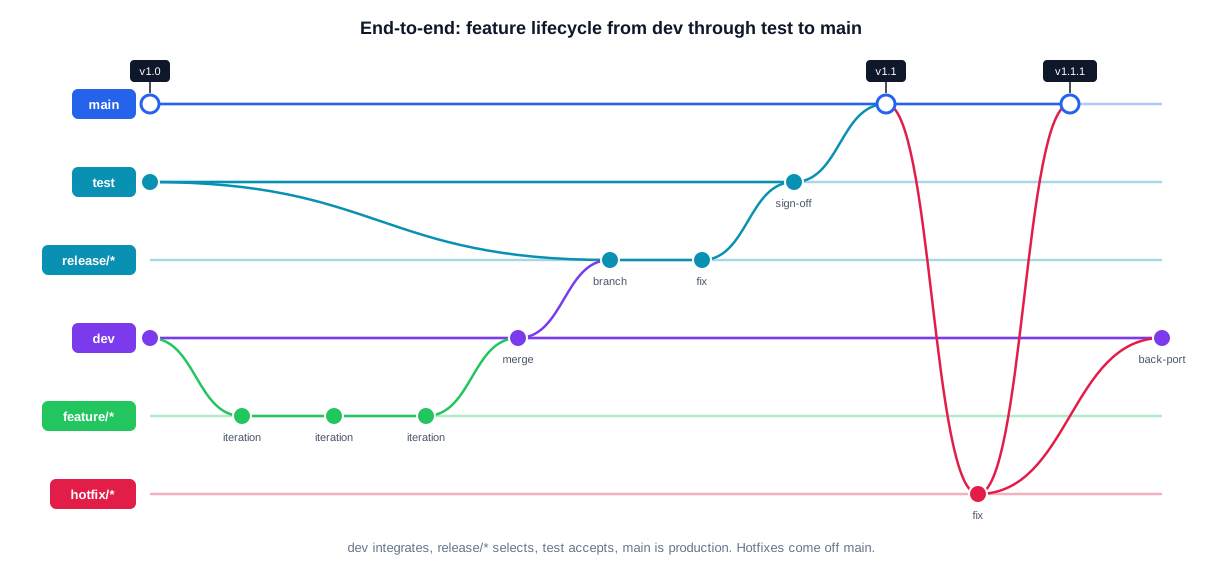
The complete lifecycle: dev integrates ongoing development, release/* selects the release content, test accepts, main is production (v1.0 → v1.1). A hotfix from main (v1.1.1) is mandatorily back-ported to dev.
This interplay is the real value: branches represent environment target states instead of arbitrary intermediate states, selective promotion decouples integration from delivery, and every fix finds its way back into the development line. For database and ETL projects, this creates a reproducible, verifiable and auditable delivery process.
Avoiding conflicts in the SSDT/SSIS/SSRS stack
Merge conflicts cannot be eliminated entirely in this stack, but they can be reduced significantly. The most important levers are small branches, small pull requests, early integration into dev, and clear ownership for conflict-prone SSIS and SSRS artefacts.
- Binding file and folder conventions for DB objects, SSIS packages and SSRS reports.
- Keep pull requests small, ideally under one functional topic.
- Integrate into dev early instead of collecting on feature branches for weeks.
- „One developer owns one artifact“ for conflict-prone SSIS/SSRS files during a story.
- Bundle refactorings of database objects in time, not in parallel with many features.
- No mixed commits across several features – so that cherry-pick and back-port remain cleanly possible.8 9
Particularities of the three artefact types
SSDT is well suited because database projects describe the target state declaratively and can be built as a DACPAC; SqlPackage supports Publish, Script and reporting.10 11 12 SSIS produces versionable build artefacts; because designer-generated files are conflict-prone, ownership per package should be unambiguous during a ticket. SSRS should be treated fully source-controlled and release-driven – reports and shared data sources must not be maintained manually in target environments, otherwise branch and environment state diverge.
One practical special case deserves attention: database refactorings such as renaming a column or splitting a table are especially prone to conflicts and potential data loss. SSDT offers refactoring logs for this, which record such renamings as a deliberate operation instead of interpreting them as „column deleted, new column created“. Anyone who versions these logs and runs SqlPackage with BlockOnPossibleDataLoss avoids a seemingly harmless refactoring silently discarding data in production. Such structural changes should be bundled in time and not run in parallel with many small features, so that selective promotion remains manageable.
A concrete instruction for the team
- Every normal feature starts from dev and merges into dev first.
- dev serves only integration, not direct promotion to test.
- For every planned release, a
release/*branch is created from test. - Only approved features go into the release branch – via cherry-pick or targeted merge of isolated branches.
release/*goes to test after a successful check; the same branch goes to main after acceptance.- Bugs in dev are fixed on dev, bugs in test on the affected
release/*state, bugs in production ashotfix/*from main. - Every fix from test or production is ported back to dev in a controlled way.
- Pull requests, branch permissions and merge checks must be configured as binding for the long-lived branches.1 3 4 13
How we work together
A branching model only delivers value once the whole team understands it, supports it and applies it consistently in day-to-day work. I bring the workflow experience, the automation and the Bitbucket configuration; the project team brings the knowledge of the existing codebase, the release cycles and the organisational constraints. From this combination emerges a process that is technically sound and actually lived in operation – rather than a document that nobody looks at after two weeks.
Typical project start
I usually begin with an assessment: what do the current branches look like, how is merging done today, which environments (dev, test, main) exist and how are they supplied? I review the existing Bitbucket or Azure DevOps configuration, the merge checks, the branch permissions and the available build pipelines. The result is a clear baseline with concrete, prioritised improvements – from the missing port-back to the unprotected main. This first step typically takes one to three days and creates the shared foundation before larger workflow changes are made.
Iterative rollout
The rollout happens step by step, without a big bang. First the long-lived branches are protected and the merge rules made binding; then the feature, bugfix and hotfix process follows, along with the selective release via release/*. Each stage is agreed with the team, documented and tested on a real release before the next stage begins. This keeps operations fully functional at all times.
- Assessment of branches, merges, environments and pipelines
- Step-by-step protection of the long-lived branches (dev, test, main)
- Binding merge checks, branch permissions and pull-request rules
- Validation on a real release instead of a purely theoretical rollout
- Knowledge transfer, cheat sheets and short hands-on sessions for the team
It matters to me that the workflow fits the organisation and not the other way round. A small team with one release per quarter needs different rules than a team shipping weekly. I adapt the model to the real release frequency, the number of parallel initiatives and the regulatory requirements.
Typical services around Git and Gitflow
Depending on the starting point and project goal, I take on different tasks – from a one-off introduction of a branching model to the ongoing care of the pull-request and CI/CD processes of a SQL, SSIS and SSRS landscape.
- Design of a branching model with dev, test and main, matching the release frequency
- Introduction of feature, bugfix, hotfix and release branches with clear rules
- Selective promotion of individual features via
release/*by merge or cherry-pick - Definition and implementation of the controlled port-back of fixes to dev
- Bitbucket configuration: branch permissions, merge checks, required reviewers
- Pull-request standards, commit conventions and review guidelines
- Merge, rebase and cherry-pick strategy including team training
- Conflict avoidance through small, frequent integrations and clear ownership
- CI/CD for SSDT database projects: build to DACPAC, DeployReport and publish with SqlPackage
- Build and deployment pipelines for SSIS packages and SSRS reports
- Automated tests and quality gates as a merge prerequisite
- Documentation, runbooks and knowledge transfer for development and operations teams
Many version-management problems are not isolated: frequent merge conflicts are often a symptom of overly long-lived feature branches, accidentally shipped features a symptom of missing selective promotion, and recurring production bugs a symptom of missing port-backs. I therefore always consider the workflow together with the CI/CD pipeline and the deployment reality.
Whether as a one-off introduction project, a review of an existing workflow or ongoing support – the scope follows your needs. Even a clearly bounded mandate, such as “protect main and set up CI/CD for SSDT”, is a sensible entry point.
Selected reference projects
Savings bank / financial services
Introduction of an end-to-end branching workflow with dev, test and main for SQL database projects. Build pipelines producing a DACPAC per branch, plus controlled deployment via SqlPackage and PowerShell. Branch permissions and merge checks secured the production-relevant main; selective releases via release/* replaced the previous blanket merging.
Logistics / corporate group
Standardisation of version management for a grown SSIS and SSRS landscape. Introduction of feature, bugfix and hotfix branches with a mandatory port-back to dev, plus build and deployment pipelines for packages and reports. Result: traceable deliveries and significantly fewer conflicts between parallel initiatives.
Insurance / reinsurance
Establishment of a selective release process in which only approved features are promoted via release/* to test and main. Training of the team in merge, rebase and cherry-pick strategies, plus the definition of clear pull-request and review rules. This made regulatory-sensitive releases controllable and audit-proof.
Public sector / research
Protection of the long-lived branches through branch permissions, required reviewers and green builds as a merge prerequisite. Creation of a documented action guide for the entire branching and release process, including runbooks and cheat sheets, so the workflow works independently of individuals.
Key terms briefly explained
The following terms appear throughout the workflow and are defined compactly here so that everyone involved understands the same thing:
- Long-lived branch: a permanently existing branch (dev, test, main) that represents an environment target state and is never deleted.
- Short-lived branch: a working branch (feature/*, bugfix/*, hotfix/*, release/*) created for a specific purpose and closed again after the merge.
- Integration: merging several development states on dev so that incompatibilities surface early – without thereby granting an approval.
- Promotion: the deliberate passing on of a checked state into the next-higher environment (dev → test → main), steered via release/* branches.
- Selective promotion: the targeted selection of individual features for a release, instead of delivering „everything currently in dev“ wholesale.
- Back-port: the controlled bringing-back of an already validated fix from test, release/* or main into dev, so that the defect does not reappear.
- DACPAC: the built, declarative artefact of an SSDT database project that describes the database target state and is published with SqlPackage.10 11
- DeployReport: a pre-analysis by SqlPackage that shows, without write access, which changes a deployment would trigger.10 11
- Merge check / branch permission: conditions configurable in Bitbucket (green build, minimum reviewers, push ban) that allow a merge onto protected branches only after they are met.3 4
Frequently asked questions
Why not simply merge dev into test and test into main?
Because then every not-yet-approved feature state would be delivered automatically. As soon as several features run in parallel and only some should be released, selective promotion via release/* is indispensable.5
When cherry-pick and when a branch merge?
If a feature branch is cleanly isolated, a merge into release/* is easy to trace. If the feature is already together with others in dev, you select the approved commits exactly via cherry-pick.8 9
Does a hotfix really have to go back into dev?
Yes. If the fix stayed only in main or test, the development line would bring the defect back at the next release. The back-port – usually via cherry-pick – is therefore mandatory.5 8
Is the model suitable for pure SSDT database projects?
Especially well. SQL Database Projects describe the target state declaratively and are built as a DACPAC; SqlPackage produces DeployReport, Script and Publish – ideal for controlled promotion between dev, test and main.10 11 12
Sources
The following sources were used for branching recommendations, Bitbucket rules, term definitions and the SQL/CI/CD reference:
- 1 Atlassian Support – Pull request and merge settings – https://support.atlassian.com/bitbucket-cloud/docs/pull-request-and-merge-settings/
- 2 Atlassian Support – Merge a pull request – https://support.atlassian.com/bitbucket-cloud/docs/merge-a-pull-request/
- 3 Atlassian Support – Suggest or require checks before a merge – https://support.atlassian.com/bitbucket-cloud/docs/suggest-or-require-checks-before-a-merge/
- 4 Atlassian Support – Use branch permissions – https://support.atlassian.com/bitbucket-cloud/docs/use-branch-permissions/
- 5 Microsoft Learn – Git branching guidance – https://learn.microsoft.com/en-us/azure/devops/repos/git/git-branching-guidance?view=azure-devops
- 6 Atlassian – Merging vs. Rebasing – https://www.atlassian.com/git/tutorials/merging-vs-rebasing
- 7 Atlassian Community – Alternatives to Git merge: Rebase and Cherry-pick – https://community.atlassian.com/forums/Bitbucket-articles/Alternatives-to-Git-merge-Git-s-Rebase-and-Cherry-pick/ba-p/2482241
- 8 Microsoft Learn – Copy changes to a branch with cherry-pick – https://learn.microsoft.com/en-us/azure/devops/repos/git/cherry-pick?view=azure-devops
- 9 Atlassian – Git Cherry Pick Tutorial – https://www.atlassian.com/git/tutorials/cherry-pick
- 10 Microsoft Learn – SqlPackage in Development Pipelines – https://learn.microsoft.com/en-us/sql/tools/sqlpackage/sqlpackage-pipelines?view=sql-server-ver17
- 11 Microsoft Learn – SqlPackage – https://learn.microsoft.com/en-us/sql/tools/sqlpackage/sqlpackage?view=sql-server-ver17
- 12 Microsoft Learn – SQL projects automation – https://learn.microsoft.com/de-de/sql/tools/sql-database-projects/sql-projects-automation?view=sql-server-ver17
- 13 Bitbucket – Features / Merge checks – https://bitbucket.org/product/en/features


