Positioning
The cloud has fundamentally changed how data platforms are built. Where servers once had to be procured, sized, and operated for years, storage, compute, and services in Microsoft Azure can now be provisioned in minutes. This freedom is both a blessing and a risk: an Azure data platform can be enormously powerful, secure, and cost-effective – or it can turn into an opaque, expensive patchwork. The difference lies in the architecture and operations, not in the services themselves.
This is precisely my focus: I build data platforms in Azure that follow a clear architecture, are designed to be secure from the outset, can be deployed in an automated fashion, and whose costs remain manageable. My background is not purely in the cloud world, but in decades of work with SQL Server, data warehouses, and ETL pipelines. This heritage shapes my perspective: a cloud platform is not an end in itself, but a means to answer business questions reliably.
In Azure projects I have worked across the full spectrum of data services: Azure Data Factory for orchestration, Azure Synapse for analytics and processing, Azure Databricks with Parquet and Delta Lake files for large data volumes, Azure Storage as the foundation of the data lake, Entra ID for identity and access, and Key Vault for the secure management of secrets. This is complemented by Azure DevOps for CI/CD and a consistent focus on costs.
Clients typically bring me in when an existing on-premises environment needs to move to the cloud, when an existing Azure landscape has become unmanageable or too expensive, or when a new platform needs to be built from the ground up. In all these cases the challenge is less about individual services and more about how they fit together: how do ingestion, storage, processing, security, and operations interlock so that the result is a reliable, maintainable platform?
What Makes an Azure Data Platform
A data platform in Azure consists of several building blocks, each with a clear purpose. Understanding these building blocks and how they interact allows you to design a platform that fits the actual business requirement – rather than randomly combining services because they happen to be available.
Storage: the data lake as foundation
At the centre typically sits a data lake based on Azure Data Lake Storage Gen2. Raw data from all sources lands here before being processed. The lake is inexpensive, practically unlimited in scale, and decouples storage from compute. This decoupling is one of the greatest advantages of the cloud: storage and compute can be sized and billed independently of each other.
Orchestration: Azure Data Factory
Azure Data Factory is the conductor. Pipelines retrieve data from sources, trigger processing steps, handle errors, and control the temporal flow via triggers. ADF connects the building blocks without itself performing the heavy data processing – it delegates that to the specialised services.
Processing: Synapse and Databricks
The actual processing of large data volumes takes place in Azure Synapse or Azure Databricks. Synapse bundles SQL-based analytics, Spark, and pipelines in a single environment; Databricks is the specialised Spark platform for demanding transformations and for working with Delta Lake. In my projects I have processed data as Parquet and Delta files, using both Synapse pipelines and Databricks notebooks.
Security and identity: Entra ID and Key Vault
Identity and access in Azure flows through Microsoft Entra ID (formerly Azure Active Directory). Secrets such as connection strings, keys, and certificates do not belong in code or configuration files, but in Azure Key Vault. These two building blocks are the backbone of a secure platform.
- Data Lake (Storage Gen2) as an inexpensive, scalable foundation
- Azure Data Factory as central orchestration
- Synapse and Databricks for the actual processing
- Delta Lake for ACID transactions and historisation in the lake
- Entra ID and Key Vault for identity, access, and secrets
- Azure DevOps for automated, traceable deployment
Why clear separation of building blocks matters
The decisive difference between a good and an arbitrary Azure platform lies not in the choice of services, but in the clarity of their division of responsibilities. Each building block should carry exactly one responsibility: the lake stores, Data Factory orchestrates, the processing services compute, Entra ID and Key Vault secure. When these roles become mixed – for example when business logic migrates into orchestration pipelines or secrets end up in configuration files – the result is a platform that is hard to understand, test, and operate. Clean separation is not an end in itself, but the foundation for maintainability over years.
These building blocks do not form a rigid corset. Which services are actually used depends on the concrete requirements. A smaller initiative may need neither Databricks nor dedicated SQL pools, but gets by with Data Factory, the lake, and serverless SQL. A large, data-intensive initiative, by contrast, justifies the full breadth. The art lies in building only as much platform as the requirement demands – and designing it so that it can grow as needs increase.
Reference Architecture in Azure
Across multiple projects a reference architecture has proven itself that processes data in clearly separated stages: from the source through ingestion into the lake, from there through the processing layers to delivery to reports and self-service BI. Each stage has a defined purpose, and security and operations sit above everything as a cross-cutting concern.
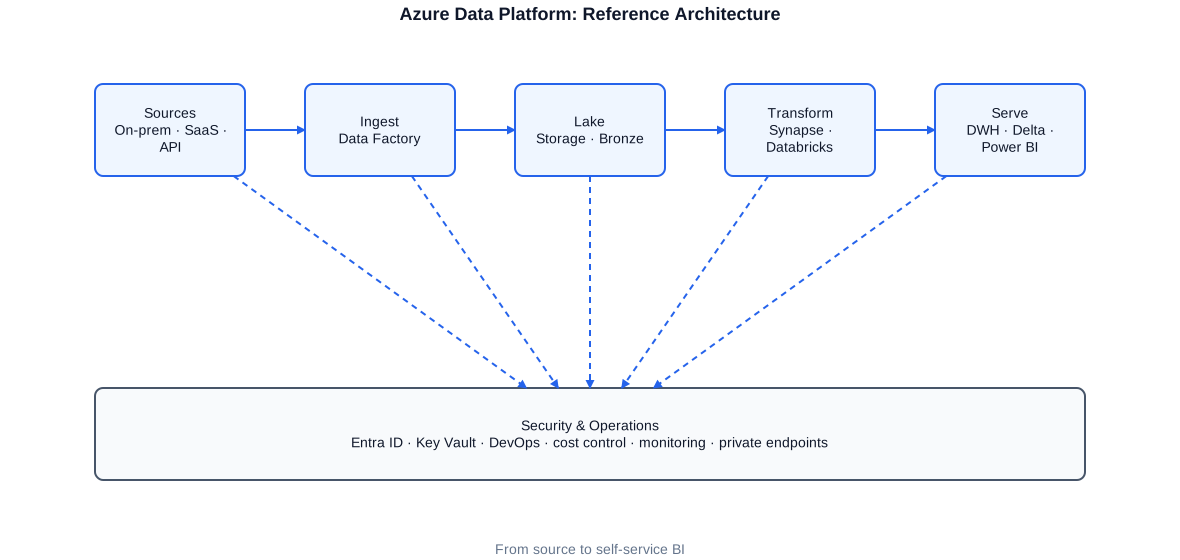
Reference architecture of an Azure data platform: sources, ingestion via Data Factory, Data Lake, processing in Synapse and Databricks, delivery to DWH and Power BI – flanked by security and operations.
Sources range from on-premises databases through SaaS applications to APIs and file deliveries. Azure Data Factory reads these sources and initially writes the raw data unchanged to the data lake. Only there does the actual processing begin, progressively refining the data until it is suitable for analysis. The result is either written to a relational data warehouse or provided directly as curated Delta tables and consumed by Power BI.
The key idea of this architecture is the separation of responsibilities. Ingestion is solely concerned with reliably bringing data into the lake. Processing is concerned with business rules and quality. Delivery is concerned with the optimal form for the respective analysis. This separation makes the platform understandable, testable, and extensible: a new source touches only ingestion, a new analysis only delivery.
Ingestion with Azure Data Factory
Ingestion is the first and in many respects most delicate step: sources are connected that cannot be changed, that are only available at certain times, and that must not be slowed down by large queries. Azure Data Factory is the tool of choice to make this connection robust and traceable.
A recurring pattern is the parameterised, metadata-driven pipeline. Instead of building a separate pipeline for each table, I store the objects to be loaded in a control table and iterate over them with a single generic pipeline. This considerably reduces maintenance effort and turns adding a new source into a pure configuration step.
{
  "name": "PL_Ingest_Generic",
  "properties": {
    "activities": [
      {
        "name": "LookupTablesToLoad",
        "type": "Lookup",
        "typeProperties": {
          // Reads the list of tables to load from the control table
          "source": { "type": "AzureSqlSource",
            "sqlReaderQuery": "SELECT SchemaName, TableName, WatermarkColumn FROM ctrl.LoadTable WHERE IsActive = 1" },
          "firstRowOnly": false
        }
      },
      {
        "name": "ForEachTable",
        "type": "ForEach",
        "dependsOn": [ { "activity": "LookupTablesToLoad", "dependencyConditions": [ "Succeeded" ] } ],
        "typeProperties": {
          "items": { "value": "@activity('LookupTablesToLoad').output.value", "type": "Expression" },
          "isSequential": false,   // parallel processing of tables
          "batchCount": 8,
          "activities": [
            {
              "name": "CopyToLake",
              "type": "Copy",
              "typeProperties": {
                // Incremental extract based on the watermark column
                "source": { "type": "AzureSqlSource",
                  "sqlReaderQuery": {
                    "value": "SELECT * FROM [@{item().SchemaName}].[@{item().TableName}] WHERE [@{item().WatermarkColumn}] > '@{pipeline().parameters.LastWatermark}'",
                    "type": "Expression" } },
                // Target: Bronze layer in the data lake as Parquet
                "sink": { "type": "ParquetSink" }
              }
            }
          ]
        }
      }
    ],
    "parameters": { "LastWatermark": { "type": "string" } }
  }
}
A single generic pipeline loads any number of tables incrementally into the Bronze layer. New sources are added solely through the control table – without any changes to the pipeline.
A key requirement for me is that ingestion is idempotent and restart-capable. If a run aborts, it must be safely repeatable without producing duplicate data. The watermark is therefore advanced only after a successful run, and the Bronze layer records exactly what was actually delivered – serving as an audit and restart point.
Lakehouse, Delta Lake, and Medallion Architecture
The lakehouse combines the flexibility and low cost of a data lake with the guarantees familiar from a data warehouse. The foundation for this is Delta Lake: an open storage format based on Parquet that brings ACID transactions, time travel, and schema management to the data lake. In my Azure projects I have built data as Parquet and Delta files and processed them via Databricks.
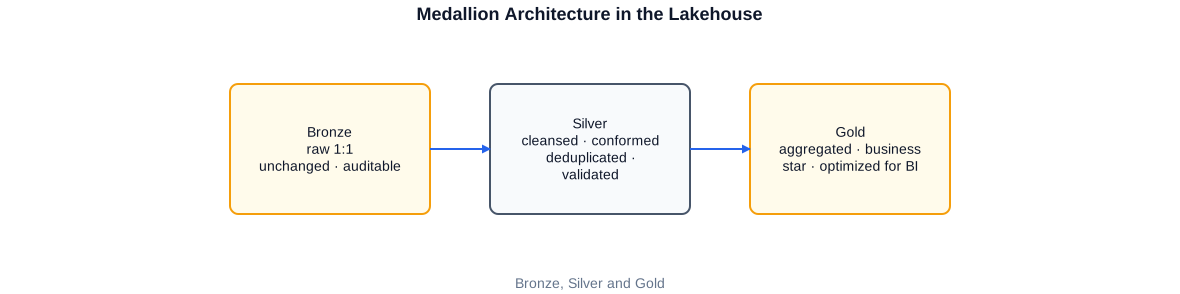
The medallion architecture progressively refines data: Bronze holds raw data, Silver holds cleansed and conformed data, Gold holds business-aggregated data optimised for BI.
Data passes through three layers. The Bronze layer holds raw data unchanged, as it was delivered – this is the auditable truth about what arrived. The Silver layer contains cleansed, deduplicated, and standardised data: data types are corrected here, keys are unified, and business plausibility checks are applied. The Gold layer finally contains business-aggregated data optimised for analysis, often already as a star schema.
# Refines raw records from the Bronze layer and writes cleansed,
# deduplicated rows idempotently into the Silver layer (Delta Lake).
from pyspark.sql import functions as F
from delta.tables import DeltaTable

# 1) Read only new records from the Bronze layer (incremental)
last_wm = (spark.sql("SELECT MAX(processed_ts) AS wm FROM ctrl.watermark WHERE entity='customer'")
                .collect()[0]["wm"])

bronze = (spark.read.format("delta").table("bronze.customer")
              .filter(F.col("ingest_ts") > F.lit(last_wm)))

# 2) Cleansing and standardisation
silver = (bronze
          .withColumn("email", F.lower(F.trim("email")))   # normalisation
          .filter(F.col("customer_id").isNotNull())         # mandatory field
          .dropDuplicates(["customer_id"])                  # deduplication
          .withColumn("processed_ts", F.current_timestamp()))

# 3) Idempotent upsert into the Silver layer
target = DeltaTable.forName(spark, "silver.customer")
(target.alias("t")
   .merge(silver.alias("s"), "t.customer_id = s.customer_id")
   .whenMatchedUpdateAll()
   .whenNotMatchedInsertAll()
   .execute())
Delta Lake makes the MERGE transactionally safe and idempotent. A repeated run with the same data changes nothing – exactly the behaviour a reliable platform requires.
Processing with Synapse and Databricks
For the actual processing, Azure offers several paths. Which is the right one depends on data volume, team expertise, and the existing landscape. I choose deliberately and justify the choice rather than following a trend.
Azure Synapse
Azure Synapse bundles several capabilities in one environment: dedicated and serverless SQL pools for relational analytics, Spark pools for distributed processing, and integrated pipelines that are technically identical to those of Azure Data Factory. Synapse is a good choice when a team comes from the SQL world and relational analytics are front and centre. Serverless SQL pools allow files in the lake to be queried directly via T-SQL without loading them first – a powerful tool for exploration and for lean delivery layers.
Azure Databricks
Azure Databricks is the specialised Spark platform and my tool of choice for demanding transformations, large data volumes, and working with Delta Lake. Databricks notebooks can be orchestrated from Azure Data Factory, making the processing part of the overall pipeline. In projects I have extracted data into Databricks, prepared it there as Parquet and Delta files, and made it available for further use.
An important consideration is compute cost. Spark clusters cost money while they are running. I therefore ensure that clusters shut down automatically when not in use, that jobs run on appropriately sized clusters, and that unnecessary repetitions are avoided. This discipline has a decisive impact on the monthly bill.
A practical example of how the two work together: Databricks prepares the data as Delta and Parquet files in the Gold area of the lake, and serverless Synapse SQL lays lean, queryable views on top without copying the data again. This way, compute is paid for only when a query actually runs, avoiding an expensive, permanently running database just for delivery.
-- Creates a queryable view directly on the Gold files in the lake.
-- No data is copied; the query reads the Parquet files directly.
CREATE OR ALTER VIEW gold.SalesByMonth AS
SELECT
    -- Aggregated revenue per month for delivery to Power BI
    YEAR(order_date)  AS order_year,
    MONTH(order_date) AS order_month,
    SUM(net_amount)   AS revenue
FROM OPENROWSET(
        BULK 'https://lakedataplatform.dfs.core.windows.net/gold/sales/',
        FORMAT = 'PARQUET'   -- Direct read access to the Gold layer
     ) AS sales
GROUP BY YEAR(order_date), MONTH(order_date);
This view can be queried directly from Power BI. The compute cost arises only when the query runs – without a permanently running database for delivery.
Security: Entra ID, Key Vault, and Networking
Security in the cloud is not optional, but a prerequisite. A data platform often processes sensitive data – personal information, financial data, business secrets. I therefore plan security from the start, not as a post-hoc hardening. Three layers interlock here: identity, secrets, and networking.
Identity and access via Entra ID
Every access – whether by humans or services – runs through Microsoft Entra ID. Services such as Data Factory or Databricks are assigned a managed identity, with which they authenticate themselves to Storage, SQL, and Key Vault. The big advantage: no passwords or keys need to be stored that could be compromised. Access follows the principle of least privilege – each identity receives only what it actually needs.
Secrets in Key Vault
Connection strings, API keys, and certificates belong in Azure Key Vault, not in code or configuration files. Pipelines and notebooks retrieve secrets at runtime from the vault, secured via the managed identity. This means no secret is ever exposed in a repository or in a configuration file.
# Reads a secret from Azure Key Vault via the managed identity.
# No password and no key is stored in code or in a file.
from azure.identity import DefaultAzureCredential
from azure.keyvault.secrets import SecretClient

VAULT_URL = "https://kv-dataplatform-prod.vault.azure.net/"

# The managed identity authenticates automatically against Entra ID
credential = DefaultAzureCredential()
client = SecretClient(vault_url=VAULT_URL, credential=credential)

# Connection string retrieved at runtime from the vault
sql_conn = client.get_secret("sql-dwh-connection").value

# ... the secret is held only in memory, never persisted ...
Via the managed identity, every stored password is eliminated. This is not only more secure, but also simplifies operations since no keys need to be rotated manually.
Networking and data isolation
At the network level, private endpoints ensure that traffic between services does not touch the public internet. Storage, SQL, and Key Vault can be secured so that they are only reachable from the defined virtual network. In regulated environments – such as financial services or the public sector – this isolation is often mandatory.
CI/CD and Infrastructure as Code
A cloud platform is software – and software belongs under version control and in an automated delivery pipeline. In several projects I have built Azure DevOps pipelines that deploy both code and infrastructure automatically and traceably. The result: every change is documented, repeatable, and identical across every environment.
At an industrial company I migrated SSIS pipelines and built Azure DevOps pipelines for automated builds. In a consulting and MDM project I deployed Azure Data Factory and Key Vault through automated workflows. The principle is always the same: manual clicks in portals are the source of errors and of differences between environments. Describing infrastructure as code eliminates this source of errors.
# Deploys Data Factory artefacts and the underlying infrastructure
# automatically to the target environment.
trigger:
  branches: { include: [ main ] }

variables:
  - group: dataplatform-prod   # Variables/secrets come from Key Vault

stages:
- stage: Deploy_Infra
  jobs:
  - job: Bicep
    pool: { vmImage: 'ubuntu-latest' }
    steps:
    - task: AzureCLI@2
      displayName: 'Deploy infrastructure as code (Bicep)'
      inputs:
        azureSubscription: 'sc-dataplatform'
        scriptType: bash
        scriptLocation: inlineScript
        inlineScript: |
          az deployment group create \
            --resource-group rg-dataplatform-prod \
            --template-file infra/main.bicep \
            --parameters env=prod

- stage: Deploy_ADF
  dependsOn: Deploy_Infra
  jobs:
  - job: ADF
    pool: { vmImage: 'ubuntu-latest' }
    steps:
    - task: AzurePowerShell@5
      displayName: 'Publish Data Factory pipelines'
      inputs:
        azureSubscription: 'sc-dataplatform'
        ScriptType: 'InlineScript'
        Inline: |
          # Publishes the Data Factory ARM templates to the target environment
          ./deploy/Publish-AdfFromArm.ps1 -Environment 'prod'
Infrastructure and artefacts are deployed in the same pipeline. This guarantees that the Data Factory always matches the infrastructure it runs on.
For version control I use Git in the variants Azure DevOps, GitHub, GitLab, and Bitbucket, depending on the project. Branch strategies, pull requests, and automated tests ensure that changes are reviewed before they reach production-adjacent environments.
The practical benefit of this discipline becomes clear at the latest when a change needs to be rolled back. Where infrastructure is described as code and every deployment is versioned, an earlier working state can always be restored – without detective work into who changed what in the portal and when. This reproducibility is not only convenient in regulated environments but is often a mandatory requirement, because every change must be traceably and revision-safely documented.
Cost Control and FinOps
The cloud charges by consumption. That is fair, but unforgiving: a forgotten compute resource, an unnecessary full load, or an over-provisioned cluster show up immediately on the bill. In my Azure projects I have deliberately implemented cost-reduction measures – not as a one-off action, but as an ongoing discipline.
- Incremental loading instead of repeated full loads – less data processed, lower costs
- Automatic pausing and shutdown of compute resources outside load windows
- Appropriate sizing of clusters and SQL pools instead of blanket over-provisioning
- Lifecycle rules in storage: move cold data to cheaper storage tiers
- Serverless services where load is irregular
- Cost transparency via tags, budgets, and breakdowns per area
A concrete example: at a textile and service provider I built load processes via Azure Synapse and Data Factory and deliberately implemented measures to reduce Azure costs. The lever was rarely a single large line item, but the sum of many small decisions: What really needs to run every hour? Which data really needs to be fully reloaded? Which clusters are really needed overnight?
Cost transparency builds trust
The most effective lever against spiralling costs is not frugality, but visibility. As long as nobody knows which area, pipeline, or report is causing which costs, every savings measure is groping in the dark. That is why I consistently tag resources – by area, environment, and purpose – so that the monthly bill can be broken down by cost centre. Only this transparency enables a factual discussion about whether a line item is justified or not.
Budgets and automatic alerts complement this picture. When an environment reaches its monthly budget at an unusually early point, that is a signal worth investigating – often a forgotten cluster, an accidentally triggered full load, or a misconfigured retry is behind it. This transforms the monthly surprise into a controllable figure. Costs become not a taboo subject but a jointly owned metric that is monitored as routinely as runtimes or error rates.
Operations, Monitoring, and Governance
A platform that is built but not operated deteriorates. That is why I plan operations, monitoring, and governance from the outset. The goal is that the platform remains understandable, observable, and controllable even years later.
Monitoring and alerting
Every run is logged, every error produces a traceable message. Azure Monitor and Log Analytics collect the telemetry of the services, making it possible to see at a glance which pipelines were successful, how long they took, and where things are stuck. In the event of a failure, alerting reaches the right people in time.
Governance and data catalogue
As the platform grows, oversight becomes important: which datasets exist? Where do they come from? Who is allowed to use them? Microsoft Purview and a consistent approach to naming conventions, tags, and documentation ensure the platform does not become an impenetrable data graveyard. Combined with master data management – for example via MDS or Profisee, both of which I have worked with in multiple projects – a reliable foundation of master data emerges.
Governance is not bureaucracy for its own sake. It is the prerequisite for data being trusted and used. A figure whose origin nobody knows is rightly questioned. A figure that is traceable to its source and whose calculation is documented builds trust.
Operability as a deliverable
Operations do not begin after delivery, but are built in from the start. I place great importance on a platform being self-explanatory enough to be taken over by a team that was not involved in building it. This includes uniform naming conventions across all services, a coherent scheme for resource groups and environments, and a clear separation between development, test, and production. Anyone looking at a resource should be able to recognise from its name what it belongs to, which environment it is in, and who is responsible for it.
A recurring theme is restart capability after disruptions. Cloud services are reliable, but not infallible: a source is briefly unavailable, a service responds more slowly than usual, a run is aborted. A well-built platform handles this gracefully rather than breaking. Pipelines are designed so they can be safely restarted without writing data twice. Idempotency is the key word here: the same run may be executed twice and must produce the same result.
Finally, operability also means having a realistic picture of what needs to happen in an emergency. I document which pipelines are business-critical, in which order they must come back up after an outage, and which data can be regenerated if necessary. This clarity prevents hectic improvisation in an actual incident.
Migration from On-Premises to Azure
Many projects do not start on a greenfield site, but with a grown on-premises landscape that needs to move to the cloud. This migration is demanding because the live operations must not be interrupted and years of business logic must not be lost. My decades of experience with SQL Server, SSIS, and data warehouses is a genuine advantage here: I understand both the world being migrated from and the world being migrated to.
I have migrated SSIS packages from older to newer SQL Server versions and moved existing pipelines step by step into the cloud. A phased approach has proven itself over a risky big-bang migration: first, sources are loaded in parallel into the lake, then processing is gradually shifted to the cloud, and finally reports are switched over. This keeps the old state available at all times as a fallback.
- Inventory of sources, pipelines, reports, and business rules
- Design the target architecture in Azure and align it with stakeholders
- Phased migration with parallel operation instead of a risky big bang
- Reconciliation of old versus new results as a business safeguard
- Switching reports only after proven equivalence
- Decommissioning the legacy landscape as the final, controlled step
What really takes effort in a migration
The technical transfer of pipelines is rarely the hardest part of a migration. The real work lies in the business logic that has grown over years, which is often not completely documented anywhere. In grown SSIS packages and stored procedures, edge cases, exceptions, and silent assumptions are hidden that work in live operations but are no longer present in anyone's memory. Exposing, understanding, and cleanly transferring this logic to the new world is the true value of a well-thought-out migration.
This is where my long background in SQL Server, SSIS, and data warehouses pays off directly. I can read grown code, reconstruct its intent, and judge which idiosyncrasies are business-justified and which are historically accumulated legacy. A migration is always also an opportunity to clean up – but only where cleaning up does not distort the outcome. The results comparison between old and new is the safeguard that prevents figures from silently shifting during the move.
The parallel operation costs temporarily double the effort, but this investment is almost always worth it. As long as the old and the new world run side by side, every deviation can be investigated before it goes live. Only when the new platform demonstrably delivers the same results over multiple load cycles is the switch made – and the legacy landscape shut down in a controlled manner, not hastily torn apart.
Working Approach and Collaboration
A good Azure platform begins with understanding, not with services. Before I build anything, I form a clear picture of the sources, the business requirements, the security requirements, and the budget. Only from this does the right architecture emerge.
- Analysis: understand sources, requirements, security requirements, and budget
- Architecture: define services, layers, security, and cost framework
- Implementation: build the platform iteratively, deployed in an automated manner from the start
- Security and testing: secure identity, secrets, networking, and data quality
- Operations: monitoring, governance, cost control, and documentation
I work remotely, in a hybrid mode, and on-site, alone or as part of an existing team. Over the years I have worked in very different industries – public sector, financial services, manufacturing, retail, and professional services. This variety helps because proven patterns can be transferred without ignoring the idiosyncrasies of each organisation.
Typical Services Around Azure
Depending on the project phase and requirement I take on different tasks around the Azure data platform – from architecture through implementation to operations.
- Architecture and build of data platforms in Azure
- Ingestion with Azure Data Factory, metadata-driven and restart-capable
- Lakehouse and medallion architecture with Delta Lake
- Processing with Azure Synapse and Azure Databricks (Parquet, Delta, PySpark)
- Security via Entra ID, managed identities, Key Vault, and private endpoints
- CI/CD and infrastructure as code with Azure DevOps
- Cost analysis and targeted cost reduction (FinOps)
- Migration of existing on-premises pipelines to Azure
- Monitoring, governance, and technical documentation
- Connection of Power BI and delivery to self-service BI
Whether the need is for an initial design, a concrete implementation, or the stabilisation of an already running platform – I step in where the need is greatest. In some projects I start with an architecture on the drawing board, in others I take over a half-finished platform and bring it to a solid state. This flexibility is particularly valuable for initiatives that are not starting from zero but building on an existing base.
What connects all these tasks is an end-to-end understanding of the full pipeline – from the source to the finished report. This end-to-end understanding is precisely what distinguishes a platform that works on paper from one that holds up in day-to-day operations. Those who know only one part of the chain easily optimise in the wrong place; those who oversee the whole chain can see where the real bottleneck is and where effort is truly worthwhile.
Selected anonymised reference projects
Textile & service provider
Build of load processes via Azure Synapse and Azure Data Factory, extraction into Databricks as Parquet and Delta files, connection of Power BI, and targeted measures to reduce Azure costs in the HR, Finance, and Controlling areas.
Industrial company / mechanical engineering
Migration of SSIS packages to a current SQL Server version, transfer into version control, and build of Azure DevOps pipelines for automated builds, plus design of an automated deployment process.
Engineering / consulting · Master Data Management
Deployment of Azure Data Factory and Key Vault via automated workflows, connection of master data management processes, and development of workflows and matching rules.
Public-sector client / research
Further development of a data platform with ETL pipelines, business tests, CI/CD automation, and GDPR-compliant anonymisation of personal data – as the foundation for a subsequent phased cloud migration.
Frequently Asked Questions about the Azure Data Platform
Synapse or Databricks – which is the right choice?
That depends on data volume, team expertise, and the existing landscape. Synapse is strong when relational analytics and SQL are front and centre; Databricks is the specialised Spark platform for demanding transformations and Delta Lake. In practice the two often complement each other.
How do you ensure security in the cloud?
Via Microsoft Entra ID and managed identities for access, Azure Key Vault for secrets, and private endpoints for network isolation. I plan security from the outset, not as a post-hoc hardening.
Can Azure costs be prevented from getting out of control?
Yes. In my projects I have deliberately reduced costs – through incremental loading, automatic pausing of compute resources, appropriate sizing, and cost transparency via tags and budgets.
Can you migrate an existing on-premises landscape to Azure?
Yes. I have migrated SSIS pipelines and moved existing data warehouses step by step into the cloud – with parallel operation and results comparison instead of a risky big-bang migration.
Do you also build the delivery layer to Power BI?
Yes. Delivery to Power BI and self-service BI is part of the platform – including a clean data model, Row-Level Security, and governance.
How do you ensure the platform remains maintainable?
Through clear division of responsibilities among services, uniform naming conventions, infrastructure as code, and documentation that is part of the deliverable. The goal is always that a team can take over and independently operate the platform – without me.
Do projects always start on a greenfield site?
Rarely. Most of the time there is a grown on-premises landscape whose business logic must not be lost. This is exactly where my long experience with SQL Server, SSIS, and data warehouses pays off: I understand the old world and can cleanly transfer it to the new one.
In which languages can we work together?
In English, German, and Portuguese – all fluent, including in technical and business discussions.


