Positioning
SQL Server is the database platform I have worked with longest and most intensively. I have been active in the database world since 1994, and SQL Server has accompanied me from version 2000 to the current generation of 2022 and 2025. Over that time I have come to know virtually every aspect of the platform: the day-to-day administration of extensive, virtualised server parks, the design and operation of high-availability solutions, the conception of security architectures, the planning of patching cycles, and the execution of complex version migrations. Added to this is the complete development spectrum with SSIS, SSRS, SSAS, T-SQL, and PowerShell.
What distinguishes me from specialists in a single SQL Server area is the breadth of this experience. A pure DBA knows operations but often has limited knowledge of the ETL logic running on the server. A pure developer knows T-SQL but rarely has deep expertise in Always On, backup strategies, or permission concepts. I work at both levels: I administer the infrastructure on which applications run, and I develop the applications themselves. This connection spares the client coordination overhead and closes knowledge gaps that would otherwise arise between administration and development.
The MCSA certification for SQL Server 2012 (MOC 70-461, 70-462, 70-463, 70-466) underpins this breadth with formalised knowledge: database development, administration, implementation, and business intelligence reporting. These examinations covered precisely the spectrum I exercise daily in practice – from T-SQL query optimisation through server installation and configuration to building SSAS cubes.
Clients typically call on me when a SQL Server environment must run reliably and development tasks arise at the same time – whether a new ETL package, a report, a planned migration, or a performance analysis. In such cases a single person covers the entire spectrum, which makes collaboration considerably simpler than working with multiple specialists would.
Scope as a SQL Server Consultant
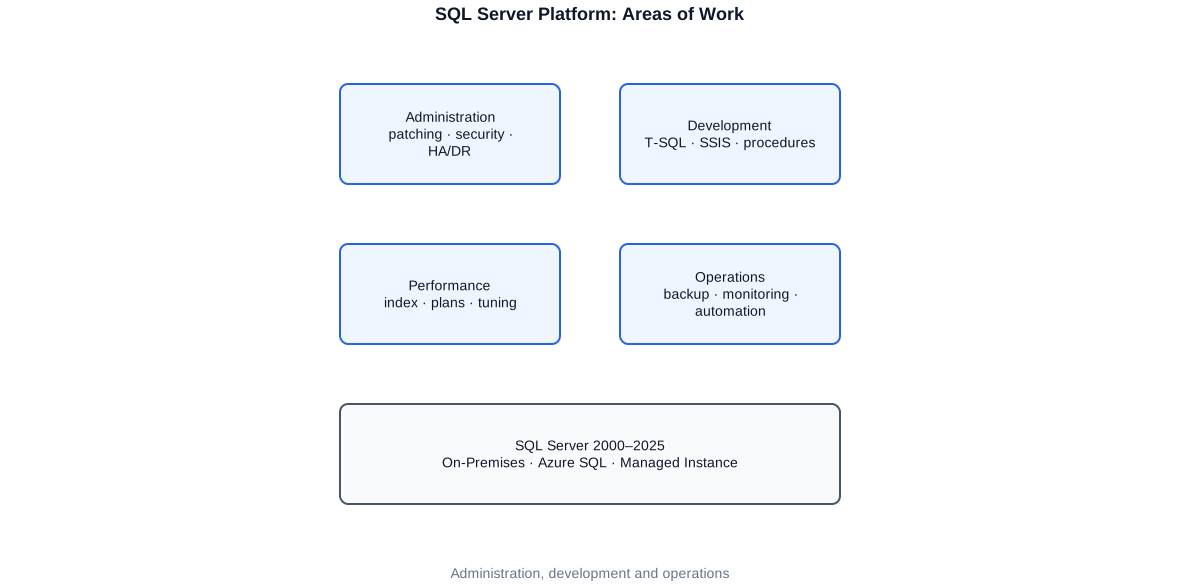
SQL Server is a comprehensive platform that goes far beyond a relational database. Over successive versions Microsoft has extended the platform with numerous services and features used for very different purposes. As a consultant active across all of these areas, I offer a service portfolio that ranges from a pure database instance to a complete BI platform.
Database Engine and Administration
The heart of the platform is the relational database engine. This is where the focus of administration lies: server installation and configuration, instance management, storage and network configuration, resource control via Resource Governor, maintenance windows, and the full range of DBA tasks that keep a SQL Server environment running. At a financial services provider I maintained a park of around 80 virtualised SQL Server instances – a task that cannot be managed without consistent automation and clear processes.
Integration Services, Reporting Services, Analysis Services
SSIS has been my primary ETL tool since its first version. I have built, migrated, and optimised hundreds of packages – from simple file loaders to complex, parameterised pipelines with error handling, logging, and automated deployment via SSISDB and SQL Agent. SSRS complements this on the reporting side: paginated reports, subscriptions, database parameters, and delivery to different target audiences. SSAS covers the analytical side: tabular models for Power BI, as well as classic multidimensional cubes with MDX.
High Availability and Operational Reliability
SQL Server offers several high-availability technologies that differ in scope, complexity, and cost. Always On Availability Groups are today the standard for business-critical databases. Failover Cluster Instances protect at the instance level. Log Shipping is the proven, straightforward solution for secondary sites. Database mirroring is deprecated but still encountered in older environments. Choosing the right solution depends on RPO, RTO, budget, and available infrastructure – a decision I have guided in many projects.
- SQL Server 2000–2025: administration, development, migration
- Integration Services (SSIS): ETL development, migration, deployment
- Reporting Services (SSRS): reports, subscriptions, parameterisation
- Analysis Services (SSAS): tabular models, MDX cubes
- Always On, Failover Cluster, Log Shipping, replication
- Backup strategies, point-in-time restore, restore tests
- Security: permissions, audit, Transparent Data Encryption
- Automation: PowerShell, dbatools, T-SQL, SQL Agent
- Performance analysis: execution plans, wait statistics, index tuning
PowerShell and Automation
What was once manual work can be automated with PowerShell and the dbatools module. Inventorying server parks, patching by script, server configuration via policy, backup verification, deployment of SSIS packages – all of this can be executed script-driven and embedded in SQL Agent or a CI/CD workflow. This automation layer is the difference between a server park that constantly requires manual intervention and one that runs according to defined processes.
This broad toolkit is not an end in itself. The strength lies in the interplay: someone who writes SSIS packages and simultaneously administers the server immediately sees when a package burdens the server through poor queries or excessive logging. Someone who designs backup strategies and at the same time automates the restore processes in SQL Agent tests recovery as part of normal operations, not only in an emergency. Exploiting these cross-connections between operations and development is my strength.
Administration of Large Server Landscapes
Administering a single SQL Server cluster is a manageable task. Administering a park of 80 or more virtualised SQL Server instances is a different discipline entirely: the focus is on processes, automation, overview, and repeatability. Configuration changes must be applied uniformly and traceably across dozens of instances. Patching must proceed in a coordinated, low-risk manner. Performance problems must be located quickly without searching through each instance individually.
At a financial services provider I managed exactly this kind of environment: around 80 virtualised SQL Server instances in a data-centre compound, heterogeneous in version and configuration, heavily utilised by the application side during normal operations. The work covered performance analysis and optimisation, audit configuration, permission clean-up, patching, and preparing migration projects. A systematic approach and automation via PowerShell and dbatools were not optional but essential in that context.
Typical SQL Server landscape in a medium-sized data centre: multiple physical hosts with virtualised instances, segmented by environment and purpose. Administration, patching, and monitoring span all layers.
Inventory and Visibility as a Foundation
Every further measure begins with an inventory. Without knowing which instances exist, which version they run, which databases are active and how large they are, neither sensible patching nor sensible prioritisation is possible. With dbatools a complete inventory can be collected in minutes and stored in a central control table. This inventory is the foundation for all subsequent processes: patching, configuration comparison, capacity planning, and reporting.
Enforcing Configuration Standards
One of the most common weaknesses in grown server parks is configuration inconsistency. Instances were installed and configured at different times by different people. Max Server Memory, parallelism settings (MAXDOP, Cost Threshold), tempdb configuration, and error-log settings diverge. PowerShell scripts can define target configurations and check them against the actual state of all instances – and selectively correct deviations without touching every server manually.
- Complete inventory via dbatools: instances, versions, databases, sizes
- Configuration comparison: target vs. actual, automated correction of deviations
- Performance monitoring: wait statistics, execution plans, missing indexes
- Storage and capacity planning: growth trends, critical space situations
- SQL Agent: control jobs, alerts, operators, and maintenance plans
- Standardised deployment of changes across all instances
Operational management of a large server park also places special demands on monitoring. Single-instance tools are not sufficient; a view across all instances is needed that highlights unusual wait statistics, long-running queries, failed jobs, and critical space situations early. This overview can be implemented via a central Management Data Warehouse, Policy-Based Management, or an external monitoring tool – depending on available infrastructure and team preferences.
High Availability and Disaster Recovery
High availability and disaster recovery are two distinct concepts that are often confused. High availability (HA) protects against short-term outages – a server fault, an operating-system crash, a hardware defect – and enables a fast, often automatic switch to a standby system. Disaster recovery (DR) protects against catastrophic events that affect an entire site and defines how a system can be restored after such an event. Together, both concepts form the foundation of a resilient SQL Server infrastructure.
SQL Server offers a graduated toolkit for HA/DR. Always On Availability Groups are today the standard for critical workloads: multiple replicas maintain synchronous or asynchronous copies of databases, and a listener enables transparent failover for applications. Failover Cluster Instances (FCI) protect at the instance level via Windows Server Failover Clustering and shared storage. Log Shipping is the simpler, robust alternative for scenarios where no shared storage is available and a defined data loss is acceptable.
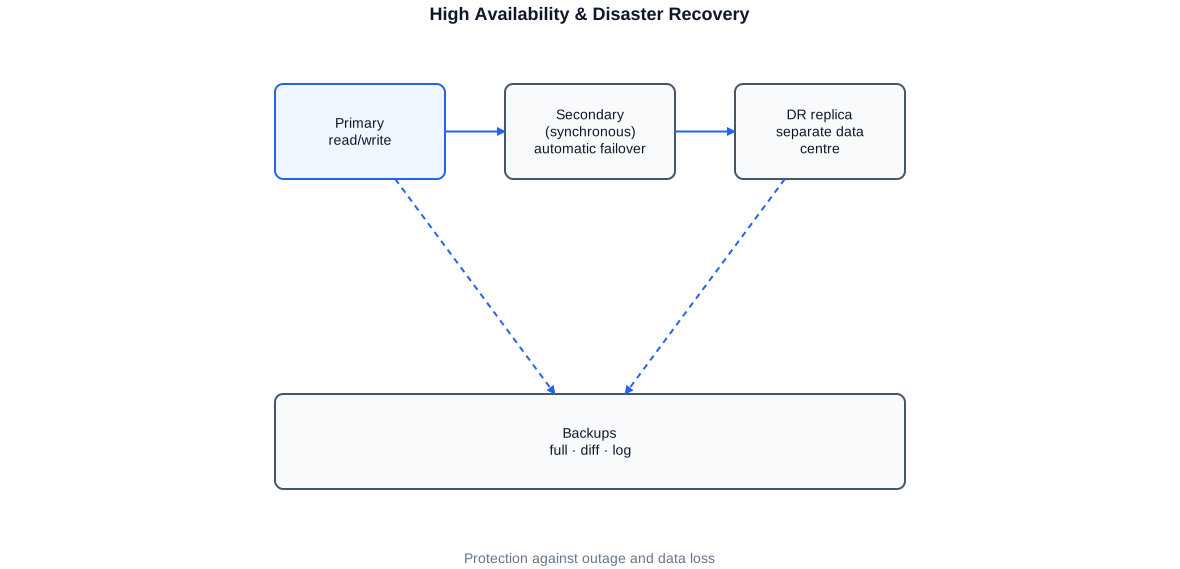
HA/DR architecture based on Always On Availability Groups: primary replica at the primary site, synchronous secondary replica for HA, asynchronous replica at the DR site. The listener provides applications with a site-independent connection.
Always On Availability Groups: Design and Operations
Configuring an Always On Availability Group is not a one-time project but an ongoing operational commitment. After initial setup, replication health, log-transport latencies, and synchronisation status must be monitored continuously. The DMVs sys.dm_hadr_availability_replica_states and sys.dm_hadr_database_replica_states provide the key metrics – supplemented by SQL Server Agent alerts for critical HADR states and regular failover tests that verify a switchover actually succeeds when it matters.
RPO and RTO as Planning Foundations
Every HA/DR decision starts with requirements: how much data loss is maximally tolerable (Recovery Point Objective, RPO)? How quickly must the system be available again after an outage (Recovery Time Objective, RTO)? A synchronous Always On replica guarantees RPO=0 – zero data loss – but requires sufficient bandwidth and low latency between sites. An asynchronous replica or Log Shipping accepts a defined data loss but works with a poorer network connection. This trade-off is not purely technical but a business decision I make together with the client.
-- Shows the current replication status of all AG replicas
-- including synchronisation lag (log send/redo queue).
SELECT
    ag.name                       AS availability_group,
    ar.replica_server_name        AS replica,
    ars.role_desc                 AS role,               -- PRIMARY or SECONDARY
    ars.synchronization_health_desc AS health,
    ars.connected_state_desc      AS connected,
    -- Backlog for log send and redo (KB)
    drs.log_send_queue_size       AS log_send_queue_kb,
    drs.redo_queue_size           AS redo_queue_kb,
    -- Estimated catch-up time (seconds)
    drs.log_send_rate             AS log_send_rate_kbps,
    drs.redo_rate                 AS redo_rate_kbps
FROM sys.availability_groups               ag
JOIN sys.availability_replicas             ar  ON ag.group_id  = ar.group_id
JOIN sys.dm_hadr_availability_replica_states ars ON ar.replica_id = ars.replica_id
JOIN sys.dm_hadr_database_replica_states   drs ON ar.replica_id = drs.replica_id
ORDER BY ag.name, ars.role_desc;
This query shows at a glance the health status of all replicas and the current backlog in log transport. Critical values should be monitored via SQL Agent alerts so that problems are detected early.
Failover tests are as important as building the HA solution itself. An availability group that has never been switched is an untested safety net. I recommend regular, planned failover tests during maintenance windows in which the switchover and the subsequent return to the primary replica are fully exercised. Only in this way can it be ensured that applications, connection strings, and monitoring respond correctly.
Security, Audit, and Permissions
Security on SQL Server encompasses several layers that must work together: authentication (who may connect?), authorisation (what may an identity access?), audit (what happened when?), encryption (are data protected at rest and in transit?), and hardening (is the server itself configured to minimise attack surface?). In regulated environments – financial sector, public administration – compliance with these layers is often a formal prerequisite for operations.
At a financial services provider I carried out extensive security and audit configurations: permission clean-ups at the database level, configuration of SQL Server Audit for security-relevant events, review and hardening of server logins, and documentation of the current state as a basis for internal audit. This work requires deep knowledge of SQL Server’s permission structure – from server principals through database roles to object-level permissions.
Authentication and Login Concept
SQL Server supports Windows Authentication and SQL Server Authentication. Windows Authentication via Active Directory is preferable in enterprise environments: passwords are managed centrally, Kerberos enables delegation, and access ends automatically when an account is disabled in AD. SQL Server logins should be restricted to exceptions – technical service accounts, legacy items – and operated consistently with strong passwords and enforced password policy.
Permissions Following the Least-Privilege Principle
The least-privilege principle requires that every login, every database user, and every application receives only the rights actually necessary for the task at hand. In practice, grown environments deviate significantly from this ideal: sa logins are enabled, developers have sysadmin rights, application accounts are members of the db_owner role. A careful permission audit – followed by a step-by-step clean-up with regression tests – is the foundation for a secure operation.
-- Shows all server principals (logins) and their role and individual permissions.
-- Foundation for the permission audit and clean-up.
SELECT
    sp.name                     AS login_name,
    sp.type_desc                AS login_type,       -- WINDOWS_LOGIN, SQL_LOGIN, etc.
    sp.is_disabled              AS is_disabled,
    -- Associated server roles
    STUFF((
        SELECT ', ' + r.name
        FROM sys.server_role_members srm
        JOIN sys.server_principals   r ON srm.role_principal_id = r.principal_id
        WHERE srm.member_principal_id = sp.principal_id
        FOR XML PATH(''), TYPE).value('.','NVARCHAR(MAX)'),1,2,'')
        AS server_roles,
    -- Explicitly granted permissions (GRANT/DENY)
    STUFF((
        SELECT ', ' + perm.state_desc + ' ' + perm.permission_name
        FROM sys.server_permissions perm
        WHERE perm.grantee_principal_id = sp.principal_id
        FOR XML PATH(''), TYPE).value('.','NVARCHAR(MAX)'),1,2,'')
        AS explicit_permissions
FROM sys.server_principals sp
WHERE sp.type IN ('S','U','G')   -- SQL, Windows users and groups
  AND sp.name NOT LIKE '##%'     -- exclude internal accounts
ORDER BY sp.type_desc, sp.name;
This query delivers a complete overview of all logins, their server roles, and explicitly granted permissions – the first step of every security audit.
SQL Server Audit
SQL Server Audit enables fine-grained, server-wide and database-specific logging of security events: successful and failed logins, schema changes, permission changes, SELECT on sensitive tables. The audit logs can be written to the Windows security event log, to files, or to a database table. In regulated environments, immutable storage in files with signatures or in external log systems is mandatory so that audit trails cannot be altered retrospectively.
Transparent Data Encryption
Transparent Data Encryption (TDE) encrypts database files at the operating-system level so that direct access to the .mdf and .ldf files without SQL Server yields no plaintext. TDE is relevant for environments in which data protection at the storage level is required – for example with cloud backups or when transferring database files. Key management is the critical point: the Database Master Key and the certificate must be backed up securely and stored separately – a lost key means the database can no longer be decrypted.
Backup and Restore Strategy
A backup that has never been tested is not a backup. This statement sounds worn, but is ignored with alarming frequency in practice. SQL Server provides a powerful and flexible backup infrastructure: full backups, differential backups, transaction log backups, and the combination of these types in a restore chain that enables point-in-time restore. This flexibility must be harnessed by a well-thought-out strategy that accounts for the RPO and RTO of the respective databases.
The backup strategy begins with classifying databases by criticality: how current must the data be in an emergency? How quickly must the database be restored? An OLTP database processing transactions every minute needs frequent log backups and a short restore chain. A reporting database loaded once a day can be covered with daily full backups. And an archive database may need only a weekly backup to cold storage.
Backup with Compression and Checksums
SQL Server backup compression typically reduces backup size by 60–80%. It costs some CPU but saves considerable storage and network capacity. In almost all modern environments, compression should therefore be enabled by default. At least as important is the use of CHECKSUM, which validates database pages for consistency and attaches a checksum to the backup set that can be verified during restore. Without checksums, a backup set can be corrupt without this being apparent at write time – a silent risk.
-- Creates a full backup with compression and checksum.
-- COPY_ONLY prevents this backup from breaking the regular backup chain.
BACKUP DATABASE [ProductionDatabase]
TO  DISK = N'\\backup-server\sql-backups\ProductionDatabase_full_20250101.bak'
WITH
    COMPRESSION,                 -- reduce backup size by typically 60-80%
    CHECKSUM,                    -- checksum for later integrity verification
    STATS = 10,                  -- progress indicator every 10 percent
    NAME = N'Full backup ProductionDatabase 2025-01-01',
    DESCRIPTION = N'Regular full backup for point-in-time restore',
    COPY_ONLY;                   -- do not break the backup chain

-- Immediately verify the integrity of the finished backup
RESTORE VERIFYONLY
FROM DISK = N'\\backup-server\sql-backups\ProductionDatabase_full_20250101.bak'
WITH CHECKSUM;
COPY_ONLY is suitable for ad-hoc backups that should not interrupt the regular differential chain. The subsequent RESTORE VERIFYONLY checks readability and checksum without writing the database back.
-- Restores a database to a specific point in time.
-- Step 1: restore the full backup (NORECOVERY = more backups to follow)
RESTORE DATABASE [ProductionDatabase_test]
FROM DISK = N'\\backup-server\sql-backups\ProductionDatabase_full_20250101.bak'
WITH
    MOVE N'ProductionDatabase'      TO N'D:\Data\ProductionDatabase_test.mdf',
    MOVE N'ProductionDatabase_log'  TO N'L:\Log\ProductionDatabase_test.ldf',
    NORECOVERY,                      -- database remains in recovery mode
    STATS = 10;

-- Step 2: apply differential backup (optional, if available)
RESTORE DATABASE [ProductionDatabase_test]
FROM DISK = N'\\backup-server\sql-backups\ProductionDatabase_diff_20250101_1200.bak'
WITH NORECOVERY, STATS = 10;

-- Step 3: apply log backups up to the target point in time
RESTORE LOG [ProductionDatabase_test]
FROM DISK = N'\\backup-server\sql-backups\ProductionDatabase_log_20250101_1400.trn'
WITH
    STOPAT = '2025-01-01T14:23:00',  -- desired recovery point in time
    NORECOVERY, STATS = 5;

-- Step 4: bring the database online (after the last log backup)
RESTORE DATABASE [ProductionDatabase_test] WITH RECOVERY;
Point-in-time restore is the most powerful capability of the SQL Server backup system. The prerequisite is the full recovery model and uninterrupted log backups between full backups.
Backup Monitoring and Restore Tests
Backup monitoring does not merely mean checking whether jobs completed successfully. It also means verifying that backups actually exist within the defined backup interval. SQL Server stores backup history in the msdb database – a daily query that reports databases without a current backup is an elementary monitoring instrument. Beyond that, regular restore tests are indispensable: at least once per quarter a full restore exercise should take place in which the recovery time is measured and documented.
Patching and Maintenance
Patching is one of the least popular but most important DBA tasks. Unpatched SQL Server instances are simultaneously a security risk and a stability risk: known vulnerabilities are exploitable, and many bug fixes for data-corruption and data-loss scenarios appear only in Cumulative Updates. Those who do not apply current Cumulative Updates may be carrying known bugs for years.
SQL Server releases Cumulative Updates (CUs) monthly and Service Packs (in older versions) quarterly. Microsoft's recommendation is always to stay on the current CU of the supported branch. In practice this means: a structured patching process that regularly tests and applies new CUs is not optional for high-quality SQL Server environments but mandatory.
Patching Process in Large Server Parks
In a park of 80 instances no individual can patch every instance manually. PowerShell and dbatools make it possible to collect the patch status of all instances, identify outdated instances, and roll out patches in a coordinated fashion across defined environments – first test, then UAT, then production. Every step is logged; deviations are reported. This process typically takes two to four weeks per CU cycle and can be largely automated.
Maintenance Windows and Online Operations
Not every maintenance operation requires downtime. Index rebuild and reorganisation can be executed online; UPDATE STATISTICS can run in the background; availability groups allow a planned failover that enables maintenance on the former primary while the secondary instance takes the load. The art lies in planning maintenance windows to minimise impact on user availability – which requires knowledge of the load profiles of the respective instance.
- Collect the CU status of all instances centrally and prioritise outdated instances
- Rollout: test → UAT → production with logging and rollback option
- Automate online index rebuild and reorganisation in maintenance windows
- Schedule UPDATE STATISTICS after larger data changes
- Run DBCC CHECKDB regularly and document results
- Review tempdb configuration after maintenance measures
Alongside patching, verifying database integrity with DBCC CHECKDB is among the elementary maintenance tasks. CHECKDB verifies that database pages are consistent and that indexes match the table. Errors reported by CHECKDB are often the first signs of a hardware problem; if ignored, they can lead to serious data loss. In a well-managed SQL Server environment, CHECKDB runs at least weekly on every production database and results are logged.
Version Upgrades and Migration
SQL Server versions have a defined end-of-support date. When extended support expires, security patch provision ends, making continued operation a calculated risk. Version migrations are therefore a recurring task in SQL Server operations – and one that must be planned carefully, because incompatibilities between versions, changed default settings, and deprecated features can produce surprises on every side.
A SQL Server migration is rarely a pure database project. It touches applications, deployment processes, monitoring configurations, and often the operating system as well. I have guided migrations across multiple version generations: from SQL Server 2000 to 2008, from 2012 to 2016, from 2016 to 2019, and from 2019 to 2022. Every jump has its own pitfalls, which I know from experience.
Approach: Analysis, Test, Migration, Stabilisation
Migration projects follow a four-stage pattern for me. First the analysis: which objects use deprecated features? What compatibility levels are set? Are there applications that rely on undocumented behaviours? The Database Experimentation Assistant (DEA) and the SQL Server Upgrade Advisor are helpful tools but no substitute for a manual code review. Then the test: migration to a test environment, application tests, performance comparison with baseline metrics from the old system. Then the actual migration – often as backup/restore to the new version, followed by a controlled cutover. Finally the stabilisation: keeping the old system as a fallback for a defined period before it is decommissioned.
Compatibility Levels and Using New Features
The database compatibility level is a powerful instrument for slowing down migrations. A database can run in SQL Server 2022 at compatibility level 130 (SQL Server 2016 behaviour), allowing application tests under controlled conditions before full compatibility is activated. New features such as improved Query Store Insights, Intelligent Query Processing, or Accelerated Database Recovery (ADR) become available only after raising the compatibility level.
- Analysis: features, compatibility levels, dependencies, application behaviour
- Test migration: backup/restore, application tests, performance baseline comparison
- Rollout: backup/restore or availability-group-based failover upgrade
- Parallel operation: old system as fallback until stability is demonstrated
- Raise compatibility level incrementally and activate new features
- Legacy items: deprecated syntax, deprecated features, sp_optionname settings
Particular care is warranted for deprecated syntax elements that SQL Server still accepts but will remove in future versions: the old outer-join operator (*=), deprecated system tables instead of DMVs, GROUP BY ALL, non-ANSI-conformant NULL comparisons. An inventory of these legacy items and their step-by-step clean-up is part of every careful migration – and prevents the next migration from being even harder than the current one.
Automation with PowerShell and T-SQL
Manual, recurring tasks in SQL Server environments are not only time sinks but sources of error. Configuring 80 instances by hand risks inconsistency. Monitoring backups manually means missing gaps. Applying patches manually means forgetting instances. PowerShell and the dbatools module are my primary tools for turning repetitive DBA tasks into reliable, repeatable processes.
The dbatools module contains over 600 cmdlets for virtually every conceivable SQL Server DBA task: instance inventory, database provisioning, permission management, backup and restore, migration, HADR monitoring. The cmdlets follow a consistent language and can be composed into scripts and pipelines that cover complete workflows – from inventory through patching to documentation.
# Collects a complete SQL Server inventory from a list of servers.
# Stores instance data, database sizes, and CU status in a central control table.

Import-Module dbatools

# List of servers to check (e.g. from a CSV file or CMDB export)
$servers = Get-Content -Path 'C:\admin\sql_server_list.txt'

$inventory = foreach ($server in $servers) {
    try {
        $inst = Connect-DbaInstance -SqlInstance $server -ErrorAction Stop

        # Retrieve basic instance data
        $info = Get-DbaInstanceProperty -SqlInstance $inst |
            Select-Object SqlInstance, BuildNumber, ProductVersion, ProductLevel,
                          Edition, Collation, MaxMemory, MinMemory

        # All databases with size and status
        $dbs = Get-DbaDatabase -SqlInstance $inst |
            Select-Object SqlInstance, Name, Status, RecoveryModel,
                          @{ Name='SizeMB'; Expression={ [math]::Round($_.Size,2) } },
                          LastBackupDate, LastLogBackupDate

        [PSCustomObject]@{
            Server        = $server
            Build         = $info.BuildNumber
            Version       = $info.ProductVersion
            Edition       = $info.Edition
            DatabaseCount = ($dbs | Measure-Object).Count
            # Mark databases without backup in the last 24 hours
            NeedBackup    = ($dbs | Where-Object { $_.LastBackupDate -lt (Get-Date).AddDays(-1) }).Name -join '; '
        }
    }
    catch {
        # Log failed connections without aborting
        [PSCustomObject]@{ Server = $server; Build = 'ERROR'; Version = $_.Exception.Message }
    }
}

# Export result as CSV and load into control table
$inventory | Export-Csv -Path 'C:\admin\sql_inventory.csv' -NoTypeInformation -Encoding UTF8
Write-Host "Inventory created for $($inventory.Count) instances."
This script collects a complete inventory across any number of instances. Failed connections are logged without aborting the run. The result can be loaded directly into a control table and used as a basis for patching and monitoring.
-- Creates a new SQL Agent job that executes a maintenance task.
-- All steps are executed as T-SQL in the context of SQL Agent.
USE msdb;
GO

-- Create the job
EXEC sp_add_job
    @job_name        = N'DBA - Weekly Integrity Check',
    @description     = N'Runs DBCC CHECKDB on all user databases.',
    @category_name   = N'Database Maintenance',
    @owner_login_name= N'sa',
    @enabled         = 1;

-- Job step: T-SQL script that executes CHECKDB
EXEC sp_add_jobstep
    @job_name        = N'DBA - Weekly Integrity Check',
    @step_name       = N'CHECKDB all user databases',
    @subsystem       = N'TSQL',
    @command         = N'
DECLARE @sql NVARCHAR(MAX) = N'''';
-- Iterate over all user databases
SELECT @sql += N''DBCC CHECKDB ('' + QUOTENAME(name) + N'') WITH NO_INFOMSGS;'' + CHAR(13)
FROM sys.databases
WHERE database_id > 4   -- user databases only, not system databases
  AND state_desc = ''ONLINE'';
EXEC sp_executesql @sql;',
    @on_success_action = 1,   -- execute next step
    @on_fail_action    = 2;   -- end job and report as failure

-- Schedule: every Sunday at 01:00
EXEC sp_add_schedule
    @schedule_name   = N'Sunday 01:00',
    @freq_type       = 8,       -- weekly
    @freq_interval   = 1,       -- Sunday
    @active_start_time= 010000; -- 01:00:00

EXEC sp_attach_schedule
    @job_name        = N'DBA - Weekly Integrity Check',
    @schedule_name   = N'Sunday 01:00';

EXEC sp_add_jobserver
    @job_name        = N'DBA - Weekly Integrity Check';
GO
Via sp_add_job, sp_add_jobstep, and sp_add_schedule, SQL Agent jobs can be created and configured entirely with T-SQL – reproducible, versionable, and without SSMS click-through wizards.
Automation in Day-to-Day Operations
Automation is not a one-time project but an attitude. Every task I perform manually more than twice goes into a script. Every script that runs reliably goes into SQL Agent or a CI/CD pipeline. This principle has proved decisive in large server parks: only those who automate repetitive tasks have enough capacity for the genuinely demanding problems – performance analysis, architecture decisions, complex migrations.
Development Breadth: SSIS, SSRS, SSAS, T-SQL
SQL Server is not merely a database engine but a complete platform for data movement, reporting, and analytical processing. As a generalist on this platform I cover the full breadth of development disciplines: ETL development with SSIS, report creation with SSRS, analytical models with SSAS, T-SQL development for stored procedures, views, and triggers, as well as integration into higher-level processes via SQL Agent and PowerShell.
SSIS: ETL Development and Deployment
Integration Services is my most important ETL tool. I have developed and migrated SSIS projects across versions 2005 through 2022: simple file-loading systems, complex delta-load scenarios with Slowly Changing Dimensions, parameterised pipelines for multi-tenant environments, and fully automated deployment processes via the SSIS catalogue (SSISDB) and SQL Agent. At an industrial company I migrated SSIS packages from version 2016 to 2022 and simultaneously moved the entire build process to Azure DevOps. At a savings bank I replaced Java- and Oracle-based ETL processes entirely with SSIS pipelines, significantly improving both performance and maintainability.
SSRS: Reports and Subscriptions
Reporting Services covers paginated reports that can be rendered as tables, matrices, or charts. I have built SSRS reports for operational and analytical purposes, configured subscriptions for automated email delivery, and developed parameterised reports used by user groups with different permission levels. Integrating SSRS with SSAS cubes for MDX-based reports also belongs to the repertoire.
SSAS: Tabular and Multidimensional
Analysis Services supports two models: the classic multidimensional model with OLAP cubes and MDX, and the more modern tabular model that forms the foundation for Power BI Premium. I have developed tabular SSAS models as a central semantic layer between the database and Power BI – with calculated columns, DAX measures, Row-Level Security, and optimised partitions for fast processing. I have built and maintained multidimensional models in older environments, including MDX queries for SSRS reports.
T-SQL: Development and Optimisation
T-SQL is the language in which SQL Server logic lives. Stored procedures, views, functions, triggers, dynamic SQL, common table expressions (CTEs), window functions, partitioning, and columnstore index usage – all of this belongs to my toolkit. I develop T-SQL with an eye on maintainability and performance: clean formatting, comments, parameterisation against SQL injection, and a focus on execution plans that reveal whether a query runs as intended.
This development breadth complements the administration tasks naturally. When an SSIS pipeline causes performance problems, I understand both the ETL logic and its effects on the SQL Server index state. When SSAS processing takes a long time, I can optimise both the tabular model and the source database. These cross-connections make the difference between a specialist who knows only their own discipline and a generalist who has a view of the entire platform.
Working Approach and Collaboration
Entering a new SQL Server engagement always begins with listening and taking stock, not with solutions. Before making a recommendation I form a clear picture of the existing landscape: versions, configurations, existing scripts and processes, open weaknesses, and the expectations of the stakeholders. This stock-taking typically takes one to two days but saves weeks of misdirected work.
- Stock-taking: instances, versions, configurations, processes, weaknesses
- Prioritisation: critical risks first – backup, HA, security gaps
- Implementation: step by step, with tests and a rollback option at every stage
- Automation: repeatable processes transferred into scripts and jobs
- Documentation: configurations, decisions, and operational procedures recorded
- Handover: knowledge transferred to the internal team, not held captive
I work remotely, in a hybrid capacity, and on-site. For many DBA tasks – monitoring, analysis, scripting – remote is sufficient and more efficient. For initial stock-taking exercises, sensitive migrations, and handovers to internal teams, personal presence is often more valuable. I align myself with what makes sense in the project.
A particular strength is my experience in regulated environments. In the financial sector and in public administration, stricter requirements apply regarding documentation, traceability, and security. I know these requirements from years of work in such environments and bring the corresponding diligence – without sacrificing operational efficiency.
What all my projects have in common is the expectation that at the end of the engagement the internal team can work independently. This means I transfer knowledge rather than accumulate it. Scripts that only I understand and configurations that only I know are not project success. Documented processes, traceable scripts, and a team that owns the solution are the goal.
Typical Services as a SQL Server Consultant
The scope of my SQL Server services covers the entire platform – from foundational administration work to complex development tasks. Depending on the project phase and requirements, I take on individual areas or the complete scope.
- SQL Server administration: installation, configuration, operations, monitoring
- Performance analysis: wait statistics, execution plans, index tuning, Query Store
- High availability: Always On Availability Groups, Failover Cluster Instances, Log Shipping
- Disaster recovery: backup strategy, point-in-time restore, restore tests, DR planning
- Security: permission concept, audit configuration, TDE, login hardening
- Patching and maintenance: CU rollout, DBCC CHECKDB, maintenance windows, index maintenance
- Version migrations: analysis, testing, migration, compatibility-level management
- Automation: PowerShell scripts, dbatools workflows, SQL Agent jobs
- ETL development with SSIS: development, migration, deployment, performance
- Reporting with SSRS: reports, subscriptions, parameterisation, Row-Level Security
- Analytical models with SSAS: tabular (DAX), multidimensional (MDX)
- T-SQL development: stored procedures, views, CTEs, window functions, partitioning
- Azure integration: Azure SQL, SQL Server on Azure VM, Azure Data Factory with SQL Server
This breadth of services does not mean I work equally deeply on every topic. Performance tuning and high availability are areas where I have worked particularly intensively; SSAS development and T-SQL optimisation are disciplines I exercise daily. The breadth makes it possible to accompany projects without interface losses; the depth in each area ensures quality.
Whether it is short-term support for an acute performance problem, preparing a version migration over several months, building a new SSIS landscape, or the long-term care of a SQL Server park – I step in where the need is greatest and adapt effort and focus to the project. This flexibility is particularly valuable for organisations that do not employ a full-time DBA but nonetheless depend on a reliable SQL Server infrastructure.
Selected anonymised reference projects
Financial services provider / Pfandbriefbank
Management of a park of around 80 virtualised SQL Server instances in a regulated financial environment. Tasks included performance analysis and optimisation, configuration of SQL Server Audit and permission clean-ups for internal audit, coordination and execution of CU rollouts, and preparation of migration projects. PowerShell and dbatools formed the foundation for inventorying, configuration comparison, and automated patching across all instances.
Public-sector client / federal state
Administration of SQL and Windows Server infrastructure in a virtualised VMware environment at a public-administration client at state level. Tasks included server configuration and operations, patch management, monitoring, and permission management under the special requirements of the public sector regarding documentation and traceability.
Industrial company / mechanical engineering
Migration of SSIS packages from SQL Server 2016 to 2022, introduction of version control, and building automated Azure DevOps build pipelines. Conception and implementation of an automated deployment process for SSIS projects that completely replaced manual delivery steps.
Financial services / savings bank
Replacement of existing Java- and Oracle-based ETL processes with SSIS pipelines, text-file loading processes, and SSDT deployment workflows. Redesign and performance optimisation of critical SSIS packages and automation of deployment and monitoring via PowerShell.
Frequently asked questions about the SQL Server consultant
What distinguishes a SQL Server consultant from a pure DBA?
A classic DBA focuses on operations and administration. As a SQL Server consultant I cover administration and development in one: SSIS, SSRS, SSAS, T-SQL, PowerShell, and SQL Agent belong to the repertoire just as much as backup strategies, HA/DR, and patching. This combination saves coordination overhead and closes gaps between operations and development.
Which SQL Server versions do you cover?
SQL Server 2000 through 2025, across all major versions. I have guided migrations across multiple version generations and know the quirks of each version from practice – from deprecated features and behaviour changes to new capabilities.
Can you take over and stabilise a running SQL Server park?
Yes. The typical entry point is a stock-taking exercise with dbatools: instance inventory, configuration deviations, backup status, open security risks. From this a prioritised list of measures is produced and worked through step by step – starting with the most critical risks.
How do you handle Always On Availability Groups?
From initial configuration through failover tests to ongoing monitoring. I know the DMVs for HADR monitoring, the pitfalls in network configuration, and the operational aspects that are often under-documented – for example the behaviour of applications during an automatic failover.
How do you support a SQL Server migration to a new version?
With a structured approach: analysis (features, compatibility levels, legacy items), test migration, performance baseline comparison, controlled rollout, and defined parallel operation as a fallback. Compatibility levels are raised incrementally so that new features are activated deliberately.
Do you write maintainable T-SQL and SSIS for third parties?
Yes, that is a core principle of my work. Commented, formatted code, documented deployment processes, and a handover with knowledge transfer to the internal team are part of the deliverable. I want a team to be able to work independently after my engagement.
Can you also work with Azure and SQL Server?
Yes. I have worked with both Azure SQL Database and Azure SQL Managed Instance as well as SQL Server on Azure VMs and understand the differences in administration, HA/DR, and backup between the cloud version and on-premises. The connection to Azure Data Factory for hybrid scenarios also belongs to the repertoire.
In which languages can we work together?
In German, English, and Portuguese – all fluent, including technical and business discussions.


