Positioning
Performance problems in SQL Server environments are rarely accidental. They arise when queries are written without regard to execution plans, when indexes are missing or outdated, when statistics no longer reflect the actual data distribution, or when tables grow without the database architecture being designed for it. The result is a gradual increase in runtimes, timeouts in applications, and eventually a system that collapses under load. The pain is real, but the cause is almost always analysable and fixable.
This is precisely my focus: I analyse SQL Server systems from the inside out, using the built-in tools that SQL Server itself provides. Dynamic Management Views, execution plans, wait statistics, and the Query Store deliver precise diagnoses without requiring expensive third-party tools. This diagnosis then leads to concrete actions: a missing index, a reformulated query, a statistics update, a plan guide against parameter sniffing, or a partitioning scheme that makes a data set that has been growing for years manageable again.
My background goes back to 1994, and I have solved performance problems in very different contexts: in transactional systems with high OLTP load, in data warehouses with large batch load processes, in SSIS pipelines with suboptimal data flows, and in reporting systems that became unacceptably slow under load. MCSA SQL Server 2012 (MOC 70-461/462/463) and project experience across all SQL Server versions from 2000 to 2025 are not just certificate numbers – they are the foundation that allows me to know how server behaviour has changed across versions and which optimisation levers work in which context.
Clients bring me in when a system has become too slow and nobody in the team knows why, when a release is approaching and critical queries have not yet reached acceptable runtimes, or when a sustainable performance strategy is missing – one that goes beyond the ad-hoc placement of indexes. In all of these cases, the goal is not cosmetic fixes but a well-founded diagnosis and measures that have a lasting effect.
What Performance Tuning Covers
SQL Server performance tuning is not a single action but a bundle of disciplines that interlock. Anyone who only adds indexes without checking the query formulation may fix a symptom but not the root cause. Anyone who maintains statistics but ignores wait statistics may overlook an I/O bottleneck that nullifies all other efforts. A complete tuning picture spans several layers.
Query layer
The query layer is the most common entry point. Here it is decided which plan the optimiser chooses, whether indexes can be used, and how many rows are actually read. Poor query formulations – implicit conversions, non-sargable predicates, excessive SELECT * usage, or missing JOINs – can slow down even a perfectly indexed data set. Reading execution plans is the central skill for seeing these problems.
Index layer
Indexes are the most effective tool for fast read operations, but they are not a cure-all. Too many indexes slow down write operations and increase storage consumption. Missing indexes force table scans. The art lies in finding the right balance: which queries are read-intensive and frequent enough to justify a dedicated index? Which columns should be added as INCLUDE columns so the index prevents a lookup? Where does a filtered index make sense that covers only a subset of the data?
Statistics and plan layer
SQL Server's Query Optimiser makes its decisions based on statistics. Outdated or misleading statistics lead to incorrect cardinality estimates and therefore to suboptimal plans. Parameter sniffing – a mechanism where SQL Server compiles a plan for the first parameter value and then reuses it for all subsequent values – is a common cause of sporadic performance drops that are hard to reproduce. Regular statistics updates, OPTION (RECOMPILE), and the Query Store help here.
Architecture and operations layer
Some performance problems cannot be fully resolved at the query or index level because they are structural in nature. Tables with hundreds of millions of rows without partitioning, batch processes that lock transactional tables, missing load windows, or uncontrolled TempDB growth are examples of this. At this layer, partitioning, columnstore indexes, TempDB configuration, and architectural considerations come into play.
- Query formulation and execution plan analysis
- Index strategy: covering, filtered, and columnstore indexes
- Statistics maintenance and handling parameter sniffing
- Table partitioning for growing data volumes
- Wait statistics as a system-wide bottleneck analysis
- TempDB configuration and resource governance
- SSIS data flow optimisation and parallelisation
- Query Store as historical performance monitoring
Systematic Tuning Workflow
A structured approach to performance tuning prevents the most common trap: optimising without prior diagnosis. I follow a multi-step workflow that runs from measurement through analysis to implementation and verification. Every measure is justified beforehand and measured afterwards.
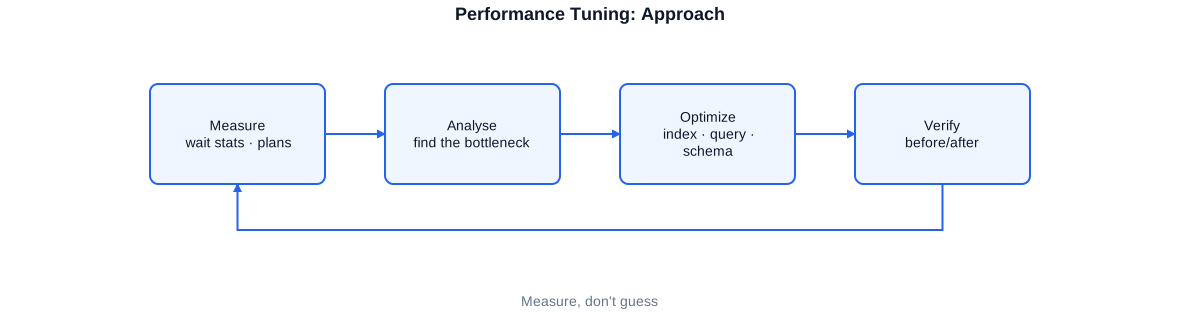
The tuning workflow begins with measurement of baseline metrics, proceeds through bottleneck analysis with DMVs and execution plans to a targeted action, and closes with verification of whether the expected improvement was actually achieved.
The first step is always the baseline measurement. Without an initial measurement it is impossible to judge whether a measure has worked. I use SET STATISTICS IO ON and SET STATISTICS TIME ON for individual queries, and sys.dm_exec_query_stats for system-wide statements about which queries account for the largest share of CPU time, logical reads, or total runtime. This prioritisation is critical: not every slow query is a worthwhile optimisation target – what matters is the combination of runtime and execution frequency.
Analysis with Dynamic Management Views
Dynamic Management Views are the first-choice diagnostic instrument. sys.dm_exec_query_stats delivers cumulative runtime statistics for all queries in the cache. sys.dm_exec_requests shows currently running queries including wait type and wait duration. sys.dm_os_wait_stats aggregates wait statistics at the system level and identifies whether the bottleneck is at I/O, memory, locking, or CPU. These three DMVs together provide a clear picture of the system state within minutes.
Measure and verify
Only after the diagnosis comes the action. That can be a new index, a reformulated query, a statistics update, a plan guide, or – for structural problems – an architectural change such as partitioning or a columnstore index. After implementation, it is measured whether the expected improvement has occurred, and the result is documented. This verification step is not optional: it provides evidence that the measure works, and protects against missing regressions in other queries.
-- 1) Measure baseline for a single query
SET STATISTICS IO ON;
SET STATISTICS TIME ON;
GO

-- query with a poor plan (no index on OrderDate, implicit conversion)
SELECT o.OrderID, o.CustomerID, o.TotalAmount
FROM   dbo.Orders AS o
WHERE  CONVERT(varchar, o.OrderDate, 104) = '01.06.2025';  -- prevents index usage!
GO

SET STATISTICS IO OFF;
SET STATISTICS TIME OFF;
GO

-- 2) Top-10 queries by logical reads system-wide
SELECT TOP 10
    qs.total_logical_reads / qs.execution_count  AS avg_logical_reads,
    qs.execution_count,
    qs.total_elapsed_time / qs.execution_count / 1000 AS avg_ms,
    SUBSTRING(qt.text, (qs.statement_start_offset/2)+1,
        ((CASE qs.statement_end_offset
            WHEN -1 THEN DATALENGTH(qt.text)
            ELSE qs.statement_end_offset
          END - qs.statement_start_offset)/2)+1)        AS query_text,
    qp.query_plan
FROM   sys.dm_exec_query_stats  AS qs
CROSS  APPLY sys.dm_exec_sql_text(qs.sql_handle)  AS qt
CROSS  APPLY sys.dm_exec_query_plan(qs.plan_handle) AS qp
ORDER  BY avg_logical_reads DESC;
CONVERT on OrderDate prevents index usage (non-sargable). The DMV query prioritises optimisation targets based on average logical reads – more meaningful than total runtime alone, because infrequent long queries are otherwise overweighted.
How SQL Server Processes a Query
To fix performance problems effectively, it helps to understand what SQL Server does internally when a query arrives. This lifecycle determines where optimisation potential lies and why some measures work while others do not.
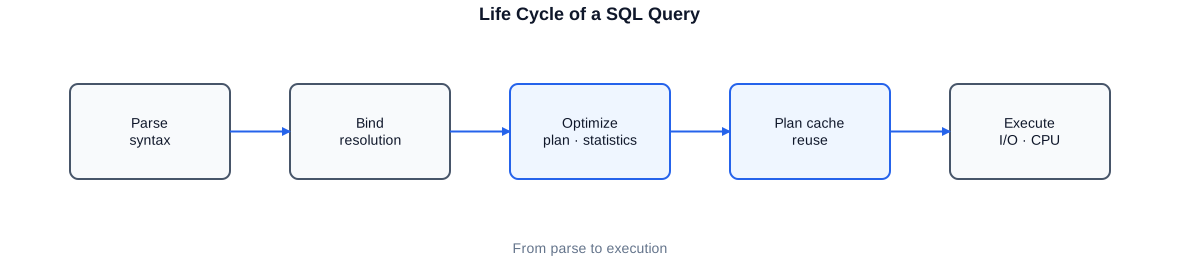
The query lifecycle shows how SQL Server parses a query, searches the plan cache, invokes the optimiser, compiles and stores the plan, and finally executes it via the execution engine – drawing on the buffer pool and storage I/O.
When a query arrives, SQL Server first checks whether a matching plan already exists in the plan cache (trivial plan cache / full plan cache lookup). If it finds one, that plan is reused – the optimiser does not need to recalculate. This reuse principle is efficient, but it carries the risk of parameter sniffing: the first plan created for a particular parameter value may be suboptimal for other values.
Parsing and algebrisation
SQL Server first decomposes the query syntactically (parsing) and then converts it into a logical operator tree (algebrisation). In this step, name resolution and implicit conversions are also performed. Implicit conversions – for example when a varchar predicate meets an int column – can cause SQL Server to be unable to use an existing index, because a full scan of the entire data set with row-by-row conversion appears cheaper than an index seek with conversion.
Query optimiser and cardinality estimation
The Query Optimiser is cost-based: it evaluates various execution alternatives based on estimated costs and selects the plan with the lowest estimated cost. The basis for this estimation is statistics – histograms of the value distribution in columns. If statistics are outdated or missing, the optimiser estimates incorrectly and an otherwise good plan is not chosen. The optimiser also cannot try out all possibilities; it stops after an internal timeout and takes the best plan found up to that point – for very complex queries an important hint as to why simplification can help.
Execution engine and buffer pool
The actual data access runs through the buffer pool. SQL Server reads pages from memory where possible (logical reads) and only accesses the disk (physical reads) when a page is not cached. The metric logical reads in SET STATISTICS IO therefore shows how many pages a query requires in the buffer pool – regardless of whether they had to be read physically. A high value signals either that very much data is being read or that a scan is occurring instead of a seek.
- Plan cache: reuse saves compile time but carries parameter sniffing risks
- Implicit conversions prevent index seeks and must be avoided in code
- Cardinality estimation depends on current statistics – outdated statistics mean poor plans
- Logical reads measure buffer pool access and are the most important I/O metric per query
- Query Store enables historical plan histories and forced plan stabilisation
Reading and Understanding Execution Plans
The execution plan is the most precise diagnostic instrument for an individual query. It shows which operators SQL Server uses, in which order it accesses tables, whether indexes are being used, how many rows are estimated and actually processed per operator, and where the highest costs occur. Anyone who can read execution plans sees the diagnosis directly – without depending on external tools.
Estimated vs. actual execution plan
The estimated execution plan shows what SQL Server intends to do without actually running the query. It is useful for quick upfront analysis. The actual execution plan additionally contains real row counts and runtime measurements. The most important comparison metric is the difference between estimated and actual rows (Estimated Rows vs. Actual Rows): a large discrepancy indicates inaccurate cardinality estimation, pointing to outdated or missing statistics.
Key operators and their meaning
Table Scan means that SQL Server reads the entire table – almost always a sign of a missing or unusable index. Clustered Index Scan is similar: the entire clustered index is traversed. Index Seek, on the other hand, is the desired access: SQL Server navigates directly to the relevant pages. Key Lookup (Bookmark Lookup) appears when a non-clustered index is used but does not contain all required columns – SQL Server must additionally look up each row in the clustered index. Many Key Lookups combined with a high row count are a clear indication that INCLUDE columns are missing from the index.
Warning signs in the plan
Yellow exclamation marks in the plan are explicit warnings: missing statistics, implicit conversions, or missing indexes (Missing Index Hints). These hints should always be investigated. Parallelism operators (Parallelism / Repartition Streams) show that SQL Server is using multiple cores – this is not always desirable and can lead to locking problems in OLTP systems. A MAXDOP hint or a Resource Governor configuration can control this.
-- Poor plan: CONVERT prevents index usage -> table scan
SELECT OrderID, CustomerID, TotalAmount
FROM   dbo.Orders
WHERE  CONVERT(varchar(10), OrderDate, 104) = '01.06.2025';
-- Execution plan: Clustered Index Scan, high logical reads

-- Good plan: direct date predicate -> index seek
SELECT OrderID, CustomerID, TotalAmount
FROM   dbo.Orders
WHERE  OrderDate >= '2025-06-01'
  AND  OrderDate <  '2025-06-02';
-- Execution plan: Index Seek on idx_Orders_OrderDate, few logical reads

-- Tip: request the actual plan with runtime data
SET STATISTICS IO ON;
SET STATISTICS TIME ON;

-- Insert query here
SET STATISTICS IO OFF;
SET STATISTICS TIME OFF;

-- Alternative: read the XML plan from the cache (for production analysis)
SELECT  qp.query_plan,
        qs.total_logical_reads,
        qs.execution_count,
        SUBSTRING(qt.text, 1, 200) AS query_snippet
FROM    sys.dm_exec_query_stats  AS qs
CROSS   APPLY sys.dm_exec_sql_text(qs.sql_handle)   AS qt
CROSS   APPLY sys.dm_exec_query_plan(qs.plan_handle) AS qp
WHERE   qt.text LIKE '%Orders%'
ORDER   BY qs.total_logical_reads DESC;
The comparison shows how a small reformulation turns a table scan into an index seek. The CONVERT function on the column makes the predicate non-sargable: SQL Server cannot use the index because it does not know which raw values the conversion will produce the sought result for.
Index Strategy
Indexes are the most important tool for fast read access in SQL Server – but only when used correctly. An index that is never used wastes space and unnecessarily slows down INSERT/UPDATE/DELETE operations. A missing index forces full scans over millions of rows. The work consists of finding the right balance: which queries are frequent and read-intensive enough to justify a dedicated index? Which indexes overlap and can be consolidated?
Covering index and INCLUDE columns
A covering index contains all the columns a query needs – both the search columns (in the key) and the output columns (as INCLUDE). Such an index enables an index-only access: SQL Server no longer needs to look back into the clustered index (Key Lookup), because all required data is contained in the non-clustered index. The difference between many Key Lookups and no Key Lookup is substantial for frequently executed queries.
Filtered index
A filtered index indexes only a subset of the data – specifically those rows that match a WHERE condition. This is particularly useful for columns with a skewed distribution: if 95 percent of orders have the status 'completed' and only 5 percent are 'open', but almost all queries filter for open orders, a filtered index on Status = 'OPEN' is considerably smaller and therefore faster than a full index. At the same time there is less overhead on write operations for the 95-percent majority.
Columnstore index for analytical queries
For analytical queries that aggregate large amounts of data, SQL Server offers the columnstore index. Data is stored column-by-column rather than row-by-row, which for typical DWH queries (SELECT few columns, large volumes, GROUP BY) means significantly better compression and considerably lower I/O load. In combined OLTP/OLAP scenarios, a non-clustered columnstore index on a transactional table can accelerate analytical queries by orders of magnitude without affecting the OLTP workload.
-- 1) Covering index: key + INCLUDE columns avoid Key Lookup
CREATE NONCLUSTERED INDEX idx_Orders_Date_Covering
ON dbo.Orders (OrderDate, CustomerID)
INCLUDE (TotalAmount, OrderStatus);
-- Queries filtering on OrderDate/CustomerID and returning TotalAmount/OrderStatus
-- require no additional lookup into the Clustered Index.

-- 2) Filtered index: index only open orders
CREATE NONCLUSTERED INDEX idx_Orders_Open
ON dbo.Orders (CustomerID, OrderDate)
WHERE OrderStatus = 'OPEN';
-- Small, fast index for the most frequent query pattern.
-- No overhead on INSERT/UPDATE for completed orders.

-- 3) Non-clustered columnstore for analytical aggregation queries
CREATE NONCLUSTERED COLUMNSTORE INDEX nccs_Orders_Analytics
ON dbo.Orders (OrderDate, CustomerID, TotalAmount, OrderStatus);
-- Aggregations (SUM, COUNT, AVG) over large data volumes benefit from
-- column-wise storage and batch-mode processing.

-- 4) Check index usage: which indexes are not being used?
SELECT  OBJECT_NAME(i.object_id)  AS table_name,
        i.name                    AS index_name,
        i.type_desc,
        ius.user_seeks,
        ius.user_scans,
        ius.user_lookups,
        ius.user_updates
FROM    sys.indexes                   AS i
LEFT JOIN sys.dm_db_index_usage_stats AS ius
       ON  ius.object_id  = i.object_id
       AND ius.index_id   = i.index_id
       AND ius.database_id = DB_ID()
WHERE   i.type > 0                    -- exclude heaps
  AND   OBJECT_NAME(i.object_id) NOT LIKE 'sys%'
ORDER   BY ius.user_seeks + ius.user_scans + ius.user_lookups ASC;
sys.dm_db_index_usage_stats shows since the last restart how often each index has been used for seeks, scans, and lookups. Indexes with user_seeks=0, user_scans=0, user_lookups=0 but high user_updates are candidates for removal.
Statistics and Parameter Sniffing
Two of the most frequent and simultaneously hardest-to-diagnose performance problems in SQL Server are outdated statistics and parameter sniffing. Both cause the Query Optimiser to choose a plan that is poorly suited to the actual data state – and both are identifiable and fixable with the right tools.
Why statistics are critical
Statistics describe the value distribution in table columns in the form of histograms. The Query Optimiser uses these histograms to estimate how many rows a predicate returns. If a histogram is outdated – because many rows have been inserted, updated, or deleted since the last update – these estimates are inaccurate. The optimiser may then choose a Hash Join instead of a Nested Loop Join, or reserve too little memory for a sort operation and spill to TempDB. Both are significantly slower than a well-informed plan.
Parameter sniffing: cause and symptoms
SQL Server compiles a plan on the first invocation of a stored procedure and stores it in the plan cache. This plan is optimised for the parameter values of the first call. When subsequent calls work with very different parameter values – for example a customer with 10 orders vs. a customer with 10 million orders – the cached plan can be extremely suboptimal for the new values. The symptom is a stored procedure that is sometimes fast and sometimes agonisingly slow, without anything in the code having changed. The Query Store is the best tool for diagnosis: it shows whether the same procedure had different plans and which plan was active at which time.
-- 1) Update statistics (with full scan for critical tables)
UPDATE STATISTICS dbo.Orders WITH FULLSCAN;
-- FULLSCAN reads all rows and delivers accurate histograms.
-- Default sampling can produce inaccurate estimates for skewed distributions.

-- 2) Update all statistics in a database (maintenance script)
EXEC sp_updatestats;  -- uses adaptive sampling, fast but less precise
-- For critical tables: a separate FULLSCAN call is recommended.

-- 3) OPTION (RECOMPILE) against parameter sniffing
-- Forces SQL Server to compile a new plan for every call.
-- Suitable for queries that run infrequently and have strongly varying parameters.
CREATE OR ALTER PROCEDURE dbo.GetOrdersByCustomer
    @CustomerID INT
AS
BEGIN
    SELECT OrderID, OrderDate, TotalAmount
    FROM   dbo.Orders
    WHERE  CustomerID = @CustomerID
    OPTION (RECOMPILE);  -- no plan caching, always a fresh plan
END;

-- 4) Query Store: identify regressed plans
SELECT  qsq.query_id,
        qsrs.avg_duration         / 1000 AS avg_ms,
        qsrs.count_executions,
        qsp.plan_id,
        qsp.is_forced_plan,
        TRY_CAST(qsp.query_plan AS XML)   AS plan_xml
FROM    sys.query_store_query           AS qsq
JOIN    sys.query_store_query_text      AS qsqt ON qsqt.query_text_id = qsq.query_text_id
JOIN    sys.query_store_plan            AS qsp  ON qsp.query_id        = qsq.query_id
JOIN    sys.query_store_runtime_stats   AS qsrs ON qsrs.plan_id        = qsp.plan_id
WHERE   qsrs.avg_duration > 500000  -- queries averaging more than 500 ms
ORDER   BY qsrs.avg_duration DESC;
OPTION (RECOMPILE) is not a cure-all – it increases CPU load through frequent recompilation. For high-frequency queries with stable parameters, plan forcing via the Query Store is the better alternative: the known good plan is enforced without recompiling every time.
A sustainable statistics strategy encompasses several elements: automatic update is enabled (AUTO_UPDATE_STATISTICS ON); for critical tables with rapidly growing data sets a threshold trace flag is used (TF 2371 or the new adaptive threshold logic from SQL Server 2016 onwards); and certain tables receive regular FULLSCAN updates in the maintenance window. The Query Store is enabled and configured to retain a sufficient history of plan histories.
Table Partitioning
When tables grow into the range of tens to hundreds of millions of rows, conventional index strategies reach their limits. Maintenance operations such as index rebuild or statistics update take hours, load operations lock the entire table, and archiving requires costly DELETE batches. Table partitioning solves these problems structurally by dividing a table internally into physically separate segments – invisible to queries and applications, but highly significant for maintenance and performance.
Partitioning is performed based on a partition key column, typically a date or a timestamp. SQL Server distributes rows according to a partition function onto partition schemes and physical filegroups. Queries that filter a date range benefit from partition elimination: SQL Server reads only the partitions that cover the searched range and skips all others. This reduces I/O and logical reads considerably.
Switch-based archiving and loading
The greatest operational advantage of partitioning lies in the partition switch. A new partition can be pre-populated as a separate table, indexed, and then inserted into the main table in a fraction of a second (metadata-only) via ALTER TABLE … SWITCH. Conversely, an old partition can be switched out just as quickly and moved to an archive table. These switch operations require no data movement and no long locks – a critical advantage in high-availability systems.
Automatic partition extension
In projects with continuous data inflow, an automatic partition extension makes sense: a SQL Agent job regularly checks whether the next time period already exists as a partition and creates it if needed. In this way the table grows in a controlled manner without requiring manual intervention. I have implemented this pattern in an e-commerce project with SCD2 historisation: monthly partitioning enabled both fast loading (switch-in) and fast archiving of older historical data (switch-out).
-- 1) Partition function: splits data by month
CREATE PARTITION FUNCTION pf_Orders_Monthly (DATE)
AS RANGE RIGHT FOR VALUES (
    '2024-01-01','2024-02-01','2024-03-01','2024-04-01',
    '2024-05-01','2024-06-01','2024-07-01','2024-08-01',
    '2024-09-01','2024-10-01','2024-11-01','2024-12-01',
    '2025-01-01','2025-02-01','2025-03-01','2025-04-01',
    '2025-05-01','2025-06-01'
);

-- 2) Partition scheme: assign each partition to a filegroup
CREATE PARTITION SCHEME ps_Orders_Monthly
AS PARTITION pf_Orders_Monthly
ALL TO ([PRIMARY]);    -- simplified: all on PRIMARY; use separate FGs in production

-- 3) Create the partitioned table
CREATE TABLE dbo.Orders_Partitioned (
    OrderID     BIGINT        NOT NULL,
    CustomerID  INT           NOT NULL,
    OrderDate   DATE          NOT NULL,
    TotalAmount DECIMAL(18,2) NOT NULL,
    CONSTRAINT pk_Orders_Part PRIMARY KEY CLUSTERED (OrderDate, OrderID)
) ON ps_Orders_Monthly (OrderDate);

-- 4) Add a new partition for the next month (extension)
ALTER PARTITION SCHEME  ps_Orders_Monthly NEXT USED [PRIMARY];
ALTER PARTITION FUNCTION pf_Orders_Monthly() SPLIT RANGE ('2025-07-01');

-- 5) Fast switch-in of a new partition (no data transfer, metadata only)
-- Staging table (same structure, same filegroup) must be pre-populated:
ALTER TABLE dbo.Orders_Staging
    SWITCH TO dbo.Orders_Partitioned PARTITION 19;
-- Takes milliseconds, no long locks on the main table.

-- 6) Check partition elimination
SELECT  partition_number,
        row_count,
        reserved_page_count * 8 / 1024 AS reserved_MB
FROM    sys.dm_db_partition_stats
WHERE   object_id = OBJECT_ID('dbo.Orders_Partitioned')
ORDER   BY partition_number;
The SPLIT RANGE at the end adds a new partition without locking the table. SWITCH IN/OUT is the decisive advantage of partitioning: instead of hours-long DELETE batches, a metadata-only operation in milliseconds.
SSIS Performance
SQL Server Integration Services is the ETL tool for many load processes in SQL Server environments. Performance problems in SSIS often do not arise from the data flow itself but from poorly configured source and destination components, missing parallelisation, unnecessary sorts, and the use of blocking transformations where streaming transformations would suffice.
Blocking vs. streaming transformations
In SSIS, a distinction is made between fully blocking, partially blocking, and row-by-row transformations. Fully blocking transformations such as Sort or Aggregate buffer all incoming rows before producing the first output row. This means high memory consumption and a complete stall in the data flow. Anyone who can avoid a sort in the data flow – for example by replacing it with ORDER BY in the SQL source query, or by providing pre-sorted data for a Merge Join – gains considerably in throughput and reduces memory consumption.
OLE DB destination and batch size
The OLE DB Destination writes data to the target. The decisive settings are the data access mode (Fast Load is almost always correct), the batch size (rows per batch), and the number of rows per commit. Batches that are too small create high overhead through many small transactions; batches that are too large can burden the transaction log and extend locks. A good starting value is 10,000 to 50,000 rows per batch, depending on row size and log configuration. MaxInsertCommitSize controls how many rows are committed per commit – 0 means the entire batch lands in a single transaction.
Parallelisation and data flow partitioning
SSIS uses multiple threads within a data flow automatically. The EngineThreads property controls the number of threads. In addition, multiple Data Flow Tasks can be parallelised by running them as children of a Sequence Container with MaxConcurrentExecutables enabled. In projects I have fundamentally redesigned SSIS pipelines by introducing parallelisation that significantly reduced total runtime.
-- During an SSIS run: check current locks and wait types on the target server
SELECT
    r.session_id,
    r.status,
    r.wait_type,
    r.wait_time        AS wait_ms,
    r.logical_reads,
    r.writes,
    SUBSTRING(t.text, 1, 200) AS query_snippet,
    DB_NAME(r.database_id)    AS db_name
FROM   sys.dm_exec_requests AS r
CROSS  APPLY sys.dm_exec_sql_text(r.sql_handle) AS t
WHERE  r.session_id <> @@SPID
  AND  r.status IN ('running','suspended')
ORDER  BY r.wait_time DESC;

-- Typical SSIS wait types and their meaning:
-- WRITELOG         : transaction log I/O (log file too slow or batch too large)
-- PAGEIOLATCH_EX   : data page I/O during writes (storage bottleneck)
-- LCK_M_*          : lock conflicts (SSIS target vs. parallel read access)
-- ASYNC_IO_COMPLETION: asynchronous I/O operations (normal with Fast Load)

-- Recommendation: schedule SSIS load in a maintenance window and enable
-- table lock (TABLOCK hint in OLE DB Destination) only when
-- no parallel read access to the target table is occurring.
WRITELOG as the dominant wait type during an SSIS run signals that the commit frequency is too high or the transaction log is too slow. Increasing MaxInsertCommitSize and switching to Fast Load resolves this problem in most cases.
Wait Stats and Monitoring
Wait statistics are the most system-wide and simultaneously most precise method to identify bottlenecks in SQL Server. SQL Server records the wait type and wait duration for every thread that has to wait for something. The aggregation of this data in sys.dm_os_wait_stats shows what the system is waiting on the longest overall – and therefore where the actual bottleneck lies, before diving into individual queries.
The most important wait types
PAGEIOLATCH_SH and PAGEIOLATCH_EX signal I/O bottlenecks: SQL Server is waiting for data pages to be read from storage. If this wait type is dominant, more RAM (larger buffer pool) or faster storage (SSD/NVMe) helps. CXPACKET and CXCONSUMER represent parallel query execution: threads are waiting for each other. Moderate CXPACKET values are normal; high values indicate skewed data or unsuitable MAXDOP. LCK_M_S, LCK_M_U, and LCK_M_X represent lock conflicts: reading and writing transactions are blocking each other. WRITELOG signals that the transaction log write operation is the bottleneck.
Query Store as historical monitoring
The Query Store, introduced in SQL Server 2016 and standard from SQL Server 2019 onwards, stores queries, plans, and runtime statistics persistently in the database. This enables historical analyses: which query had a plan regression last week? Which plan was active before the last index rebuild? With plan forcing, a known good plan can be permanently enforced – without touching the application code. This is particularly valuable with third-party applications whose query code is not accessible or cannot be modified.
Regular maintenance regime
Besides reactive diagnosis, a proactive maintenance regime is part of a healthy SQL Server environment. This includes regular index reorganisations and rebuilds based on fragmentation level (not a rigid schedule), statistics updates with FULLSCAN for critical tables, review of the Query Store for regressions, and a weekly or monthly review of the top wait stats categories. Only this regularity prevents performance problems from building up gradually until they become acute.
-- Top 20 wait types since last restart (normalised to percentage)
WITH waits AS (
    SELECT
        wait_type,
        waiting_tasks_count,
        wait_time_ms,
        max_wait_time_ms,
        signal_wait_time_ms,
        wait_time_ms - signal_wait_time_ms AS resource_wait_ms
    FROM   sys.dm_os_wait_stats
    WHERE  wait_type NOT IN (           -- filter out idle wait types
        'SLEEP_TASK','BROKER_TO_FLUSH','BROKER_TASK_STOP','CLR_AUTO_EVENT',
        'DISPATCHER_QUEUE_SEMAPHORE','FT_IFTS_SCHEDULER_IDLE_WAIT',
        'HADR_FILESTREAM_IOMGR_IOCOMPLETION','HADR_WORK_QUEUE',
        'LAZYWRITER_SLEEP','LOGMGR_QUEUE','ONDEMAND_TASK_QUEUE',
        'REQUEST_FOR_DEADLOCK_SEARCH','RESOURCE_QUEUE','SERVER_IDLE_CHECK',
        'SLEEP_DBSTARTUP','SLEEP_DCOMSTARTUP','SLEEP_MASTERDBREADY',
        'SLEEP_MASTERMDREADY','SLEEP_MASTERUPGRADED','SLEEP_MSDBSTARTUP',
        'SLEEP_TEMPDBSTARTUP','SNI_HTTP_ACCEPT','SP_SERVER_DIAGNOSTICS_SLEEP',
        'SQLTRACE_BUFFER_FLUSH','SQLTRACE_INCREMENTAL_FLUSH_SLEEP',
        'WAIT_XTP_OFFLINE_CKPT_NEW_LOG','WAITFOR','XE_DISPATCHER_WAIT',
        'XE_TIMER_EVENT','BROKER_EVENTHANDLER','CHECKPOINT_QUEUE',
        'DBMIRROR_EVENTS_QUEUE','SQLTRACE_WAIT_ENTRIES'
    )
)
SELECT TOP 20
    wait_type,
    waiting_tasks_count,
    wait_time_ms,
    max_wait_time_ms,
    CAST(100.0 * wait_time_ms
         / SUM(wait_time_ms) OVER ()    AS DECIMAL(5,2)) AS pct_total,
    resource_wait_ms,
    signal_wait_time_ms                                   AS cpu_queue_ms
FROM   waits
ORDER  BY wait_time_ms DESC;
Idle wait types are filtered out because SQL Server waits on them during quiet periods and they would distort the picture. The remaining wait types show the real bottleneck: I/O, locking, parallelism, or CPU queue.
Working Approach
Performance tuning is not an isolated activity but a collaboration with the team that knows and operates the systems. I bring the analytical tools and diagnostic expertise; the project team brings subject-matter knowledge about the workflows, the time windows, and the criticality of the affected systems. This combination produces measures that are technically sound and feasible in operation.
Typical project entry
As a rule I begin with an assessment: I get an overview of the SQL Server environment, analyse wait statistics, the most expensive queries from sys.dm_exec_query_stats, and the Query Store, review the index inventory and statistics freshness. The result is a prioritised list of bottlenecks and measures. This first step typically takes one to three days – depending on the size of the environment – and provides a clear picture before more extensive measures are tackled.
Iterative implementation
Implementation proceeds iteratively and measurably. Every measure is justified beforehand, measured after implementation, and documented. This creates a traceable performance log that shows which measure had which effect. This is valuable not only for the current project but also for the long-term understanding of the system: why was this index created back then? What problem was it meant to solve?
- Assessment: wait stats, top queries, index inventory, statistics freshness
- Prioritisation: rank measures by effort/impact ratio
- Implementation: iterative, every measure is measured and documented
- Verification: before/after comparison with the same tools
- Knowledge transfer: familiarise the team with diagnostic tools and patterns
I work remotely, in a hybrid arrangement, and on-site. In performance projects in particular, close coordination with the operations team is important, because many measures must be carried out in a maintenance window and because the team should afterwards be able to apply the same diagnostic approach themselves. Knowledge transfer is not an add-on for me but part of the deliverable.
Typical Services Around SQL Performance Tuning
Depending on the starting point and project objective, I take on different tasks – from a one-off emergency analysis to a multi-stage performance programme that permanently raises an environment to a new level.
- Performance assessment: wait stats, top queries, index and statistics analysis
- Execution plan analysis and query optimisation for critical workloads
- Index strategy: design, implementation, and cleanup of redundant indexes
- Statistics strategy: maintenance plan, FULLSCAN schedules, Query Store configuration
- Parameter sniffing diagnosis and resolution (Recompile, Plan Forcing, Query Store)
- Table partitioning: design, implementation, and automatic extension
- Columnstore index introduction for analytical workloads
- SSIS performance optimisation: data flow redesign, parallelisation, batch sizes
- TempDB configuration and spill diagnosis
- Wait stats monitoring and historical performance tracking
- Query Store configuration and plan regression management
- Knowledge transfer and coaching for development teams
Many performance problems are not isolated: a slow query is often a symptom of a missing index strategy, which in turn stems from a lack of monitoring practice. I therefore do not only look at the acutely burning spot but take the entire environment into view – and separate what needs to be fixed immediately from what contributes to a healthy performance baseline in the medium and long term.
The breadth of my SQL Server experience – from SQL Server 2000 to 2025, from OLTP through DWH to SSIS, from small standalone systems to environments with around 80 virtualised servers – allows me to quickly assess which measures are realistic and effective in which context. Not every partitioning effort pays off, not every columnstore index is a gain – context decides, and that context is always the concrete workload characteristics of the respective system.
Selected anonymised reference projects
Financial services / savings bank
Replacement of existing Java-based load processes with newly designed SSIS pipelines, including text file loads and SSDT deployment via PowerShell. At the same time, systematic performance optimisation of the new SSIS pipelines: redesign of data flows, parallelisation, batch size configuration, and reduction of blocking transformations. Result: significantly shorter load windows and stable operational processes.
Loyalty / retail / clearing
Comprehensive performance analysis of a clearing platform with high transaction volume: wait stats analysis, execution plan review for critical clearing queries, index optimisation, and statistics strategy. Additionally SSIS performance tuning for batch load processes and setup of Power BI data models with Row-Level Security.
Retail / e-commerce
Design and implementation of a monthly-based table partitioning scheme for a growing order history with SCD2 historisation. Implementation of automatic partition extension via a SQL Agent job. Switch-based loading and archiving reduced load times and eliminated long table locks in production.
Textile & service provider
Build and optimisation of ETL pipelines in a hybrid environment of SQL Server and Azure Synapse. Performance analysis of existing SSIS packages, targeted revision of data flows, and reduction of redundant load steps. Integration with Power BI using optimised data models, and cost-reduction measures in the Azure environment.
Frequently asked questions about SQL performance tuning
How does a performance analysis proceed?
I begin with a baseline measurement: wait statistics at the system level, top queries from sys.dm_exec_query_stats, and a look into the Query Store. This yields a prioritised list of bottlenecks. Then comes execution plan analysis for the most expensive queries, index review, and statistics assessment. Every measure is measured before and after implementation.
Which SQL Server versions do you cover?
SQL Server 2000 through 2025. Diagnostic and optimisation tools are broadly consistent across versions; newer versions offer additional capabilities such as the Query Store (from 2016) or Intelligent Query Processing (from 2019), which I use specifically where they are available.
What is parameter sniffing, and how do you resolve it?
SQL Server stores a plan on the first call to a stored procedure, optimised for the first parameter value. This plan can be suboptimal for other values. Diagnosis is done via the Query Store. Solutions: OPTION (RECOMPILE) for infrequently executed procedures with strongly varying parameters, plan forcing via the Query Store for known good plans, or refactoring the query.
When does table partitioning make sense?
Partitioning makes sense when tables grow into the range from around 50–100 million rows, when maintenance operations (index rebuild, statistics update) take unacceptably long, when switch-based loading and archiving are needed, or when queries typically have a time range filter that enables partition elimination.
Can you also resolve SSIS performance problems?
Yes. SSIS performance tuning covers data flow redesign, parallelisation, batch size configuration, avoidance of blocking transformations, and optimisation of the destination configuration (OLE DB Destination Fast Load, MaxInsertCommitSize). Often the actual bottleneck is on the database side – poor indexes on the target or missing indexes on the source.
How sustainable are the optimisation measures?
Sustainability comes from monitoring. I set up regular wait stats snapshots, configure the Query Store, and hand over diagnostic queries to the team so it can recognise when problems are building up. The goal is that after the project, the team is independently capable of diagnosing performance bottlenecks.
Do you also work remotely?
Yes, fully remote is possible. Performance analyses and index optimisations can be carried out effectively via remote database access and screen sharing. For structural measures such as partitioning carried out in a maintenance window, occasional on-site coordination is helpful but not mandatory.
In which languages can we work together?
In German, English, and Portuguese – all fluent, including technical discussions about execution plans, DMV output, and architectural decisions.


