Positioning
Oracle is the core database for many organisations running business-critical applications. At the same time, Oracle is one of the most complex database platforms on the market: the instance model with SGA, PGA and background processes, the PL/SQL language with its own conventions, the subtleties of optimiser behaviour and the particular complexity of migration projects make Oracle expertise a specialised field. I have been working with Oracle databases since the early 2000s — from Oracle 8i through 10g, 11g, 12c and 18c to the current 19c generation. This breadth allows me to understand older systems while selectively using modern Oracle features.
What distinguishes my Oracle work is the combination of PL/SQL development depth and a broad track record in migration projects. Many clients come to me when an Oracle legacy system needs to be replaced: Java applications with an Oracle backend that need to move to .NET and SQL Server, or Oracle ETL processes that need to be replaced by modern SSIS pipelines. I know both sides — the Oracle source system and the SQL Server target platform — and can therefore carry migration projects through without the usual knowledge handover between two separate specialists.
On top of that comes my experience in Oracle performance tuning. A poorly optimised PL/SQL package or a query without a suitable index can put serious load on an Oracle database. Explain plan analysis, the use of optimiser hints, the correct use of bind variables and index design are tools I apply systematically when diagnosing and sustainably resolving performance problems. This combination of development, migration and performance expertise is the value I bring to Oracle engagements.
Oracle 8i to 19c
Oracle databases have evolved over several decades into a complex ecosystem. Version 8i brought internet integration; 9i improved Real Application Clusters; 10g introduced grid computing and automatic segment space management (ASSM); 11g strengthened Data Guard and RAC capabilities; 12c introduced the multitenant architecture with CDB and PDB; 18c and 19c consolidated the long-term support generation of modern Oracle. Each version brought new PL/SQL features, new optimiser technologies and new administration tools. This version breadth matters greatly in legacy environments: many installations still run Oracle 11g or 12c, and code that works there relies on different behaviour than current 19c code.
Oracle Editions and Licensing Implications
Oracle is available in several editions: Oracle Database Express Edition (XE) for small environments and development; Standard Edition 2 (SE2) for smaller production environments; and Enterprise Edition (EE) for the full feature set. Oracle's licensing model — in particular the processor-based licensing of Enterprise Edition — is a major driver of migration projects. When a company replaces Oracle EE with SQL Server Standard or Enterprise, licence costs can be significantly reduced. I always factor this licensing dimension into migration decisions, because it is often the primary reason a project is initiated in the first place.
Typical Oracle Workloads
In daily project work I encounter Oracle databases in three typical roles: as the backend for Java applications with JDBC access; as an ETL source database — often together with ODI, Informatica or custom PL/SQL; and as the core database for billing and insurance systems with extensive stored-procedure logic. These roles require different emphases: JDBC-heavy applications typically suffer from missing bind variables and parse overhead; ETL environments benefit most from bulk-collect optimisations; billing systems require robust exception handling and transaction-safe PL/SQL packages.
- Oracle 8i to 19c: version breadth from live projects
- Multitenant architecture: CDB and PDB since Oracle 12c
- Editions: XE, SE2, EE — licensing considerations in migrations
- Real Application Clusters (RAC): foundational understanding and scoping
- Oracle features: partitioning, materialized views, advanced queuing
- PL/SQL development: packages, procedures, functions, triggers
- Tooling: SQL*Plus (scripting and automation), SQL Developer, TOAD
- Performance: optimiser, explain plan, hints, indexes
- Migration: SSMA, datatype mapping, PL/SQL to T-SQL
Database Architecture and Instance Model
The Oracle instance model is fundamentally different from SQL Server. An Oracle instance consists of memory structures (SGA — System Global Area) and a set of background processes; the database files reside separately. This separation of instance and database has far-reaching consequences: it is possible to start an instance without mounting a database; a database can be attached to a different instance. This model is the foundation for Oracle RAC, Data Guard and Multitenant. Anyone administering or migrating Oracle needs to have internalised this model.
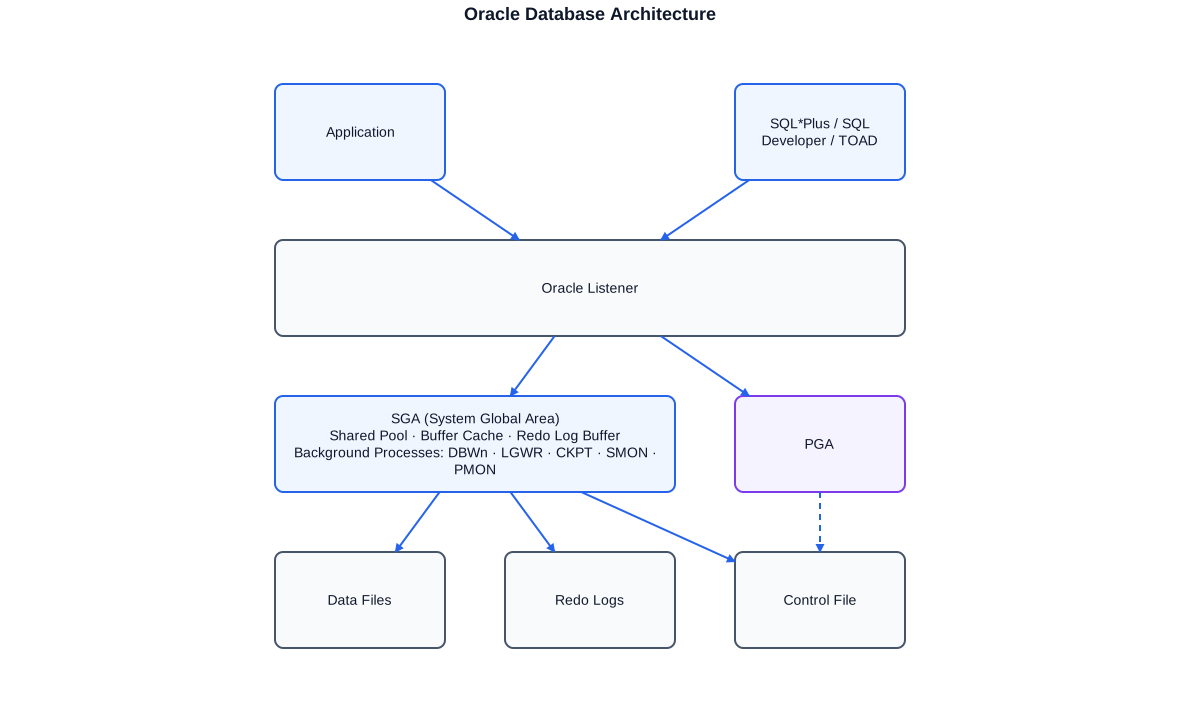
Schematic of the Oracle instance: the SGA holds shared memory structures for all sessions; background processes coordinate write, log and recovery operations; data files, redo logs and the control file form the persistent storage layer.
SGA: Shared Pool, Buffer Cache and Redo Log Buffer
The shared pool stores parsed SQL statements and compiled PL/SQL units in the library cache, and database metadata in the data dictionary cache. Poorly optimised code using literal values instead of bind variables forces Oracle to parse the same statement repeatedly — a classic performance problem that puts pressure on the shared pool and generates hard-parse overhead. The buffer cache holds data blocks in memory to minimise physical reads from data files. The buffer cache hit ratio is an early indicator of memory shortage when it drops below typical thresholds. The redo log buffer queues change records before the LGWR process writes them to the redo log files.
Background Processes: DBWn, LGWR, CKPT, SMON, PMON
Background processes are the backbone of the Oracle instance. DBWn (Database Writer) writes modified data blocks from the buffer cache to the data files — asynchronously and on its own schedule, not immediately after each COMMIT. LGWR (Log Writer) writes the redo log buffer to the redo log files at each COMMIT, guaranteeing transaction durability. CKPT (Checkpoint) records the SCN up to which all changes have been flushed to disk — a checkpoint minimises recovery time. SMON (System Monitor) performs crash recovery and cleans up temporary segments. PMON (Process Monitor) cleans up after failed connections. Understanding how these interact is essential for diagnosing performance problems and for understanding how Oracle internally processes transactions.
Multitenant: CDB and PDB since Oracle 12c
Oracle 12c introduced the multitenant architecture: a Container Database (CDB) can host multiple Pluggable Databases (PDB). Each PDB has its own data, its own schema and its own configuration, but shares instance resources (SGA, background processes) with other PDBs. This architecture is Oracle's equivalent of a SQL Server instance with multiple databases, but with its own particularities around connection strings, authorisation models and the handling of common users. In migrations from 12c/19c environments it is important to know whether code executes at CDB or PDB level.
PL/SQL: Packages, Procedures, Cursors
PL/SQL is Oracle's procedural extension to SQL. Unlike T-SQL, which executes directly in the SQL Server context, PL/SQL has its own compiler infrastructure, its own memory concepts and its own semantics for transactions and locking. The most powerful construct in PL/SQL is the package: a unit that bundles type definitions, variables, procedures and functions, and provides a clear separation between the public interface (specification) and the implementation (body). Packages can maintain state across an entire session — a capability that SQL Server does not have directly and that requires careful attention in migrations.
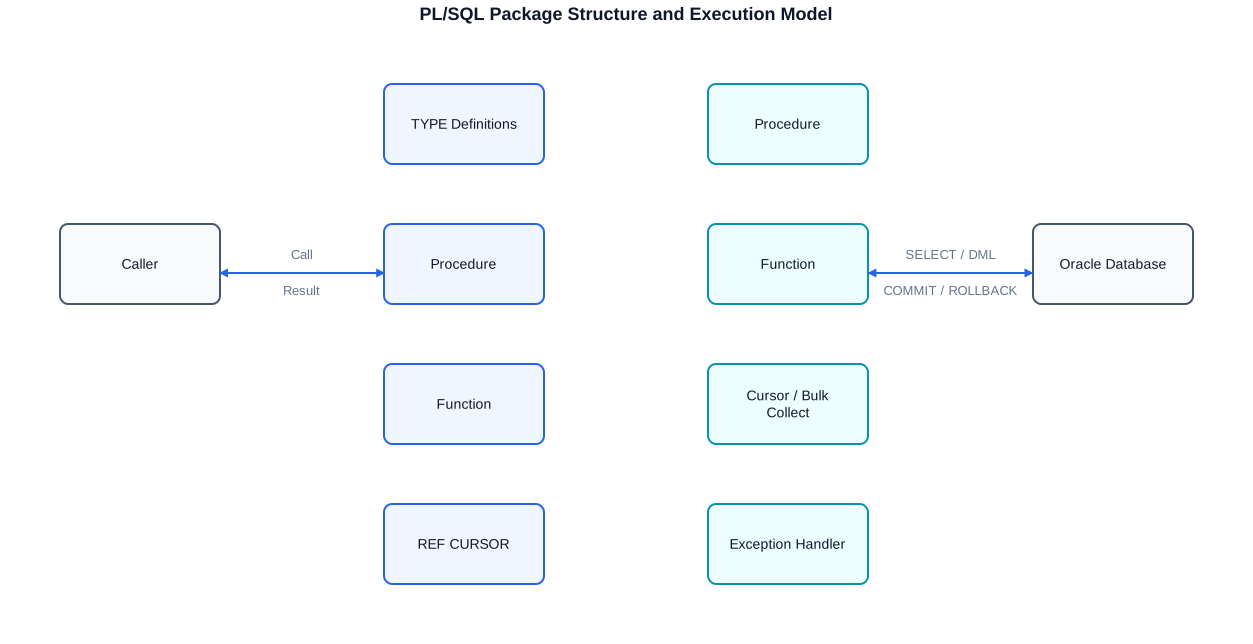
Structure diagram of a PL/SQL package: the specification defines the public interface with procedure signatures, type definitions and REF CURSOR declarations. The body implements the logic with cursors, bulk-collect steps and structured exception handling.
Package Specification and Body
The specification of a PL/SQL package is equivalent to a header in C or an interface in Java: it declares what is visible externally. This includes procedure and function signatures, type definitions (TYPE ... IS TABLE OF, TYPE ... IS RECORD), constants and public variables. The body contains the actual implementation of everything declared in the specification, plus private helper procedures that are not accessible from outside. This modularisation is indispensable for larger systems: it allows the interface to remain stable while the body evolves independently. I use packages consistently because they make code more testable, maintainable and documentable.
Explicit Cursors and Ref Cursors
An explicit cursor gives the developer full control over the query process: OPEN, FETCH (row by row or in bulk) and CLOSE. This control is necessary when processing must be row-by-row or when the cursor is used in multiple places in the code. The ref cursor (REF CURSOR or SYS_REFCURSOR) is a pointer to a cursor result set, which can be passed as a parameter or returned to a caller. Ref cursors are the standard pattern for procedures that return result sets to calling layers — comparable to a recordset in ADO or a DataReader in ADO.NET. In migrations to SQL Server, ref-cursor procedures are typically converted to stored procedures that return a SELECT result set.
-- Package specification: public interface
CREATE OR REPLACE PACKAGE pkg_orders AS
    -- Public type for bulk-collect operations
    TYPE t_orders_tab IS TABLE OF orders%ROWTYPE;

    -- Ref cursor type for returning result sets
    TYPE t_ref_cursor IS REF CURSOR;

    -- Procedure: process orders for a customer
    PROCEDURE process_orders(
        p_customer_id IN  orders.customer_id%TYPE,
        p_status      IN  VARCHAR2 DEFAULT 'OPEN',
        p_result      OUT t_ref_cursor,
        p_count       OUT NUMBER
    );

    -- Function: total amount for a customer
    FUNCTION get_total_amount(
        p_customer_id IN orders.customer_id%TYPE
    ) RETURN NUMBER;
END pkg_orders;
/

-- Package body: implementation
CREATE OR REPLACE PACKAGE BODY pkg_orders AS

    -- Private helper procedure (internal only)
    PROCEDURE log_error(p_code IN NUMBER, p_message IN VARCHAR2) IS
        PRAGMA AUTONOMOUS_TRANSACTION;  -- independent transaction for logging
    BEGIN
        INSERT INTO error_log (error_code, error_message, created_at)
        VALUES (p_code, p_message, SYSDATE);
        COMMIT;  -- commit only for the autonomous transaction
    END log_error;

    -- Main procedure with explicit cursor and bulk collect
    PROCEDURE process_orders(
        p_customer_id IN  orders.customer_id%TYPE,
        p_status      IN  VARCHAR2 DEFAULT 'OPEN',
        p_result      OUT t_ref_cursor,
        p_count       OUT NUMBER
    ) IS
        -- Local collection for bulk processing
        v_orders   t_orders_tab;

        -- Explicit cursor: data selection
        CURSOR c_orders IS
            SELECT * FROM orders
            WHERE  customer_id = p_customer_id
            AND    status      = p_status
            ORDER BY created_at;
    BEGIN
        -- Bulk collect: load the entire result into a collection
        OPEN c_orders;
        FETCH c_orders BULK COLLECT INTO v_orders LIMIT 1000;
        CLOSE c_orders;

        p_count := v_orders.COUNT;

        -- Row-by-row processing within the collection
        FOR i IN 1 .. v_orders.COUNT LOOP
            UPDATE orders
            SET    processed_at = SYSDATE,
                   processed_by = USER
            WHERE  order_id = v_orders(i).order_id;
        END LOOP;

        -- Open ref cursor result for the caller
        OPEN p_result FOR
            SELECT * FROM orders
            WHERE  customer_id = p_customer_id
            AND    status      = p_status
            ORDER BY created_at;

    EXCEPTION
        WHEN NO_DATA_FOUND THEN
            p_count := 0;
            -- No error propagated; return empty cursor
            OPEN p_result FOR SELECT * FROM orders WHERE 1=0;
        WHEN OTHERS THEN
            -- Log all unhandled errors
            log_error(SQLCODE, SQLERRM);
            RAISE;  -- re-raise to the caller
    END process_orders;

    FUNCTION get_total_amount(
        p_customer_id IN orders.customer_id%TYPE
    ) RETURN NUMBER IS
        v_total NUMBER := 0;
    BEGIN
        SELECT NVL(SUM(amount), 0)
        INTO   v_total
        FROM   orders
        WHERE  customer_id = p_customer_id;
        RETURN v_total;
    EXCEPTION
        WHEN OTHERS THEN
            log_error(SQLCODE, SQLERRM);
            RETURN NULL;
    END get_total_amount;

END pkg_orders;
/
This package demonstrates the full pattern: specification with public types and signatures; body with a private helper using PRAGMA AUTONOMOUS_TRANSACTION; an explicit cursor; bulk collect; and a ref-cursor return. Comments are in English, ASCII-only throughout.
Bulk Collect, Bulk Bind and Pipelined Functions
One of the most common performance pitfalls in PL/SQL is the row-by-row approach: a loop opens a cursor, reads one row, processes it, issues an UPDATE — and repeats this for thousands or millions of rows. Every switch between the PL/SQL engine and the SQL engine costs time; with many iterations, this context-switch overhead adds up significantly. Bulk Collect and Bulk Bind solve this problem by reading or writing multiple rows in a single SQL-engine call.
BULK COLLECT INTO with LIMIT
FETCH ... BULK COLLECT INTO loads multiple rows at once into a PL/SQL collection (VARRAY, nested table or associative array). The optional LIMIT clause caps the size of each load and prevents the entire cursor result from being loaded uncontrolled into PGA memory. For large data volumes, a LIMIT of 500 to 2000 rows is typically optimal: large enough to minimise context-switch overhead, small enough to avoid PGA overflow.
FORALL: Bulk DML
The FORALL statement is the counterpart to BULK COLLECT on the DML side: it executes an INSERT, UPDATE or DELETE for all elements of a collection in a single SQL-engine call. Unlike a FOR loop with DML, FORALL dramatically reduces context-switch overhead and often improves throughput for bulk operations by an order of magnitude. The SAVE EXCEPTIONS clause allows DML errors (e.g. constraint violations) to be collected and reviewed after the batch run, rather than aborting on the first error.
Pipelined Table Functions
Pipelined table functions produce result rows iteratively and deliver them directly to the caller while the function is still running. This enables queries such as SELECT * FROM TABLE(my_function()), where complex transformation logic runs inside a function but the result is available directly in a FROM clause. Pipelined functions are useful for transformation logic that cannot be expressed cleanly in pure SQL but still needs to be consumed via SQL. When migrating to SQL Server there is no direct equivalent; pipelined functions are typically replaced by table-valued functions (TVFs) or set-based queries.
DECLARE
    -- Collection types for bulk operations
    TYPE t_id_tab     IS TABLE OF orders.order_id%TYPE;
    TYPE t_amount_tab IS TABLE OF orders.amount%TYPE;

    v_ids     t_id_tab;
    v_amounts t_amount_tab;

    -- Cursor: select all open orders
    CURSOR c_open IS
        SELECT order_id, amount
        FROM   orders
        WHERE  status = 'OPEN'
        ORDER BY created_at;

    -- Error tracking for SAVE EXCEPTIONS
    v_errors NUMBER;
    ex_dml   EXCEPTION;
    PRAGMA EXCEPTION_INIT(ex_dml, -24381);  -- error code for SAVE EXCEPTIONS
BEGIN
    OPEN c_open;
    LOOP
        -- Bulk collect: load up to 500 rows at a time
        FETCH c_open BULK COLLECT INTO v_ids, v_amounts LIMIT 500;
        EXIT WHEN v_ids.COUNT = 0;

        BEGIN
            -- Bulk DML: update all loaded rows in one SQL-engine call
            FORALL i IN 1 .. v_ids.COUNT SAVE EXCEPTIONS
                UPDATE orders
                SET    status       = 'PROCESSED',
                       processed_at = SYSDATE,
                       final_amount = v_amounts(i) * 1.19  -- example: add VAT
                WHERE  order_id     = v_ids(i);

        EXCEPTION
            WHEN ex_dml THEN
                -- Evaluate individual DML errors without aborting the entire batch
                v_errors := SQL%BULK_EXCEPTIONS.COUNT;
                FOR j IN 1 .. v_errors LOOP
                    -- Log the error code and the failing row
                    INSERT INTO error_log (error_code, error_message, created_at)
                    VALUES (
                        SQL%BULK_EXCEPTIONS(j).ERROR_CODE,
                        'Error at order_id: ' || v_ids(SQL%BULK_EXCEPTIONS(j).ERROR_INDEX),
                        SYSDATE
                    );
                END LOOP;
        END;

        -- Commit per batch to distribute redo log pressure
        COMMIT;

    END LOOP;
    CLOSE c_open;
END;
/
BULK COLLECT LIMIT 500 fetches in chunks; FORALL SAVE EXCEPTIONS writes all updates in one call and catches individual errors without aborting the batch. Committing per batch avoids overflowing undo segments on large data volumes.
Exception Handling and Error Logging
Robust exception handling in PL/SQL is just as important as in any other language — and in Oracle environments often the difference between a system that recovers cleanly after errors and one that leaves data in inconsistent states. PL/SQL distinguishes between predefined exceptions (e.g. NO_DATA_FOUND, TOO_MANY_ROWS, ZERO_DIVIDE), named user-defined exceptions and the generic OTHERS handler. Combining these mechanisms allows fine-grained error handling that correctly manages both expected exceptions (e.g. no result found) and unexpected errors (e.g. constraint violations).
PRAGMA EXCEPTION_INIT and User-Defined Exceptions
PRAGMA EXCEPTION_INIT maps an Oracle error code (ORA-XXXXX) to a named exception identifier, making exception handlers more readable and allowing specific responses to particular Oracle errors without reaching for the generic OTHERS handler. User-defined exceptions are declared with DECLARE ... my_exception EXCEPTION; and raised with RAISE my_exception; — a pattern that communicates error conditions clearly between package procedures.
Autonomous Transactions for Error Logging
A classic problem in exception handling is logging: if a transaction fails and is rolled back, any LOG entries made within the same transaction are rolled back with it. The solution is PRAGMA AUTONOMOUS_TRANSACTION in the logging procedure: it issues its own COMMIT, independent of the outer transaction. This pattern is standard for error-log tables in Oracle systems and ensures that error records remain visible even when the failing transaction has been fully rolled back.
SQLERRM, SQLCODE and DBMS_UTILITY.FORMAT_ERROR_BACKTRACE
SQLCODE and SQLERRM return the Oracle error code and message for the most recently raised exception. DBMS_UTILITY.FORMAT_ERROR_BACKTRACE returns the full stack trace, enabling precise localisation of an error in a multi-layer package. This combination — SQLCODE, SQLERRM and FORMAT_ERROR_BACKTRACE — is the foundation of a meaningful error log that makes production issue diagnosis substantially easier.
Performance: Explain Plan, Hints, Indexes
Oracle performance analysis starts with the explain plan. EXPLAIN PLAN FOR
Bind Variables and Hard Parse
The most common self-inflicted performance problem in Oracle environments is excessive hard parsing due to missing bind variables. When a Java application sends queries such as SELECT * FROM customers WHERE id = 12345 with embedded literal values, Oracle must parse, optimise and cache each distinct query text separately. The same statement with bind variables (WHERE id = :p1) is parsed once, cached in the shared pool, and reused for subsequent executions. In heavily loaded systems, switching to bind variables can significantly reduce shared-pool latch contention and noticeably improve overall performance.
Optimiser Hints
Hints are directives to the Oracle Cost-Based Optimiser (CBO) that force or prefer a specific execution plan. They are embedded as comments immediately after the SELECT, INSERT, UPDATE or DELETE keyword using the form /*+ HINT */. Common hints include INDEX (prefer this index), NO_INDEX (avoid this index), FULL (force a full table scan), LEADING (determine join order) and USE_NL / USE_HASH / USE_MERGE (determine join method). Hints should be used with care: they can fix performance problems in the short term, but prevent the optimiser from adapting its decisions as statistics change.
-- Step 1: Generate explain plan for a query
EXPLAIN PLAN FOR
    SELECT /*+ INDEX(a idx_orders_customer) LEADING(a c) USE_NL(c) */
           a.order_id,
           a.amount,
           c.name         AS customer_name
    FROM   orders    a
    JOIN   customers c ON c.customer_id = a.customer_id
    WHERE  a.customer_id = :p_customer_id   -- bind variable instead of literal
    AND    a.status      = 'OPEN'
    AND    a.created_at >= TRUNC(SYSDATE) - 30;

-- Step 2: Display the plan (TYPICAL format with cost estimates)
SELECT * FROM TABLE(DBMS_XPLAN.DISPLAY(
    format => 'TYPICAL +ROWS +BYTES +COST +PEEKED_BINDS'
));

-- Step 3: Runtime statistics for an already-executed query
-- (from the cursor cache, identified via SQL_ID)
SELECT s.sql_id,
       s.executions,
       s.elapsed_time / NULLIF(s.executions, 0) / 1e6  AS avg_sec,
       s.buffer_gets  / NULLIF(s.executions, 0)        AS avg_bufgets,
       s.rows_processed / NULLIF(s.executions, 0)      AS avg_rows,
       s.sql_text
FROM   v$sql s
WHERE  s.sql_text LIKE '%orders%'
AND    s.executions > 0
ORDER BY avg_sec DESC
FETCH FIRST 10 ROWS ONLY;

-- Step 4: Identify full-table-scan operations in the last plan
-- (potential candidates for index creation)
SELECT d.operation,
       d.options,
       d.object_name,
       d.object_alias,
       d.cost,
       d.cardinality
FROM   plan_table d
WHERE  d.operation = 'TABLE ACCESS'
AND    d.options   = 'FULL'
ORDER BY d.cost DESC;
Explain plan with hints steers the optimiser; bind variables prevent hard parse; v$sql delivers real runtime statistics from the cursor cache for retrospective analysis.
Index Strategies in Oracle
Oracle supports B-tree indexes (standard), bitmap indexes, function-based indexes and composite indexes. B-tree indexes are optimal for selective queries returning few rows; bitmap indexes suit columns with low cardinality (e.g. status columns) in data warehouse environments. Function-based indexes index the value of an expression (e.g. UPPER(name)) and enable indexed searches on transformed values. A frequent mistake is applying functions to indexed columns in the WHERE clause — this renders the index unusable. Oracle index monitoring (ALTER INDEX ... MONITORING USAGE) helps identify unused indexes for removal.
Oracle-to-SQL Server Migration
Migrating from Oracle to SQL Server is a multi-layered project that goes far beyond simply copying data. Schema mapping, datatype conversion, replacing sequences with IDENTITY or SQL Server SEQUENCE objects, rewriting PL/SQL logic in T-SQL and ensuring application consistency are each separate, demanding tasks. I have carried out such migrations in several projects: at a chemicals and industrial company where a Java/Oracle landscape was moved to .NET/SQL Server, and at a savings bank where Oracle ETL processes were replaced by SSIS.
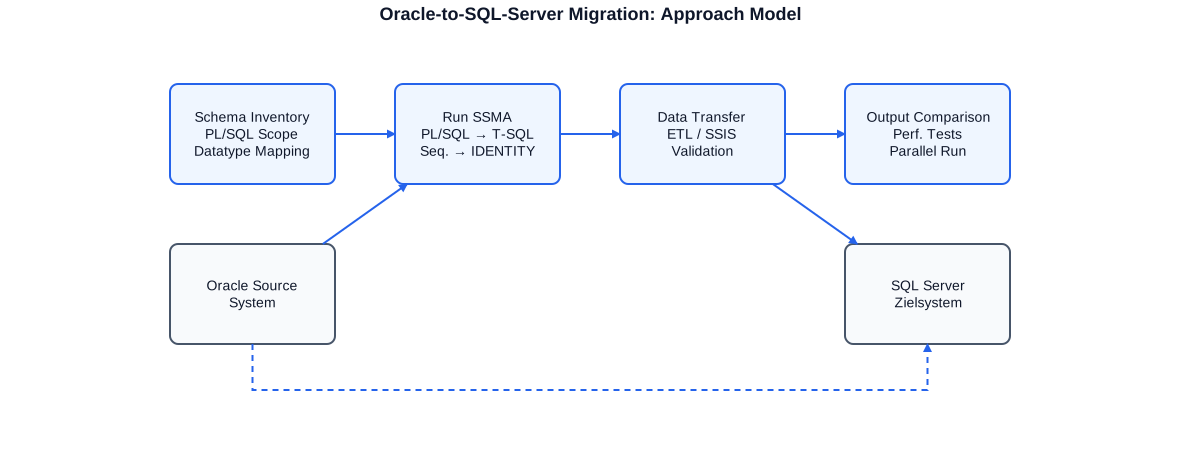
The approach model is structured in four phases: analysis (schema inventory, PL/SQL scope, datatype mapping), conversion (SSMA, PL/SQL-to-T-SQL, sequences to IDENTITY), data migration (ETL/SSIS, validation) and acceptance (output comparison, performance tests, parallel run).
Datatype Mapping: Oracle to SQL Server
Datatype mapping is one of the first and most important tasks in an Oracle-to-SQL Server migration. Many Oracle datatypes have no direct equivalent in SQL Server; others have an equivalent but behave subtly differently. NUMBER is Oracle's general numeric type and maps to INT, BIGINT, DECIMAL or FLOAT in SQL Server depending on precision and scale. VARCHAR2 corresponds in most cases to VARCHAR(n) in SQL Server. DATE in Oracle stores both date and time; the SQL Server equivalent DATETIME2 is more precise, but DATE in SQL Server stores only the date — a common source of errors. CLOB and BLOB become VARCHAR(MAX) and VARBINARY(MAX). RAW becomes VARBINARY.
-- ============================================================
-- ORACLE SIDE: sample table with typical Oracle datatypes
-- ============================================================
CREATE TABLE orders_oracle (
    order_id     NUMBER(10)        NOT NULL,   -- INT / BIGINT in SQL Server
    customer_id  NUMBER(10)        NOT NULL,
    amount       NUMBER(15, 2)     NOT NULL,   -- DECIMAL(15,2) in SQL Server
    description  VARCHAR2(500),               -- VARCHAR(500) in SQL Server
    notes        CLOB,                         -- VARCHAR(MAX) in SQL Server
    image        BLOB,                         -- VARBINARY(MAX) in SQL Server
    created_at   DATE,                         -- DATETIME2(0) in SQL Server (includes time!)
    active       CHAR(1) DEFAULT 'Y',          -- BIT or CHAR(1) in SQL Server
    raw_data     RAW(100),                     -- VARBINARY(100) in SQL Server
    CONSTRAINT pk_orders PRIMARY KEY (order_id)
);

-- Sequence as primary key generator (Oracle side)
CREATE SEQUENCE seq_orders START WITH 1 INCREMENT BY 1 NOCACHE;

-- ============================================================
-- SQL SERVER SIDE: equivalent table after SSMA migration
-- ============================================================
CREATE TABLE orders_sqlserver (
    order_id     INT              NOT NULL IDENTITY(1,1),  -- IDENTITY replaces sequence
    customer_id  INT              NOT NULL,
    amount       DECIMAL(15, 2)   NOT NULL,
    description  NVARCHAR(500)    NULL,        -- NVARCHAR for unicode safety
    notes        NVARCHAR(MAX)    NULL,        -- CLOB -> NVARCHAR(MAX)
    image        VARBINARY(MAX)   NULL,        -- BLOB -> VARBINARY(MAX)
    created_at   DATETIME2(0)     NULL,        -- Oracle DATE has time -> DATETIME2
    active       BIT              NOT NULL DEFAULT 1,  -- CHAR(1) -> BIT
    raw_data     VARBINARY(100)   NULL,        -- RAW -> VARBINARY
    CONSTRAINT pk_orders_ss PRIMARY KEY (order_id)
);

-- MERGE equivalent: Oracle MERGE vs. SQL Server MERGE
-- Oracle:
MERGE INTO orders_oracle t
USING (SELECT 1001 AS id, 'PROCESSED' AS status FROM DUAL) s
ON (t.order_id = s.id)
WHEN MATCHED     THEN UPDATE SET t.active = 'N'
WHEN NOT MATCHED THEN INSERT (order_id, customer_id, amount, active)
                      VALUES (seq_orders.NEXTVAL, 0, 0, 'N');

-- SQL Server (after SSMA migration):
MERGE INTO orders_sqlserver AS t
USING (VALUES (1001, 'PROCESSED')) AS s (id, status)
ON (t.order_id = s.id)
WHEN MATCHED     THEN UPDATE SET t.active = 0
WHEN NOT MATCHED THEN INSERT (customer_id, amount, active) VALUES (0, 0, 0);
The mapping shows the key type conversions: NUMBER to INT/DECIMAL, VARCHAR2 to NVARCHAR, CLOB to NVARCHAR(MAX), Oracle DATE semantics, sequence to IDENTITY, and MERGE syntax variants between Oracle and SQL Server.
SQL Server Migration Assistant (SSMA)
SSMA for Oracle is Microsoft's free migration tool that automatically converts schema and simple PL/SQL code. SSMA analyses the Oracle schema, produces a migration report with issues and warnings, and generates T-SQL DDL scripts. For straightforward code — tables, views, simple procedures — SSMA is very effective. For complex PL/SQL packages with cursor logic, PRAGMA AUTONOMOUS_TRANSACTION, package state or Oracle-specific built-ins, SSMA produces stubs with TODO comments that must be completed manually. SSMA is a good starting point, not a fully automated migration tool. The manual follow-up work requires deep knowledge of both Oracle and SQL Server — exactly the combination I bring.
PL/SQL-to-T-SQL Conversion
Converting PL/SQL to T-SQL is the most technically demanding task in an Oracle-to-SQL Server migration. Both languages are procedural SQL extensions, but they differ so much in syntax, semantics and available constructs that mechanical translation almost never works. My approach is systematic: first an inventory of all PL/SQL objects with their dependencies, then a classification by conversion effort, then conversion in prioritised batches with regression tests after each batch.
Key Differences: Variables, Cursors, Exceptions
In T-SQL, variables are declared with DECLARE @var TYPE and assigned with SET @var = ... or SELECT @var = .... PL/SQL does not distinguish between SET and SELECT. Cursors exist in T-SQL (DECLARE CURSOR, OPEN, FETCH, CLOSE, DEALLOCATE), but are rarely used in practice because of performance concerns — set-based alternatives are almost always preferable. Exceptions in T-SQL use TRY/CATCH with THROW, ERROR_NUMBER() and ERROR_MESSAGE(). The concept of PRAGMA EXCEPTION_INIT does not exist; ERROR_NUMBER() returns the SQL Server error code, but there is no direct 1:1 mapping from Oracle ORA- codes to SQL Server error codes.
Oracle Constructs with No Direct T-SQL Equivalent
Some Oracle constructs require creative solutions in T-SQL: DUAL (Oracle's single-row table used in SELECT 1 FROM DUAL) simply becomes SELECT 1 in T-SQL, with no FROM clause. ROWNUM for top-N queries becomes TOP n or ROW_NUMBER() OVER (...). CONNECT BY PRIOR for hierarchical queries becomes a recursive CTE using WITH ... AS (... UNION ALL ...). DECODE() maps to CASE WHEN. NVL() maps to ISNULL() or COALESCE(). TO_DATE(), TO_CHAR() and TRUNC() each have T-SQL equivalents (CONVERT, FORMAT, CAST, DATETRUNC). Package state — variables that retain their values between calls within a session — has no direct equivalent in SQL Server; it requires context tables, temporary tables or application-level session context.
-- ============================================================
-- ORIGINAL: Oracle PL/SQL procedure with cursor and exception
-- ============================================================
CREATE OR REPLACE PROCEDURE oracle_process_invoices(
    p_due_by    DATE,
    p_processed OUT NUMBER
) IS
    CURSOR c_due IS
        SELECT i.invoice_id, i.amount, c.email
        FROM   invoices   i
        JOIN   customers  c ON c.customer_id = i.customer_id
        WHERE  i.due_date <= p_due_by
        AND    i.status = 'OPEN';
    v_row    c_due%ROWTYPE;
    v_count  NUMBER := 0;
BEGIN
    OPEN c_due;
    LOOP
        FETCH c_due INTO v_row;
        EXIT WHEN c_due%NOTFOUND;
        UPDATE invoices
        SET status = 'REMINDED', reminded_at = SYSDATE
        WHERE invoice_id = v_row.invoice_id;
        v_count := v_count + 1;
    END LOOP;
    CLOSE c_due;
    COMMIT;
    p_processed := v_count;
EXCEPTION
    WHEN OTHERS THEN
        ROLLBACK;
        RAISE;
END;
/

-- ============================================================
-- CONVERSION: SQL Server T-SQL stored procedure
-- No cursor needed: set-based UPDATE with OUTPUT clause
-- ============================================================
CREATE OR ALTER PROCEDURE dbo.process_invoices
    @due_by     DATE,
    @processed  INT OUTPUT
AS
BEGIN
    SET NOCOUNT ON;

    -- Table variable to capture OUTPUT results
    DECLARE @updated TABLE (invoice_id INT);

    BEGIN TRY
        BEGIN TRANSACTION;

        -- Set-based UPDATE: completely replaces the Oracle cursor loop
        -- OUTPUT clause captures the updated invoice IDs
        UPDATE i
        SET    i.status      = 'REMINDED',
               i.reminded_at = GETDATE()
        OUTPUT inserted.invoice_id INTO @updated (invoice_id)
        FROM   dbo.invoices i
        WHERE  i.due_date <= @due_by
        AND    i.status   = 'OPEN';

        -- Return the number of processed rows
        SET @processed = @@ROWCOUNT;

        COMMIT TRANSACTION;
    END TRY
    BEGIN CATCH
        IF @@TRANCOUNT > 0 ROLLBACK TRANSACTION;
        -- Re-raise to the caller (equivalent to RAISE in PL/SQL)
        THROW;
    END CATCH;
END;
GO
The Oracle cursor loop is replaced in T-SQL by a set-based UPDATE with the OUTPUT clause — simpler, faster and idiomatic T-SQL. TRY/CATCH with THROW maps directly to the Oracle EXCEPTION WHEN OTHERS THEN RAISE pattern.
Sequences to IDENTITY and SQL Server Sequences
Oracle sequences (CREATE SEQUENCE ... NEXTVAL) are mapped to SQL Server in two ways: IDENTITY columns for simple auto-increment primary keys, and SQL Server sequences (CREATE SEQUENCE, NEXT VALUE FOR ...) for cases where the value is needed before the INSERT. SSMA converts Oracle sequences to IDENTITY by default, which is correct for most cases. When sequences are used in PL/SQL code outside INSERT statements — for example to number batches or generate keys for multiple tables simultaneously — a SQL Server SEQUENCE object is the more appropriate mapping.
Tooling: SQL*Plus, SQL Developer, TOAD
The tooling for Oracle database work has evolved considerably over the years. SQL*Plus, the command-line tool that Oracle has shipped since its earliest days, remains the tool of choice for script automation, batch processing and quick ad-hoc queries in server environments without a graphical interface. SQL Developer is Oracle's free graphical client with IDE capabilities: PL/SQL debugger, data modeller, migration assistant and Data Pump integration. TOAD from Quest is the industry standard for professional Oracle development and DBA work: extensive code analysis, schema comparison, performance diagnostics and team-coding features. I have used all three tools intensively and apply them contextually depending on the task and environment.
SQL*Plus for Automation
SQL*Plus can be driven entirely from scripts: CONNECT, START, SPOOL, SET SERVEROUTPUT ON and the EXECUTE syntax enable the execution of complete PL/SQL workflows from the command line. In Unix/Linux environments — where many large Oracle installations run — SQL*Plus is the natural tool for shell scripts that orchestrate database operations. In migration projects I have used SQL*Plus to automate schema dumps, data exports and validation queries.
TOAD: Performance Diagnostics and Code Analysis
TOAD offers features that go well beyond basic query execution: Schema Compare enables comparison of database objects between environments; Code Analysis checks PL/SQL code for quality and performance anti-patterns; the SQL Optimiser provides graphical explain plan display and execution plan comparison; Team Coding supports version-controlled code exchange. In projects with licence budget available, TOAD is the most efficient tool for intensive PL/SQL development and performance analysis.
Data Pump, SQL*Loader and External Tools
For data migration and transfer, Data Pump (expdp/impdp), SQL*Loader and external ETL tools are the essential instruments. Data Pump produces logical exports in Oracle's proprietary format (dump files) and is the recommended method for schema migration between Oracle instances. SQL*Loader efficiently loads external data files (CSV, fixed format) into Oracle tables and is particularly useful in the initial load phase of migration projects. For transferring data from Oracle to SQL Server, SSIS with an OLE DB or ODBC Oracle connector, Azure Data Factory with Oracle connector, or dedicated migration tools such as SSMA are the available options.
ANSI SQL for Cross-Platform Reports
In environments where reports or queries must run against multiple database systems — Oracle, SQL Server, Teradata, MySQL — ANSI-SQL-compliant code offers a significant maintenance advantage. Crystal Reports, SSRS and other reporting tools can query Oracle data sources directly; if those queries are ANSI-compliant, the same code runs against SQL Server or Teradata sources as well. I write reporting SQL deliberately ANSI-compliant where possible: standard joins instead of Oracle join syntax (+), CASE instead of DECODE, COALESCE instead of NVL, EXTRACT instead of TO_CHAR for date components, CAST instead of proprietary conversion functions.
Oracle-Specific Syntax and its ANSI Equivalents
Oracle has historically introduced many proprietary syntax extensions still found in older code: the old outer-join operator (+) instead of LEFT/RIGHT/FULL OUTER JOIN; DECODE instead of CASE WHEN; NVL instead of COALESCE; ROWNUM for top-N instead of ROW_NUMBER() OVER (...); START WITH ... CONNECT BY PRIOR for hierarchical queries instead of recursive CTEs. This older code works in Oracle but nowhere else. Where reporting SQL needs to be platform-independent it must be refactored to ANSI syntax.
Practical Approach for Cross-Platform Queries
My approach for cross-platform reporting queries: ANSI-standard joins, CASE WHEN, COALESCE, ISO date functions (EXTRACT, CURRENT_DATE, CURRENT_TIMESTAMP), standard aggregate functions and ROW_NUMBER()/RANK()/DENSE_RANK() for analytical queries. What must remain platform-specific (e.g. ROWID, partitioning hints, Oracle functions such as LISTAGG or REGEXP_SUBSTR) is isolated in platform-specific SQL views or parameters. Reporting tools such as Crystal Reports can then switch to a different backend with minimal rework.
Collaboration Approach
Every Oracle engagement starts with careful analysis. Before making recommendations or writing code, I build a complete picture: which Oracle version is in use? Which PL/SQL packages exist and what are their dependencies? What performance problems are known? If a migration is planned: what is the timeline, which applications depend on the Oracle system, which ETL processes must be replaced? These questions must be answered before technical solutions are discussed.
- Analysis: Oracle version, schema inventory, PL/SQL dependencies, known performance issues
- Prioritisation: performance-critical code, migration path, legacy risks
- Development/tuning: incremental implementation with review cycles and regression tests
- Migration: SSMA analysis, conversion, data migration, parallel run, acceptance
- Documentation: PL/SQL annotation, migration guide, operations documentation
- Knowledge transfer: training for the internal team, handover of scripts and procedures
I work remotely, in a hybrid model or on-site. For PL/SQL development, performance analysis and SSMA conversion, remote is sufficient and efficient. For initial schema workshops, sensitive migration cutovers and go-live of the target platform, on-site presence is often more valuable. I work in German, English or Portuguese — all three fluently, including for deep technical discussions.
What sets Oracle projects apart from other database engagements is the depth of legacy dependencies. Oracle systems have often been running for years or decades; the PL/SQL code has grown organically, the authors have long since moved on, and documentation is sparse. In these environments, the ability to understand foreign code quickly and change or migrate it safely is more important than writing new code to specification. I have developed and applied this capability across several legacy migration projects.
Typical Oracle Services
My Oracle service portfolio covers development, performance tuning, migration and data migration. Depending on project needs, I cover individual areas or the full scope from analysis to production go-live.
- PL/SQL development: packages, procedures, functions, cursors, bulk collect, exceptions
- Performance tuning: explain plan analysis, optimiser hints, index design, bind variables
- Oracle-to-SQL Server migration: schema analysis, SSMA, datatype mapping
- PL/SQL-to-T-SQL conversion: cursors, exceptions, package state, sequences to IDENTITY
- Data migration: ETL with SSIS, Oracle JDBC connector, validation, parallel run
- Tooling: SQL*Plus script automation, SQL Developer, TOAD performance diagnostics
- ANSI SQL refactoring for cross-platform reports (Crystal Reports, SSRS)
- ODI (Oracle Data Integrator): fundamentals, interfaces, knowledge module concepts
- Oracle ETL replacement by SSIS: converting Java+Oracle processes to SSIS pipelines
- Documentation and knowledge transfer: PL/SQL annotation, migration guides
A particular focus is migration projects in which Java/Oracle legacy systems are moved to .NET/SQL Server. In these projects I combine Oracle source knowledge (PL/SQL, data model, business logic in code) with SQL Server target competence (T-SQL, SSIS, SSMS administration) and .NET experience (T4 templates for code generation, tSQLt tests for migrated logic). This combination substantially reduces the coordination overhead between Oracle specialists, SQL Server developers and .NET developers.
In the insurance sector I have worked with ODI (Oracle Data Integrator): interfaces, knowledge modules (KM) for different load strategies and technologies, and the orchestration of data migration processes. There too the goal was typically to replace the proprietary Oracle ETL infrastructure with standardised SSIS pipelines on SQL Server.
Selected anonymised reference projects
Chemicals / Industry
Full migration of a Java application with Oracle backend to .NET/SQL Server. Work included analysis of the Oracle schema and PL/SQL logic, mapping to SQL Server data structures, development of ETL routines for the data transfer, use of T4 templates for code-generated data access layers, and verification of migrated logic through tSQLt regression tests. Datatype mapping, SSMA usage and PL/SQL-to-T-SQL conversion were core elements of the project.
Savings Bank / Financial Services
Replacement of a Java-based ETL system with an Oracle backend by SSIS pipelines on SQL Server. The project included analysis of existing Oracle queries and PL/SQL procedures, their translation into SSIS data flow components, construction of text file load processes and automation of deployment via SSDT and PowerShell. Performance redesign of critical ETL pipelines was a key part of the engagement.
Insurance / Reinsurance
Development and maintenance of PL/SQL packages for data migration processes in the insurance sector, combined with ODI interface and knowledge-module configuration. Subsequently migrated the Oracle/ODI processes to SSIS/SQL Server: equivalence analysis, output comparison and incremental go-live of the new platform running in parallel with the legacy system.
Logistics / Enterprise Group
Deployed in a large enterprise environment with a heterogeneous database landscape: Oracle PL/SQL for database-level transformation logic, Teradata and Informatica PowerCenter for the central ETL process. Focus was on quality assurance of data flows, reconciliation between Oracle sources and Teradata targets, and documentation of the process landscape.
Frequently asked questions about Oracle and PL/SQL
What is the difference between PL/SQL and T-SQL?
PL/SQL is Oracle's procedural SQL extension; T-SQL is Microsoft's equivalent for SQL Server. Both allow procedural logic in the database but differ significantly: PL/SQL has packages with specification/body, PRAGMA AUTONOMOUS_TRANSACTION, explicit cursors with BULK COLLECT and ref cursors. T-SQL has TRY/CATCH, set-based bulk operations and MERGE, but no package state and no autonomous transactions. Conversion requires deep knowledge of both languages.
Which Oracle versions do you have experience with?
Oracle 8i through 19c from live projects. Particularly intensive experience with 11g, 12c and 18c/19c. I know the version-specific behaviours relevant to migrations: changed optimiser defaults, new PL/SQL features and the multitenant specifics of 12c+.
Can you carry out an Oracle-to-SQL Server migration?
Yes. This is a core offering. I combine Oracle source knowledge (PL/SQL, schema, datatypes) with SQL Server target competence (T-SQL, SSIS, administration). I use SSMA as an analysis and conversion aid; the manual follow-up work on Oracle-specific constructs (package state, hierarchical queries, bulk-collect patterns) is the real core task.
What is Bulk Collect and why does it matter?
BULK COLLECT loads multiple rows in a single SQL-engine call into a PL/SQL collection instead of reading them one by one. This dramatically reduces the context-switch overhead between the PL/SQL engine and the SQL engine. Combined with FORALL for writing, bulk operations that take minutes row-by-row can be reduced to seconds.
How do you approach explain plans and optimiser hints?
Explain plan shows the intended execution path; I use DBMS_XPLAN.DISPLAY with a detailed format. I use hints when the optimiser chooses a suboptimal plan despite correct statistics — as a surgical intervention, not as a replacement for missing statistics. Bind variables are the single most important measure against shared-pool contention.
Can you replace Oracle ETL processes with SSIS?
Yes. I have done exactly that in several projects: replacing Oracle-based ETL processes (PL/SQL packages, ODI interfaces) with SSIS pipelines. The critical point is output validation: the SSIS pipeline must produce the same result as the Oracle process before the parallel run is terminated.
What is ANSI SQL and why does it matter for cross-platform reports?
ANSI SQL is the international standard supported by all major database systems. Oracle-specific syntax such as (+)-joins, DECODE or ROWNUM only works on Oracle. Writing reporting queries in ANSI-compliant form (JOIN syntax, CASE WHEN, COALESCE, ROW_NUMBER()) means the same queries run against Oracle, SQL Server and Teradata — a major advantage when changing platforms.
Do you have ODI (Oracle Data Integrator) experience?
Yes. I have experience with ODI fundamentals: interfaces, knowledge modules (staging area KM, integration KM), procedures and ODI process orchestration. In an insurance project, ODI was the ETL platform whose processes were later migrated to SSIS. This knowledge helps in correctly understanding and translating ODI source processes.
What languages do you work in?
German, English and Portuguese — all fluent, including for deep technical discussions about PL/SQL, T-SQL and database architecture.


